
Delay problem

Quote from impactband4u on March 25, 2019, 10:45 pmHi Guys
When i press a button ( or Enter on my keyboard ) to start a drum beat (drumbeat1.wav), it takes milliseconds before it starts playing. So there is a slight delay before it start the drum beat. I want to start the drum beat the moment I press the button ( zero delay ). I also use a shortcut key on the keyboard to play the drum beat. When I add the "StopMedia" action, it stops the beat the moment I press the button, but not when I want to start it. I think it has something to do with latency or something like that. I really need to fix this for my project. Any suggestions please...
Greetings
Hi Guys
When i press a button ( or Enter on my keyboard ) to start a drum beat (drumbeat1.wav), it takes milliseconds before it starts playing. So there is a slight delay before it start the drum beat. I want to start the drum beat the moment I press the button ( zero delay ). I also use a shortcut key on the keyboard to play the drum beat. When I add the "StopMedia" action, it stops the beat the moment I press the button, but not when I want to start it. I think it has something to do with latency or something like that. I really need to fix this for my project. Any suggestions please...
Greetings

Quote from Deleted user on March 28, 2019, 3:22 pmI have created a sample VisualNEO Publication that fixes your issue.
http://s000.tinyupload.com/index.php?file_id=98148928081997322926
The prefetch button's method meets your requirement.
Make sure to notice the code that executes on Page Enter event
I have created a sample VisualNEO Publication that fixes your issue.
http://s000.tinyupload.com/index.php?file_id=98148928081997322926
The prefetch button's method meets your requirement.
Make sure to notice the code that executes on Page Enter event
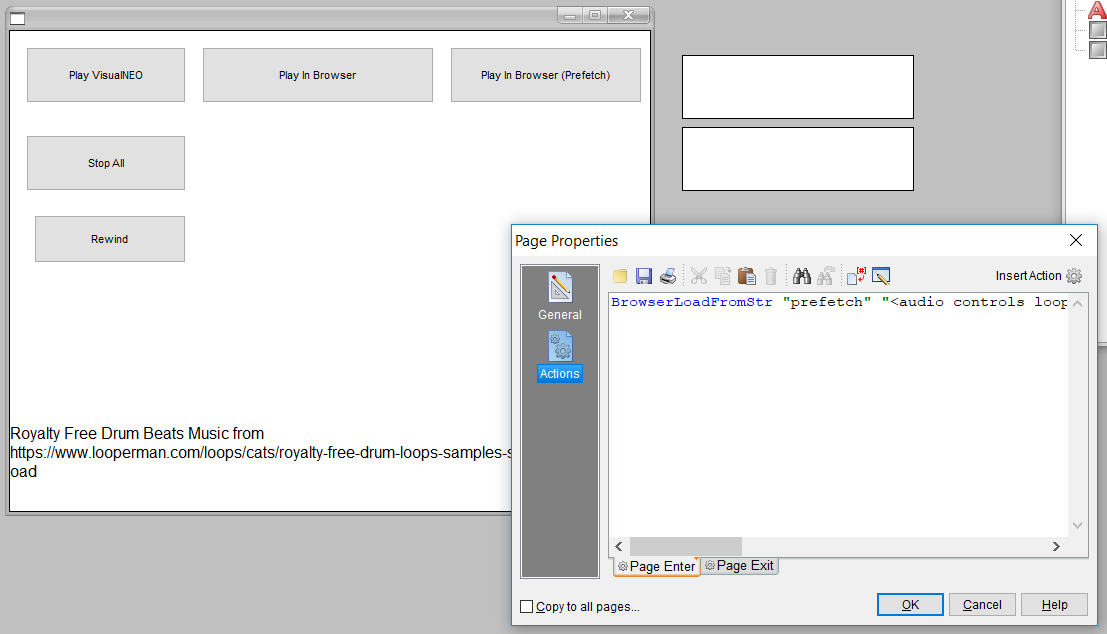
Quote from impactband4u on March 28, 2019, 6:41 pmHi neodude.
I was so excited when I see that there is a solution to my problem, but I keep getting this message when I press the (Prefetch) button. Only the "Play VisualNeo" button work but not for the rest.

Hi neodude.
I was so excited when I see that there is a solution to my problem, but I keep getting this message when I press the (Prefetch) button. Only the "Play VisualNeo" button work but not for the rest.

Quote from Deleted user on March 28, 2019, 9:22 pm80020101 - This error means that the JavaScript code that was executed in the browser raised some exception (failed to run).
Does the publication also show 80020101 error while starting up? - Book>Run(from Start) F9
Also, may I know your Windows version?
Try the VisualNEO V2 Method - http://s000.tinyupload.com/index.php?file_id=22632986758767874435
80020101 - This error means that the JavaScript code that was executed in the browser raised some exception (failed to run).
Does the publication also show 80020101 error while starting up? - Book>Run(from Start) F9
Also, may I know your Windows version?
Try the VisualNEO V2 Method - http://s000.tinyupload.com/index.php?file_id=22632986758767874435
Quote from impactband4u on March 28, 2019, 9:54 pmNo it does not show the error when I run the pub, Run from start (F9), only when I press (Play in Browser (Prefetch), (Stop All) and (Rewind) buttons.
I have Windows 7 64bit
No it does not show the error when I run the pub, Run from start (F9), only when I press (Play in Browser (Prefetch), (Stop All) and (Rewind) buttons.
I have Windows 7 64bit
Quote from impactband4u on March 28, 2019, 9:59 pmThe VisualNEO V2 Method doesn't show the error
The VisualNEO V2 Method doesn't show the error
Quote from Deleted user on March 28, 2019, 10:09 pmDoes the V2 Method meet your requirements?
Does the V2 Method meet your requirements?
Quote from impactband4u on March 28, 2019, 10:19 pmneodude, i'm leaving tomorrow morning and will be back Saturday, if it's alright with you I will make a video (screen capture) of what I want it to do, the V2 Method also has a slight delay when I press the button. I will explain on video so that you can see what i want to accomplish. I think it will be better if you see what I need to do first. Thanks for your quick reply every time.
Greetings
neodude, i'm leaving tomorrow morning and will be back Saturday, if it's alright with you I will make a video (screen capture) of what I want it to do, the V2 Method also has a slight delay when I press the button. I will explain on video so that you can see what i want to accomplish. I think it will be better if you see what I need to do first. Thanks for your quick reply every time.
Greetings
Quote from Deleted user on March 28, 2019, 10:27 pmSure. That would be self explanatory.
Have a nice journey!
Greetings :)
Sure. That would be self explanatory.
Have a nice journey!
Greetings :)