
DPI Awareness -- Why am I just now learning about this?

Quote from rcohen on May 8, 2022, 8:45 pmI would like to begin this with a big THANK YOU to @talker, as he was the person who brought this issue to our attention. I personally don't use non standard DPI monitors (or projection) as I didn't even KNOW this was a thing. Apparently DPI Awareness is a feature that has been a part of Windows since Vista, and somehow I missed the memo. And since my knowledge on the subject is limited and @talker is very experienced with the topic given what he does, he offered to write the explanation for this and so I graciously accepted.
If you are serious about the apps you create with VisualNeo Win, especially if you are a commercial developer then the new zmwDPIAware plug-in from RCMedia may be the most important VisualNeo plug-in you will ever buy.
Many of your potential customers are using some kind of Windows scaling because standard display settings make many items on the screen hard to read. Many people use 110% to 125% scaling. However, some UHD users use Windows scaling up to 250%. It is important that your Neo app automatically adjusts to the user’s Windows scaling. If it doesn't, the text, labels, and buttons in your app will typically display "blurry".
Although VisualNeo is an invaluable program for many non-programmers, it has no support for DPIAwareness. Not the program itself, nor the applications you compile with it. Due to certain programming restrictions DPI-Awareness support in VisualNeo is not to be expected anytime soon either.
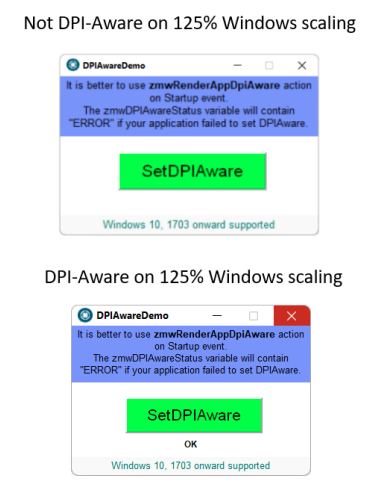
This is where the zmwDPIAware plug-in comes in. Just add the zmwRenderAppDpiAware action to the startup event of your application and the magic happens when you compile it. All the elements in your application will display razor-sharp on any Windows scaling setting!
And NOW, you can run your VisualNeo for Windows IDE in DPI Awareness mode as well.
I would like to begin this with a big THANK YOU to @talker, as he was the person who brought this issue to our attention. I personally don't use non standard DPI monitors (or projection) as I didn't even KNOW this was a thing. Apparently DPI Awareness is a feature that has been a part of Windows since Vista, and somehow I missed the memo. And since my knowledge on the subject is limited and @talker is very experienced with the topic given what he does, he offered to write the explanation for this and so I graciously accepted.
If you are serious about the apps you create with VisualNeo Win, especially if you are a commercial developer then the new zmwDPIAware plug-in from RCMedia may be the most important VisualNeo plug-in you will ever buy.
Many of your potential customers are using some kind of Windows scaling because standard display settings make many items on the screen hard to read. Many people use 110% to 125% scaling. However, some UHD users use Windows scaling up to 250%. It is important that your Neo app automatically adjusts to the user’s Windows scaling. If it doesn't, the text, labels, and buttons in your app will typically display "blurry".
Although VisualNeo is an invaluable program for many non-programmers, it has no support for DPIAwareness. Not the program itself, nor the applications you compile with it. Due to certain programming restrictions DPI-Awareness support in VisualNeo is not to be expected anytime soon either.
This is where the zmwDPIAware plug-in comes in. Just add the zmwRenderAppDpiAware action to the startup event of your application and the magic happens when you compile it. All the elements in your application will display razor-sharp on any Windows scaling setting!
And NOW, you can run your VisualNeo for Windows IDE in DPI Awareness mode as well.
Uploaded files:

Quote from Vadim on May 8, 2022, 9:50 pm@rcohen @zmworks7
This really is an extremely important addition! Excellent and extremely useful work! Bravo!
This really is an extremely important addition! Excellent and extremely useful work! Bravo!


Quote from Krakerman on May 8, 2022, 11:44 pmWhen using and have DPI Awarness enabled it makes everything crisper however it shrinks the window and fonts scaling down to like 100% making it un-usable on a 55" display. My Current windows DPI is set at 225% fyi.
The only fix to that it seems is to increase the fonts size within the VNW app itself.
Unless I am missing or doing something wrong should it not keep the same window size but just make everything crisper and if so that is not happening.
Just wanted to check because I really want this too work.
Thanks again.
When using and have DPI Awarness enabled it makes everything crisper however it shrinks the window and fonts scaling down to like 100% making it un-usable on a 55" display. My Current windows DPI is set at 225% fyi.
The only fix to that it seems is to increase the fonts size within the VNW app itself.
Unless I am missing or doing something wrong should it not keep the same window size but just make everything crisper and if so that is not happening.
Just wanted to check because I really want this too work.
Thanks again.
Quote from zmWorks7 on May 9, 2022, 12:02 amHi @krakerman
This currently DPI Awares the application as well as the VisualNeo Win IDE. Scaling is not yet available. We will try our best to add this in the future.
Thanks.
Hi @krakerman
This currently DPI Awares the application as well as the VisualNeo Win IDE. Scaling is not yet available. We will try our best to add this in the future.
Thanks.

Quote from Talker on May 9, 2022, 1:56 amAdding DPI-Awareness to a project (and not letting Windows decide how to scale it) usually has a tendency to make the GUI of your produced app smaller. This is the same in Visual Studio which also does not produce DPI-Aware applications by default. You either need to explicitly add some lines to the Program.cs or add an edited Manifest file to the project.
I do have a feeling though that in Neo the size difference is a little bit more than usual. I can only speak for 125%-150% scaling on a regular HD monitor. Indeed Zaeem's next step would be to add some kind of scaling option.
I agree with Vadim, this WinNeo plug-in is extremely important! It already is the most important plug-in for me. The lack of DPI-Awareness may not be a big deal for small utilities with only a couple of buttons, but if you are creating text apps then yes, blurry text can be a real turnoff.
I've asked several plug-in developers for this. Zaeem is the one who came through with it. I think he did a remarkable job (just like he did with his other plug-ins).
@Krakerman
I totally understand what you're saying. That's why I'm sticking to a regular HD monitor for as long as I can (currently using a 24-inch). My eyes aren't getting any better and although UHD monitors may render a very sharp picture, details are getting harder to spot and many people end up using the largest possible scaling, which sort of puts them back at square one...
Adding DPI-Awareness to a project (and not letting Windows decide how to scale it) usually has a tendency to make the GUI of your produced app smaller. This is the same in Visual Studio which also does not produce DPI-Aware applications by default. You either need to explicitly add some lines to the Program.cs or add an edited Manifest file to the project.
I do have a feeling though that in Neo the size difference is a little bit more than usual. I can only speak for 125%-150% scaling on a regular HD monitor. Indeed Zaeem's next step would be to add some kind of scaling option.
I agree with Vadim, this WinNeo plug-in is extremely important! It already is the most important plug-in for me. The lack of DPI-Awareness may not be a big deal for small utilities with only a couple of buttons, but if you are creating text apps then yes, blurry text can be a real turnoff.
I've asked several plug-in developers for this. Zaeem is the one who came through with it. I think he did a remarkable job (just like he did with his other plug-ins).
@Krakerman
I totally understand what you're saying. That's why I'm sticking to a regular HD monitor for as long as I can (currently using a 24-inch). My eyes aren't getting any better and although UHD monitors may render a very sharp picture, details are getting harder to spot and many people end up using the largest possible scaling, which sort of puts them back at square one...
Quote from Krakerman on May 9, 2022, 3:03 amHopefully he can make it happen as this will be HUGE and a big plus for VisualNeo Win :)
Hopefully he can make it happen as this will be HUGE and a big plus for VisualNeo Win :)
Quote from Talker on May 9, 2022, 4:01 amI think for now the best solution is to add a button to your produced app saying "Set DPI-Aware" with zmwRenderAppDpiAware so the user has a choice. And of course, an additional button "Set DPI-Unaware".
However, since there is not yet a zmwRenderAppDpiUnAware function in the plug-in (hint, hint ;-)), that button will need a script to restart the app.
Is there a way to Restart the app directly in VisualNeo Win (without having to resort to external kill executables)? I only see a script to Exit...
I think for now the best solution is to add a button to your produced app saying "Set DPI-Aware" with zmwRenderAppDpiAware so the user has a choice. And of course, an additional button "Set DPI-Unaware".
However, since there is not yet a zmwRenderAppDpiUnAware function in the plug-in (hint, hint ;-)), that button will need a script to restart the app.
Is there a way to Restart the app directly in VisualNeo Win (without having to resort to external kill executables)? I only see a script to Exit...
Quote from rcohen on May 9, 2022, 4:17 amQuote from Talker on May 9, 2022, 4:01 amI think for now the best solution is to add a button to your produced app saying "Set DPI-Aware" with zmwRenderAppDpiAware so the user has a choice. And of course, an additional button "Set DPI-Unaware".
...
I asked Zaeem about that and right now, because of the way it mounts and configures, you can't turn it on and off like that. He might be able to solve this issue in the future but right now it's either engaged or it's not.
Quote from Talker on May 9, 2022, 4:01 amI think for now the best solution is to add a button to your produced app saying "Set DPI-Aware" with zmwRenderAppDpiAware so the user has a choice. And of course, an additional button "Set DPI-Unaware".
...
I asked Zaeem about that and right now, because of the way it mounts and configures, you can't turn it on and off like that. He might be able to solve this issue in the future but right now it's either engaged or it's not.
Quote from Talker on May 9, 2022, 4:31 amI added the "Set DPI-Aware" button to one of my apps and it works. You can switch it to DPI-Awareness in real-time. However, you cannot switch it back...
The only way to simulate that is to restart the app (if it is not DPI-Aware by default). The best thing of course would be to have a checkbox saying "Always start this app DPI-Aware".
But apart from that. Is there a function in Neo that restarts your app?
I added the "Set DPI-Aware" button to one of my apps and it works. You can switch it to DPI-Awareness in real-time. However, you cannot switch it back...
The only way to simulate that is to restart the app (if it is not DPI-Aware by default). The best thing of course would be to have a checkbox saying "Always start this app DPI-Aware".
But apart from that. Is there a function in Neo that restarts your app?
Quote from rcohen on May 9, 2022, 4:39 amThat's great. I haven't had the chance to mess with it yet, but that's great to hear. I'm sure Zaeem can shed more light on this when he reads it.
I have never tried this so I don't know if it will work, but you can try to add a RUN command back to your app in the EXIT script. Let me know if that works ;)
you would of course need to put that into a conditional statement or you'll never be able to leave ;-)
That's great. I haven't had the chance to mess with it yet, but that's great to hear. I'm sure Zaeem can shed more light on this when he reads it.
I have never tried this so I don't know if it will work, but you can try to add a RUN command back to your app in the EXIT script. Let me know if that works ;)
you would of course need to put that into a conditional statement or you'll never be able to leave ;-)
Quote from Talker on May 9, 2022, 5:33 pmHow do I do that? Looks like it's impossible once the Exit function has been issued the app would not be able to receive any calls anymore....
In the meantime, I'm calling a VBS script to reload the app, but that's a bit of an ugly solution...
How do I do that? Looks like it's impossible once the Exit function has been issued the app would not be able to receive any calls anymore....
In the meantime, I'm calling a VBS script to reload the app, but that's a bit of an ugly solution...
Quote from rcohen on May 10, 2022, 12:16 amQuote from zmWorks7 on May 9, 2022, 8:23 pm@talker
For now, here is a work around first run the application then exit.
That's exactly what I was talking about.... with the RUN command.
But doing it with a conditional so you only engaged the secondary copy when you needed to. ;-)
IF by chance that doesn't work at first, then UNcheck the "run only one copy" setting... and try again.
Quote from zmWorks7 on May 9, 2022, 8:23 pmFor now, here is a work around first run the application then exit.
That's exactly what I was talking about.... with the RUN command.
But doing it with a conditional so you only engaged the secondary copy when you needed to. ;-)
IF by chance that doesn't work at first, then UNcheck the "run only one copy" setting... and try again.
Quote from Talker on May 10, 2022, 1:39 amForgive my ignorance, indeed I got it backward...
First, do "Run" and then "Exit" does work. Thanks :-).
Luckily I did not have to uncheck the "run one copy only" option because I want my Neo apps to be singleton.
Forgive my ignorance, indeed I got it backward...
First, do "Run" and then "Exit" does work. Thanks :-).
Luckily I did not have to uncheck the "run one copy only" option because I want my Neo apps to be singleton.

Quote from Robert Marquardt on May 16, 2023, 10:06 pmAs addition to the topic, I override the high DPI scaling behavior by settings a registry value in the App Compatibility settings that the Scaling is performed by the application.
In the app I use the following code in the startup action.
StrParse "[CommandLine]" "[#13]" "[gCommandLine]" ""
Run "reg" "add [#34]HKCU\Software\Microsoft\Windows NT\CurrentVersion\AppCompatFlags\Layers[#34] /v [#34][gCommandLine1][#34] /t REG_SZ /d [#34]~ HIGHDPIAWARE[#34] /f" "RunOnce+Wait+Hidden" "" ""And in the resize action I run a subroutine to do the resizing based on
[PubWidth]and[PubHeight]like
Math "136 * ([PubWidth] / 1024)" "0" "[ScaledWidth]"
Math "60 * ([PubHeight] / 768)" "0" "[ScaledHeight]"
Math "16 * ([PubWidth] / 1024)" "0" "[ScaledX]"
Math "16 * ([PubHeight] / 768)" "0" "[ScaledY]"
Math "9 * ([PubWidth] / 1024)" "0" "[ScaledFontSize]"Of course the registry setting is not active on the first start of the app but you could add the registry entry by a setup or a launcher or check the registry value, set the entry if its not present and exit the app with a message like "HiDPI settings added. Please restart the application." after to doing so.
About the scaling, you should test it with different resolutions and scaling settings in Windows 10 or 11, but for me its working fine.
As addition to the topic, I override the high DPI scaling behavior by settings a registry value in the App Compatibility settings that the Scaling is performed by the application.
In the app I use the following code in the startup action.
StrParse "[CommandLine]" "[#13]" "[gCommandLine]" ""
Run "reg" "add [#34]HKCU\Software\Microsoft\Windows NT\CurrentVersion\AppCompatFlags\Layers[#34] /v [#34][gCommandLine1][#34] /t REG_SZ /d [#34]~ HIGHDPIAWARE[#34] /f" "RunOnce+Wait+Hidden" "" ""
And in the resize action I run a subroutine to do the resizing based on [PubWidth] and [PubHeight] like
Math "136 * ([PubWidth] / 1024)" "0" "[ScaledWidth]"
Math "60 * ([PubHeight] / 768)" "0" "[ScaledHeight]"
Math "16 * ([PubWidth] / 1024)" "0" "[ScaledX]"
Math "16 * ([PubHeight] / 768)" "0" "[ScaledY]"
Math "9 * ([PubWidth] / 1024)" "0" "[ScaledFontSize]"
Of course the registry setting is not active on the first start of the app but you could add the registry entry by a setup or a launcher or check the registry value, set the entry if its not present and exit the app with a message like "HiDPI settings added. Please restart the application." after to doing so.
About the scaling, you should test it with different resolutions and scaling settings in Windows 10 or 11, but for me its working fine.

Quote from PaulJonestindall on May 30, 2023, 8:05 amIf you don't mind using an additional plugin, both dec_Plus and NeoDouble plugins have actions for restarting your app.
If you don't mind using an additional plugin, both dec_Plus and NeoDouble plugins have actions for restarting your app.
Quote from Robert Marquardt on May 30, 2023, 1:30 pmThanks but you could also do it via batch file in the startup action which checks the registry value and continues or does the registry change, kills and restarts the application. Of course its much cleaner using a plugin.
Thanks but you could also do it via batch file in the startup action which checks the registry value and continues or does the registry change, kills and restarts the application. Of course its much cleaner using a plugin.
Quote from Talker on May 31, 2023, 1:20 am@PaulJonestindall
Which action in dec_Plus restarts your app? I have an English translation (kindly provided by Vadim) but I cannot find the Restart action...
Where can I download the NeoDouble plug-in?
Which action in dec_Plus restarts your app? I have an English translation (kindly provided by Vadim) but I cannot find the Restart action...
Where can I download the NeoDouble plug-in?