
EasyPy Desktop: Visual development meets the power of Python - Page 2 - Forum
EasyPy Desktop: Visual development meets the power of Python

Quote from fkapnist on February 4, 2026, 3:52 amIs there an easy way to use python dialogs and message boxes in a VisualNEO Win app? How do they share variables, etc?
.
Is there an easy way to use python dialogs and message boxes in a VisualNEO Win app? How do they share variables, etc?
.

Quote from Darbdenral on February 4, 2026, 10:55 am@emmanuel-fernandez
It only took me a few minutes to see the incredible value and power behind this tool. I'm officially sold and made my purchase! Best of luck with the project! I'm genuinely excited to see how it evolves.
Brad
It only took me a few minutes to see the incredible value and power behind this tool. I'm officially sold and made my purchase! Best of luck with the project! I'm genuinely excited to see how it evolves.
Brad

Quote from emo on February 4, 2026, 11:06 am@darbdenral
Thank you so much, Brad — I really appreciate your kind words.
Coming from someone with your experience, that means a lot to me.
I’m glad you see the value in the tool, and I’m really looking forward to seeing the applications or plugins you come up with using it.As a programming enthusiast, I regularly use VisualneoWeb for rapid web development and VisualneoWin for lightweight desktop applications. Since I released the PureBasic SDK, I’ve loved seeing developers create so many great new plugins for VisualneoWin.
I created and use EasyPyDesktop because there were no simple, all-in-one visual tools available for Python, and as you can see, it makes generating a complete Python project with AI incredibly easy.
Best regards, and thanks again!
Thank you so much, Brad — I really appreciate your kind words.
Coming from someone with your experience, that means a lot to me.
I’m glad you see the value in the tool, and I’m really looking forward to seeing the applications or plugins you come up with using it.
As a programming enthusiast, I regularly use VisualneoWeb for rapid web development and VisualneoWin for lightweight desktop applications. Since I released the PureBasic SDK, I’ve loved seeing developers create so many great new plugins for VisualneoWin.
I created and use EasyPyDesktop because there were no simple, all-in-one visual tools available for Python, and as you can see, it makes generating a complete Python project with AI incredibly easy.
Best regards, and thanks again!
Quote from emo on February 4, 2026, 7:41 pmQuote from fkapnist on February 4, 2026, 3:52 amIs there an easy way to use python dialogs and message boxes in a VisualNEO Win app? How do they share variables, etc?
.
@fkapnist
Yes, there are ways to use Python dialogs and message boxes in a VisualNEO Win app, but because VisualNEO Win is 32‑bit and EasyPyDesktop is 64‑bit, you can’t directly call Python GUI functions inside VisualNEO. Instead, you communicate between the two processes.
Ways to exchange variables and messages between Python and VisualNEO Win:
Text files – Python writes messages; VisualNEO reads them, and vice versa.
CSV files – For structured tabular data.
JSON files – For complex objects or multiple variables.
Binary files – For raw data or serialized objects.
Clipboard – Copy/paste data between apps.
TCP/UDP sockets – Network communication on localhost.
HTTP / REST API – Python exposes a local server, VisualNEO sends requests.
Named Pipes – Windows interprocess communication.
Databases – SQLite or Access as a shared data store.
INI or property files – Simple key-value exchange.
Calling Python scripts – VisualNEO runs Python scripts with command-line arguments and reads the output.
This approach is basically the same as usual, so there’s nothing radically new here. Keep in mind that VisualNEO Win has limitations with UTF‑8, so you’ll need to stick to ASCII or compatible encodings when exchanging text. The best is to explore it yourself to see what fits your needs. In Python, you’ll always find examples, or AI can help you solve it.
Quote from fkapnist on February 4, 2026, 3:52 amIs there an easy way to use python dialogs and message boxes in a VisualNEO Win app? How do they share variables, etc?
.
Yes, there are ways to use Python dialogs and message boxes in a VisualNEO Win app, but because VisualNEO Win is 32‑bit and EasyPyDesktop is 64‑bit, you can’t directly call Python GUI functions inside VisualNEO. Instead, you communicate between the two processes.
Ways to exchange variables and messages between Python and VisualNEO Win:
-
Text files – Python writes messages; VisualNEO reads them, and vice versa.
-
CSV files – For structured tabular data.
-
JSON files – For complex objects or multiple variables.
-
Binary files – For raw data or serialized objects.
-
Clipboard – Copy/paste data between apps.
-
TCP/UDP sockets – Network communication on localhost.
-
HTTP / REST API – Python exposes a local server, VisualNEO sends requests.
-
Named Pipes – Windows interprocess communication.
-
Databases – SQLite or Access as a shared data store.
-
INI or property files – Simple key-value exchange.
-
Calling Python scripts – VisualNEO runs Python scripts with command-line arguments and reads the output.
This approach is basically the same as usual, so there’s nothing radically new here. Keep in mind that VisualNEO Win has limitations with UTF‑8, so you’ll need to stick to ASCII or compatible encodings when exchanging text. The best is to explore it yourself to see what fits your needs. In Python, you’ll always find examples, or AI can help you solve it.
Quote from fkapnist on February 4, 2026, 8:10 pmQuote from emo on February 4, 2026, 11:06 am@darbdenral
Thank you so much, Brad — I really appreciate your kind words.
Coming from someone with your experience, that means a lot to me.
I’m glad you see the value in the tool, and I’m really looking forward to seeing the applications or plugins you come up with using it.As a programming enthusiast, I regularly use VisualneoWeb for rapid web development and VisualneoWin for lightweight desktop applications. Since I released the PureBasic SDK, I’ve loved seeing developers create so many great new plugins for VisualneoWin.
I created and use EasyPyDesktop because there were no simple, all-in-one visual tools available for Python, and as you can see, it makes generating a complete Python project with AI incredibly easy.
Best regards, and thanks again!
Spider Basic I think is a version of Pure Basic for the web.
Quote from emo on February 4, 2026, 11:06 amThank you so much, Brad — I really appreciate your kind words.
Coming from someone with your experience, that means a lot to me.
I’m glad you see the value in the tool, and I’m really looking forward to seeing the applications or plugins you come up with using it.As a programming enthusiast, I regularly use VisualneoWeb for rapid web development and VisualneoWin for lightweight desktop applications. Since I released the PureBasic SDK, I’ve loved seeing developers create so many great new plugins for VisualneoWin.
I created and use EasyPyDesktop because there were no simple, all-in-one visual tools available for Python, and as you can see, it makes generating a complete Python project with AI incredibly easy.
Best regards, and thanks again!
Spider Basic I think is a version of Pure Basic for the web.
Quote from emo on February 4, 2026, 10:31 pmQuote from fkapnist on February 4, 2026, 8:08 pmyou built a 64bit app with 32bit VisualNEO Win?
@fkapnist
No, that’s a misunderstanding! EasyPyDesktop was NOT built with VisualNEO Win.
EasyPyDesktop is built entirely with Python and PySide6 (Qt). That is why it is a native 64‑bit application.
I mentioned VisualNEO Win only to answer your specific question about how to use Python dialogs inside a VisualNEO app. Since they are different processes (one is 32-bit, the other 64-bit), they cannot run in the same memory space.
They are completely different tools, but you can make them "talk" to each other via command line arguments or text files — which I believe is what you originally asked about and what I was answering.
Just to be clear on the architecture:
EasyPyDesktop Technical Details
Operating System: Windows 10 / 11 (64-bit) only.
Framework: Built strictly for PySide6 (Qt for Python).
Output: The automated compiler generates native Windows Executables (.exe).
Compatibility Note: This tool is Windows-only and is designed exclusively for Windows Desktop development.
It does not support macOS, Linux, Android (Kivy), iOS, or Web frameworks.Running or adapting the generated source code on other platforms is outside the scope of this tool and is not supported.
Quote from fkapnist on February 4, 2026, 8:08 pmyou built a 64bit app with 32bit VisualNEO Win?
No, that’s a misunderstanding! EasyPyDesktop was NOT built with VisualNEO Win.
EasyPyDesktop is built entirely with Python and PySide6 (Qt). That is why it is a native 64‑bit application.
I mentioned VisualNEO Win only to answer your specific question about how to use Python dialogs inside a VisualNEO app. Since they are different processes (one is 32-bit, the other 64-bit), they cannot run in the same memory space.
They are completely different tools, but you can make them "talk" to each other via command line arguments or text files — which I believe is what you originally asked about and what I was answering.
Just to be clear on the architecture:
EasyPyDesktop Technical Details
-
Operating System: Windows 10 / 11 (64-bit) only.
-
Framework: Built strictly for PySide6 (Qt for Python).
-
Output: The automated compiler generates native Windows Executables (.exe).
-
Compatibility Note: This tool is Windows-only and is designed exclusively for Windows Desktop development.
It does not support macOS, Linux, Android (Kivy), iOS, or Web frameworks.Running or adapting the generated source code on other platforms is outside the scope of this tool and is not supported.

Quote from Sinesi Giuseppe on February 7, 2026, 4:56 pmTranslator83
Hi, I need to contact you for some information about the software. Thanks.
83
Quote from emo on February 8, 2026, 11:08 amHi,
I only shared this tool here as a resource for the VisualNEO community; this forum is not intended for product questions.
Thank you.
Hi,
I only shared this tool here as a resource for the VisualNEO community; this forum is not intended for product questions.
Thank you.

Quote from no1g8tor96 on February 9, 2026, 3:49 pmEasyPY is fantastic. Creating Apps I needed in a few hours and not weeks. I then have AI help me move it to VisualNeo Web to share on the internet. I know its not supported but thank you so much for letting it give us the full Python code so I can use it on my Mac also. This is what makes it a complete Tool. Keep up the good work. Please buy and support Emo. He is a great programmer.
EasyPY is fantastic. Creating Apps I needed in a few hours and not weeks. I then have AI help me move it to VisualNeo Web to share on the internet. I know its not supported but thank you so much for letting it give us the full Python code so I can use it on my Mac also. This is what makes it a complete Tool. Keep up the good work. Please buy and support Emo. He is a great programmer.
Quote from fkapnist on February 9, 2026, 7:58 pmInstalling Python is not always so friendly. I wonder why Microsoft doesn't just include it, directly pre-installed, in its Windows operating system? They tried to debunk javascript and replace it with vbscript. Now modern browser don't recognize vbscript but are preloaded with javascript and css interpretors. Maybe Python will be next...
.
Installing Python is not always so friendly. I wonder why Microsoft doesn't just include it, directly pre-installed, in its Windows operating system? They tried to debunk javascript and replace it with vbscript. Now modern browser don't recognize vbscript but are preloaded with javascript and css interpretors. Maybe Python will be next...
.
Quote from emo on February 9, 2026, 10:25 pmHi,
I just updated EasyPyDesktop to v2.93! 🎉
Here’s what’s new:
New demos added: CSV Editor, Memory Game, File Security Save demo, and Simon Game.
Export: Added export options for macOS and Linux.
Bug Fix: Fixed a syntax error that occurred when using comment-only code blocks.
Security: AI API Keys are now encrypted in the config file.
Build: Added a new dialog to manage Hidden Imports and debug options.
Performance: Optimized Undo/Redo memory usage (limited to 20 steps).
Localization: Updated translations for all supported languages.
New prefabs tab to store your selectionsA big thanks to @no1g8tor96 for the feedback about using the full Python code on a Mac — this export option makes that much easier.
I also want to thank all early supporters and testers of EasyPyDesktop.
Thanks again to everyone for trying the program!
Hi,
I just updated EasyPyDesktop to v2.93! 🎉
Here’s what’s new:
New demos added: CSV Editor, Memory Game, File Security Save demo, and Simon Game.
Export: Added export options for macOS and Linux.
Bug Fix: Fixed a syntax error that occurred when using comment-only code blocks.
Security: AI API Keys are now encrypted in the config file.
Build: Added a new dialog to manage Hidden Imports and debug options.
Performance: Optimized Undo/Redo memory usage (limited to 20 steps).
Localization: Updated translations for all supported languages.
New prefabs tab to store your selections
A big thanks to @no1g8tor96 for the feedback about using the full Python code on a Mac — this export option makes that much easier.
I also want to thank all early supporters and testers of EasyPyDesktop.
Thanks again to everyone for trying the program!
Quote from no1g8tor96 on February 10, 2026, 3:03 amI saw the new export and thank you so much. You really are a very talented programmer, and this tool is just the coolest. Also, thank you to Luis to let him share this with us. Its great to have tools like these as non-programmers/novice programmers to help us make programs without having to go to school to learn.
Also, thank you for making it affordable. Its a blessing to have found these tools. Please everyone support Emo. He deserves it.
Talk soon.
I saw the new export and thank you so much. You really are a very talented programmer, and this tool is just the coolest. Also, thank you to Luis to let him share this with us. Its great to have tools like these as non-programmers/novice programmers to help us make programs without having to go to school to learn.
Also, thank you for making it affordable. Its a blessing to have found these tools. Please everyone support Emo. He deserves it.
Talk soon.

Quote from luiz on February 13, 2026, 10:26 pmI sign what Brad posted:
"It only took me a few minutes to see the incredible value and power behind this tool. I'm officially sold and made my purchase! Best of luck with the project! I'm genuinely excited to see how it evolves".
Emo is a trusted partner of VisualNeo and an exceptionally skilled programmer. His technical expertise, reliability, and dedication consistently stand out. I fully recommend his work.
I sign what Brad posted:
"It only took me a few minutes to see the incredible value and power behind this tool. I'm officially sold and made my purchase! Best of luck with the project! I'm genuinely excited to see how it evolves".
Emo is a trusted partner of VisualNeo and an exceptionally skilled programmer. His technical expertise, reliability, and dedication consistently stand out. I fully recommend his work.
Quote from emo on February 16, 2026, 3:01 amEasyPyDesktop 2.97
🎉 New Features & ImprovementsData Binding & Sync: Automatically sync text and values between widgets.
No-Code Logic: Checkbox Controller (show/hide/enable) and Value Router (trigger actions based on values).
Data Persistence: Save/load settings and batch form processing with INI files.
System Utilities: Open URLs, local folders, get date/time, copy to clipboard.
Geometry & Layout: Auto-center widgets, move relative, read geometry (X, Y, W, H).
3D Support: New 3D OpenGL Viewer plugin and demo.
CLI & Console: Build CLI-only apps, open system console via CMD button, full CLI support.
AI & PDF: Optimized AI context handling, variable obfuscation.
UI Fixes & Enhancements: Cursor fixes, new anchor positions, resizable projects enforce minimum window size.
📂 New Demos
Widgets events & wizards (Sync, Checkbox Controller, Router).
INI commands and batch save/load for user profiles.
Geometry commands (auto-center, relative movement).
3D OpenGL Viewer demo.
Anchor positioning demo & simple Visual Novel example.
CLI demos: simple CLI and advanced Textual TUI projects.
NEW VERSION 3.05
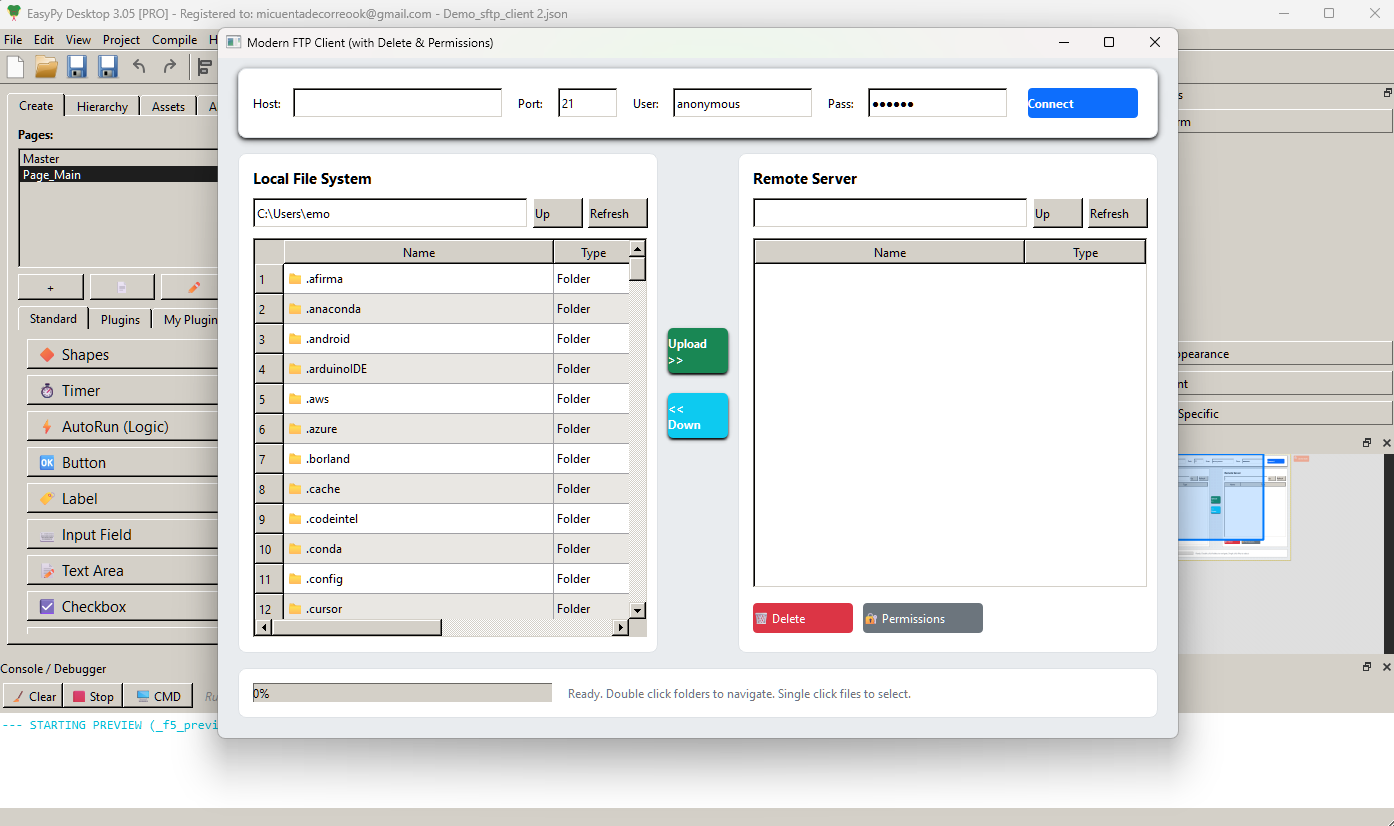
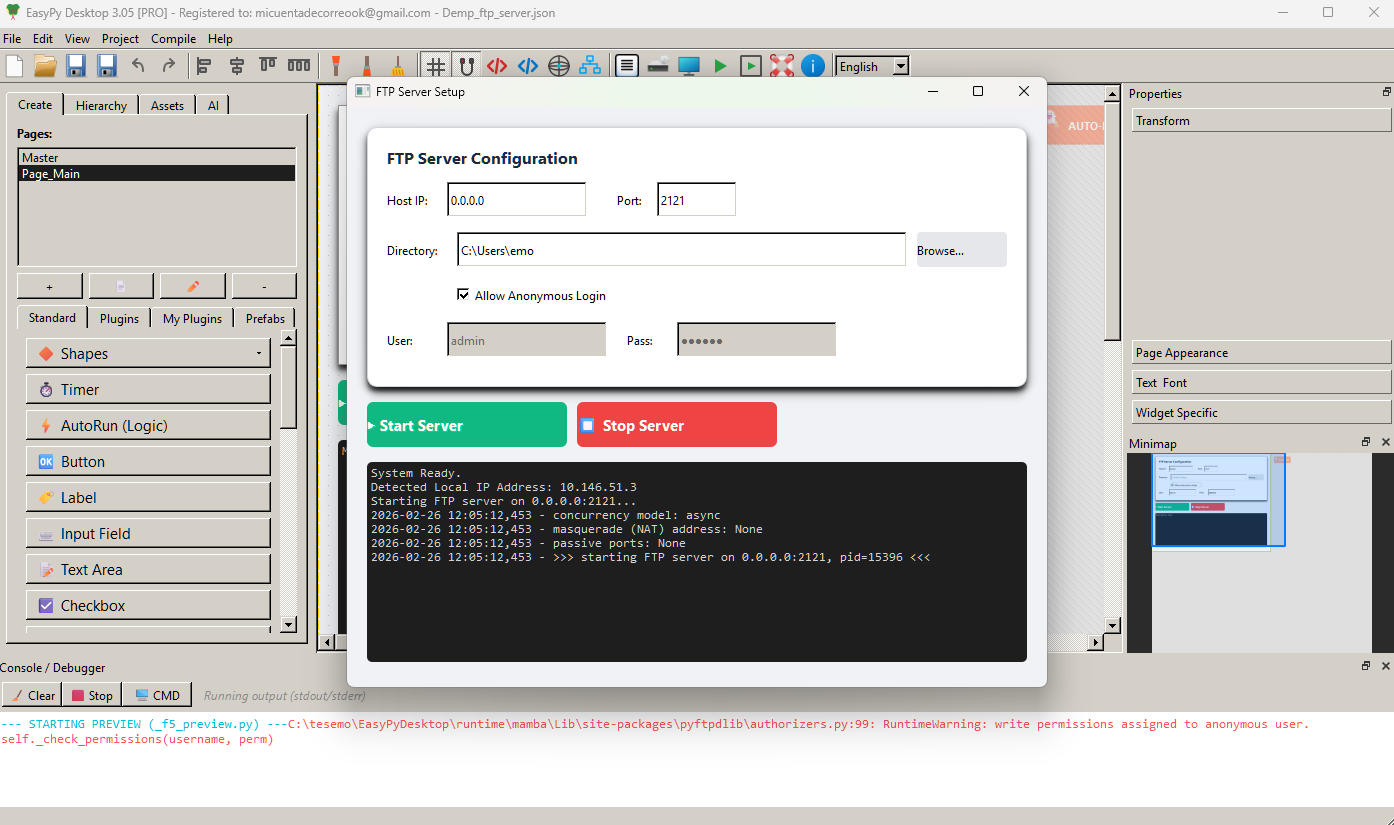
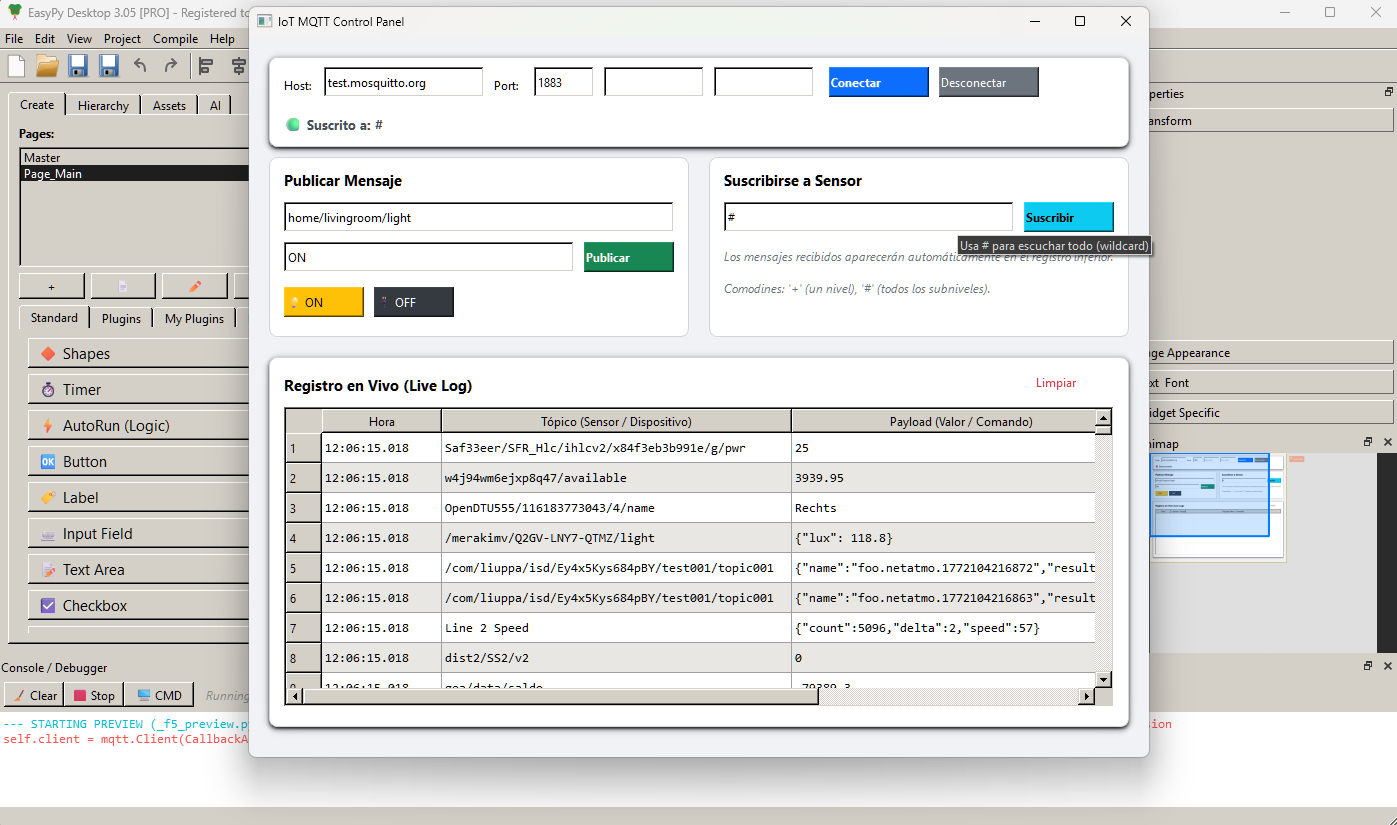
I used the master prompt from EasyPyDesktop (the one included in Section 9 of the Help documentation). I simply copied and pasted it into an AI (in this case, ChatGPT) and asked it to generate three applications: an SFTP client, an FTP server, and an MQTT client.
In less than five minutes, I had all three applications generated and loaded into EasyPyDesktop. After that, I made a few style adjustments, added the required libraries through the Library Manager, and generated the corresponding EXE files.
The entire process took less than 10 minutes, and I ended up with three fully functional programs.
https://youtu.be/-IL1o7aTICw?si=C0ZIyczDl-AYFzY0
EasyPyDesktop 2.97
🎉 New Features & Improvements
Data Binding & Sync: Automatically sync text and values between widgets.
No-Code Logic: Checkbox Controller (show/hide/enable) and Value Router (trigger actions based on values).
Data Persistence: Save/load settings and batch form processing with INI files.
System Utilities: Open URLs, local folders, get date/time, copy to clipboard.
Geometry & Layout: Auto-center widgets, move relative, read geometry (X, Y, W, H).
3D Support: New 3D OpenGL Viewer plugin and demo.
CLI & Console: Build CLI-only apps, open system console via CMD button, full CLI support.
AI & PDF: Optimized AI context handling, variable obfuscation.
UI Fixes & Enhancements: Cursor fixes, new anchor positions, resizable projects enforce minimum window size.
📂 New Demos
Widgets events & wizards (Sync, Checkbox Controller, Router).
INI commands and batch save/load for user profiles.
Geometry commands (auto-center, relative movement).
3D OpenGL Viewer demo.
Anchor positioning demo & simple Visual Novel example.
CLI demos: simple CLI and advanced Textual TUI projects.
NEW VERSION 3.05
I used the master prompt from EasyPyDesktop (the one included in Section 9 of the Help documentation). I simply copied and pasted it into an AI (in this case, ChatGPT) and asked it to generate three applications: an SFTP client, an FTP server, and an MQTT client.
In less than five minutes, I had all three applications generated and loaded into EasyPyDesktop. After that, I made a few style adjustments, added the required libraries through the Library Manager, and generated the corresponding EXE files.
The entire process took less than 10 minutes, and I ended up with three fully functional programs.
https://youtu.be/-IL1o7aTICw?si=C0ZIyczDl-AYFzY0
Uploaded files:
Quote from no1g8tor96 on February 19, 2026, 3:34 pm@xpto, you can purchase it here. You get a key to activate it. Just Click Add to Cart and it will take you to the checkout page.
You will be sent a link to download it or you can do it here.
EasyPyDesktop – Visual Python Builder (FREE). Put 0 in the money and purchase.
This is an amazing piece of software so far and Emo is doing amazing job so Quickly.
Hope this helps. Please support him.
@xpto, you can purchase it here. You get a key to activate it. Just Click Add to Cart and it will take you to the checkout page.
You will be sent a link to download it or you can do it here.
EasyPyDesktop – Visual Python Builder (FREE). Put 0 in the money and purchase.
This is an amazing piece of software so far and Emo is doing amazing job so Quickly.
Hope this helps. Please support him.
Quote from luiz on March 5, 2026, 9:15 pm@emmanuel-fernandez
Thanks for the great updates on EasyPyDesktop.
Some friends from Brazil are trying to download EasyPyDesktop and are having trouble. Is it still available for download?
The link I sent to them: EasyPyDesktop – Visual Python Builder (FREE)
Thanks in advance.
L.A.G.M. - Brasil
Thanks for the great updates on EasyPyDesktop.
Some friends from Brazil are trying to download EasyPyDesktop and are having trouble. Is it still available for download?
The link I sent to them: EasyPyDesktop – Visual Python Builder (FREE)
Thanks in advance.
L.A.G.M. - Brasil
Quote from luiz on March 19, 2026, 1:20 am
Thanks @emmanuel-fernandez for the great updates on v. 3.18 ( EasyPyDesktop – Visual Python Builder (FREE) ).
EasyPy Desktop is becoming an excellent tool.
L.A.G.M. - Brasil
Thanks @emmanuel-fernandez for the great updates on v. 3.18 ( EasyPyDesktop – Visual Python Builder (FREE) ).
EasyPy Desktop is becoming an excellent tool.
L.A.G.M. - Brasil
Quote from Sinesi Giuseppe on March 20, 2026, 12:30 pmSince I started using EasyPyDesktop, I have to say that it is exceptional and has managed to make me forget Visualneo. Thanks to the use of Ai, I can create things imaginable for someone like me who does not have great IT skills. I thank @emmanuel-fernandez for creating this application. I recommend everyone to try its potential.
Since I started using EasyPyDesktop, I have to say that it is exceptional and has managed to make me forget Visualneo. Thanks to the use of Ai, I can create things imaginable for someone like me who does not have great IT skills. I thank @emmanuel-fernandez for creating this application. I recommend everyone to try its potential.