
HTML App Creation Kit for VisualNEO Win: build incredible desktop apps with an HTML interface, with the help of AI... - Forum
HTML App Creation Kit for VisualNEO Win: build incredible desktop apps with an HTML interface, with the help of AI...

Quote from Anthony LaTorre on October 25, 2026, 11:12 pmWant your VisualNEO apps to look like modern software? This free kit lets you build Windows desktop apps whose whole interface is an HTML page running in VisualNEO’s Modern Web Browser. VisualNEO takes care of the window, the files and Windows.
You don’t have to write the HTML, JavaScript or NeoScript yourself. Upload the kit’s AI guide and the AI Development Kit to an AI assistant such as Claude or ChatGPT, describe your app in plain words, and the AI builds the complete project: the .pub file and the App folder.
What your apps can do
- Save and load their own files, with text in any language
- Work with photos, PDFs and other files, and import or export them through the standard Windows dialogs
- Spell check any text entered into a field...
- Remember settings, offer dark and light themes, and support more than one language...
- Run fully offline, like any normal Windows program
What’s in the kit
The AI guide: everything the AI needs to build a working app. *This is a Markdown document in the Docs folder.
Two free plugins: SpecialFolders and Base64Files (source code included) *You need these 2 plugins for the app to work correctly.
User guides in English and Spanish
Daily Journal, a complete demo app: calendar, entries with moods and photos, search, export, dark/light themes and English/Spanish*This is now my preferred way of creating VisualNeo Win apps... I just created a fully-functional Book Planner and Blueprint app that rivals any commercial software on the market in 2 days with this method... If I had to design, code and assemble the software myself, it would have taken months... This is a game changer...
The HTML App Creation Kit has everything you need to build an amazing app with the help of AI. *Make sure you read the included User Guide before working with your AI program...
Let me know if you need help with anything...
Cheers*Note: I included the latest VNW AI Kit with the HTML App Creation Kit... If Luis updates the Ai Kit, make sure you replace the older kit with it...
Want your VisualNEO apps to look like modern software? This free kit lets you build Windows desktop apps whose whole interface is an HTML page running in VisualNEO’s Modern Web Browser. VisualNEO takes care of the window, the files and Windows.
You don’t have to write the HTML, JavaScript or NeoScript yourself. Upload the kit’s AI guide and the AI Development Kit to an AI assistant such as Claude or ChatGPT, describe your app in plain words, and the AI builds the complete project: the .pub file and the App folder.
What your apps can do
- Save and load their own files, with text in any language
- Work with photos, PDFs and other files, and import or export them through the standard Windows dialogs
- Spell check any text entered into a field...
- Remember settings, offer dark and light themes, and support more than one language...
- Run fully offline, like any normal Windows program
What’s in the kit
The AI guide: everything the AI needs to build a working app. *This is a Markdown document in the Docs folder.
Two free plugins: SpecialFolders and Base64Files (source code included) *You need these 2 plugins for the app to work correctly.
User guides in English and Spanish
Daily Journal, a complete demo app: calendar, entries with moods and photos, search, export, dark/light themes and English/Spanish
*This is now my preferred way of creating VisualNeo Win apps... I just created a fully-functional Book Planner and Blueprint app that rivals any commercial software on the market in 2 days with this method... If I had to design, code and assemble the software myself, it would have taken months... This is a game changer...
The HTML App Creation Kit has everything you need to build an amazing app with the help of AI. *Make sure you read the included User Guide before working with your AI program...
Let me know if you need help with anything...
Cheers
*Note: I included the latest VNW AI Kit with the HTML App Creation Kit... If Luis updates the Ai Kit, make sure you replace the older kit with it...
Uploaded files: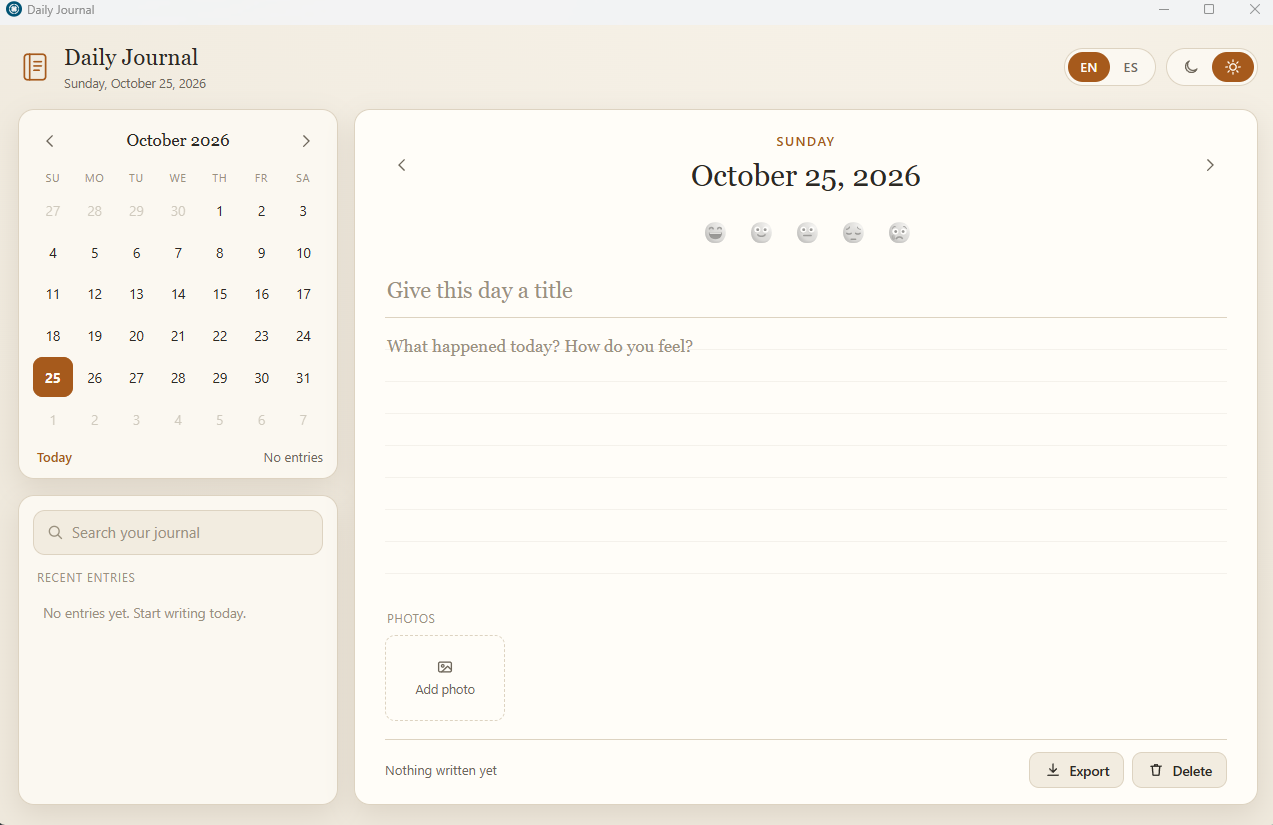

Quote from alangonzalez91 on October 26, 2026, 2:33 amGood suggestion, Antony!
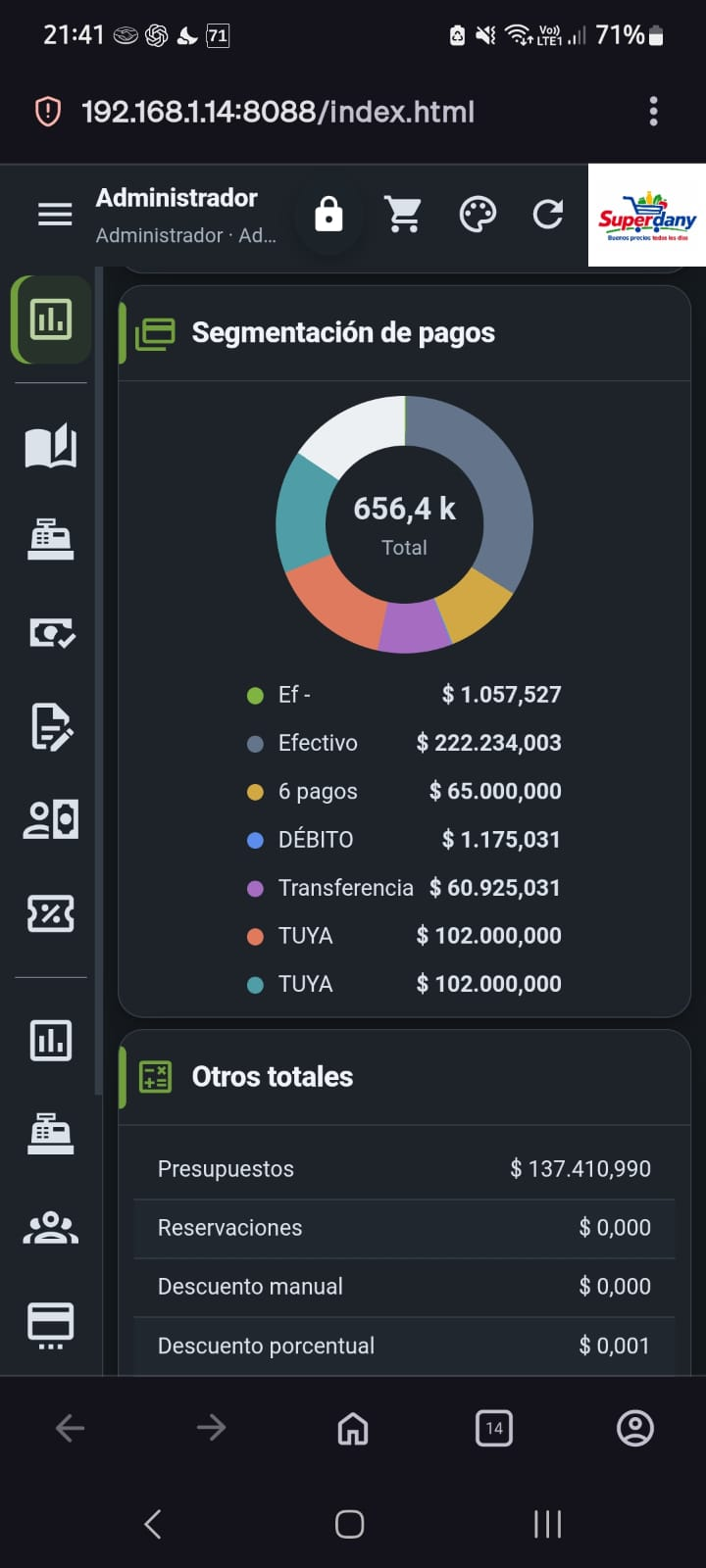
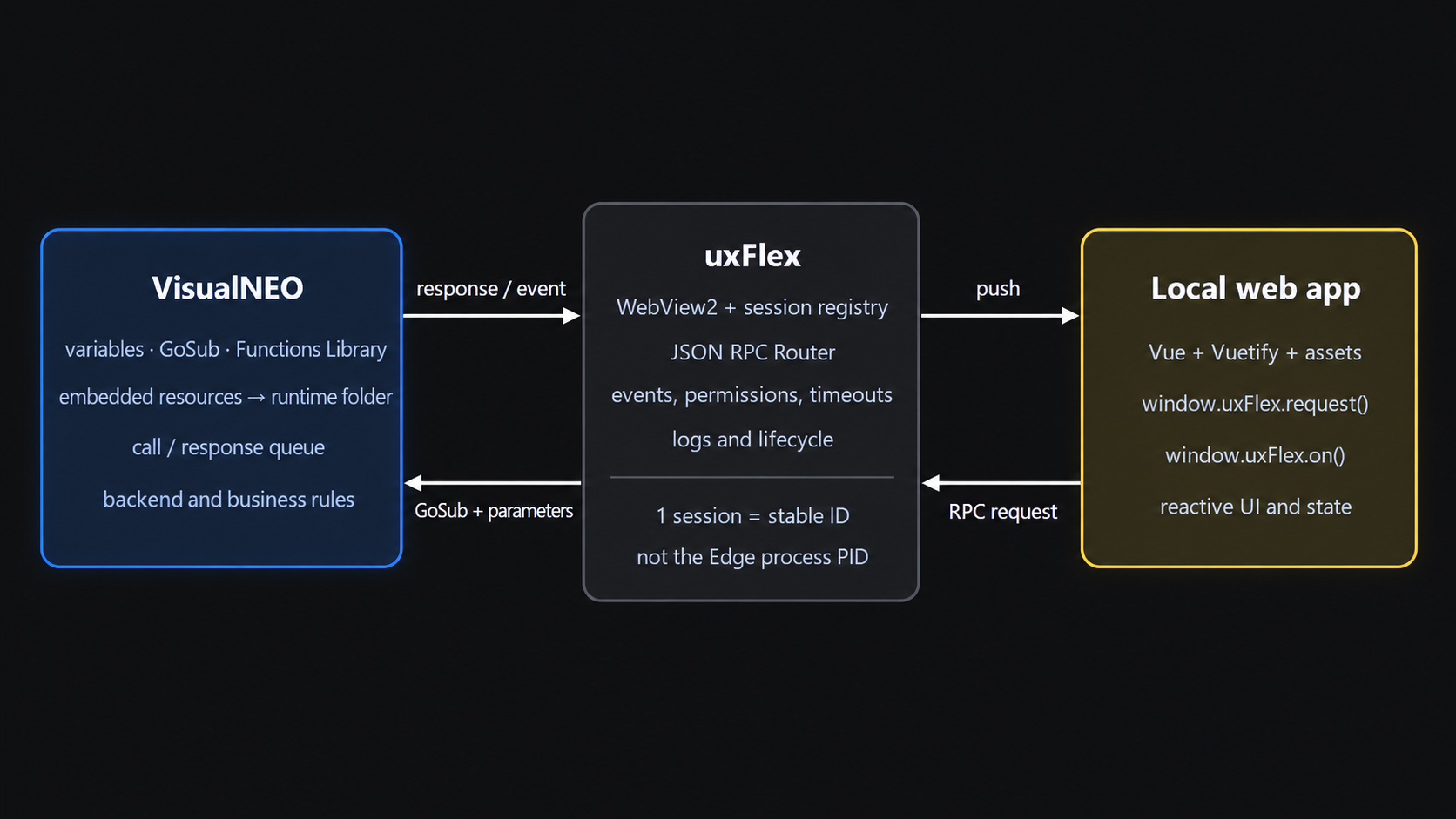
I am working on a plugin dedicated entirely to this; however, I haven’t released it yet because it is only compatible with the previous version. The "uxFlex" plugin can work natively with the OS-provided WebView2 (available on Windows 10/11) or include its own version of WebView2 (v109) for compatibility with Windows 7, 8, and 8.1. It uses VisualNEO + NeoDBPro as the backend. It also incorporates a WebSocket system to "stream" the application via a web port (e.g., http://192.168.1.8:8088), allowing it to be accessed from another device while still utilizing the backend on the PC. This means you can perform tasks like printing, accessing data, or making HTTP calls—all from a phone, while the actual processing happens on the PC over wifi.
-----------------------
Estoy trabajando en un plugin dedicado 100% a esto, nada mas que no lo libero porque solo es compatible con la versión anterior. El plugin uxFlex puede trabajar de forma nativa con webview2 del SO disponible en win10/11 o portar su propio webview2 v109 compatilbe para win7 / 8 / 8.1... Dejando a VisualNEO + NeoDBPro como backend... Tambien incorpora un sistema de websocket para "transmitir" la app por un puerto web por wj: http://192.168.1.8:8088 y poder usarla desde otro dispositivo, pero consumiendo el backend en el pc, por lo que puede usar la impresora, datos, llamadas http, etc. en el pc desde un teléfono vía wifi
Good suggestion, Antony!
I am working on a plugin dedicated entirely to this; however, I haven’t released it yet because it is only compatible with the previous version. The "uxFlex" plugin can work natively with the OS-provided WebView2 (available on Windows 10/11) or include its own version of WebView2 (v109) for compatibility with Windows 7, 8, and 8.1. It uses VisualNEO + NeoDBPro as the backend. It also incorporates a WebSocket system to "stream" the application via a web port (e.g., http://192.168.1.8:8088), allowing it to be accessed from another device while still utilizing the backend on the PC. This means you can perform tasks like printing, accessing data, or making HTTP calls—all from a phone, while the actual processing happens on the PC over wifi.
-----------------------
Estoy trabajando en un plugin dedicado 100% a esto, nada mas que no lo libero porque solo es compatible con la versión anterior. El plugin uxFlex puede trabajar de forma nativa con webview2 del SO disponible en win10/11 o portar su propio webview2 v109 compatilbe para win7 / 8 / 8.1... Dejando a VisualNEO + NeoDBPro como backend... Tambien incorpora un sistema de websocket para "transmitir" la app por un puerto web por wj: http://192.168.1.8:8088 y poder usarla desde otro dispositivo, pero consumiendo el backend en el pc, por lo que puede usar la impresora, datos, llamadas http, etc. en el pc desde un teléfono vía wifi
Uploaded files:

Quote from Anthony LaTorre on October 26, 2026, 3:13 amVery cool idea... especially accessing the PC app remotely... I can see a lot of potential uses for this...
There is so much you can do with HTML CSS, and Javascript.. I think the days of creating an app with standard VNW controls are done for me... I can have Claude design and code a complete app in no time... And the functionality and visual design are better than anything I can produce in VNW...
Good luck with your plugin Alan.
Very cool idea... especially accessing the PC app remotely... I can see a lot of potential uses for this...
There is so much you can do with HTML CSS, and Javascript.. I think the days of creating an app with standard VNW controls are done for me... I can have Claude design and code a complete app in no time... And the functionality and visual design are better than anything I can produce in VNW...
Good luck with your plugin Alan.