
mobile keyboard

Quote from asmat on March 10, 2019, 9:22 pmI have a problem with the mobile's keyboard, when I focus on TextInput the application shrinks. How can I avoid this problem without disabling "auto size content to fit device" because if I disable this option then that time the application only works for one or two devices.I don't want this to happen . I want a logical way to solve this problem. In this condition, the application should get a scroll bar. You can see this problem in this picture.
https://tinyurl.com/y534cqq5
link for sample:
https://tinyurl.com/yxa5ltgx
application link:
https://tinyurl.com/yyp5xnah
I have a problem with the mobile's keyboard, when I focus on TextInput the application shrinks. How can I avoid this problem without disabling "auto size content to fit device" because if I disable this option then that time the application only works for one or two devices.I don't want this to happen . I want a logical way to solve this problem. In this condition, the application should get a scroll bar. You can see this problem in this picture.
link for sample:
application link:

Quote from luishp on March 10, 2019, 11:12 pmHave you tried slScaleAppFitWidth command instead of the autosize App properties?
I have done some research and it seems adding this code to the config.xml generated file could change the way the keyboard works sliding over the content instead of pushing it up:<activity android:windowSoftInputMode="adjustPan"> </activity>Look here for more information:
https://stackoverflow.com/questions/36134534/cordova-android-keyboard-push-up-content
Please let me know if you have success.
Have you tried slScaleAppFitWidth command instead of the autosize App properties?
I have done some research and it seems adding this code to the config.xml generated file could change the way the keyboard works sliding over the content instead of pushing it up:
<activity android:windowSoftInputMode="adjustPan"> </activity>
Look here for more information:
https://stackoverflow.com/questions/36134534/cordova-android-keyboard-push-up-content
Please let me know if you have success.

Quote from AsleyCruz on March 11, 2019, 8:31 pmQuote from asmat on March 11, 2019, 8:26 pmI couldn't find a way for solving this problem..
Hi asmat
Try with:
SetObjectStyle "PageName" "margin-top" "0px"
it should work.
Quote from asmat on March 11, 2019, 8:26 pmI couldn't find a way for solving this problem..
Hi asmat
Try with:
SetObjectStyle "PageName" "margin-top" "0px"
it should work.
Quote from asmat on March 12, 2019, 9:14 amwhere should I put this piece of code?
I have trialed it at the startup,page enter and keydown of textInput but, it doesn't work ....
where should I put this piece of code?
I have trialed it at the startup,page enter and keydown of textInput but, it doesn't work ....
Quote from AsleyCruz on March 12, 2019, 4:32 pmQuote from asmat on March 12, 2019, 9:14 amwhere should I put this piece of code?
I have trialed it at the startup,page enter and keydown of textInput but, it doesn't work ....
Try to add the page height with [NAB.ClientHeight] on page enter .
Doing this the page height won't change on showing keyboard.
Quote from asmat on March 12, 2019, 9:14 amwhere should I put this piece of code?
I have trialed it at the startup,page enter and keydown of textInput but, it doesn't work ....
Try to add the page height with [NAB.ClientHeight] on page enter .
Doing this the page height won't change on showing keyboard.
Quote from AsleyCruz on March 12, 2019, 4:33 pmQuote from luishp on March 12, 2019, 11:23 amI have been looking into this and can't find a solution... by now.
Sorry.Hi bro
Tray to fix this on next update, please.
Thanks
Quote from luishp on March 12, 2019, 11:23 amI have been looking into this and can't find a solution... by now.
Sorry.
Hi bro
Tray to fix this on next update, please.
Thanks
Quote from AsleyCruz on March 12, 2019, 9:19 pmQuote from asmat on March 12, 2019, 8:59 pmI solved this problem thank you all...
You should share the way you solved this, so other users can use it.
Quote from asmat on March 12, 2019, 8:59 pmI solved this problem thank you all...
You should share the way you solved this, so other users can use it.
Quote from asmat on March 12, 2019, 10:24 pmyou should use this code at startup:
SetVar [h] [NAB.ClientHeight]
SetVar [w] [NAB.ClientWidth]
TopCenterApp
SizeObject "Main" [w] [h]
SizeObject "Container1" [w] [h]"Main" is here the name of page.....
you should use this code at startup:
SetVar [h] [NAB.ClientHeight]
SetVar [w] [NAB.ClientWidth]
TopCenterApp
SizeObject "Main" [w] [h]
SizeObject "Container1" [w] [h]
"Main" is here the name of page.....

Quote from shahram on February 5, 2021, 1:15 pmQuote from asmat on March 12, 2019, 10:24 pmyou should use this code at startup:
SetVar [h] [NAB.ClientHeight]
SetVar [w] [NAB.ClientWidth]
TopCenterApp
SizeObject "Main" [w] [h]
SizeObject "Container1" [w] [h]"Main" is here the name of page.....
Also you can use cordova status bar plugin and use below code in startup event:
BeginJS
StatusBar.hide();
EndJSalso you have to add these lines in confix.xml:
<preference name="fullscreen" value="false" />
<preference name="StatusBarOverlaysWebView" value="false" />
Quote from asmat on March 12, 2019, 10:24 pmyou should use this code at startup:
SetVar [h] [NAB.ClientHeight]
SetVar [w] [NAB.ClientWidth]
TopCenterApp
SizeObject "Main" [w] [h]
SizeObject "Container1" [w] [h]"Main" is here the name of page.....
Also you can use cordova status bar plugin and use below code in startup event:
BeginJS
StatusBar.hide();
EndJS
also you have to add these lines in confix.xml:
<preference name="fullscreen" value="false" />
<preference name="StatusBarOverlaysWebView" value="false" />

Quote from Chillcoder on July 27, 2021, 12:18 amThe solution of:
you should use this code at startup:
SetVar [h] [NAB.ClientHeight]
SetVar [w] [NAB.ClientWidth]
TopCenterApp
SizeObject "Main" [w] [h]
SizeObject "Container1" [w] [h]"Main" is here the name of page.....
I have tried this in PWA running on IPhone and the application still moves when the keypad is activated as you enter a numeric input. Nothing seems to prevent to the app moving.
Has anyone tried and solved this problem for IPhone when viewing a PWA?
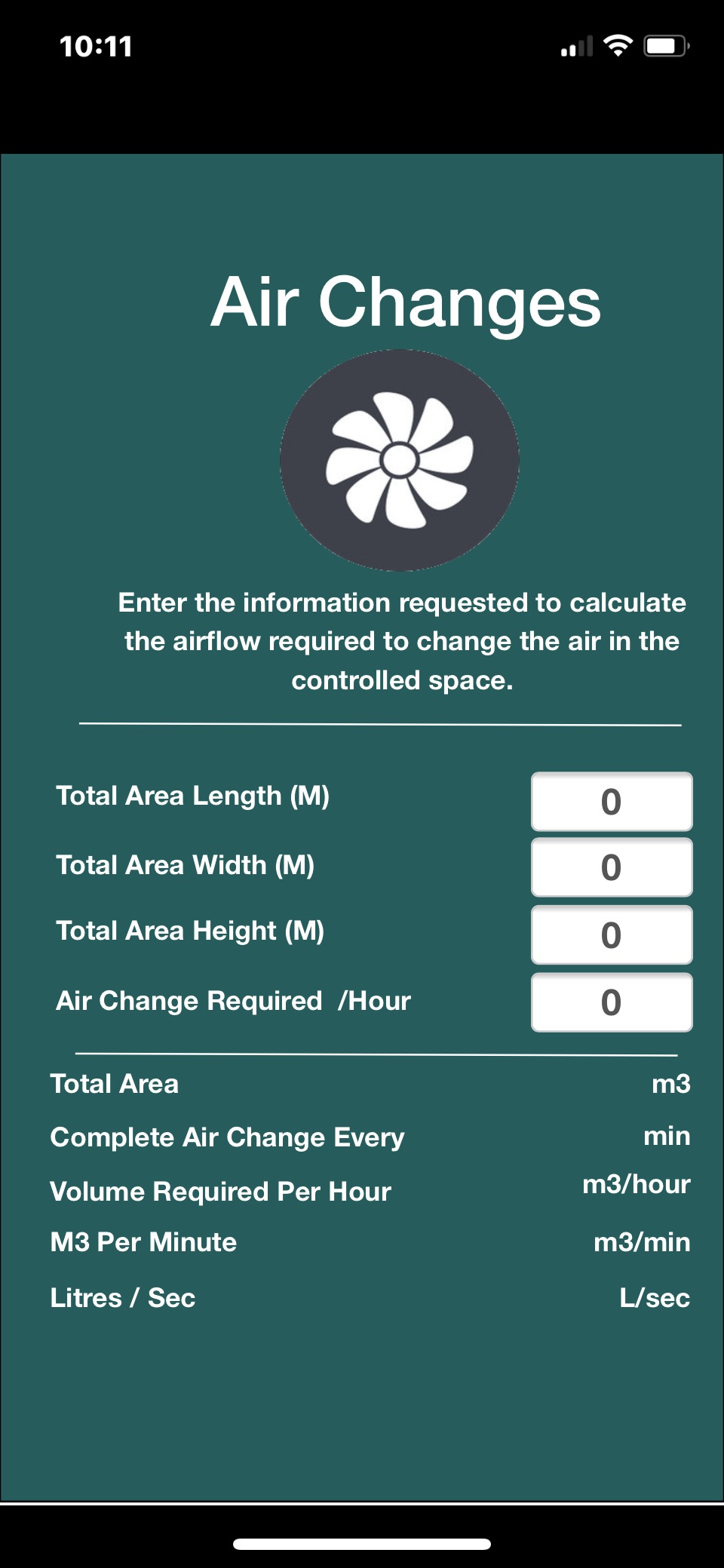
Screenshot 1 - Normal
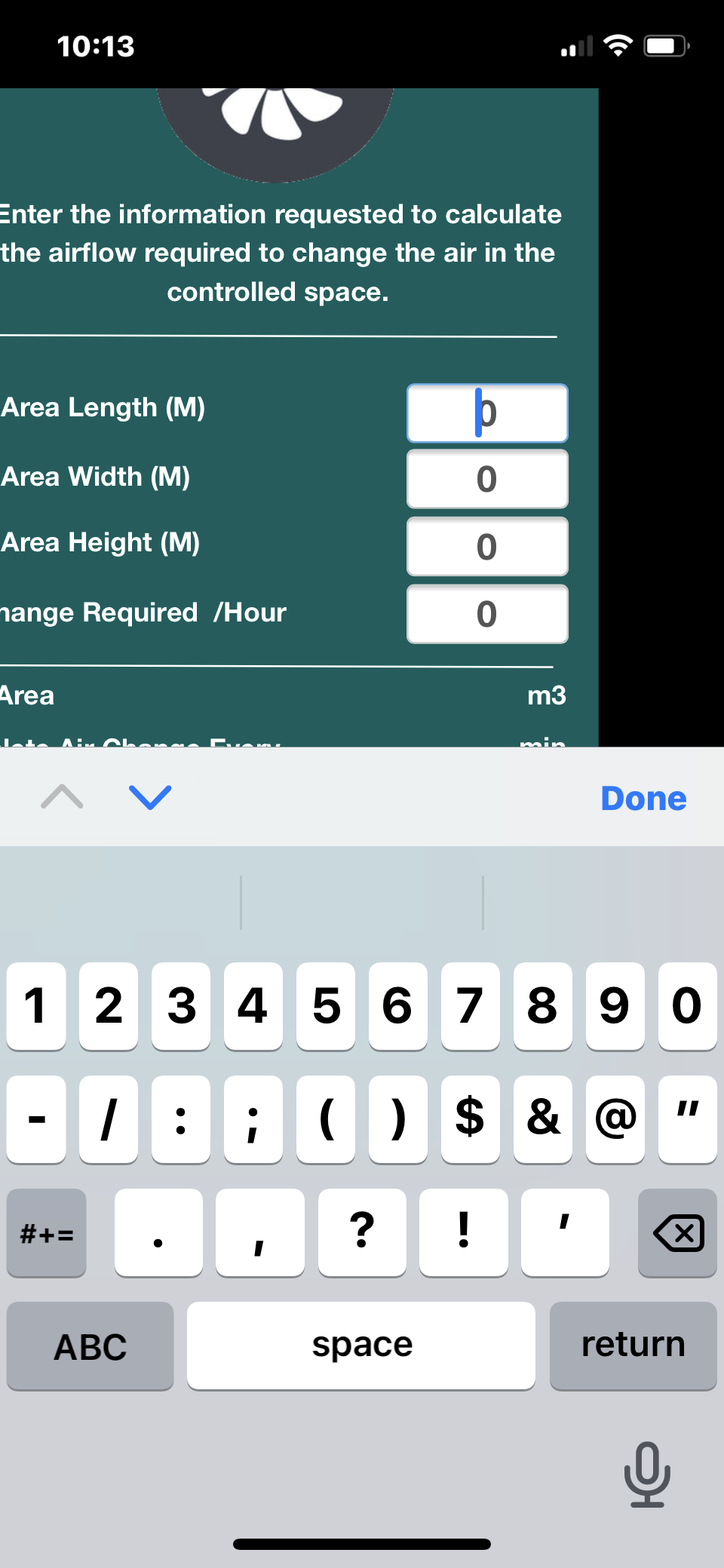
Screenshot 2 - Keyboard Showing - App Moved
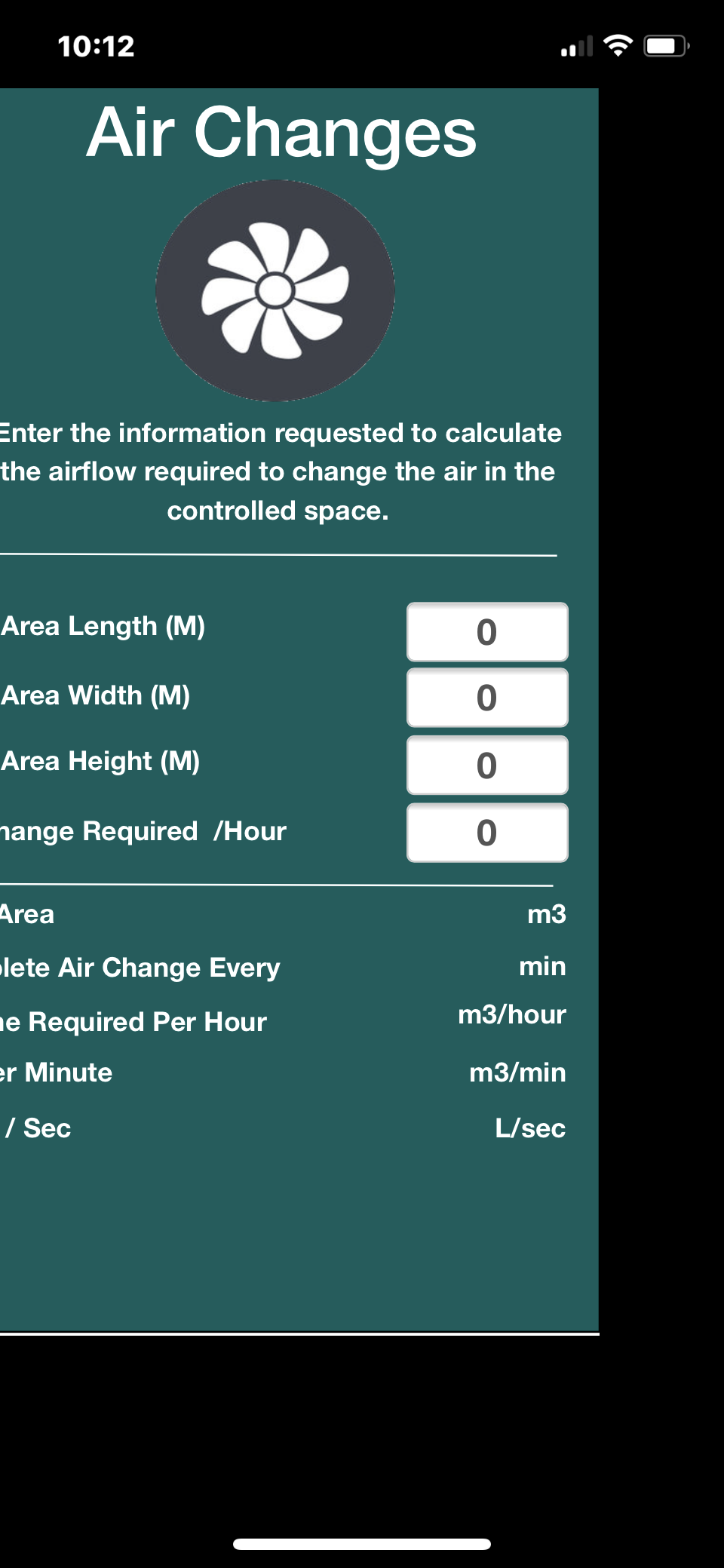
Screenshot 3 - After keyboard hidden app still moved.
The solution of:
you should use this code at startup:
SetVar [h] [NAB.ClientHeight]
SetVar [w] [NAB.ClientWidth]
TopCenterApp
SizeObject "Main" [w] [h]
SizeObject "Container1" [w] [h]"Main" is here the name of page.....
I have tried this in PWA running on IPhone and the application still moves when the keypad is activated as you enter a numeric input. Nothing seems to prevent to the app moving.
Has anyone tried and solved this problem for IPhone when viewing a PWA?
Screenshot 1 - Normal
Screenshot 2 - Keyboard Showing - App Moved
Screenshot 3 - After keyboard hidden app still moved.
Uploaded files:
Quote from luishp on July 27, 2021, 8:58 am@jason-roberts I think the problem comes by the way you are scaling your app.
It seems your app width is greater than the device screen width.
Which option are you using?Possibilities:
- Project > Properties > Size > Autosize
- Project > Properties > Size > Responsive Design
- FitAppToScreen command
- slScaleAppLetterBox command
- slScaleAppLetterBoxMax command
- slScaleAppDeform command
- slScaleAppFit command
- slScaleAppFitWidth command
- slScaleAppFitHeight command
@jason-roberts I think the problem comes by the way you are scaling your app.
It seems your app width is greater than the device screen width.
Which option are you using?
Possibilities:
- Project > Properties > Size > Autosize
- Project > Properties > Size > Responsive Design
- FitAppToScreen command
- slScaleAppLetterBox command
- slScaleAppLetterBoxMax command
- slScaleAppDeform command
- slScaleAppFit command
- slScaleAppFitWidth command
- slScaleAppFitHeight command
Quote from Chillcoder on July 27, 2021, 9:13 amYes I had put the scale controls in at start up. When removed it seems to fix it. I need to see if the scaling can still work though for other devices so more testing needed. Seems to have fixed the problem described.
Thank you very much.
Yes I had put the scale controls in at start up. When removed it seems to fix it. I need to see if the scaling can still work though for other devices so more testing needed. Seems to have fixed the problem described.
Thank you very much.
Quote from Chillcoder on July 27, 2021, 11:28 amUpdate.
Back to the start again as if I remove the commands to scale the application it wont look correct on devices with different screen resolutions. The auto size does not work correctly with text and objects it seems, so have to use the
slScaleAppFitWidth
slScaleAppFitHeightThe keyboard show on entry to a field seems to cause the problem above only when the scale commands above are in the startup, otherwise it is fine.
Update.
Back to the start again as if I remove the commands to scale the application it wont look correct on devices with different screen resolutions. The auto size does not work correctly with text and objects it seems, so have to use the
slScaleAppFitWidth
slScaleAppFitHeight
The keyboard show on entry to a field seems to cause the problem above only when the scale commands above are in the startup, otherwise it is fine.
Quote from Chillcoder on July 27, 2021, 10:24 pmLast update.
The only way seems to be responsive design to fix the issue with keyboard focus and scaling.
Last update.
The only way seems to be responsive design to fix the issue with keyboard focus and scaling.
Quote from Chillcoder on September 2, 2021, 8:15 amFINALLY!
For those that have the same issue. This will be good.
Thanks to Luis the solution was simple and is actually a fix for general use between devices including desktop browser at least for me anyway on this project.
In the events:
FitAppToScreen false "top" "center"
AppBackgroundColor "#ffffff"Obviously this is for white background. Choose what you need.
Then ensure the setting for dynamic size are all off. That bit was counter intuitive!
Anyway works well for me. No problems with the keyboard moving the app now.
Thank you Luis!
FINALLY!
For those that have the same issue. This will be good.
Thanks to Luis the solution was simple and is actually a fix for general use between devices including desktop browser at least for me anyway on this project.
In the events:
FitAppToScreen false "top" "center"
AppBackgroundColor "#ffffff"
Obviously this is for white background. Choose what you need.
Then ensure the setting for dynamic size are all off. That bit was counter intuitive!
Anyway works well for me. No problems with the keyboard moving the app now.
Thank you Luis!