
neoCms Preview 1 - Backend edition and Collection loading

Quote from luishp on November 26, 2021, 4:23 pmI have just published the first neoCms Sample as a sneak preview:
https://visualneo.com/tutorials/neocms1/Data is retrieved from a remote server in a different domain where neoCms is installed:
https://cms.sinlios.euThere I have created an author account for you to test, with limited permissions so you can sign-in an edit contents:
User: author
Password: cmsauthorMax image file size to upload: 20Kb.
Once you update the content in neoCms reload the sample app to see the changes.This is just the tip of the iceberg... More to come.
Let me know what you think.
Thank you!
I have just published the first neoCms Sample as a sneak preview:
https://visualneo.com/tutorials/neocms1/
Data is retrieved from a remote server in a different domain where neoCms is installed:
https://cms.sinlios.eu
There I have created an author account for you to test, with limited permissions so you can sign-in an edit contents:
User: author
Password: cmsauthor
Max image file size to upload: 20Kb.
Once you update the content in neoCms reload the sample app to see the changes.
This is just the tip of the iceberg... More to come.
Let me know what you think.
Thank you!

Quote from roccocogliano on November 26, 2021, 5:03 pmAt first glance it looks very, very interesting indeed.
Thank you so much Luis
At first glance it looks very, very interesting indeed.
Thank you so much Luis

Quote from CDY@44 on November 26, 2021, 5:35 pmHi Luis,
I can't believe my eyes !!! Really, VisualNeoWeb is....To infinity, and beyond!
Thank you for all !!!
Hi Luis,
I can't believe my eyes !!! Really, VisualNeoWeb is....To infinity, and beyond!
Thank you for all !!!

Quote from Vadim on November 26, 2021, 6:23 pm@luishp
I tried to make a record, through the GUI. I just could not add a picture from my desktop, it must be disabled. It looks very professional and beautiful!!! Interesting to learn more about what you can create with NeoCMS! In a neighboring thread, you wrote that this plugin can make working with databases easier, if I understand correctly.
Thank you so much for the new features!!!
I tried to make a record, through the GUI. I just could not add a picture from my desktop, it must be disabled. It looks very professional and beautiful!!! Interesting to learn more about what you can create with NeoCMS! In a neighboring thread, you wrote that this plugin can make working with databases easier, if I understand correctly.
Thank you so much for the new features!!!

Quote from Darbdenral on November 26, 2021, 9:50 pmThis looks like a powerful addition! I can't wait for it! The ideas are spinning in my head.. :)
thanks!
This looks like a powerful addition! I can't wait for it! The ideas are spinning in my head.. :)
thanks!
Quote from luishp on November 26, 2021, 11:47 pmSorry @vadim, I have reviewed the configuration. Now it's possible to upload .png and .jpg images up to 20Kb using "Select asset" option. Thank you for testing!
Sorry @vadim, I have reviewed the configuration. Now it's possible to upload .png and .jpg images up to 20Kb using "Select asset" option. Thank you for testing!
Quote from Darbdenral on November 27, 2021, 12:45 amQuote from luishp on November 26, 2021, 11:47 pmSorry @vadim, I have reviewed the configuration. Now it's possible to upload .png and .jpg images up to 20Kb using "Select asset" option. Thank you for testing!
@luishp I was curious.. I have Cockpit installed and I was looking for something to limit file size or dimensions for images on their forums.. Is that a custom config option?
thanks!
Quote from luishp on November 26, 2021, 11:47 pmSorry @vadim, I have reviewed the configuration. Now it's possible to upload .png and .jpg images up to 20Kb using "Select asset" option. Thank you for testing!
@luishp I was curious.. I have Cockpit installed and I was looking for something to limit file size or dimensions for images on their forums.. Is that a custom config option?
thanks!
Quote from luishp on November 27, 2021, 7:52 am@darbdenral I have tested many options and addons in Cockpit to pack a "customized version" for us.
I use some important addons to allow better user management, included upload file size. I also use "Cockpit Next" branch, as it seems to fix some problems in the main one.
The only thing I don't like about Cockpit is it's lack of documentation...
Anyway it seems to me like the perfect marriage for VisualNEO Web. I will be sharing more samples and possibilities to help you getting familiarized before publishing the next VisualNEO Wrb release.Take a look at the attcahed neoCms command list I have already prepared :)
Regards.
@darbdenral I have tested many options and addons in Cockpit to pack a "customized version" for us.
I use some important addons to allow better user management, included upload file size. I also use "Cockpit Next" branch, as it seems to fix some problems in the main one.
The only thing I don't like about Cockpit is it's lack of documentation...
Anyway it seems to me like the perfect marriage for VisualNEO Web. I will be sharing more samples and possibilities to help you getting familiarized before publishing the next VisualNEO Wrb release.
Take a look at the attcahed neoCms command list I have already prepared :)
Regards.
Uploaded files: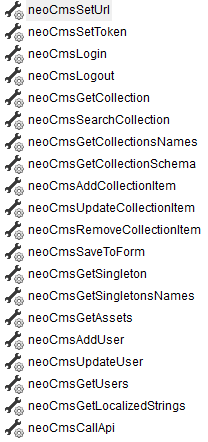
Quote from luishp on November 27, 2021, 8:03 amI have re-uploaded the sample files (see first post) to fix remotely hosted images problem.
Thank you!
I have re-uploaded the sample files (see first post) to fix remotely hosted images problem.
Thank you!
Quote from Darbdenral on November 27, 2021, 9:02 amYou have been busy ;) A customized version? That sounds like a really good idea! It's a sweet script and really does seem like a great fit, good find. I experienced the lack of documentation too. I did manage to implement user groups with the help of their forums but I'll look into that branch you mentioned and look forward to what you come up with.. :)
thanks!
You have been busy ;) A customized version? That sounds like a really good idea! It's a sweet script and really does seem like a great fit, good find. I experienced the lack of documentation too. I did manage to implement user groups with the help of their forums but I'll look into that branch you mentioned and look forward to what you come up with.. :)
thanks!

Quote from farhad2008 on November 28, 2021, 5:07 pmhi,@luishp
Thank You for neoCms sample but missed plugin .
Best Regards.
hi,@luishp
Thank You for neoCms sample but missed plugin .
Best Regards.
Quote from luishp on November 28, 2021, 9:17 pmHi @farhad2008, this is just a preview. You are helping me to test the new funcitonalities while I work on them.
Thank you for your patience :)
Hi @farhad2008, this is just a preview. You are helping me to test the new funcitonalities while I work on them.
Thank you for your patience :)
Quote from luishp on November 29, 2021, 10:05 amI have updated this sample app to show search and sorting capabilities. If you test it online please press Ctrl-F5 once loaded to be sure you are not loading the cache version.
Thank you!
I have updated this sample app to show search and sorting capabilities. If you test it online please press Ctrl-F5 once loaded to be sure you are not loading the cache version.
Thank you!
Quote from Darbdenral on November 29, 2021, 10:48 amOhh man, @luishp you really released the power with the SearchCollection command! Seemed to work fine here ;) Looking good..
Ohh man, @luishp you really released the power with the SearchCollection command! Seemed to work fine here ;) Looking good..
Quote from farhad2008 on November 29, 2021, 11:36 amhi, luishp
Thank You and It works well.
hi, luishp
Thank You and It works well.

Quote from Neal Stone on November 30, 2021, 12:38 pmThis is great. Can it access SQL data bases?
This is great. Can it access SQL data bases?
Quote from luishp on November 30, 2021, 1:10 pmThis is great. Can it access SQL data bases?
@neal-stone No. You can do that using neoPhp. This has a different purpose.
Although neoCms use SQLite (or optionally MongoDB) it's a NoSQL solution.
If you need more advanced search, it will include GraphQL compatibility.
But you will be able to search, read, insert, update and delete "Items on Collections" (just like records on tables) All from client side, no server side programming necessary.
Please stay tuned for the new samples I will be publishing.Best regards.
This is great. Can it access SQL data bases?
@neal-stone No. You can do that using neoPhp. This has a different purpose.
Although neoCms use SQLite (or optionally MongoDB) it's a NoSQL solution.
If you need more advanced search, it will include GraphQL compatibility.
But you will be able to search, read, insert, update and delete "Items on Collections" (just like records on tables) All from client side, no server side programming necessary.
Please stay tuned for the new samples I will be publishing.
Best regards.
Quote from Neal Stone on November 30, 2021, 5:14 pmHmmmmm maybe I can learn PHP to pull off the same idea? Second question. I see that it will be a service type product. Will I be able to allow users to check their own stats on projects I create?
Hmmmmm maybe I can learn PHP to pull off the same idea? Second question. I see that it will be a service type product. Will I be able to allow users to check their own stats on projects I create?
Quote from luishp on November 30, 2021, 6:10 pmI see that it will be a service type product.
@neal-stone that will be optional. You will be able to host your own neoCms backend very easily and even test it local.
Will I be able to allow users to check their own stats on projects I create?
Yes, but you will have to create your own statistics facility.
Regards
I see that it will be a service type product.
@neal-stone that will be optional. You will be able to host your own neoCms backend very easily and even test it local.
Will I be able to allow users to check their own stats on projects I create?
Yes, but you will have to create your own statistics facility.
Regards