
neoCms Preview 2 - User login and registration

Quote from luishp on November 27, 2021, 10:10 pmIn the previous neoCms sample app we accessed the backend by sharing the same user "author".
Now I will show you how to register a new user, in this case with privilege to access the backend as an author.
You can even choose the desired backend language.User login and registration sample app:
https://visualneo.com/tutorials/neocms2Once registered you can also login here with your own username and password:
https://cms.sinlios.euLet me know what you think.
Regards.
In the previous neoCms sample app we accessed the backend by sharing the same user "author".
Now I will show you how to register a new user, in this case with privilege to access the backend as an author.
You can even choose the desired backend language.
User login and registration sample app:
https://visualneo.com/tutorials/neocms2
Once registered you can also login here with your own username and password:
https://cms.sinlios.eu
Let me know what you think.
Regards.

Quote from CDY@44 on November 27, 2021, 11:22 pmHi @luishp
Just try to create an account. It seems that the text entry for "email" allows only 18 letters...may be a bit to short...
Regards,
Hi @luishp
Just try to create an account. It seems that the text entry for "email" allows only 18 letters...may be a bit to short...
Regards,

Quote from Darbdenral on November 28, 2021, 5:44 amThat was great! I did have a small issue.. It didn't like my first email address. It was an email address with a period in the beginning and a bit long maybe too.. Example: visualneo.a13139@nicorik.com Otherwise, I created an account, logged in as an author and successfully posted to the customer collection.
That was great! I did have a small issue.. It didn't like my first email address. It was an email address with a period in the beginning and a bit long maybe too.. Example: visualneo.a13139@nicorik.com Otherwise, I created an account, logged in as an author and successfully posted to the customer collection.
Quote from luishp on November 28, 2021, 9:07 am@cdy44-2, @darbdenral sorry! I have just updated the sample app. Please try again with longer emails and let me know if it works now. Thank you!
@cdy44-2, @darbdenral sorry! I have just updated the sample app. Please try again with longer emails and let me know if it works now. Thank you!

Quote from Vadim on November 28, 2021, 9:17 am@luishp
It works perfectly! I was now able to attach an image!
Having the ability to translate into your language is super!!!Will neoCms be able to set password complexity requirements?
To display new information in the database, you need to reload the page in the browser. To test I used this application: https://visualneo.com/tutorials/neocms1/#!/card (in another browser tab I added new information and with forward and backward buttons I searched for its display on this page, indicated by the link in the link)
Is it possible to display new data without reloading the page or does neocms not allow this?
It works perfectly! I was now able to attach an image!
Having the ability to translate into your language is super!!!
Will neoCms be able to set password complexity requirements?
To display new information in the database, you need to reload the page in the browser. To test I used this application: https://visualneo.com/tutorials/neocms1/#!/card (in another browser tab I added new information and with forward and backward buttons I searched for its display on this page, indicated by the link in the link)
Is it possible to display new data without reloading the page or does neocms not allow this?
Quote from luishp on November 28, 2021, 9:24 amIt works perfectly! I was now able to attach an image!
Having the ability to translate into your language is super!!!Hi @vadim! Great :)
Will neoCms be able to set password complexity requirements?
You can check it on client side before sending the data to neoCms.
My sample app is just very simple.Is it possible to display new data without reloading the page or does neocms not allow this?
You just need to add a "Reload data" button into your VisualNEO Web app or use a Timer to do it automatically after some given time. Just use the super simple command neoCmsGetCollection and done!
I will be sharing more samples as I test the new plugin.
Thank you!
It works perfectly! I was now able to attach an image!
Having the ability to translate into your language is super!!!
Hi @vadim! Great :)
Will neoCms be able to set password complexity requirements?
You can check it on client side before sending the data to neoCms.
My sample app is just very simple.
Is it possible to display new data without reloading the page or does neocms not allow this?
You just need to add a "Reload data" button into your VisualNEO Web app or use a Timer to do it automatically after some given time. Just use the super simple command neoCmsGetCollection and done!
I will be sharing more samples as I test the new plugin.
Thank you!
Quote from Darbdenral on November 28, 2021, 10:29 amVery good @luishp .. Worked fine here too. :)
Is it possible to add a sort option for collection retrieval? I see it in the API but I'm not sure if that's possible on retrieval.. But it would be nice to have the ability to display the newest entries first, unlike the sample app..
thanks!
Very good @luishp .. Worked fine here too. :)
Is it possible to add a sort option for collection retrieval? I see it in the API but I'm not sure if that's possible on retrieval.. But it would be nice to have the ability to display the newest entries first, unlike the sample app..
thanks!
Quote from luishp on November 28, 2021, 1:20 pm@darbdenral yes, there is a sort option. It's also possible to select the default sorting from the neoCms backend.
@darbdenral yes, there is a sort option. It's also possible to select the default sorting from the neoCms backend.
Quote from CDY@44 on November 28, 2021, 8:53 pmHi @Luishp,
Thank you for updating the template.
I succeed to create my account and a collection.
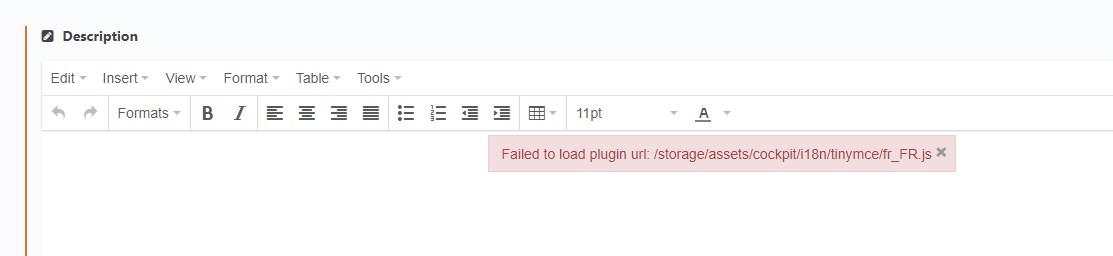
I had an error message during the creation of my collection, see image below :
Hi @Luishp,
Thank you for updating the template.
I succeed to create my account and a collection.
I had an error message during the creation of my collection, see image below :
Quote from luishp on November 28, 2021, 9:16 pmHi @cdy44-2, please try again adding your own item to the Customers collection.
I have just included the localization files for the WYSIWYG editor.
Please let me know if it works correctly now. Thank you!
Hi @cdy44-2, please try again adding your own item to the Customers collection.
I have just included the localization files for the WYSIWYG editor.
Please let me know if it works correctly now. Thank you!
Quote from CDY@44 on November 28, 2021, 9:58 pmHi Luishp,
I cleared my browser cache and I have allways the same error message...
I try on CHROME and EDGE, same...So I try to change language from French to English, and then no more error message. If this can help you.
Regards,
Hi Luishp,
I cleared my browser cache and I have allways the same error message...
I try on CHROME and EDGE, same...
So I try to change language from French to English, and then no more error message. If this can help you.
Regards,