
NeoEdge and DatabasePro

Quote from noyzen on August 17, 2021, 8:20 amHi, I have a question about NeoEdge,
Problem with VisualNEO Win is not supporting UTF-8 and my language (Persian)
I want to know if I use NeoEdge on VisualNeo Web, can I use plugins like DatabasePro of VisualNEO Win and then use Persian language in it?
Sorry for bad English and thank you.
Hi, I have a question about NeoEdge,
Problem with VisualNEO Win is not supporting UTF-8 and my language (Persian)
I want to know if I use NeoEdge on VisualNeo Web, can I use plugins like DatabasePro of VisualNEO Win and then use Persian language in it?
Sorry for bad English and thank you.

Quote from luishp on August 17, 2021, 10:57 am@noyzen neoEdge will execute a VisualNEO Web app within an Embedded Microsoft Edge Browser and this App can call any VisualNEO Win functionality. But those functionalities are VisualNEO Win dependants and thus will have the same limitations.
Anyway, as you are going to show all the information in Edge with total support for UTF-8, you can try to store the data encoded in Base64 format or similar and unencode it back when trying to show it on the screen.
Not sure if this can help you.Best regards.
@noyzen neoEdge will execute a VisualNEO Web app within an Embedded Microsoft Edge Browser and this App can call any VisualNEO Win functionality. But those functionalities are VisualNEO Win dependants and thus will have the same limitations.
Anyway, as you are going to show all the information in Edge with total support for UTF-8, you can try to store the data encoded in Base64 format or similar and unencode it back when trying to show it on the screen.
Not sure if this can help you.
Best regards.
Quote from noyzen on August 17, 2021, 11:21 amThanks Luis, I will check that encoding solution also.
Even when problem can't be solved you always have a trick to do the work!
:)
Thanks Luis, I will check that encoding solution also.
Even when problem can't be solved you always have a trick to do the work!
:)
Quote from noyzen on October 25, 2021, 12:09 pmQuote from luishp on August 17, 2021, 10:57 amyou can try to store the data encoded in Base64 format or similar and unencode it back when trying to show it on the screen.
Not sure if this can help you.Best regards.
Maybe i can make Persian VisualNEO Win softwares using this trick:
Making UI and forms in VisualNEO Web (web browser in VNwin and encode utf8 data to base64 and pass them to VisualNEO Win with "VisualNEO Win Communication" function to store on database etc... and read encoded data back.
First part i tested and working.
But how can i pass them back to VNweb so i can decode and show to user? because VNwin don't have a "VisualNEO Web communication".
Quote from luishp on August 17, 2021, 10:57 amyou can try to store the data encoded in Base64 format or similar and unencode it back when trying to show it on the screen.
Not sure if this can help you.Best regards.
Maybe i can make Persian VisualNEO Win softwares using this trick:
Making UI and forms in VisualNEO Web (web browser in VNwin and encode utf8 data to base64 and pass them to VisualNEO Win with "VisualNEO Win Communication" function to store on database etc... and read encoded data back.
First part i tested and working.
But how can i pass them back to VNweb so i can decode and show to user? because VNwin don't have a "VisualNEO Web communication".
Quote from luishp on October 25, 2021, 6:39 pmBut how can i pass them back to VNweb so i can decode and show to user? because VNwin don't have a "VisualNEO Web communication".
@noyzen Are you running your VisualNEO Web application within a WebBrowser object in VisualNEO Win?
If so, you can use it's capabilities to send informarion back to VisualNEO Web:
https://winhelp.visualneo.com/WebBrowserTool.htmlIf you are using neoEdge instead, then you can use neoEdge plugin commands as they are quite more flexible than "VisualNEO Win communication" action commands.
But how can i pass them back to VNweb so i can decode and show to user? because VNwin don't have a "VisualNEO Web communication".
@noyzen Are you running your VisualNEO Web application within a WebBrowser object in VisualNEO Win?
If so, you can use it's capabilities to send informarion back to VisualNEO Web:
https://winhelp.visualneo.com/WebBrowserTool.html
If you are using neoEdge instead, then you can use neoEdge plugin commands as they are quite more flexible than "VisualNEO Win communication" action commands.
Quote from noyzen on October 25, 2021, 8:00 pmQuote from luishp on October 25, 2021, 6:39 pmBut how can i pass them back to VNweb so i can decode and show to user? because VNwin don't have a "VisualNEO Web communication".
@noyzen Are you running your VisualNEO Web application within a WebBrowser object in VisualNEO Win?
Exactly.
Thanks i'll read guide to see i can do the job :)
(I dont want to use NeoEdge for this)
Quote from luishp on October 25, 2021, 6:39 pmBut how can i pass them back to VNweb so i can decode and show to user? because VNwin don't have a "VisualNEO Web communication".
@noyzen Are you running your VisualNEO Web application within a WebBrowser object in VisualNEO Win?
Exactly.
Thanks i'll read guide to see i can do the job :)
(I dont want to use NeoEdge for this)
Quote from noyzen on October 28, 2021, 11:38 amHow stupid i was...
I can send data from VisualNEO Web by "WinSetVar"
and i can get data by "WinGetVar"!
Easy as hell... :))
Now i can make Persian VisualNEO Win applications thanks to combination of both VisualNEO Win&Web.
How stupid i was...
I can send data from VisualNEO Web by "WinSetVar"
and i can get data by "WinGetVar"!
Easy as hell... :))
Now i can make Persian VisualNEO Win applications thanks to combination of both VisualNEO Win&Web.
Quote from noyzen on December 5, 2021, 7:39 pmAh... another problem appeared sadly.
Lets say HOME is a utf8 word in my language.
and RED is another one.Converting HOME in base64 will be like AAAA
and RED will be BBBbut when i store RED HOME in base64 (to use in VisualNEO Win which does not support utf8,
it will be like: CCCCCCCCand i cant use stored data in database for searching and query and another works...
because when i query for HOME (AAAA) that can't be find in REDHOME because it changed to CCCCCCC.So, is there any other format or solution?
Ah... another problem appeared sadly.
Lets say HOME is a utf8 word in my language.
and RED is another one.
Converting HOME in base64 will be like AAAA
and RED will be BBB
but when i store RED HOME in base64 (to use in VisualNEO Win which does not support utf8,
it will be like: CCCCCCCC
and i cant use stored data in database for searching and query and another works...
because when i query for HOME (AAAA) that can't be find in REDHOME because it changed to CCCCCCC.
So, is there any other format or solution?

Quote from Vadim on December 5, 2021, 8:01 pm@noyzen
You can try RTF format, it is a simple text format, which understands VisualNEO Win. And there is a special plugin EditorsToolbox 1.75 (C. Giebel).
You can try RTF format, it is a simple text format, which understands VisualNEO Win. And there is a special plugin EditorsToolbox 1.75 (C. Giebel).
Quote from noyzen on December 5, 2021, 9:32 pmThanks Vadim, can you tell me how to encode strings in VisualNeo Web into RTF format?
(so i can send into visualneo WIN and store in database)
For decoding i think plugin you mentioned will do the job in VisualNEO Win.
Regards.
Thanks Vadim, can you tell me how to encode strings in VisualNeo Web into RTF format?
(so i can send into visualneo WIN and store in database)
For decoding i think plugin you mentioned will do the job in VisualNEO Win.
Regards.
Quote from luishp on December 6, 2021, 8:07 amHi @noyzen,
Please take a look at the attached plugin. I have included plugin source code too.
The original code comes from:https://stackoverflow.com/questions/29922771/convert-rtf-to-and-from-plain-text
https://stackoverflow.com/questions/29299632/how-to-convert-html-to-rtf-using-javascript/46656606Please, let me know if it works for you.
Hi @noyzen,
Please take a look at the attached plugin. I have included plugin source code too.
The original code comes from:
https://stackoverflow.com/questions/29922771/convert-rtf-to-and-from-plain-text
https://stackoverflow.com/questions/29299632/how-to-convert-html-to-rtf-using-javascript/46656606
Please, let me know if it works for you.
Uploaded files:
Quote from farhad2008 on December 6, 2021, 12:16 pmhi,@noyzen
What is your problem? Because I use Persian and I have no problem.
Regarsds
hi,@noyzen
What is your problem? Because I use Persian and I have no problem.
Regarsds
Quote from noyzen on December 6, 2021, 2:26 pmQuote from luishp on December 6, 2021, 8:07 amHi @noyzen,
Please take a look at the attached plugin. I have included plugin source code too.
The original code comes from:https://stackoverflow.com/questions/29922771/convert-rtf-to-and-from-plain-text
https://stackoverflow.com/questions/29299632/how-to-convert-html-to-rtf-using-javascript/46656606Please, let me know if it works for you.
Thaaaanks Luis, sure i go into it as soon as i can :))
I will give feedback then.
Quote from luishp on December 6, 2021, 8:07 amHi @noyzen,
Please take a look at the attached plugin. I have included plugin source code too.
The original code comes from:https://stackoverflow.com/questions/29922771/convert-rtf-to-and-from-plain-text
https://stackoverflow.com/questions/29299632/how-to-convert-html-to-rtf-using-javascript/46656606Please, let me know if it works for you.
Thaaaanks Luis, sure i go into it as soon as i can :))
I will give feedback then.
Quote from noyzen on December 6, 2021, 2:28 pmQuote from farhad2008 on December 6, 2021, 12:16 pmhi,@noyzen
What is your problem? Because I use Persian and I have no problem.
Regarsds
Hi Farhad, you can use Persian in VisualNEO Win?
Or web?
Web is OK, problem is Win. How you use Persian in Win can you tell me please?
Thanks.
Quote from farhad2008 on December 6, 2021, 12:16 pmhi,@noyzen
What is your problem? Because I use Persian and I have no problem.
Regarsds
Hi Farhad, you can use Persian in VisualNEO Win?
Or web?
Web is OK, problem is Win. How you use Persian in Win can you tell me please?
Thanks.
Quote from noyzen on December 6, 2021, 3:14 pmRTF Format is not what we need it guys.
I used plugin which Luis provided above,
it change the standard Persian string "فارسی" from visual neo web utf8 into:{\rtf1\ansi\ansicpg1252\deff0\deflang2057{\fonttbl{\f0\fnil\fcharset0 Microsoft Sans Serif;}}
\viewkind4\uc1\pard\f0\fs17 ?????\par
}In VisualNEO Win.
But good new is i found 2 more ways to do the job!
1- Converting utf8 strings into ascii (link below is an online converter but i dont know how to make a plugin for it)
https://onlineutf8tools.com/convert-utf8-to-ascii
which is always same. example: "REDHOME" will be "AAABBBB"!2- make a converter for myself in visualNEO Web and replace all Persian characters with some english ones, I'm not sure this will work and is possible to do it...
for example i say all "ب" characters change to "B" and so on...I think first method is standrad and a better way to do the job.
I'm trying to find some script to convert utf8 into ascii and reverse...I understand that the ASCII representation will not look correct and would be larger (in terms of bytes) than its UTF-8 counterpart, since its an encoded form of the UTF-8 original.
RTF Format is not what we need it guys.
I used plugin which Luis provided above,
it change the standard Persian string "فارسی" from visual neo web utf8 into:
{\rtf1\ansi\ansicpg1252\deff0\deflang2057{\fonttbl{\f0\fnil\fcharset0 Microsoft Sans Serif;}}
\viewkind4\uc1\pard\f0\fs17 ?????\par
}
In VisualNEO Win.
But good new is i found 2 more ways to do the job!
1- Converting utf8 strings into ascii (link below is an online converter but i dont know how to make a plugin for it)
https://onlineutf8tools.com/convert-utf8-to-ascii
which is always same. example: "REDHOME" will be "AAABBBB"!
2- make a converter for myself in visualNEO Web and replace all Persian characters with some english ones, I'm not sure this will work and is possible to do it...
for example i say all "ب" characters change to "B" and so on...
I think first method is standrad and a better way to do the job.
I'm trying to find some script to convert utf8 into ascii and reverse...
I understand that the ASCII representation will not look correct and would be larger (in terms of bytes) than its UTF-8 counterpart, since its an encoded form of the UTF-8 original.
Quote from farhad2008 on December 6, 2021, 5:09 pmHi,@noyzen
yes , i can use persian in VisualNEO Win.
Please send me a sample to try.
Regards.
yes , i can use persian in VisualNEO Win.
Please send me a sample to try.
Regards.
Quote from noyzen on December 6, 2021, 6:00 pmWait... What?!
It's impossible.. or at least in standard ways. (VisualNeo Win does not support UTF8 languages including Persian/Farsi)
Just make a new app, add a button with Persian lable when pressing it set a Persian Variable and show it in a message or paragraph object or...Or see this example app attached.
Or send me one of your Persian Apps you made.Thanks.
Wait... What?!
It's impossible.. or at least in standard ways. (VisualNeo Win does not support UTF8 languages including Persian/Farsi)
Just make a new app, add a button with Persian lable when pressing it set a Persian Variable and show it in a message or paragraph object or...
Or see this example app attached.
Or send me one of your Persian Apps you made.
Thanks.
Uploaded files:Quote from noyzen on December 6, 2021, 7:15 pmUpdate: @farhad2008
Remember, i don't want to mess with windows regional setting! which is not standard way to use Persian in VisualNEO Win.
Example: in Free Downlaod Manager or 7Zip softwares, go to setting and change language to Persian. it works on any system without any need to change any setting on windows. this is the standard way...
OR: add this code into a button in VisualNEO Win:
SetVar "[Clipboard]" "فارسی"
Then open notepad and paste copied word, if it's like: Ùارسی
Then you are NOT using standard way, and so you can't use plugins like DBPro and...Regards.
Update: @farhad2008
Remember, i don't want to mess with windows regional setting! which is not standard way to use Persian in VisualNEO Win.
Example: in Free Downlaod Manager or 7Zip softwares, go to setting and change language to Persian. it works on any system without any need to change any setting on windows. this is the standard way...
OR: add this code into a button in VisualNEO Win:
SetVar "[Clipboard]" "فارسی"
Then open notepad and paste copied word, if it's like: Ùارسی
Then you are NOT using standard way, and so you can't use plugins like DBPro and...
Regards.
Quote from Vadim on December 6, 2021, 8:36 pm@noyzen
Here is the text, using the EditorsToolbox 1.75 plugin (C. Giebel).
Here is the text, using the EditorsToolbox 1.75 plugin (C. Giebel).
Uploaded files:
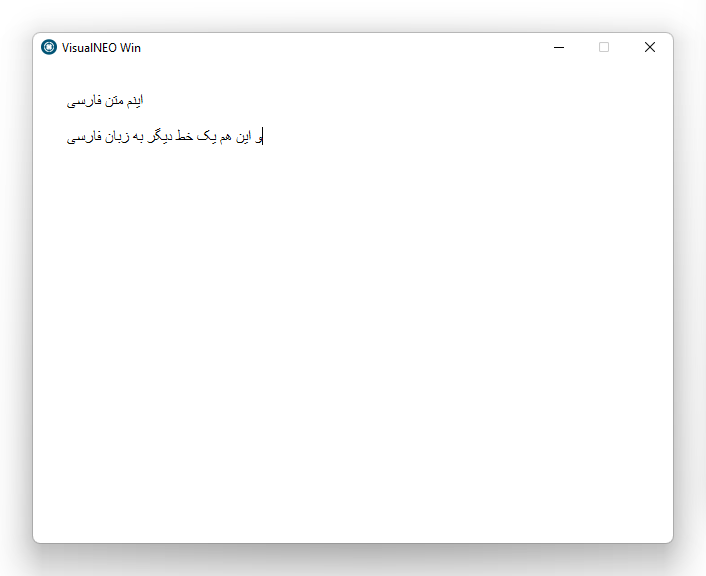
Quote from noyzen on December 6, 2021, 8:51 pm@vadim Thanks, i know that i can write some Persian text using EditorsToolbox. im using web browser to show my UI which is made with VN WEB and its utf8 support. (attached)
thats not my problem. i dont want to just show some text, i need persian variables, persian strings, persian data in database and...
thats all possible in VisualNEO Web, but not in Win.
I can't encode a utf8 standard Persian text in VN WEB and decode it or use it in VN WIN it will be like "???????"
To make it more clear i attach a software i made using both VisualNEO win and VisualNeo web:
(the UI part is web, i pass data (base64 format) to win part, then store in database and write to files and blah...)
@vadim Thanks, i know that i can write some Persian text using EditorsToolbox. im using web browser to show my UI which is made with VN WEB and its utf8 support. (attached)
thats not my problem. i dont want to just show some text, i need persian variables, persian strings, persian data in database and...
thats all possible in VisualNEO Web, but not in Win.
I can't encode a utf8 standard Persian text in VN WEB and decode it or use it in VN WIN it will be like "???????"
To make it more clear i attach a software i made using both VisualNEO win and VisualNeo web:
(the UI part is web, i pass data (base64 format) to win part, then store in database and write to files and blah...)
Uploaded files: