
neoMap Plugin coming soon

Quote from luishp on January 21, 2021, 3:15 pmneoMap plugin will allow to include different maps in our applications. It will be possible to add markers and other interactive functionalities. Think about geography, history and geographical based apps and games :)
This is a sample app with initial basic functionality:
https://visualneo.com/tutorials/neomap/What would you like to see in this plugin?
UPDATED sample app (2021/01/25)
Try to drag the added markers to get position and distance among them.
neoMap plugin will allow to include different maps in our applications. It will be possible to add markers and other interactive functionalities. Think about geography, history and geographical based apps and games :)
This is a sample app with initial basic functionality:
https://visualneo.com/tutorials/neomap/
What would you like to see in this plugin?
UPDATED sample app (2021/01/25)
Try to drag the added markers to get position and distance among them.

Quote from CDY@44 on January 21, 2021, 4:19 pmHi Luis,
An other great plugin !!!! Thank you !!!!
- Possibility to see distance between 2 points on the map ?
Hi Luis,
An other great plugin !!!! Thank you !!!!
- Possibility to see distance between 2 points on the map ?

Quote from Vadim on January 21, 2021, 8:09 pmLuis, thank you so much!!! Great plugin!!!
Is it possible to choose the language to indicate settlements?
Luis, thank you so much!!! Great plugin!!!
Is it possible to choose the language to indicate settlements?

Quote from rrey on January 21, 2021, 9:34 pm@luishp muy interesante. ¿Se podrían pone container invisible para que el usuario pudiera buscar por ejemplo ciudades en una simulación de un juego en que se hace un viaje.? O por ejemplo arrastar imágenes a puntos concretos de ciudades.
@luishp muy interesante. ¿Se podrían pone container invisible para que el usuario pudiera buscar por ejemplo ciudades en una simulación de un juego en que se hace un viaje.? O por ejemplo arrastar imágenes a puntos concretos de ciudades.

Quote from farhad2008 on January 22, 2021, 1:03 amVery Good Luis , Thank You.
Very Good Luis , Thank You.


Quote from luishp on January 25, 2021, 2:18 pmI have updated the sample app with new functionalities (Try dragging the Markers after adding them to the map)
Using maps is really much more interesting than expected and I can imagine very useful apps by using them.- Possibility to see distance between 2 points on the map ?
@cdy44-2 Yes :)
Is it possible to choose the language to indicate settlements?
@vadim It depends on the map provider (take a look at the diferent ones included on the listbox)
¿Se podrían pone container invisible para que el usuario pudiera buscar por ejemplo ciudades en una simulación de un juego en que se hace un viaje.? O por ejemplo arrastar imágenes a puntos concretos de ciudades.
@rrey Puedes arrastrar marcadores y utilizarlos para mostrar imágenes al hacer click sobre ellos.
Estoy valorando la posibilidad de incluir imágenes directamente en los mapas.
Lo del container invisible para buscar ciudades no lo entiendo muy bien...
I have updated the sample app with new functionalities (Try dragging the Markers after adding them to the map)
Using maps is really much more interesting than expected and I can imagine very useful apps by using them.
- Possibility to see distance between 2 points on the map ?
@cdy44-2 Yes :)
Is it possible to choose the language to indicate settlements?
@vadim It depends on the map provider (take a look at the diferent ones included on the listbox)
¿Se podrían pone container invisible para que el usuario pudiera buscar por ejemplo ciudades en una simulación de un juego en que se hace un viaje.? O por ejemplo arrastar imágenes a puntos concretos de ciudades.
@rrey Puedes arrastrar marcadores y utilizarlos para mostrar imágenes al hacer click sobre ellos.
Estoy valorando la posibilidad de incluir imágenes directamente en los mapas.
Lo del container invisible para buscar ciudades no lo entiendo muy bien...
Quote from rrey on January 26, 2021, 8:20 am@luish Sobre loque comentaba del container invisible me refiero a poder fijar en áreas específicas del mapa containers o botones transparents para poder hacer zonas interactivas. Por ejemplo para una apliación donde se le pide al usuario que navegue por un mapa y haga clic en unas ciudades determinadas.
@luish Sobre loque comentaba del container invisible me refiero a poder fijar en áreas específicas del mapa containers o botones transparents para poder hacer zonas interactivas. Por ejemplo para una apliación donde se le pide al usuario que navegue por un mapa y haga clic en unas ciudades determinadas.
Quote from luishp on January 26, 2021, 10:51 amSobre loque comentaba del container invisible me refiero a poder fijar en áreas específicas del mapa containers o botones transparents para poder hacer zonas interactivas. Por ejemplo para una apliación donde se le pide al usuario que navegue por un mapa y haga clic en unas ciudades determinadas.
@rrey si, puedes añadir círculos o áreas poligonales transparentes en las que al hacer click se ejecute una determinada subrutina :)
Sobre loque comentaba del container invisible me refiero a poder fijar en áreas específicas del mapa containers o botones transparents para poder hacer zonas interactivas. Por ejemplo para una apliación donde se le pide al usuario que navegue por un mapa y haga clic en unas ciudades determinadas.
@rrey si, puedes añadir círculos o áreas poligonales transparentes en las que al hacer click se ejecute una determinada subrutina :)

Quote from paultomo on February 9, 2021, 3:55 pmI have been building a basic mobile map app based on the new neoMap and neoMenu plugin's, mainly to teach my-self the various functions and it works really well. (I have added a screen shot.)
I can search for points on the map with a Latitude and longitude without any problems but just wondered if it is possible to include a place name search function by say a City or Town name?
Both are Excellent Plugin's and a good addition to VisualNEO Web. Keep them coming.
Many Thanks
I have been building a basic mobile map app based on the new neoMap and neoMenu plugin's, mainly to teach my-self the various functions and it works really well. (I have added a screen shot.)
I can search for points on the map with a Latitude and longitude without any problems but just wondered if it is possible to include a place name search function by say a City or Town name?
Both are Excellent Plugin's and a good addition to VisualNEO Web. Keep them coming.
Many Thanks
Uploaded files: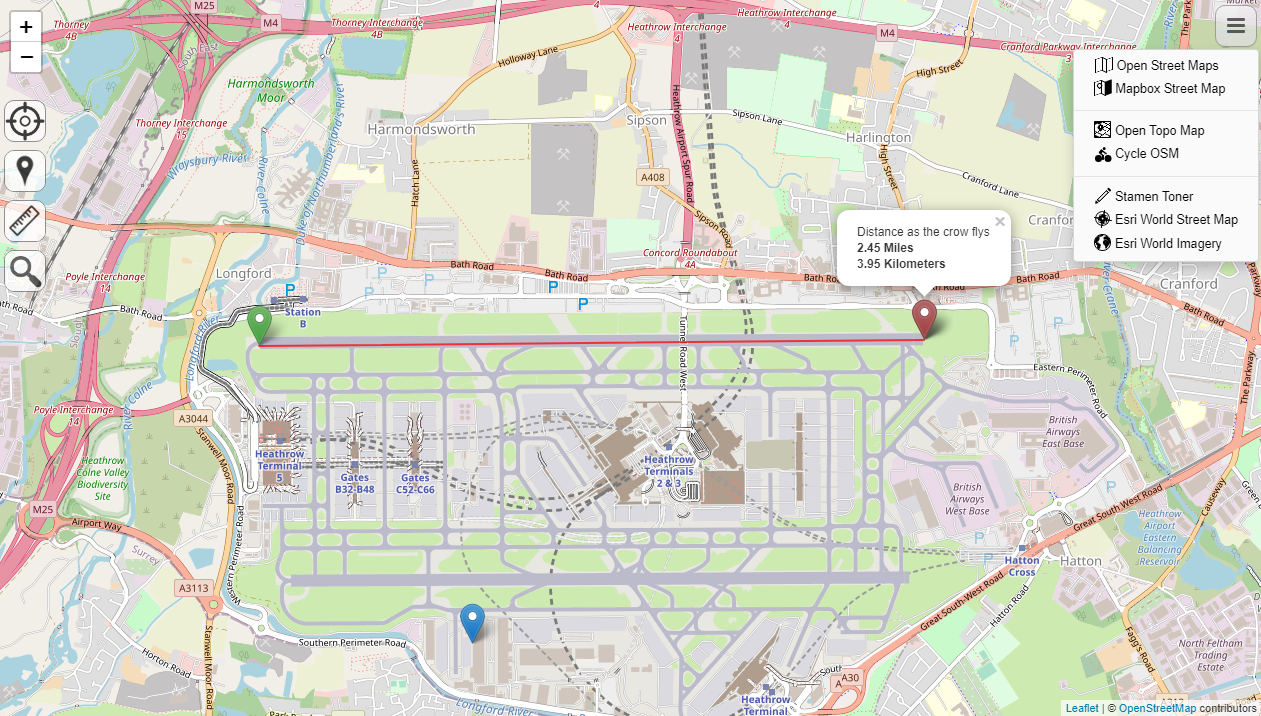
Quote from luishp on February 9, 2021, 5:36 pm@paultomo, I'm glad you like the plugin :)
I have just discovered this online free service to search for addresses:
https://photon.komoot.io/Attached a sample app using the free address search service and neoMap plugin.
Note that I have used a proxy to avoid CORS.Regards.
@paultomo, I'm glad you like the plugin :)
I have just discovered this online free service to search for addresses:
https://photon.komoot.io/
Attached a sample app using the free address search service and neoMap plugin.
Note that I have used a proxy to avoid CORS.
Regards.
Uploaded files: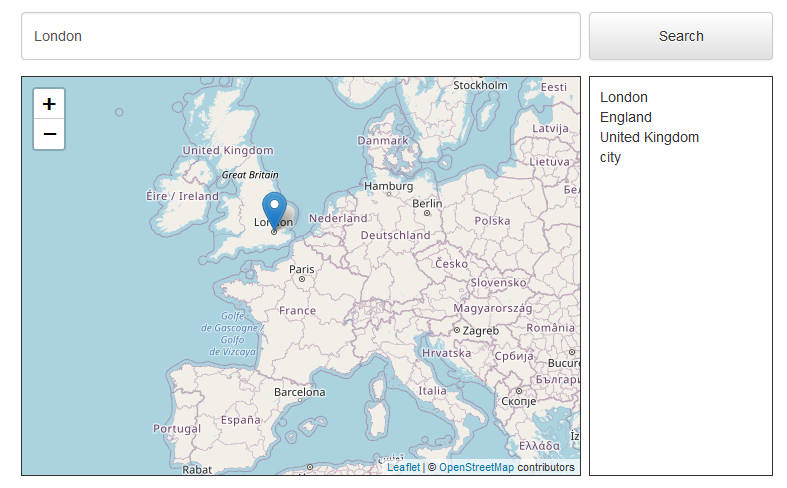
Quote from paultomo on February 9, 2021, 8:46 pmThanks for the information.
A few minor modifications to your sample app and it all works perfectly.
Adding the neoMapFlyTo function once the marker has been set is also very impressive.
Thanks Again...
Thanks for the information.
A few minor modifications to your sample app and it all works perfectly.
Adding the neoMapFlyTo function once the marker has been set is also very impressive.
Thanks Again...
Quote from luishp on February 9, 2021, 10:39 pm@paultomo please share your modifications and/or your findings.
I have had not much time to explore the service but it seems really interesting.
Thanks!
@paultomo please share your modifications and/or your findings.
I have had not much time to explore the service but it seems really interesting.
Thanks!
Quote from luishp on February 9, 2021, 10:43 pmMy sample app now includes multiple words addresses :)
It's published here (try with any complete address):
https://visualneo.com/tutorials/neomap2/
My sample app now includes multiple words addresses :)
It's published here (try with any complete address):
https://visualneo.com/tutorials/neomap2/
Quote from paultomo on February 10, 2021, 12:54 am@luishp I didn't make to many changes to your sample app, I just used it for testing but quickly found searching could only be done with single name towns. So I corrected this by adding the pipe character (|) into the variable string when there were spaces present due to multiple words. I see you have since added the same functionality but used (-).
The JSON request returns multiple results, 20 plus on some searches but you can request just the first in the list by adding "&limit=1" at the end of the LoadAsyncJSON function. I changed to this but it would be good to understand how to display all the results, I've seen this on Open Street Maps, so the end user can pick the correct one that matches their search from the full list, as it can be a bit hit and miss using just the first result.
StrReplace "[address]" " " "|" [address2] ""
LoadAsyncJSON "https://photon.komoot.io/api/?q=[address2]&limit=1" "parseData"
I also added some additional values that were returned from the search. e.g. street, city to give a more fully populated address and added this so it would show up on the marker when clicked.
I then added the "neoMapFlyTo" to the subroutine, which gives a nice effect as it moves from the current location to that of the searched result.
SetVar [mydata] [data]

.Longitude and latitude
SetVar [lat] [mydata.features(0).geometry.coordinates(1)]
SetVar [lng] [mydata.features(0).geometry.coordinates(0)]

.Properties
SetVar [name] [mydata.features(0).properties.name]
SetVar [street] [mydata.features(0).properties.street]
SetVar [city] [mydata.features(0).properties.city]
SetVar [county] [mydata.features(0).properties.county]
SetVar [state] [mydata.features(0).properties.state]
SetVar [country] [mydata.features(0).properties.country]
SetVar [kind] [mydata.features(0).properties.osm_value]

neoMapAddMarker "Container1" "[address]" "blue" [lat] [lng] false "<b>[name]</b><br>[street]<br>[city]<br>[county]<br>[state]<br>[country]"
neoMapFlyTo "Container1" [lat] [lng] 14
Photon looks like it's a very powerful search tool, as you can add a street name and town, a shop or place name and town, even an establishment, as an example "Kennedy Space Center" and you are flown their. (That would be nice!)
I then added and changed the search option in my own test app from lat/long to the full text searching, which now works very well indeed.
I think that was about it. I would have attached your sample back with the changes I've added but I get blocked by Wordfence?...
I hope this helps.
Paul
@luishp I didn't make to many changes to your sample app, I just used it for testing but quickly found searching could only be done with single name towns. So I corrected this by adding the pipe character (|) into the variable string when there were spaces present due to multiple words. I see you have since added the same functionality but used (-).
The JSON request returns multiple results, 20 plus on some searches but you can request just the first in the list by adding "&limit=1" at the end of the LoadAsyncJSON function. I changed to this but it would be good to understand how to display all the results, I've seen this on Open Street Maps, so the end user can pick the correct one that matches their search from the full list, as it can be a bit hit and miss using just the first result.
StrReplace "[address]" " " "|" [address2] ""
LoadAsyncJSON "https://photon.komoot.io/api/?q=[address2]&limit=1" "parseData"
I also added some additional values that were returned from the search. e.g. street, city to give a more fully populated address and added this so it would show up on the marker when clicked.
I then added the "neoMapFlyTo" to the subroutine, which gives a nice effect as it moves from the current location to that of the searched result.
SetVar [mydata] [data]

.Longitude and latitude
SetVar [lat] [mydata.features(0).geometry.coordinates(1)]
SetVar [lng] [mydata.features(0).geometry.coordinates(0)]

.Properties
SetVar [name] [mydata.features(0).properties.name]
SetVar [street] [mydata.features(0).properties.street]
SetVar [city] [mydata.features(0).properties.city]
SetVar [county] [mydata.features(0).properties.county]
SetVar [state] [mydata.features(0).properties.state]
SetVar [country] [mydata.features(0).properties.country]
SetVar [kind] [mydata.features(0).properties.osm_value]

neoMapAddMarker "Container1" "[address]" "blue" [lat] [lng] false "<b>[name]</b><br>[street]<br>[city]<br>[county]<br>[state]<br>[country]"
neoMapFlyTo "Container1" [lat] [lng] 14
Photon looks like it's a very powerful search tool, as you can add a street name and town, a shop or place name and town, even an establishment, as an example "Kennedy Space Center" and you are flown their. (That would be nice!)
I then added and changed the search option in my own test app from lat/long to the full text searching, which now works very well indeed.
I think that was about it. I would have attached your sample back with the changes I've added but I get blocked by Wordfence?...
I hope this helps.
Paul
Quote from paultomo on February 10, 2021, 12:57 am@luishp Just trying to upload sample app back over to you again.
Hopefully it has worked this time.
@luishp Just trying to upload sample app back over to you again.
Hopefully it has worked this time.
Uploaded files:Quote from luishp on February 10, 2021, 10:32 am@paultomo thank for sharing!
If you don't mind I will include our mini-app as a sample neoMap app in the next VisualNEO Web release.
Best regards.
@paultomo thank for sharing!
If you don't mind I will include our mini-app as a sample neoMap app in the next VisualNEO Web release.
Best regards.