neoSweet Alerts Plugin

Quote from Darbdenral on November 4, 2021, 9:15 pmThe popups for the most part are working correctly on my phone, they are responsive and look great. A few are not and I suspect it's a problem with my web page and or size settings and possibly the demo code, but not the sweetAlert2 library.
Unfortunately, my code container stays outside the bounds of my phone when reduced. I've been struggling with that container last night trying to fix it. I suspect it's my overall page width not being responsive. But, the sweetAlerts2 library is responsive.
I would suggest trying them from your own web page design and see if you have the same behavior with the commands.
thanks!
The popups for the most part are working correctly on my phone, they are responsive and look great. A few are not and I suspect it's a problem with my web page and or size settings and possibly the demo code, but not the sweetAlert2 library.
Unfortunately, my code container stays outside the bounds of my phone when reduced. I've been struggling with that container last night trying to fix it. I suspect it's my overall page width not being responsive. But, the sweetAlerts2 library is responsive.
I would suggest trying them from your own web page design and see if you have the same behavior with the commands.
thanks!
Quote from Darbdenral on November 8, 2021, 1:59 amThis issue with the web page should be resolved :)
This issue with the web page should be resolved :)

Quote from smartmedia on February 23, 2023, 8:49 amHi @darbdenral
Thanks for bring us a simple cozy plugin. I have some questions.
- In your demo page (https://tropicdesigns.net/neosweet-demo.html) you change the Alert font size from standard to large. How i can do that ?
- In sweetalert2 official page (https://sweetalert2.github.io/#examples) i saw that supports different themes, are you willing to upgrade it ?
- In some cases you need to show a window with options, postpone the rest of code till the user decides and according to decision has made to continue. It can be done with this plugin ?
Thanks
Hi @darbdenral
Thanks for bring us a simple cozy plugin. I have some questions.
- In your demo page (https://tropicdesigns.net/neosweet-demo.html) you change the Alert font size from standard to large. How i can do that ?
- In sweetalert2 official page (https://sweetalert2.github.io/#examples) i saw that supports different themes, are you willing to upgrade it ?
- In some cases you need to show a window with options, postpone the rest of code till the user decides and according to decision has made to continue. It can be done with this plugin ?
Thanks
Quote from Darbdenral on February 24, 2023, 12:55 amHi @smartmedia
Your welcome!
1.) Changing font size, I had to create a subroutine, which is called by the click of the button. Code attached below..
You can also change it globally for your project by adding this CSS to the VisualNEO Web project/properties/styles entry box.
.swal2-popup{font-size: 1.5rem!important;}2. Themes
Themes can be accomplished quite easily, but they were buggy and I decided to leave them out. A couple worked Ok, others have various issues, fonts too dark, buttons aligned incorrectly, small buttons, etc. Probably conflicting with VisualNeoWeb .
I'll post each NeoSweet compiled with different themes that may work for some of you, themes I left out were terrible. If you want a theme I left out, let me know, you could possibly edit CSS in your app to override and fix. I also posted the default theme, upgraded to the latest sweetAlert2 version below.
Download with themes below..
3. Choices
Yes, you will see samples with choices in the online demo. Subroutines and code are available in the demo, just copy the subroutine code where choices can be processed.
Hope this helps..
Hi @smartmedia
Your welcome!
1.) Changing font size, I had to create a subroutine, which is called by the click of the button. Code attached below..
You can also change it globally for your project by adding this CSS to the VisualNEO Web project/properties/styles entry box.
.swal2-popup{font-size: 1.5rem!important;}
2. Themes
Themes can be accomplished quite easily, but they were buggy and I decided to leave them out. A couple worked Ok, others have various issues, fonts too dark, buttons aligned incorrectly, small buttons, etc. Probably conflicting with VisualNeoWeb .
I'll post each NeoSweet compiled with different themes that may work for some of you, themes I left out were terrible. If you want a theme I left out, let me know, you could possibly edit CSS in your app to override and fix. I also posted the default theme, upgraded to the latest sweetAlert2 version below.
Download with themes below..
3. Choices
Yes, you will see samples with choices in the online demo. Subroutines and code are available in the demo, just copy the subroutine code where choices can be processed.
Hope this helps..
Uploaded files:
Quote from Phil78 on February 24, 2023, 6:22 pmHi @darbdenral, I never can access to your address https://tropicdesigns.net !
How put html inside alert text ?
Hi @darbdenral, I never can access to your address https://tropicdesigns.net !
How put html inside alert text ?
Quote from Darbdenral on February 25, 2023, 4:18 amHi @phil78, I'm sorry you can't access the site .. I've not seen any downtime, I run app and check every few minutes.. Maybe a glitch?
Yes, in the demo there is a Javascript example that uses html for the text .. All you need to do is add html in the html property and don't use the text property, see below for example. Just add to a button click event ..
BeginJs
Swal.fire({
  title: "HTML example",
  html:
    "You can use <b>BOLD</b> text, " +
    '<a href="https://tropicdesigns.net" target="_blank">LINKS</a> ' +
    "and other <i>HTML</i> tags",
  showCloseButton: true,
});
EndJs
Hi @phil78, I'm sorry you can't access the site .. I've not seen any downtime, I run app and check every few minutes.. Maybe a glitch?
Yes, in the demo there is a Javascript example that uses html for the text .. All you need to do is add html in the html property and don't use the text property, see below for example. Just add to a button click event ..
BeginJs
Swal.fire({
  title: "HTML example",
  html:
    "You can use <b>BOLD</b> text, " +
    '<a href="https://tropicdesigns.net" target="_blank">LINKS</a> ' +
    "and other <i>HTML</i> tags",
  showCloseButton: true,
});
EndJs
Quote from Darbdenral on February 25, 2023, 5:11 amHi @phil78,
We may as well add an HTML Alert action to make this cleaner..
New action added: sweetAlertHtml
sweetAlertHtml "Alert with HTML" "You can use <b>BOLD</b> text, <a href='https://tropicdesigns.net' target='_blank'>LINKS</a> and other <i>HTML</i> tags" "info" "OK" "You can use <b>BOLD</b> text too"I attached the new plugin with the new action for Html alerts, zip file includes all working themes. Bulma looks pretty nice ;)
Hi @phil78,
We may as well add an HTML Alert action to make this cleaner..
New action added: sweetAlertHtml
sweetAlertHtml "Alert with HTML" "You can use <b>BOLD</b> text, <a href='https://tropicdesigns.net' target='_blank'>LINKS</a> and other <i>HTML</i> tags" "info" "OK" "You can use <b>BOLD</b> text too"
I attached the new plugin with the new action for Html alerts, zip file includes all working themes. Bulma looks pretty nice ;)
Uploaded files:
Quote from smartmedia on February 25, 2023, 8:53 amHi @darbdenral
I test it the 1.4.1 version, in the sweetPosAlert i use, there isn't any more the sade of the all screen under the Alertbox. Can i have it back ? I don't want be able the user to push any button till the Alerbox closes. Also the window shows up in different animation. Or tell me where i can find the 1.3 version that was working the way i wanted.
In Bulma version the AlertBox is big but there isn't any animation. Dark version is not showing the text at all.
Again, thanks for your effort.
Hi @darbdenral
I test it the 1.4.1 version, in the sweetPosAlert i use, there isn't any more the sade of the all screen under the Alertbox. Can i have it back ? I don't want be able the user to push any button till the Alerbox closes. Also the window shows up in different animation. Or tell me where i can find the 1.3 version that was working the way i wanted.
In Bulma version the AlertBox is big but there isn't any animation. Dark version is not showing the text at all.
Again, thanks for your effort.
Quote from Darbdenral on February 25, 2023, 9:47 am@smartmedia, I will check .. So, no more shade background on sweetPosAlert? I don't see that in original demo either, it's not shaded by my design..
The sweetTimerAlert has shade ..
v1.3 is here still
https://tropicdesigns.net/neosweet-plugin.html
@smartmedia, I will check .. So, no more shade background on sweetPosAlert? I don't see that in original demo either, it's not shaded by my design..
The sweetTimerAlert has shade ..
v1.3 is here still
https://tropicdesigns.net/neosweet-plugin.html
Quote from Phil78 on February 25, 2023, 1:54 pmHi @darbdenral, thanks for version 1.4.1 it is perfect for me.
Regards
Hi @darbdenral, thanks for version 1.4.1 it is perfect for me.
Regards
Quote from smartmedia on February 25, 2023, 4:08 pmHi @darbdenral,
i roll back to 1.3 version and everything went back to normal. Thanks again.
Hi @darbdenral,
i roll back to 1.3 version and everything went back to normal. Thanks again.
Quote from Darbdenral on February 26, 2023, 12:52 amQuote from smartmedia on February 25, 2023, 4:08 pmHi @darbdenral,
i roll back to 1.3 version and everything went back to normal. Thanks again.
I'm sorry to hear that you still experienced an issue. Would it be possible for you to provide more information, perhaps through a video or a clearer explanation, so that I can better understand what's going on?
I want to make sure I'm addressing the right issue as well. Just to clarify, when you mentioned the problems, are you referring to the default theme that's currently being used or one of the other themes available?
You mentioned sweetPosAlert not being shaded, but after checking the code in previous versions, I couldn't find any indication that it was ever shaded. I want to do everything I can to assist you, but without more information, it's difficult for me to pinpoint the issue.
If you could provide me with more support and send a video, I would greatly appreciate it.
Thanks!
Quote from smartmedia on February 25, 2023, 4:08 pmHi @darbdenral,
i roll back to 1.3 version and everything went back to normal. Thanks again.
I'm sorry to hear that you still experienced an issue. Would it be possible for you to provide more information, perhaps through a video or a clearer explanation, so that I can better understand what's going on?
I want to make sure I'm addressing the right issue as well. Just to clarify, when you mentioned the problems, are you referring to the default theme that's currently being used or one of the other themes available?
You mentioned sweetPosAlert not being shaded, but after checking the code in previous versions, I couldn't find any indication that it was ever shaded. I want to do everything I can to assist you, but without more information, it's difficult for me to pinpoint the issue.
If you could provide me with more support and send a video, I would greatly appreciate it.
Thanks!
Quote from smartmedia on February 26, 2023, 7:56 pmHi @darbdenral,
The video shows the version 1.3 sweetPosAlert that is working as expected for me, now on later version as i explain above specially in default 1.4.1 there isn't any shade under the Alertbox and the Alertbox enters the screen differently. I don't know if you see different result with that version. Any way, for the moment i am ok with the result. Again thanks for the time you spend to create and update the plugin.
Hi @darbdenral,
The video shows the version 1.3 sweetPosAlert that is working as expected for me, now on later version as i explain above specially in default 1.4.1 there isn't any shade under the Alertbox and the Alertbox enters the screen differently. I don't know if you see different result with that version. Any way, for the moment i am ok with the result. Again thanks for the time you spend to create and update the plugin.
Uploaded files:
Quote from Darbdenral on February 27, 2023, 12:26 am@smartmedia your welcome..
I will just create a new action that will add the backdrop as an option, this should solve any issue in the next version.
thanks!
@smartmedia your welcome..
I will just create a new action that will add the backdrop as an option, this should solve any issue in the next version.
thanks!
Quote from Darbdenral on February 27, 2023, 4:42 am@phil78 @smartmedia
I added a new action and attached neoSweet Version 1.4.2
sweetAlertEx
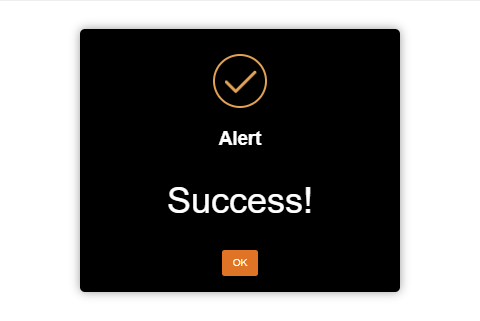
This is an extended Alert popup that supports html text, shaded background and color changes. An optional feature is a footer that allows html too. Leave footer blank if you don't wish to use it. There is another option to offset the Alert CSS body & Html height, which is set to auto !important (that's a sweetAlert2 default). If you had problems before you may try setting it to False, otherwise true.Here's an example of an alert using the default theme, but I changed the alert colors using the sweetAlertEx action . This is unique to this one action only, if you want new colors for other actions, you would need to use another theme or custom command.
sweetAlertEx "Alert" "<h1>Success!</h1>" "success" "OK" "#fff" "#000" "#E2A255" "#DF7326" false false ""sweetPosAlert
Added new shaded background option and offset the Alert CSS body & Html height option.
So if you download this version you will need to update this command in your projects.
sweetPosAlert "center" "Your work has been saved.." "" "success" true false
I added a new action and attached neoSweet Version 1.4.2
sweetAlertEx
This is an extended Alert popup that supports html text, shaded background and color changes. An optional feature is a footer that allows html too. Leave footer blank if you don't wish to use it. There is another option to offset the Alert CSS body & Html height, which is set to auto !important (that's a sweetAlert2 default). If you had problems before you may try setting it to False, otherwise true.
Here's an example of an alert using the default theme, but I changed the alert colors using the sweetAlertEx action . This is unique to this one action only, if you want new colors for other actions, you would need to use another theme or custom command.
sweetAlertEx "Alert" "<h1>Success!</h1>" "success" "OK" "#fff" "#000" "#E2A255" "#DF7326" false false ""
sweetPosAlert
Added new shaded background option and offset the Alert CSS body & Html height option.
So if you download this version you will need to update this command in your projects.
sweetPosAlert "center" "Your work has been saved.." "" "success" true false