
phpWFM Plugin (Web File Manager)

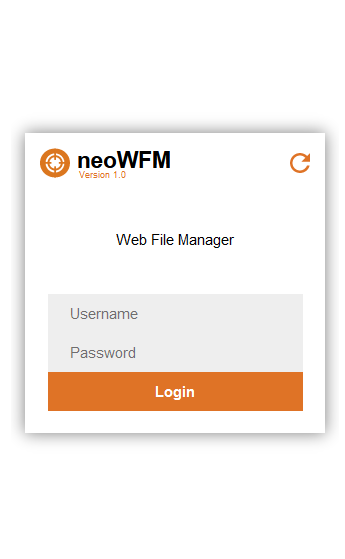
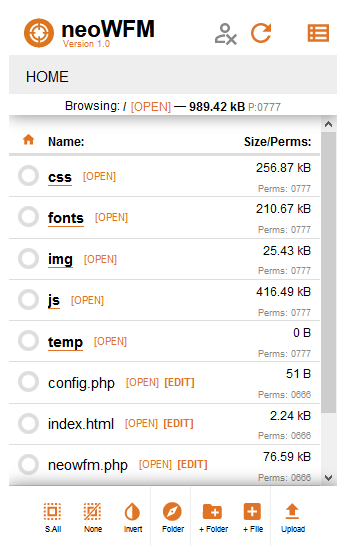
Quote from luishp on May 22, 2020, 6:03 pmThis plugin embeds a complete PHP application (one file) to manage files server side: upload, edit, delete, copy, zip, unzip... within an IFrame object. To run locally needs neoPHP Server. Define user name and password within config.php file:
$adminName="username";
$adminPass="password";
It was an experiment but seems to work really well :)
Based on Muon File Manager. Will be included in next VisualNEO Web version.HOW TO USE:
- Add an IFrame object to the current page.
- Add a button or include this command into the Page code tab:
phpWFM "IFrame1"- Save your project and compile it as Web Application HTML.
- Open neoPhp Server: Tools > neoPHP Server (check copy config.php file and press Start button)
- On neoPhp Server edit config.php file: Edit > config.php (root folder)
- Delete everything except these lines of code (use your own user name and password and save):
<?php
$adminName="admin";
$adminPass="admin";
?>
Then open your web browser and navigate to localhost URL.
If you make any changes to your project just compile again and reload on web browser (F5).Let me know if it you have any doubts.
UPDATE 2020/05/23
To avoid confusion I have changed the plugin name to phpWFM (php web file manager) so any new PHP based plugin will include this prefix from now on. Please unistall previous version and install the updated one.
This plugin embeds a complete PHP application (one file) to manage files server side: upload, edit, delete, copy, zip, unzip... within an IFrame object. To run locally needs neoPHP Server. Define user name and password within config.php file:
$adminName="username";
$adminPass="password";
It was an experiment but seems to work really well :)
Based on Muon File Manager. Will be included in next VisualNEO Web version.
HOW TO USE:
- Add an IFrame object to the current page.
- Add a button or include this command into the Page code tab:
phpWFM "IFrame1"
- Save your project and compile it as Web Application HTML.
- Open neoPhp Server: Tools > neoPHP Server (check copy config.php file and press Start button)
- On neoPhp Server edit config.php file: Edit > config.php (root folder)
- Delete everything except these lines of code (use your own user name and password and save):
<?php
$adminName="admin";
$adminPass="admin";
?>
Then open your web browser and navigate to localhost URL.
If you make any changes to your project just compile again and reload on web browser (F5).
Let me know if it you have any doubts.
UPDATE 2020/05/23
To avoid confusion I have changed the plugin name to phpWFM (php web file manager) so any new PHP based plugin will include this prefix from now on. Please unistall previous version and install the updated one.

Quote from rrey on May 22, 2020, 7:23 pmHola @luishp,
Y se puede instalar en cualquier servidor. Porque es justamente lo que estaba buscando.
Saludos,
Hola @luishp,
Y se puede instalar en cualquier servidor. Porque es justamente lo que estaba buscando.
Saludos,
Quote from luishp on May 22, 2020, 7:27 pm@rrey si, cualquiera que soporte PHP (prácticamente todos). No requiere ninguna configuración. Subir y listo.
Saludos!
@rrey si, cualquiera que soporte PHP (prácticamente todos). No requiere ninguna configuración. Subir y listo.
Saludos!
Quote from luishp on May 23, 2020, 10:26 am@rrey @gaev I have renamed the plugin to phpWFM and included step by step instructions on how to use it. Please uninstall previous version and install the latest one. I plan to include more PHP based plugins with advanced functionalities. To avoid confusions all those plugins will include the "php" prefix.
Best regards.
@rrey @gaev I have renamed the plugin to phpWFM and included step by step instructions on how to use it. Please uninstall previous version and install the latest one. I plan to include more PHP based plugins with advanced functionalities. To avoid confusions all those plugins will include the "php" prefix.
Best regards.
Quote from rrey on May 23, 2020, 10:46 amMuchas gracias. Esto dará mucha potencia a VisualNeo. Yo conozco PHP y hecho cosas muy básicas con este lenguaje y con la base dstos sqlite. Ahora me interesa temas como autentificación en sqlite. Creo que esta base de datos es sencilla, eficaz y no depende de la instalación como en MySQL. Y creo que sqlite se podría usar como base de datos local para, móvil pero no estoy seguro.
Saludos
Muchas gracias. Esto dará mucha potencia a VisualNeo. Yo conozco PHP y hecho cosas muy básicas con este lenguaje y con la base dstos sqlite. Ahora me interesa temas como autentificación en sqlite. Creo que esta base de datos es sencilla, eficaz y no depende de la instalación como en MySQL. Y creo que sqlite se podría usar como base de datos local para, móvil pero no estoy seguro.
Saludos

Quote from BGUK on May 23, 2020, 12:42 pmGreat plugin. I have successfully used it both in localhost and a web server using an sqlite database.
Great plugin. I have successfully used it both in localhost and a web server using an sqlite database.

Quote from Gaev on May 23, 2020, 4:15 pm@luishp
The eagle has landed ... I mean, I was able to upload a small image ... duck.png (5.22 KB)
So how do I access this file ? ... i.e. what is the url of this file that I can specify in order to have it render in an image container ? ... preferably by other users running other Apps (without having to sign in) ?
@luishp
The eagle has landed ... I mean, I was able to upload a small image ... duck.png (5.22 KB)
So how do I access this file ? ... i.e. what is the url of this file that I can specify in order to have it render in an image container ? ... preferably by other users running other Apps (without having to sign in) ?
Quote from luishp on May 23, 2020, 4:29 pmSo how do I access this file ? ... i.e. what is the url of this file that I can specify in order to have it render in an image container ? ... preferably by other users running other Apps (without having to sign in) ?
@gaev, use the [OPEN] link to locate the image URL. If you click it the image will be shown in a new tab with the URL exposed. You can also right-click the link and copy the link url.
So how do I access this file ? ... i.e. what is the url of this file that I can specify in order to have it render in an image container ? ... preferably by other users running other Apps (without having to sign in) ?
@gaev, use the [OPEN] link to locate the image URL. If you click it the image will be shown in a new tab with the URL exposed. You can also right-click the link and copy the link url.
Quote from Gaev on May 23, 2020, 5:48 pm@luishp
If you click it the image will be shown in a new tab with the URL exposed. You can also right-click the link and copy the link url.
In both cases, the url is http://localhost/img/duck.png
So, if i have another App (say it is resident at www.abcd.com/myApp/index.html ... how does a user who invokes this App get to see this image in an Image container ?
Perhaps I was mistaken in the belief that this facility would enable developers to upload files to a remote server.
If you click it the image will be shown in a new tab with the URL exposed. You can also right-click the link and copy the link url.
In both cases, the url is http://localhost/img/duck.png

So, if i have another App (say it is resident at http://www.abcd.com/myApp/index.html ... how does a user who invokes this App get to see this image in an Image container ?
Perhaps I was mistaken in the belief that this facility would enable developers to upload files to a remote server.
Quote from rrey on May 23, 2020, 6:06 pm@luishp una mejora o función que se le podría añadir es que pudiera ordenar los fichero por orden del nombre de archivo y por nombre de fecha. Esto permite cuando hay muchos ficheros una búsqueda rápida. Y esto se podría ser haciendo clic en la cabecera de la columna de datos ya sea en nombre de archivo o fecha.
@luishp una mejora o función que se le podría añadir es que pudiera ordenar los fichero por orden del nombre de archivo y por nombre de fecha. Esto permite cuando hay muchos ficheros una búsqueda rápida. Y esto se podría ser haciendo clic en la cabecera de la columna de datos ya sea en nombre de archivo o fecha.
Quote from luishp on May 23, 2020, 6:19 pmPerhaps I was mistaken in the belief that this facility would enable developers to upload files to a remote server.
@gaev, no, you are right. But you should upload (publish) the File Manager first on your remote server. Once there you can easily manage your server files. You can even upload only phpwfm.php and config.php to make it work (rename phpwfm.php to index.php to load it by default every time you access that folder, for example mydomain.com/filemanager).
Regards.
Perhaps I was mistaken in the belief that this facility would enable developers to upload files to a remote server.
@gaev, no, you are right. But you should upload (publish) the File Manager first on your remote server. Once there you can easily manage your server files. You can even upload only phpwfm.php and config.php to make it work (rename phpwfm.php to index.php to load it by default every time you access that folder, for example mydomain.com/filemanager).
Regards.

Quote from rocote on September 27, 2020, 11:12 pmCDY@44 J'aimerais bien comprendre le processus d'intégrité de l'usage PHP sur un serveur web 'HOST'. J'aimerais que le serveur m'envoie automatiquement les informations de l'usagé lorsqu'il se connecte sur ma page. Chaque usagé à son mon de passe et nom d'usagé. Autres données telles que; l'heure, date, nom d'usagé etc... me serait envoyé par le serveur HOST lié à mon application.
Merci.
CDY@44 J'aimerais bien comprendre le processus d'intégrité de l'usage PHP sur un serveur web 'HOST'. J'aimerais que le serveur m'envoie automatiquement les informations de l'usagé lorsqu'il se connecte sur ma page. Chaque usagé à son mon de passe et nom d'usagé. Autres données telles que; l'heure, date, nom d'usagé etc... me serait envoyé par le serveur HOST lié à mon application.
Merci.