
NEW PLUGIN! Introducing StyledText Editor Plugin - Professional Typography for VisualNeo Win UPDADTED: 12/17/25 - Forum
NEW PLUGIN! Introducing StyledText Editor Plugin - Professional Typography for VisualNeo Win UPDADTED: 12/17/25

Quote from Anthony LaTorre on November 30, 2025, 11:29 amI'm excited to announce the release of the StyledText Editor plugin, bringing rich text formatting capabilities to your VisualNeo Win publications!
Key Features:Complete Text Styling - Bold, italic, underline, and strikethrough formatting
Full Color Control - RGB color support with hex codes for unlimited color options
Professional Fonts - 29 carefully selected fonts including Segoe UI, Arial, Times New Roman, Consolas, Impact, and more
Flexible Sizing - Font sizes from 8pt to 72pt for everything from fine print to large headlines
Word Wrap - Toggle automatic text wrapping for responsive layouts. Center-Toggle to align text to center for styled headlines...Transparent Backgrounds - Create floating text over images and backgrounds
Multiple Windows - Display unlimited independent styled text areas simultaneously
Easy to Use - Simple BBCode-style tags with visual editor and live previewWhy Use StyledText Editor?
While VisualNeo Win's Article Object is excellent for long articles and reports loaded from files, StyledText Editor fills a different need - it's designed for creating dynamic labels, titles, captions, and short formatted text directly in your code. Perfect for:Eye-catching headlines and titles
Colorful menus and navigation elements
Warning messages and alerts with colored text
Styled quotes and testimonials
Product feature lists
Status displays and notifications
Code snippets with monospaced fonts
UI text...No external files needed - just format your text inline using the built in StyleText Editor and display it instantly!
Simple Commands:
StyledText_Show "X" "Y" "Width" "Height" "BGColor" "Text" "WordWrap"
StyledText_Destroy "X" "Y" "Width" "Height"
Example:
StyledText_Show "50" "50" "500" "150" "#FFFFFF" "<size=28><b><color=#0000FF>Welcome!</color></b></size><br><br><size=20>Create beautiful text with <i>ease</i>.</size>" "0"You can also insert VisualNeo Win variables in your styling code...
What's Included:
StyledTextEditor.nbp plugin
Comprehensive user guide (English & Spanish PDF)
7 ready-to-use examples
Full documentation with best practicesThe plugin is completely free for the VisualNeo Win community. Download includes everything you need to get started immediately!
I hope you find this plugin useful for your projects. Looking forward to seeing what you create with it!Cheers
UPDATED! Now includes Windows Char Maps...
UPDATED! Now there is a checkbox to center text... Perfect for headlines... *Please note: The Center Text, Word Wrap, and Line Height options applies to the whole Styled Text code...
UPDATED! Now includes the option to set line heights... And new commands to make it easier to destroy Styled Text Windows...
UPDATED! Now you can launch a subroutine by using the new StyledText_SetOnClick command... See the: "Styled Text Last UPDATE" demo pub in the zip package to learn how to use this new feature...
UPDATED! Added support for Bitmap images...FINAL UPDATE! 1 12/17/25 Added the ability to add hyperlinked text...
The EDITOR GIUDES & STYLING GUIDES! Have been updated and are now INCLUDED in the zipped download.
I'm excited to announce the release of the StyledText Editor plugin, bringing rich text formatting capabilities to your VisualNeo Win publications!
Key Features:
Complete Text Styling - Bold, italic, underline, and strikethrough formatting
Full Color Control - RGB color support with hex codes for unlimited color options
Professional Fonts - 29 carefully selected fonts including Segoe UI, Arial, Times New Roman, Consolas, Impact, and more
Flexible Sizing - Font sizes from 8pt to 72pt for everything from fine print to large headlines
Word Wrap - Toggle automatic text wrapping for responsive layouts. Center-Toggle to align text to center for styled headlines...
Transparent Backgrounds - Create floating text over images and backgrounds
Multiple Windows - Display unlimited independent styled text areas simultaneously
Easy to Use - Simple BBCode-style tags with visual editor and live preview
Why Use StyledText Editor?
While VisualNeo Win's Article Object is excellent for long articles and reports loaded from files, StyledText Editor fills a different need - it's designed for creating dynamic labels, titles, captions, and short formatted text directly in your code. Perfect for:
Eye-catching headlines and titles
Colorful menus and navigation elements
Warning messages and alerts with colored text
Styled quotes and testimonials
Product feature lists
Status displays and notifications
Code snippets with monospaced fonts
UI text...
No external files needed - just format your text inline using the built in StyleText Editor and display it instantly!
Simple Commands:
StyledText_Show "X" "Y" "Width" "Height" "BGColor" "Text" "WordWrap"
StyledText_Destroy "X" "Y" "Width" "Height"
Example:
StyledText_Show "50" "50" "500" "150" "#FFFFFF" "<size=28><b><color=#0000FF>Welcome!</color></b></size><br><br><size=20>Create beautiful text with <i>ease</i>.</size>" "0"
You can also insert VisualNeo Win variables in your styling code...
What's Included:
StyledTextEditor.nbp plugin
Comprehensive user guide (English & Spanish PDF)
7 ready-to-use examples
Full documentation with best practices
The plugin is completely free for the VisualNeo Win community. Download includes everything you need to get started immediately!
I hope you find this plugin useful for your projects. Looking forward to seeing what you create with it!
Cheers
UPDATED! Now includes Windows Char Maps...
UPDATED! Now there is a checkbox to center text... Perfect for headlines... *Please note: The Center Text, Word Wrap, and Line Height options applies to the whole Styled Text code...
UPDATED! Now includes the option to set line heights... And new commands to make it easier to destroy Styled Text Windows...
UPDATED! Now you can launch a subroutine by using the new StyledText_SetOnClick command... See the: "Styled Text Last UPDATE" demo pub in the zip package to learn how to use this new feature...
UPDATED! Added support for Bitmap images...
FINAL UPDATE! 1 12/17/25 Added the ability to add hyperlinked text...
The EDITOR GIUDES & STYLING GUIDES! Have been updated and are now INCLUDED in the zipped download.
Uploaded files:
Quote from Matilde on November 30, 2025, 11:11 pm@anthony-latorre gracias... esto es un inmenso aporte!!!!
saludos
@anthony-latorre gracias... esto es un inmenso aporte!!!!
saludos
Quote from Anthony LaTorre on November 30, 2025, 11:35 pmThank you, I hope you find this plugin useful. If you encounter any problems please reply to this message. I have subscribed to this topic and I will reply when I can... Good luck and happy coding...
Thank you, I hope you find this plugin useful. If you encounter any problems please reply to this message. I have subscribed to this topic and I will reply when I can... Good luck and happy coding...

Quote from luiz on December 1, 2025, 9:26 pm@anthony-latorre ,
Thanks for the plugin. Good job.
It can be very useful, as we can use variables.
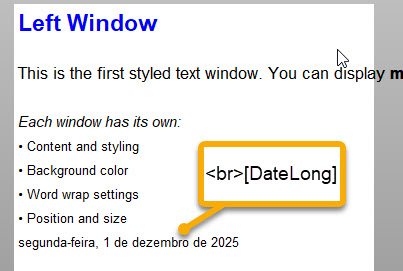
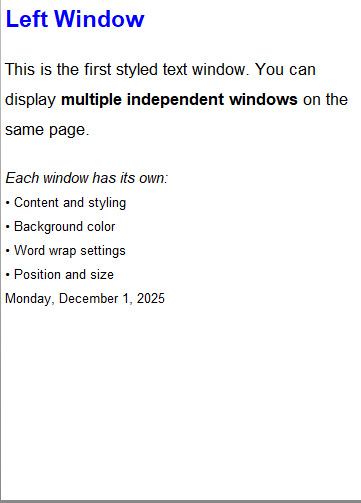
Why does the Styled Text is displayed 2 times?
Thanks for the plugin. Good job.
It can be very useful, as we can use variables.
Why does the Styled Text is displayed 2 times?
Uploaded files:
Quote from Anthony LaTorre on December 1, 2025, 9:54 pmLuiz, I don't know why you are seeing the text twice... I suggest you download the StyledText Styling guide I uploaded... and try using some code examples from the guide... There's one in English and one in Spanish...
The plugin is working fine on my end...
It looks like you didn't check the Word Wrap box before clicking ok
Luiz, I don't know why you are seeing the text twice... I suggest you download the StyledText Styling guide I uploaded... and try using some code examples from the guide... There's one in English and one in Spanish...
The plugin is working fine on my end...
It looks like you didn't check the Word Wrap box before clicking ok
Quote from luiz on December 1, 2025, 10:56 pmI managed to identify something @anthony-latorre , @luishp , @gaev , .
When running within VisualNeoWin, it shows up twice.
Running after compilation, it doesn't show up twice.
Both videos are attached.
The execution log seems normal:
==========================================
Styled Text (01/12/2025 17:28:55)
New Page > Page Enter
" .StyledText_Show "50" "250" "" "" "" ""PushButton1 > Left Click
" .destroy any previously open style window...
+ StyledText_Destroy "25" "25" "750" "500"
+ Delay "100"
+ StyledText_Show "25" "25" "750" "500" "#FFFFFF" "<size=32><b><color=#FF0000>SALE!</color></b></size><br><size=24>Save up to <b><color=#0000FF>50% OFF</color></b></size><br><size=20><i>Limited time only</i></size>" "0" "0"PushButton4 > Left Click
+ StyledText_Destroy "25" "25" "750" "500"
+ Delay "100"
+ StyledText_Show "25" "25" "750" "500" "#80BFFF" "<size=28><b><color=#0000FF>StyledText Editor Demonstration</color></b></size><br><br><size=20>This plugin offers <b>powerful formatting options</b> for your VisualNeo Win publications. You can easily apply <i>italic emphasis</i>, <u>underline important text</u>, or use <s>strikethrough for corrections</s>. Change colors to highlight key information like <color=#FF0000>urgent alerts in red</color>, <color=#008000>success messages in green</color>, or <color=#FF00FF>special offers in purple</color>.</size><br><br><size=24><b>Font Control</b></size><br><size=18>Switch between <font=Times New Roman>professional serif fonts like Times New Roman</font>, <font=Consolas>monospaced fonts like Consolas for code</font>, or <font=Comic Sans MS>playful fonts like Comic Sans MS</font>. You can even combine styles: <b><i><u><color=#FF8C00>bold, italic, underlined orange text</color></u></i></b>!</size><br><br><size=22><color=#8B4513><b>Size Matters</b></color></size><br><size=18>Create <size=14>small footnotes</size> or <size=32><b>HUGE headlines</b></size> with ease. Mix <size=12>tiny</size> and <size=28>large</size> text in the same line for <b><i>dynamic layouts</i></b>.</size><br><br><size=20><font=Georgia><i>The StyledText Editor plugin brings professional typography to your VisualNeo Win projects with an intuitive interface and powerful BBCode rendering engine.</i></font></size>" "1" "0"PushButton5 > Left Click
+ StyledText_Destroy "25" "25" "750" "500"
+ Delay "100"
+ StyledText_Show "25" "25" "750" "500" "transparent" "<size=30><color=#FF0000>R</color><color=#FF7F00>A</color><color=#FFFF00>I</color><color=#00FF00>N</color><color=#0000FF>B</color><color=#4B0082>O</color><color=#9400D3>W</color></size><br><size=24><b><i>…<i>Every color you need!</i></i></b></size>" "0" "0"App > Shutdown
+ StyledText_Destroy "25" "25" "750" "500"
+ StyledText_Destroy "25" "25" "360" "500"
+ StyledText_Destroy "415" "25" "360" "500"===========================================
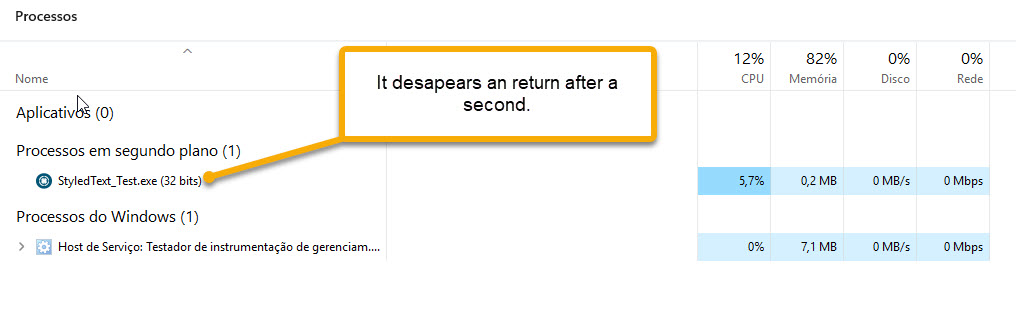
Perhaps this is a side effect of something that happens every time I run an app within VisualNeoWin. I close the app and return to VisualNeoWin, but it's frozen (as if still running). I have to work with the Task Manager open and always end the task, because VisualNeoWin doesn't respond if I don't end the task.
I would appreciate any user who could give me a hint about this. Thank you in advance.
I managed to identify something @anthony-latorre , @luishp , @gaev , .
When running within VisualNeoWin, it shows up twice.
Running after compilation, it doesn't show up twice.
Both videos are attached.
The execution log seems normal:
==========================================
Styled Text (01/12/2025 17:28:55)
New Page > Page Enter
" .StyledText_Show "50" "250" "" "" "" ""
PushButton1 > Left Click
" .destroy any previously open style window...
+ StyledText_Destroy "25" "25" "750" "500"
+ Delay "100"
+ StyledText_Show "25" "25" "750" "500" "#FFFFFF" "<size=32><b><color=#FF0000>SALE!</color></b></size><br><size=24>Save up to <b><color=#0000FF>50% OFF</color></b></size><br><size=20><i>Limited time only</i></size>" "0" "0"
PushButton4 > Left Click
+ StyledText_Destroy "25" "25" "750" "500"
+ Delay "100"
+ StyledText_Show "25" "25" "750" "500" "#80BFFF" "<size=28><b><color=#0000FF>StyledText Editor Demonstration</color></b></size><br><br><size=20>This plugin offers <b>powerful formatting options</b> for your VisualNeo Win publications. You can easily apply <i>italic emphasis</i>, <u>underline important text</u>, or use <s>strikethrough for corrections</s>. Change colors to highlight key information like <color=#FF0000>urgent alerts in red</color>, <color=#008000>success messages in green</color>, or <color=#FF00FF>special offers in purple</color>.</size><br><br><size=24><b>Font Control</b></size><br><size=18>Switch between <font=Times New Roman>professional serif fonts like Times New Roman</font>, <font=Consolas>monospaced fonts like Consolas for code</font>, or <font=Comic Sans MS>playful fonts like Comic Sans MS</font>. You can even combine styles: <b><i><u><color=#FF8C00>bold, italic, underlined orange text</color></u></i></b>!</size><br><br><size=22><color=#8B4513><b>Size Matters</b></color></size><br><size=18>Create <size=14>small footnotes</size> or <size=32><b>HUGE headlines</b></size> with ease. Mix <size=12>tiny</size> and <size=28>large</size> text in the same line for <b><i>dynamic layouts</i></b>.</size><br><br><size=20><font=Georgia><i>The StyledText Editor plugin brings professional typography to your VisualNeo Win projects with an intuitive interface and powerful BBCode rendering engine.</i></font></size>" "1" "0"
PushButton5 > Left Click
+ StyledText_Destroy "25" "25" "750" "500"
+ Delay "100"
+ StyledText_Show "25" "25" "750" "500" "transparent" "<size=30><color=#FF0000>R</color><color=#FF7F00>A</color><color=#FFFF00>I</color><color=#00FF00>N</color><color=#0000FF>B</color><color=#4B0082>O</color><color=#9400D3>W</color></size><br><size=24><b><i>…<i>Every color you need!</i></i></b></size>" "0" "0"
App > Shutdown
+ StyledText_Destroy "25" "25" "750" "500"
+ StyledText_Destroy "25" "25" "360" "500"
+ StyledText_Destroy "415" "25" "360" "500"
===========================================
Perhaps this is a side effect of something that happens every time I run an app within VisualNeoWin. I close the app and return to VisualNeoWin, but it's frozen (as if still running). I have to work with the Task Manager open and always end the task, because VisualNeoWin doesn't respond if I don't end the task.
I would appreciate any user who could give me a hint about this. Thank you in advance.
Uploaded files: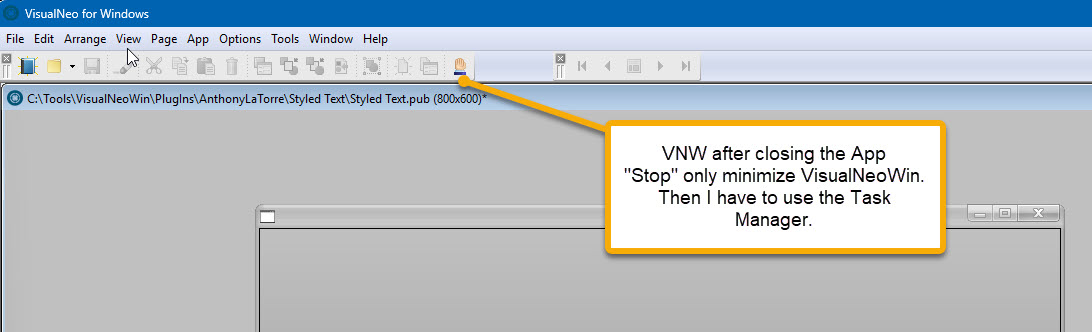
Quote from Anthony LaTorre on December 1, 2025, 11:48 pmThat is very strange... Try downloading and installing the plugin again It is working fine on my end...
That is very strange... Try downloading and installing the plugin again It is working fine on my end...

Quote from joferar333 on December 2, 2025, 9:56 am@anthony-latorre Excelente trabajo amigo, muchísimas gracias por tu gran aporte.
FUNCIONA DE MARAVILLA....
Saludos!
@anthony-latorre Excelente trabajo amigo, muchísimas gracias por tu gran aporte.
FUNCIONA DE MARAVILLA....
Saludos!