New Plugin NeoSkins

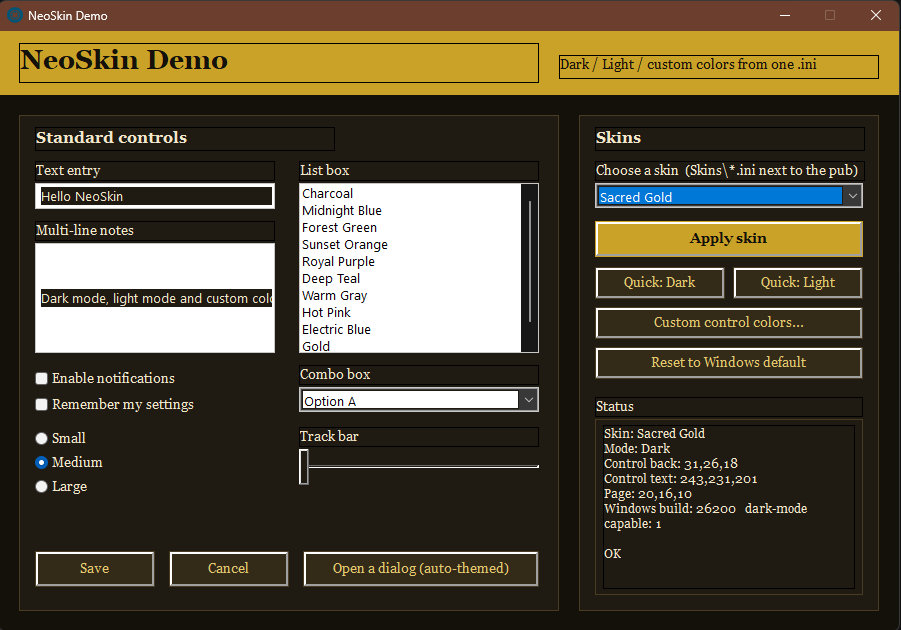
Quote from Anthony LaTorre on October 8, 2026, 3:43 amNeoSkin – Dark mode, light mode and color skins for VisualNEO Win apps
NeoSkin is a free plugin that gives your compiled VNW applications a modern themed look from a single skin file (.ini). Apply a skin with one command and the whole app changes at once.
What it does:
Native Dark / Light mode – text entries, memos, list boxes, combo boxes (including the drop list), scroll bars, menus and dialog boxes all switch, using Windows' own dark-mode engine (Windows 10 1809+ / Windows 11).Custom control colors – any background and text color on the native controls, on any Windows version.Title bar colors – background and text color of the window caption (Windows 11), immersive dark/light on Windows 10.
Skin files – mode, control colors, title bar and a free-form [Objects] section, all in one editable .ini. The plugin exports every key as a [Skin.*] variable so your script can color rectangles, text and buttons with the normal SetObjectFill / SetObjectFont actions.Seamless switching – NeoSkin_BeginUpdate / EndUpdate freeze repainting so a skin change appears in one frame instead of control by control.
Auto-theming – new pages, Custom Windows and dialog boxes pick up the skin automatically.19 ready-made skins – Midnight, Forest, Sunset, Obsidian, Nord, Dracula, Ocean, Ember, Matrix, Amethyst, Sacred Gold, High Contrast, Paper, Snow, Sand, Mint, Lavender, Sky and Default (stock Windows). Copy one, change a few colors, and you have your own.
Included: plugin, demo publication, 19 skins, user manual (English and Spanish).
Minimal use – one line in your page enter action:
NeoSkin_Apply "[PubDir]Skins\Midnight.ini" "SkinObjects"This plugin and demo app are for VNW Version: 26.9.30
I used the AI Kit and Claude AI to create the Plugin and Demo app. I really haven't had much time to give this a good test run... So if you encounter any issues, please let me know.Cheers
NeoSkin – Dark mode, light mode and color skins for VisualNEO Win apps
NeoSkin is a free plugin that gives your compiled VNW applications a modern themed look from a single skin file (.ini). Apply a skin with one command and the whole app changes at once.
What it does:
Native Dark / Light mode – text entries, memos, list boxes, combo boxes (including the drop list), scroll bars, menus and dialog boxes all switch, using Windows' own dark-mode engine (Windows 10 1809+ / Windows 11).Custom control colors – any background and text color on the native controls, on any Windows version.
Title bar colors – background and text color of the window caption (Windows 11), immersive dark/light on Windows 10.
Skin files – mode, control colors, title bar and a free-form [Objects] section, all in one editable .ini. The plugin exports every key as a [Skin.*] variable so your script can color rectangles, text and buttons with the normal SetObjectFill / SetObjectFont actions.
Seamless switching – NeoSkin_BeginUpdate / EndUpdate freeze repainting so a skin change appears in one frame instead of control by control.
Auto-theming – new pages, Custom Windows and dialog boxes pick up the skin automatically.
19 ready-made skins – Midnight, Forest, Sunset, Obsidian, Nord, Dracula, Ocean, Ember, Matrix, Amethyst, Sacred Gold, High Contrast, Paper, Snow, Sand, Mint, Lavender, Sky and Default (stock Windows). Copy one, change a few colors, and you have your own.
Included: plugin, demo publication, 19 skins, user manual (English and Spanish).
Minimal use – one line in your page enter action:
NeoSkin_Apply "[PubDir]Skins\Midnight.ini" "SkinObjects"
This plugin and demo app are for VNW Version: 26.9.30
I used the AI Kit and Claude AI to create the Plugin and Demo app. I really haven't had much time to give this a good test run... So if you encounter any issues, please let me know.
Cheers
Uploaded files: