
| Action | Format | Loader | Action Name |
|---|---|---|---|
| 60 | GLB/glTF | GLTFLoader | ThreeJSLoadModel |
| 61 | OBJ/MTL | OBJLoader + MTLLoader | ThreeJSLoadOBJ |
| 65 | STL | STLLoader | ThreeJSLoadSTL |
| 66 | PLY | PLYLoader | ThreeJSLoadPLY |
| 67 | FBX | FBXLoader | ThreeJSLoadFBX |
| 68 | 3DS | TDSLoader | ThreeJSLoad3DS |
| 69 | SVG | SVGLoader (3D extrude) | ThreeJSLoadSVG |

NEW! ThreeJS plugin - Full 3d render Engine +Physics Available - 🚀 - Super Powerful 107 3D Actions for VisualNeo Win! - Forum
Forum breadcrumbs - You are here:VisualNEO Support ForumVisualNEO Win: Plugins & Components VisualNEO WinNEW! ThreeJS plugin - Full 3d ren …
You need to log in to create posts and topics.
NEW! ThreeJS plugin - Full 3d render Engine +Physics Available - 🚀 - Super Powerful 107 3D Actions for VisualNeo Win!
Page 1 of 2Next

#1 · January 30, 2026, 3:07 pm
Quote from Kriscall on January 30, 2026, 3:07 pm🎮 ThreeJS Plugin for VisualNEO Win
Bringing Real-Time 3D Graphics to Your Applications!
Hey Guys! I'am Super excited about this one this I would like to introduce the ThreeJS Plugin - a powerful new plugin that brings full 3D graphics capabilities to VisualNEO Win directly. Create interactive 3D scenes, basic games, simulations, and visualizations directly in your applications without any external software embedded commands! I spent allot of time porting this over to VisualNeoWin I wanted to convert the java and web stuff over to windows command and VisualneoActions for Easy integration so I can network other data and functions for my Robotic Sims. Just lay a rectangle object and call the ThreeJS actions over. This MONSTER Plugin has 112 Actions PORTED over into VisualneoWin actions. This plugin graphical huge must have foe VisualneoWin as it allows allot of modern WEB renders straight into your WinApps.
✨ What Can You Create?
- 3D Games - Build arcade games, puzzles, and interactive experiences
- Product Visualizers - Display 3D models that users can rotate and explore
- Simulations - Physics-based simulations with realistic gravity and collisions
- Data Visualization - 3D charts, graphs, and interactive displays
- Educational Content - Solar systems, molecular structures, architectural models
- Robot & Mechanical Simulations - Articulated arms with pivot points and kinematics
- Animated Scenes - Particles, explosions, floating objects, and more
🚀 Key Features
📦 3D Object Creation
Create a variety of 3D shapes with a single command:
- Boxes/Cubes - Walls, buildings, platforms
- Spheres - Balls, planets, characters
- Cylinders - Pillars, cans, wheels
- Cones - Rockets, trees, arrows
- Torus - Rings, donuts, wheels
- Planes - Floors, walls, screens
🎨 Materials & Appearance
- Full color control (hex colors)
- Transparency/opacity support
- Texture mapping from images
- Texture tiling and repeat
🔄 Transformations
- Position objects anywhere in 3D space
- Rotate on any axis
- Scale to any size
- Pivot points for realistic joint rotation (perfect for robot arms!)
🎬 Animations
- Continuous rotation
- Move to position over time
- Orbit around points
- Bounce and float effects
- Camera animations and auto-orbit
⚡ Physics Engine (Cannon.js)
- Realistic gravity
- Object collisions
- Apply forces and impulses
- Set velocities
- Friction and bounciness controls
- Perfect for games and simulations!
📷 Camera Control
- Position camera anywhere
- Look-at targeting
- Mouse orbit and zoom controls
- Smooth camera movements
- Click detection on 3D objects
🎯 Game Development Features
- Keyboard input detection
- Collision detection (box and sphere)
- Object grouping for batch collision checks
- Clone/duplicate objects
- Object existence checking
🔗 Object Hierarchy
- Parent-child relationships
- Attach objects together (weapons to characters, etc.)
- Detach and reattach dynamically
🎆 Special Effects
- Particle systems
- Explosion effects
- 3D text labels
- Lines between points
- Sprites (2D images in 3D space)
📁 3D Model Loading
- Load GLTF/GLB models
- Load OBJ models with materials
- Play model animations
- Scale models to fit your scene
🎮 Included Demos
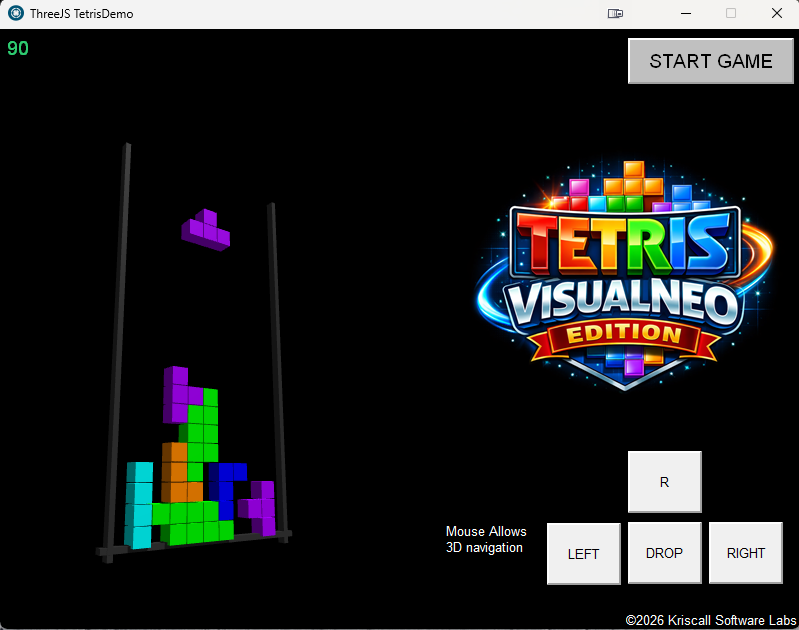
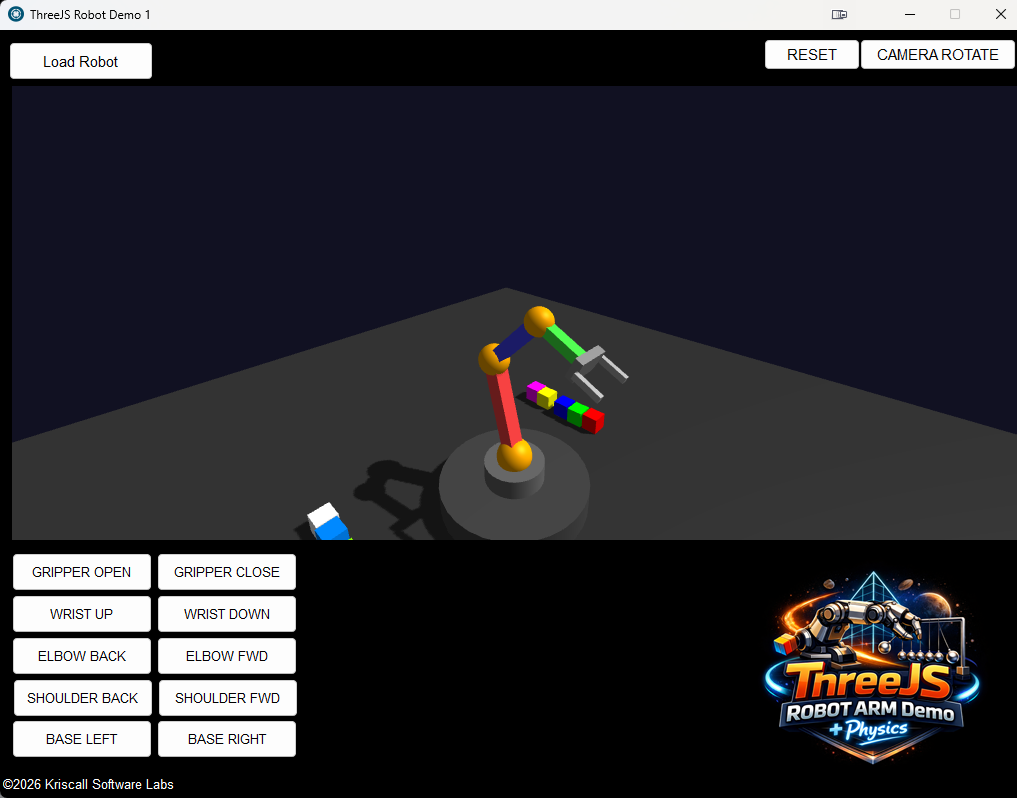
The plugin comes with several demo projects to get you started:
💻 Simple Example
Creating a 3D scene is easy! Here's a spinning cube in just a few lines:
ThreeJSCreate "Rectangle1" ""
ThreeJSBackground "Rectangle1" "000033"
ThreeJSCreateBox "Rectangle1" "myCube" "2" "2" "2" "ff0000"
ThreeJSSetPosition "Rectangle1" "myCube" "0" "0" "0"
ThreeJSRotate "Rectangle1" "myCube" "0.5" "1" "0.3"
ThreeJSMouseControl "Rectangle1" "True"
That's it! You now have a spinning red cube that users can orbit around with their mouse.
🔧 Technical Details
- Rendering Engine: Three.js (WebGL-based)
- Physics Engine: Cannon.js
- Supported Formats: GLTF, GLB, OBJ, FBX, SVG, PLY, STL,3DS and more..
- Performance: Hardware-accelerated via WebGL
- Compatibility: Works in any VisualNEOWin Rectangle object
🎮 ThreeJS Plugin for VisualNEO Win
Bringing Real-Time 3D Graphics to Your Applications!
Hey Guys! I'am Super excited about this one this I would like to introduce the ThreeJS Plugin - a powerful new plugin that brings full 3D graphics capabilities to VisualNEO Win directly. Create interactive 3D scenes, basic games, simulations, and visualizations directly in your applications without any external software embedded commands! I spent allot of time porting this over to VisualNeoWin I wanted to convert the java and web stuff over to windows command and VisualneoActions for Easy integration so I can network other data and functions for my Robotic Sims. Just lay a rectangle object and call the ThreeJS actions over. This MONSTER Plugin has 112 Actions PORTED over into VisualneoWin actions. This plugin graphical huge must have foe VisualneoWin as it allows allot of modern WEB renders straight into your WinApps.
✨ What Can You Create?
- 3D Games - Build arcade games, puzzles, and interactive experiences
- Product Visualizers - Display 3D models that users can rotate and explore
- Simulations - Physics-based simulations with realistic gravity and collisions
- Data Visualization - 3D charts, graphs, and interactive displays
- Educational Content - Solar systems, molecular structures, architectural models
- Robot & Mechanical Simulations - Articulated arms with pivot points and kinematics
- Animated Scenes - Particles, explosions, floating objects, and more
🚀 Key Features
📦 3D Object Creation
Create a variety of 3D shapes with a single command:
- Boxes/Cubes - Walls, buildings, platforms
- Spheres - Balls, planets, characters
- Cylinders - Pillars, cans, wheels
- Cones - Rockets, trees, arrows
- Torus - Rings, donuts, wheels
- Planes - Floors, walls, screens
🎨 Materials & Appearance
- Full color control (hex colors)
- Transparency/opacity support
- Texture mapping from images
- Texture tiling and repeat
🔄 Transformations
- Position objects anywhere in 3D space
- Rotate on any axis
- Scale to any size
- Pivot points for realistic joint rotation (perfect for robot arms!)
🎬 Animations
- Continuous rotation
- Move to position over time
- Orbit around points
- Bounce and float effects
- Camera animations and auto-orbit
⚡ Physics Engine (Cannon.js)
- Realistic gravity
- Object collisions
- Apply forces and impulses
- Set velocities
- Friction and bounciness controls
- Perfect for games and simulations!
📷 Camera Control
- Position camera anywhere
- Look-at targeting
- Mouse orbit and zoom controls
- Smooth camera movements
- Click detection on 3D objects
🎯 Game Development Features
- Keyboard input detection
- Collision detection (box and sphere)
- Object grouping for batch collision checks
- Clone/duplicate objects
- Object existence checking
🔗 Object Hierarchy
- Parent-child relationships
- Attach objects together (weapons to characters, etc.)
- Detach and reattach dynamically
🎆 Special Effects
- Particle systems
- Explosion effects
- 3D text labels
- Lines between points
- Sprites (2D images in 3D space)
📁 3D Model Loading
- Load GLTF/GLB models
- Load OBJ models with materials
- Play model animations
- Scale models to fit your scene
🎮 Included Demos
The plugin comes with several demo projects to get you started:
💻 Simple Example
Creating a 3D scene is easy! Here's a spinning cube in just a few lines:
ThreeJSCreate "Rectangle1" ""
ThreeJSBackground "Rectangle1" "000033"
ThreeJSCreateBox "Rectangle1" "myCube" "2" "2" "2" "ff0000"
ThreeJSSetPosition "Rectangle1" "myCube" "0" "0" "0"
ThreeJSRotate "Rectangle1" "myCube" "0.5" "1" "0.3"
ThreeJSMouseControl "Rectangle1" "True"
That's it! You now have a spinning red cube that users can orbit around with their mouse.
🔧 Technical Details
- Rendering Engine: Three.js (WebGL-based)
- Physics Engine: Cannon.js
- Supported Formats: GLTF, GLB, OBJ, FBX, SVG, PLY, STL,3DS and more..
- Performance: Hardware-accelerated via WebGL
- Compatibility: Works in any VisualNEOWin Rectangle object
Click for thumbs down.0Click for thumbs up.10
luishp, Vadim and 8 other users have reacted to this post.
luishpVadimdglojnarluizalangonzalez91danitoraslDarbdenralAnthony LaTorreemo


#3 · January 31, 2026, 9:09 am
Quote from Darbdenral on January 31, 2026, 9:09 am@kriscall that's some cool additions!
thanks so much for your hard work!
@kriscall that's some cool additions!
thanks so much for your hard work!
Click for thumbs down.0Click for thumbs up.1
Kriscall has reacted to this post.
Kriscall
#4 · January 31, 2026, 2:57 pm
Quote from Kriscall on January 31, 2026, 2:57 pm"Necessity is the mother of invention"
That's the story here and with all my plugins generally. There is always a workaround but sometimes that's not good enough for me lol .. so I have to think out of the box.. I wanted to share data from my Visualneowin applications that I love and find easy to make applications, so I want to introduce new and other technologies like Three.js in this case a web based Java library thats awesome to create cool 3D renders easily to VisualNeoWin. We all know you can write to a file and read or I can get from clipboard or many other work arounds, in this case my issue was to communicate through Edge plugin sucked the workaround was slow and impractical. .. . so made this and ported most of the features of Threejs to actions and now it feels , well it is more integrated... allowing other actions to mix with it and communicate directly with Three.js... so fixed , see much better now lol ... enjoy guys😉 make some amazing things share your creations.
"Necessity is the mother of invention"
That's the story here and with all my plugins generally. There is always a workaround but sometimes that's not good enough for me lol .. so I have to think out of the box.. I wanted to share data from my Visualneowin applications that I love and find easy to make applications, so I want to introduce new and other technologies like Three.js in this case a web based Java library thats awesome to create cool 3D renders easily to VisualNeoWin. We all know you can write to a file and read or I can get from clipboard or many other work arounds, in this case my issue was to communicate through Edge plugin sucked the workaround was slow and impractical. .. . so made this and ported most of the features of Threejs to actions and now it feels , well it is more integrated... allowing other actions to mix with it and communicate directly with Three.js... so fixed , see much better now lol ... enjoy guys😉 make some amazing things share your creations.
Click for thumbs down.0Click for thumbs up.7
Vadim, naglieri and 5 other users have reacted to this post.
Vadimnaglieriluizalangonzalez91impactband4uraslAnthony LaTorre

#5 · February 1, 2026, 12:49 pm
Quote from Anthony LaTorre on February 1, 2026, 12:49 pmChristopher, many thanks for your contribution.... Brining 3D capabilities to VNW opens up a whole new world of possibilities... Can't wait to give this plugin a good test drive.
Thanks Again...
Christopher, many thanks for your contribution.... Brining 3D capabilities to VNW opens up a whole new world of possibilities... Can't wait to give this plugin a good test drive.
Thanks Again...
Click for thumbs down.0Click for thumbs up.1
Kriscall has reacted to this post.
Kriscall

naglieri@naglieri
118 Posts
#6 · February 1, 2026, 7:28 pm
Quote from naglieri on February 1, 2026, 7:28 pmQuote from Kriscall on January 31, 2026, 2:57 pm"Necessity is the mother of invention"
That's the story here and with all my plugins generally. There is always a workaround but sometimes that's not good enough for me lol .. so I have to think out of the box.. I wanted to share data from my Visualneowin applications that I love and find easy to make applications, so I want to introduce new and other technologies like Three.js in this case a web based Java library thats awesome to create cool 3D renders easily to VisualNeoWin. We all know you can write to a file and read or I can get from clipboard or many other work arounds, in this case my issue was to communicate through Edge plugin sucked the workaround was slow and impractical. .. . so made this and ported most of the features of Threejs to actions and now it feels , well it is more integrated... allowing other actions to mix with it and communicate directly with Three.js... so fixed , see much better now lol ... enjoy guys
make some amazing things share your creations.
For personal reasons, a minor operation, I have to stay at home for at least four days. Strangely enough, I'm happy about it because I can take my time studying all these new plugins.
Quote from Kriscall on January 31, 2026, 2:57 pm"Necessity is the mother of invention"
That's the story here and with all my plugins generally. There is always a workaround but sometimes that's not good enough for me lol .. so I have to think out of the box.. I wanted to share data from my Visualneowin applications that I love and find easy to make applications, so I want to introduce new and other technologies like Three.js in this case a web based Java library thats awesome to create cool 3D renders easily to VisualNeoWin. We all know you can write to a file and read or I can get from clipboard or many other work arounds, in this case my issue was to communicate through Edge plugin sucked the workaround was slow and impractical. .. . so made this and ported most of the features of Threejs to actions and now it feels , well it is more integrated... allowing other actions to mix with it and communicate directly with Three.js... so fixed , see much better now lol ... enjoy guys
For personal reasons, a minor operation, I have to stay at home for at least four days. Strangely enough, I'm happy about it because I can take my time studying all these new plugins.
Click for thumbs down.0Click for thumbs up.2
Vadim and Kriscall have reacted to this post.
VadimKriscall
#7 · February 2, 2026, 2:53 am
Quote from Kriscall on February 2, 2026, 2:53 am@luishp
Hey Louis Any chance with all these new plugins, you can put these in Feebies section for me or tell me how to do it, or I give me access to that section so I can maintain them for everyone there, also easier will make it easier to find them. Not sure if this is something you do or something I can manage but if you can assist. Thanks
Hey Louis Any chance with all these new plugins, you can put these in Feebies section for me or tell me how to do it, or I give me access to that section so I can maintain them for everyone there, also easier will make it easier to find them. Not sure if this is something you do or something I can manage but if you can assist. Thanks
Click for thumbs down.0Click for thumbs up.0
#8 · February 2, 2026, 11:31 am
Quote from luishp on February 2, 2026, 11:31 am@kriscall yes of course!
Please, check this and let me know if you hace any questions:
https://visualneo.com/forum/topic/hosting-your-own-plugins-in-visualneo-website
Thank you!
@kriscall yes of course!
Please, check this and let me know if you hace any questions:
https://visualneo.com/forum/topic/hosting-your-own-plugins-in-visualneo-website
Thank you!
Click for thumbs down.0Click for thumbs up.0
#9 · February 3, 2026, 9:18 am
Quote from luishp on February 3, 2026, 9:18 am@kriscall I have already published your "store":
https://visualneo.com/shop/kriscall-software-labs-plugins
Thank you so much!
@kriscall I have already published your "store":
https://visualneo.com/shop/kriscall-software-labs-plugins
Thank you so much!
Click for thumbs down.0Click for thumbs up.1
Vadim has reacted to this post.
Vadim
naglieri@naglieri
118 Posts
#10 · February 3, 2026, 7:59 pm
Quote from naglieri on February 3, 2026, 7:59 pmI have a problem with the ThreeJs plugin.
Example robotDemo and Tetris are ok.
In the 3JSDemos example, the Duck.glb object is not displayed; I only see a rectangle.
I have also try to conver Duck glb in obj
ThreeJSLoadOBJ "Rectangle3" "model1" "[PubDir]Duck.obj" "[PubDir]Duck.mtl" "1"
but nothing.
Where is my error?
I have a problem with the ThreeJs plugin.
Example robotDemo and Tetris are ok.
In the 3JSDemos example, the Duck.glb object is not displayed; I only see a rectangle.
I have also try to conver Duck glb in obj
ThreeJSLoadOBJ "Rectangle3" "model1" "[PubDir]Duck.obj" "[PubDir]Duck.mtl" "1"
but nothing.
Where is my error?
Click for thumbs down.0Click for thumbs up.0
#11 · February 4, 2026, 12:06 am
Quote from Kriscall on February 4, 2026, 12:06 amYour error is the file needs to be on a server configuration meaning you need to ether run a server or have it online some where does not work locally as a file
this is a web plugin originally using 3rd party open source threeJS the was ported to this plugin. Try pointing it to a url .. Let me know if you still have issues, I will have a deep look and send you a sample. Example c:\duck.glb (NO NOT THIS) Something like this --> http://server:port/duck.glb it's a security thing as Thre.js is a web plugin originally ported.
try this:
https://raw.githubusercontent.com/KhronosGroup/glTF-Sample-Assets/main/Models/Duck/glTF-Binary/Duck.glb
Your error is the file needs to be on a server configuration meaning you need to ether run a server or have it online some where does not work locally as a file
this is a web plugin originally using 3rd party open source threeJS the was ported to this plugin. Try pointing it to a url .. Let me know if you still have issues, I will have a deep look and send you a sample. Example c:\duck.glb (NO NOT THIS) Something like this --> http://server:port/duck.glb it's a security thing as Thre.js is a web plugin originally ported.
try this:
Click for thumbs down.0Click for thumbs up.0
naglieri@naglieri
118 Posts
#12 · February 4, 2026, 3:31 pm
Quote from naglieri on February 4, 2026, 3:31 pmQuote from Kriscall on February 4, 2026, 12:06 amYour error is the file needs to be on a server configuration meaning you need to ether run a server or have it online some where does not work locally as a file
this is a web plugin originally using 3rd party open source threeJS the was ported to this plugin. Try pointing it to a url .. Let me know if you still have issues, I will have a deep look and send you a sample. Example c:\duck.glb (NO NOT THIS) Something like this --> http://server:port/duck.glb it's a security thing as Thre.js is a web plugin originally ported.
try this:
https://raw.githubusercontent.com/KhronosGroup/glTF-Sample-Assets/main/Models/Duck/glTF-Binary/Duck.glb
on you example is write
ThreeJSLoadModel "Rectangle3" "duck" "file:///[PubDir]Duck.glb" "0.01"
But If I modify command with different path have the same error, in not possible see Duck
ThreeJSLoadModel "Rectangle3" "duck" "https://raw.githubusercontent.com/KhronosGroup/glTF-Sample-Assets/main/Models/Duck/glTF-Binary/Duck.glb" "0.01"
to have a path more short I have also copy duck on my www, but nothing to do
ThreeJSLoadModel "Rectangle3" "duck" "https://www.naglieri.it/Duck.glb" "0.01"
Can you make a little example ?
Thanks
Quote from Kriscall on February 4, 2026, 12:06 amYour error is the file needs to be on a server configuration meaning you need to ether run a server or have it online some where does not work locally as a file
this is a web plugin originally using 3rd party open source threeJS the was ported to this plugin. Try pointing it to a url .. Let me know if you still have issues, I will have a deep look and send you a sample. Example c:\duck.glb (NO NOT THIS) Something like this --> http://server:port/duck.glb it's a security thing as Thre.js is a web plugin originally ported.
try this:
on you example is write
ThreeJSLoadModel "Rectangle3" "duck" "file:///[PubDir]Duck.glb" "0.01"
But If I modify command with different path have the same error, in not possible see Duck
ThreeJSLoadModel "Rectangle3" "duck" "https://raw.githubusercontent.com/KhronosGroup/glTF-Sample-Assets/main/Models/Duck/glTF-Binary/Duck.glb" "0.01"
to have a path more short I have also copy duck on my www, but nothing to do
ThreeJSLoadModel "Rectangle3" "duck" "https://www.naglieri.it/Duck.glb" "0.01"
Can you make a little example ?
Thanks
Click for thumbs down.0Click for thumbs up.0
naglieri@naglieri
118 Posts
#13 · February 5, 2026, 1:29 pm
Quote from naglieri on February 5, 2026, 1:29 pmWhen you have time, could you run some tests on how to load a GLB file? I would like to integrate ThreeJS into one of my projects, and I am interested in being able to load GLB models.
Thank you.
When you have time, could you run some tests on how to load a GLB file? I would like to integrate ThreeJS into one of my projects, and I am interested in being able to load GLB models.
Thank you.
Click for thumbs down.0Click for thumbs up.0
#14 · February 6, 2026, 7:39 am
Quote from Kriscall on February 6, 2026, 7:39 am@naglieri ThreeJS Version 2.0 uploaded 8 bug fixes and new formats added ALSO included NEW DEMO to show all formats loading. I have also started adding plugins to FREEBEE Section for record keeping. Total 112 Actions now Enjoy
@naglieri ThreeJS Version 2.0 uploaded 8 bug fixes and new formats added ALSO included NEW DEMO to show all formats loading. I have also started adding plugins to FREEBEE Section for record keeping. Total 112 Actions now Enjoy
| Action | Format | Loader | Action Name |
|---|---|---|---|
| 60 | GLB/glTF | GLTFLoader | ThreeJSLoadModel |
| 61 | OBJ/MTL | OBJLoader + MTLLoader | ThreeJSLoadOBJ |
| 65 | STL | STLLoader | ThreeJSLoadSTL |
| 66 | PLY | PLYLoader | ThreeJSLoadPLY |
| 67 | FBX | FBXLoader | ThreeJSLoadFBX |
| 68 | 3DS | TDSLoader | ThreeJSLoad3DS |
| 69 | SVG | SVGLoader (3D extrude) | ThreeJSLoadSVG |
Click for thumbs down.0Click for thumbs up.3
luishp, Vadim and luiz have reacted to this post.
luishpVadimluiz
naglieri@naglieri
118 Posts
#15 · February 6, 2026, 1:27 pm
Quote from naglieri on February 6, 2026, 1:27 pmI promise I won't bother you anymore (that's what they always say) :-)
In the FileSample.pub file, I modified
ThreeJSLoadSTL "Rectangle1" "stldisk" "https://raw.githubusercontent.com/mrdoob/three.js/r128/examples/models/stl/ascii/slotted_disk.stl" "1" "4fc3f7"
in
ThreeJSLoadSTL "Rectangle1" "stldisk" "https://www.naglieri.it/slotted_disk.stl" "1" "4fc3f7"
slotted_disk.stl is inside www.naglieri.it
But is not load, I don't see it
Where is my error ?
Thanks again
I promise I won't bother you anymore (that's what they always say) :-)
In the FileSample.pub file, I modified
ThreeJSLoadSTL "Rectangle1" "stldisk" "https://raw.githubusercontent.com/mrdoob/three.js/r128/examples/models/stl/ascii/slotted_disk.stl" "1" "4fc3f7"
in
ThreeJSLoadSTL "Rectangle1" "stldisk" "https://www.naglieri.it/slotted_disk.stl" "1" "4fc3f7"
slotted_disk.stl is inside http://www.naglieri.it
But is not load, I don't see it
Where is my error ?
Thanks again
Click for thumbs down.0Click for thumbs up.0
#16 · February 6, 2026, 2:12 pm
Quote from Kriscall on February 6, 2026, 2:12 pmFirst of all did the sample file I made you work as is ? Are you trying 🤔 to load from local is that the issue. And no bother brother all good we are all learning. You moved the stl to another server to test ?
First of all did the sample file I made you work as is ? Are you trying 🤔 to load from local is that the issue. And no bother brother all good we are all learning. You moved the stl to another server to test ?
Click for thumbs down.0Click for thumbs up.0
naglieri@naglieri
118 Posts
#17 · February 6, 2026, 5:58 pm
Quote from naglieri on February 6, 2026, 5:58 pmQuote from Kriscall on February 6, 2026, 2:12 pmFirst of all did the sample file I made you work as is ? Are you trying
to load from local is that the issue. And no bother brother all good we are all learning. You moved the stl to another server to test ?
Something is wrong.
This is also a glb file.
https://svs.gsfc.nasa.gov/vis/a010000/a014900/a014959/Moon_NASA_LRO_8k_Flat.glbThreeJSLoadModel "Rectangle1" "duck" "https://svs.gsfc.nasa.gov/vis/a010000/a014900/a014959/Moon_NASA_LRO_8k_Flat.glb" "1"
But it is not displayed
The important thing is that the FBX files display correctly locally.
Quote from Kriscall on February 6, 2026, 2:12 pmFirst of all did the sample file I made you work as is ? Are you trying
Something is wrong.
This is also a glb file.
https://svs.gsfc.nasa.gov/vis/a010000/a014900/a014959/Moon_NASA_LRO_8k_Flat.glb
ThreeJSLoadModel "Rectangle1" "duck" "https://svs.gsfc.nasa.gov/vis/a010000/a014900/a014959/Moon_NASA_LRO_8k_Flat.glb" "1"
But it is not displayed
The important thing is that the FBX files display correctly locally.
Click for thumbs down.0Click for thumbs up.1
Kriscall has reacted to this post.
Kriscall
#18 · February 7, 2026, 6:50 am
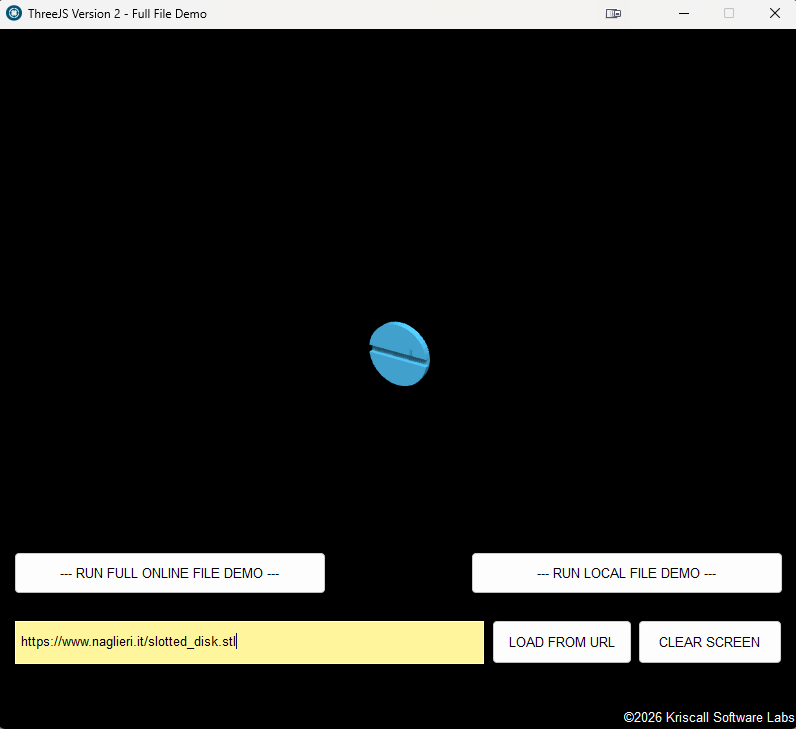
Quote from Kriscall on February 7, 2026, 6:50 am@naglieri Thank you for beta testing this for me. Because of your feedback, I discovered a security-related bug (since this is a browser add-on). I’ve implemented a workaround and fixed the issue. While addressing it, I also localized the files so they can now be loaded either locally or from the server.
I’ve provided a new Build 2.1 that includes this fix, along with an updated demo. Please see the images below showing your links loading correctly.
Thanks again! Hopefully we ironed out the file loading bugs
@naglieri Thank you for beta testing this for me. Because of your feedback, I discovered a security-related bug (since this is a browser add-on). I’ve implemented a workaround and fixed the issue. While addressing it, I also localized the files so they can now be loaded either locally or from the server.
I’ve provided a new Build 2.1 that includes this fix, along with an updated demo. Please see the images below showing your links loading correctly.
Thanks again! Hopefully we ironed out the file loading bugs
Uploaded files: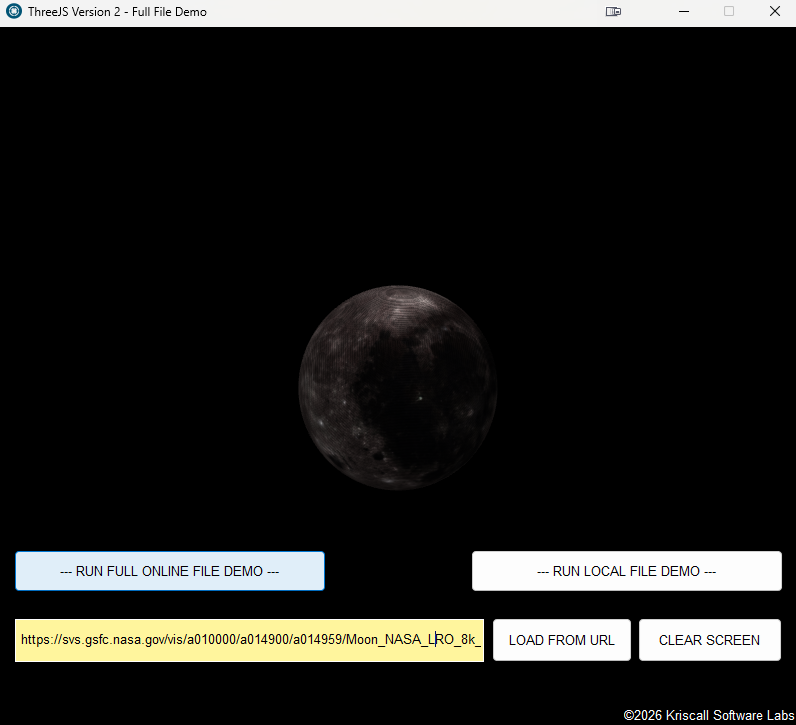
Click for thumbs down.0Click for thumbs up.2
luiz and danito have reacted to this post.
luizdanito
naglieri@naglieri
118 Posts
#19 · February 7, 2026, 7:35 pm
Quote from naglieri on February 7, 2026, 7:35 pmIt works perfectly.
Thank you for your patience. As you wrote, this isn't your job, but you fixed everything quickly anyway.
Now I'm studying all the commands, which are really numerous. :-)
It works perfectly.
Thank you for your patience. As you wrote, this isn't your job, but you fixed everything quickly anyway.
Now I'm studying all the commands, which are really numerous. :-)
Click for thumbs down.0Click for thumbs up.1
Kriscall has reacted to this post.
Kriscall
naglieri@naglieri
118 Posts
#20 · February 8, 2026, 1:22 pm
Quote from naglieri on February 8, 2026, 1:22 pmJust to note, compared to the first version, the initialization of the rectangle is a little slower, but then everything works perfectly.
But that's no problem, it's fine.
Just to note, compared to the first version, the initialization of the rectangle is a little slower, but then everything works perfectly.
But that's no problem, it's fine.
Click for thumbs down.0Click for thumbs up.0
Page 1 of 2Next