
sgExcelPages: Excel Wrapper and Embedder for VisualNeo Win

Quote from sghoshnbu on September 20, 2026, 6:33 pmsgExcelPages — Plug-in Annotation
==================================
Publisher: Saptarshi Ghosh
Platform: VisualNEO Win(Latest)
WHAT IT IS
----------
sgExcelPages is a VisualNEO Win plug-in that opens a Microsoft Excel workbook (.xlsx) and displays its worksheets as a live, editable grid inside a VisualNEO publication. The grid is drawn natively over a Rectangle object you place on a page, so it behaves like a real spreadsheet — scrollable rows and columns, cell selection, in-place editing, per-cell highlighting, saving changes back to the file, and exporting to CSV, Text, HTML, an XML Spreadsheet, Word, or PDF.TWO WAYS TO USE IT
-------------------
1. Direct viewing (sgExcelPagesOpen) — attach one live workbook viewer to a Rectangle on a single page. The whole workbook stays open behind that page; Prev/Next switch between its worksheets on the same page.2. Page import (sgExcelPagesImport) — generate a brand-new VisualNEO page for every selected worksheet in one step, each with its own Rectangle and its own Page Enter/Exit actions already wired up. Moving between worksheets then means moving between real VisualNEO pages, using genuine VisualNEO page-navigation commands (Gotonextpage/GotoPrevpage), so each page's own Enter/Exit logic fires normally.
BUILT-IN TOOLBAR
-----------------
Both routes share an optional on-screen toolbar (Prev, Next, Edit, Highlight, Save) drawn along the top of the grid, switched on per viewer.ELEVEN ACTIONS
----------------
sgExcelPagesOpen, sgExcelPagesNext, sgExcelPagesPrev, sgExcelPagesGoto, sgExcelPagesClose, sgExcelPagesSave, sgExcelPagesExport, sgExcelPagesImport,
sgExcelPagesEdit, sgExcelPagesHighlight, sgExcelPagesSettings.Full parameter-by-parameter documentation and worked examples for each of these are in sgExcelPages_Help.pdf.
TYPICAL USE
------------
Load a workbook for browsing/editing on a single page, or import an entire workbook as a ready-to-use set of pages in one action — either way, the resulting pages need no manual grid setup: the Rectangle, the open/close actions and the toolbar are already in place.Disclaimer: The plugin is still in development. I am trying to integrate full spreadsheet actions, and you will find a redundant tool menu when you open sgExcelPagesOpen and choose Show toolbar. It will show the toolbar, but no code is wired into it yet. Will finish it ASAP.
sgExcelPages — Plug-in Annotation
==================================
Publisher: Saptarshi Ghosh
Platform: VisualNEO Win(Latest)
WHAT IT IS
----------
sgExcelPages is a VisualNEO Win plug-in that opens a Microsoft Excel workbook (.xlsx) and displays its worksheets as a live, editable grid inside a VisualNEO publication. The grid is drawn natively over a Rectangle object you place on a page, so it behaves like a real spreadsheet — scrollable rows and columns, cell selection, in-place editing, per-cell highlighting, saving changes back to the file, and exporting to CSV, Text, HTML, an XML Spreadsheet, Word, or PDF.
TWO WAYS TO USE IT
-------------------
1. Direct viewing (sgExcelPagesOpen) — attach one live workbook viewer to a Rectangle on a single page. The whole workbook stays open behind that page; Prev/Next switch between its worksheets on the same page.
2. Page import (sgExcelPagesImport) — generate a brand-new VisualNEO page for every selected worksheet in one step, each with its own Rectangle and its own Page Enter/Exit actions already wired up. Moving between worksheets then means moving between real VisualNEO pages, using genuine VisualNEO page-navigation commands (Gotonextpage/GotoPrevpage), so each page's own Enter/Exit logic fires normally.
BUILT-IN TOOLBAR
-----------------
Both routes share an optional on-screen toolbar (Prev, Next, Edit, Highlight, Save) drawn along the top of the grid, switched on per viewer.
ELEVEN ACTIONS
----------------
sgExcelPagesOpen, sgExcelPagesNext, sgExcelPagesPrev, sgExcelPagesGoto, sgExcelPagesClose, sgExcelPagesSave, sgExcelPagesExport, sgExcelPagesImport,
sgExcelPagesEdit, sgExcelPagesHighlight, sgExcelPagesSettings.
Full parameter-by-parameter documentation and worked examples for each of these are in sgExcelPages_Help.pdf.
TYPICAL USE
------------
Load a workbook for browsing/editing on a single page, or import an entire workbook as a ready-to-use set of pages in one action — either way, the resulting pages need no manual grid setup: the Rectangle, the open/close actions and the toolbar are already in place.
Disclaimer: The plugin is still in development. I am trying to integrate full spreadsheet actions, and you will find a redundant tool menu when you open sgExcelPagesOpen and choose Show toolbar. It will show the toolbar, but no code is wired into it yet. Will finish it ASAP.
Uploaded files: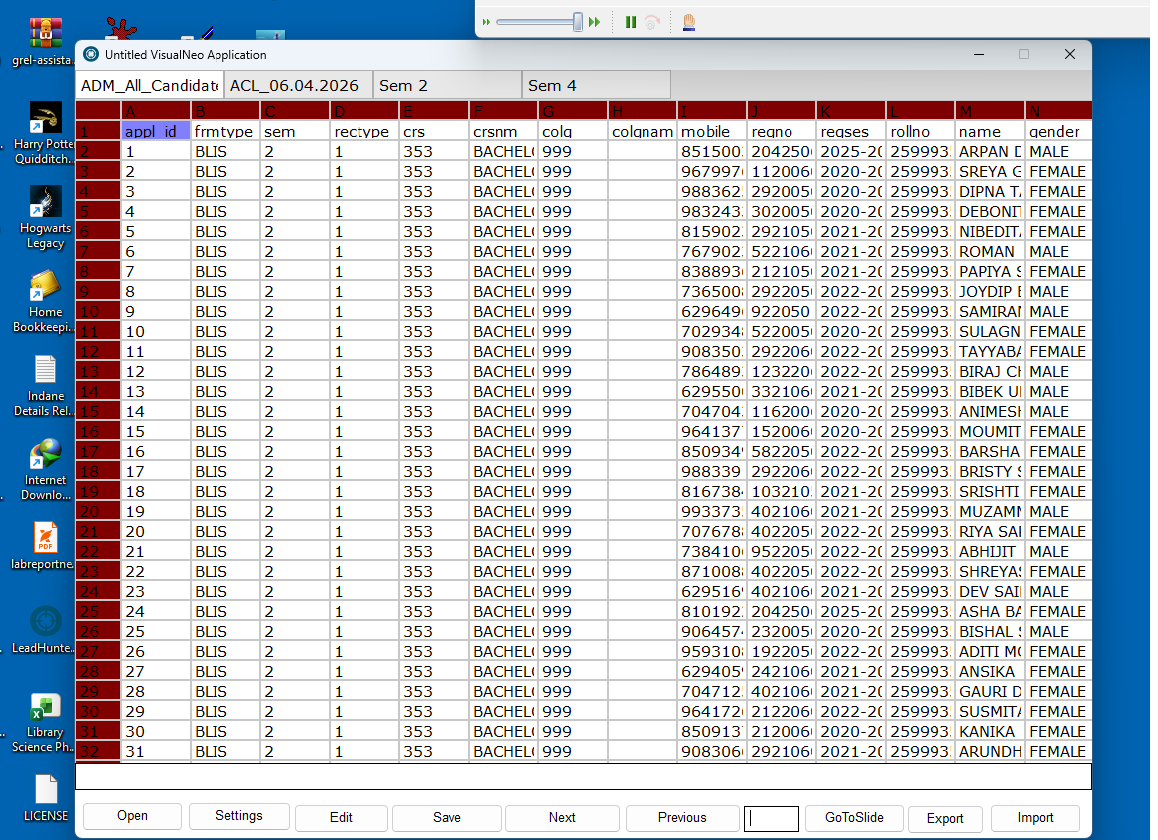
Quote from sghoshnbu on September 27, 2026, 7:09 amVersion 2 with additional actions. Now the plugin can create sheets in design-time and can save the file as excel.
Version 2 with additional actions. Now the plugin can create sheets in design-time and can save the file as excel.
Uploaded files:
Quote from joferar333 on November 3, 2026, 1:36 am@sghoshnbu Hi!!!
Hello,
I am using your sgExcelPages plugin for VisualNEO Win and I have encountered two issues that I would appreciate your help with.
1. Possible 2,000-row limitation
I am opening an Excel (.xlsx) file containing 2,273 product records.
The plugin opens the file successfully. However, when I export it to CSV using the following command:
sgExcelPagesExport "Rectangle1" "[PubDir]export.csv" "CSV" "AllSheets"The resulting CSV contains only 1,998 product records, plus the header and an additional row.
I have repeated the test and obtained the same result.
Is there a built-in limitation of approximately 2,000 rows in the plugin?
If so, is there any setting or workaround that would allow me to load and export all 2,273 records without losing data?
2. Horizontal scrolling issue
When displaying the Excel worksheet inside the sgExcelPages component, I cannot scroll horizontally to view all 18 columns.
Is horizontal scrolling supported? Is there a specific setting or command required to enable it?
3. Intended use
I am developing a synchronization application in VisualNEO Win that needs to read Excel files containing several thousand customer and product records.
It is essential that the plugin processes every row and column without truncating the data.
Could you please confirm whether sgExcelPages supports this requirement and, if necessary, provide an example or recommended solution?
Thank you very much for your assistance.
Best regards.
@sghoshnbu Hi!!!
Hello,
I am using your sgExcelPages plugin for VisualNEO Win and I have encountered two issues that I would appreciate your help with.
1. Possible 2,000-row limitation
I am opening an Excel (.xlsx) file containing 2,273 product records.
The plugin opens the file successfully. However, when I export it to CSV using the following command:
sgExcelPagesExport "Rectangle1" "[PubDir]export.csv" "CSV" "AllSheets"
The resulting CSV contains only 1,998 product records, plus the header and an additional row.
I have repeated the test and obtained the same result.
Is there a built-in limitation of approximately 2,000 rows in the plugin?
If so, is there any setting or workaround that would allow me to load and export all 2,273 records without losing data?
2. Horizontal scrolling issue
When displaying the Excel worksheet inside the sgExcelPages component, I cannot scroll horizontally to view all 18 columns.
Is horizontal scrolling supported? Is there a specific setting or command required to enable it?
3. Intended use
I am developing a synchronization application in VisualNEO Win that needs to read Excel files containing several thousand customer and product records.
It is essential that the plugin processes every row and column without truncating the data.
Could you please confirm whether sgExcelPages supports this requirement and, if necessary, provide an example or recommended solution?
Thank you very much for your assistance.
Best regards.
Quote from sghoshnbu on November 3, 2026, 3:38 am
Hello @joferar333
Thank you for the detailed report. You were right on both points, and both are fixed in sgExcelPages 2.1 (attached). Replace sgExcelPlugIn.nbp in your VisualNEO Win plug-ins folder and restart VisualNEO Win. Your existing scripts work unchanged.
1. The ~2,000-row limit
Yes, version 2 had a hard-coded internal limit of 2,000 rows (header included) and 200 columns per worksheet. Rows beyond that were silently dropped. That is why
you got 1,998 products plus the header and one extra row. Version 2.1 removes the limit, so every row and column of the sheet is loaded and exported. The extra row came from cells that carry only formatting (borders, fill colour) with no value. Version 2.1 ignores such cells when it works out the sheet size,so no blank padding rows or columns are added.I tested your exact scenario: a workbook with 2,273 product records in 18 columns, exported with your command. The CSV contains the header plus all 2,273 records, 18 columns each, and it matches the workbook cell for cell.
2. Horizontal scrolling
Version 2 had no scrollbars. Horizontal movement was only possible with the arrow
keys (after clicking a cell) or with Shift + mouse wheel, which was not obvious. Version 2.1 adds standard horizontal and vertical scrollbars to the viewer. You can click the arrows, click the track to page, or drag the thumb. Touchpad sideways swipes and tilt-wheel mice also scroll horizontally. No setting or command is needed.3. Your synchronisation application
sgExcelPages 2.1 reads every row and every column of each worksheet. A few notes:- With "AllSheets", CSV can hold only one table, so the plug-in writes one file per worksheet, named <file>_<SheetName>.csv. Your command
sgExcelPagesExport "Rectangle1" "[PubDir]export.csv" "CSV" "AllSheets" produces e.g. export_Products.csv and export_Customers.csv. To export only the sheet on screen, use "CurrentSheet" and the file name is used as given.
- Each worksheet is read fully into memory. In my tests a sheet of 40,000 rows x 18 columns loaded and exported completely, so several thousand customer and product
records are well within range. For sheets beyond roughly 40,000 rows x 18 columns (about 700,000 cells), split the data across sheets or files.Example: export all sheets, then process the product rows one by one:
sgExcelPagesOpen "Rectangle1" "[PubDir]products.xlsx" "[Sheet]" "Top" "No"
sgExcelPagesExport "Rectangle1" "[PubDir]export.csv" "CSV" "AllSheets"
sgExcelPagesClose "Rectangle1"FileLen "[PubDir]export_Products.csv" "[LineCount]"
Loop "2" "[LineCount]" "[i]"
FileRead "[PubDir]export_Products.csv" "[i]" "[Line]"
StrParse "[Line]" "," "[Field]" "[FieldCount]"
.. [Field1] = SKU, [Field2] = Name, ... [Field18] = last column
.. your synchronisation logic here
EndLoop(Line 1 is the header, so the loop starts at line 2. If your data contains commas
inside values, those values are quoted in the CSV. In that case export with "Text"
(tab-separated) and parse on [#9] instead of ",".)Thanks again for the clear report. It made both problems easy to reproduce. Please let me know how 2.1 works with your files.
Best regards,
Saptarshi
Hello @joferar333
Thank you for the detailed report. You were right on both points, and both are fixed in sgExcelPages 2.1 (attached). Replace sgExcelPlugIn.nbp in your VisualNEO Win plug-ins folder and restart VisualNEO Win. Your existing scripts work unchanged.
1. The ~2,000-row limit
Yes, version 2 had a hard-coded internal limit of 2,000 rows (header included) and 200 columns per worksheet. Rows beyond that were silently dropped. That is why
you got 1,998 products plus the header and one extra row. Version 2.1 removes the limit, so every row and column of the sheet is loaded and exported. The extra row came from cells that carry only formatting (borders, fill colour) with no value. Version 2.1 ignores such cells when it works out the sheet size,so no blank padding rows or columns are added.
I tested your exact scenario: a workbook with 2,273 product records in 18 columns, exported with your command. The CSV contains the header plus all 2,273 records, 18 columns each, and it matches the workbook cell for cell.
2. Horizontal scrolling
Version 2 had no scrollbars. Horizontal movement was only possible with the arrow
keys (after clicking a cell) or with Shift + mouse wheel, which was not obvious. Version 2.1 adds standard horizontal and vertical scrollbars to the viewer. You can click the arrows, click the track to page, or drag the thumb. Touchpad sideways swipes and tilt-wheel mice also scroll horizontally. No setting or command is needed.
3. Your synchronisation application
sgExcelPages 2.1 reads every row and every column of each worksheet. A few notes:
- With "AllSheets", CSV can hold only one table, so the plug-in writes one file per worksheet, named <file>_<SheetName>.csv. Your command
sgExcelPagesExport "Rectangle1" "[PubDir]export.csv" "CSV" "AllSheets" produces e.g. export_Products.csv and export_Customers.csv. To export only the sheet on screen, use "CurrentSheet" and the file name is used as given.
- Each worksheet is read fully into memory. In my tests a sheet of 40,000 rows x 18 columns loaded and exported completely, so several thousand customer and product
records are well within range. For sheets beyond roughly 40,000 rows x 18 columns (about 700,000 cells), split the data across sheets or files.
Example: export all sheets, then process the product rows one by one:
sgExcelPagesOpen "Rectangle1" "[PubDir]products.xlsx" "[Sheet]" "Top" "No"
sgExcelPagesExport "Rectangle1" "[PubDir]export.csv" "CSV" "AllSheets"
sgExcelPagesClose "Rectangle1"
FileLen "[PubDir]export_Products.csv" "[LineCount]"
Loop "2" "[LineCount]" "[i]"
FileRead "[PubDir]export_Products.csv" "[i]" "[Line]"
StrParse "[Line]" "," "[Field]" "[FieldCount]"
.. [Field1] = SKU, [Field2] = Name, ... [Field18] = last column
.. your synchronisation logic here
EndLoop
(Line 1 is the header, so the loop starts at line 2. If your data contains commas
inside values, those values are quoted in the CSV. In that case export with "Text"
(tab-separated) and parse on [#9] instead of ",".)
Thanks again for the clear report. It made both problems easy to reproduce. Please let me know how 2.1 works with your files.
Best regards,
Saptarshi
Quote from joferar333 on November 3, 2026, 12:28 pm@sghoshnbu Hello Saptarshi,
First of all, I would like to sincerely thank you for your prompt response, your excellent technical support, and the time and effort you have dedicated to improving sgExcelPages.
I also want to congratulate you on the outstanding work you have done with this plugin. It is a very useful and powerful tool for those of us developing applications with VisualNEO Win, and your dedication to continuously improving it is truly appreciated.
I have tested version 2.1 with my actual Excel files, and I am very happy with the results!
The plugin successfully opens and displays all 2,273 product records and 357 customer records. The previous row limitation has been resolved, and the new scrollbars work perfectly.
I only noticed one small issue with the CSV export function.
When selecting CSV as the export format, the exported file is generated with an
.xlsxextension instead of.csv.Although the file contains valid CSV data, Microsoft Excel cannot recognize it correctly because the extension does not match its actual format.
Would it be possible to adjust the export function so that CSV files are automatically saved with the correct
.csvextension?This is a minor detail compared to the excellent improvements you have already implemented.
Once again, thank you very much for your professionalism, your willingness to help, and the remarkable work you have done developing this plugin.
It is a pleasure to work with software developed by someone who genuinely cares about its quality and the needs of its users.
Best regards,
@sghoshnbu Hello Saptarshi,
First of all, I would like to sincerely thank you for your prompt response, your excellent technical support, and the time and effort you have dedicated to improving sgExcelPages.
I also want to congratulate you on the outstanding work you have done with this plugin. It is a very useful and powerful tool for those of us developing applications with VisualNEO Win, and your dedication to continuously improving it is truly appreciated.
I have tested version 2.1 with my actual Excel files, and I am very happy with the results!
The plugin successfully opens and displays all 2,273 product records and 357 customer records. The previous row limitation has been resolved, and the new scrollbars work perfectly.
I only noticed one small issue with the CSV export function.
When selecting CSV as the export format, the exported file is generated with an .xlsx extension instead of .csv.
Although the file contains valid CSV data, Microsoft Excel cannot recognize it correctly because the extension does not match its actual format.
Would it be possible to adjust the export function so that CSV files are automatically saved with the correct .csv extension?
This is a minor detail compared to the excellent improvements you have already implemented.
Once again, thank you very much for your professionalism, your willingness to help, and the remarkable work you have done developing this plugin.
It is a pleasure to work with software developed by someone who genuinely cares about its quality and the needs of its users.
Best regards,
Quote from sghoshnbu on November 3, 2026, 5:47 pm@joferar333
Thank you very much for your kind words, and for testing 2.1 so carefully with your real
files. I'm glad all 2,273 products and 357 customers now load and that the scrollbars
work well.You were right about the export. Version 2.1 used the file name exactly as given, so
when the name ended in .xlsx (for example the workbook's own name), CSV data was saved
with an .xlsx extension. Excel then refused to open it as CSV.Version 2.2 (attached) fixes this. The export now always saves the file with the
extension that matches the chosen format:CSV -> .csv Text -> .txt (.tsv/.tab are also accepted)
HTML -> .htm/.html XML Spreadsheet -> .xml
Word -> .docx PDF -> .pdfIf the name you give has no extension or the wrong one, it is replaced automatically.
For example, "products.xlsx" with CSV becomes "products.csv", and with "AllSheets" you
get "products_Products.csv" and "products_Customers.csv". If the extension is already
correct, the name is not changed. The file contents are the same as in 2.1.To update, replace sgExcelPlugIn.nbp in your VisualNEO Win plug-ins folder and restart
VisualNEO Win. Your scripts do not need any changes.Thank you again for the clear reports and the encouraging feedback. Please let me know
if anything else comes up.Best regards,
LIS Software Lab
Thank you very much for your kind words, and for testing 2.1 so carefully with your real
files. I'm glad all 2,273 products and 357 customers now load and that the scrollbars
work well.
You were right about the export. Version 2.1 used the file name exactly as given, so
when the name ended in .xlsx (for example the workbook's own name), CSV data was saved
with an .xlsx extension. Excel then refused to open it as CSV.
Version 2.2 (attached) fixes this. The export now always saves the file with the
extension that matches the chosen format:
CSV -> .csv Text -> .txt (.tsv/.tab are also accepted)
HTML -> .htm/.html XML Spreadsheet -> .xml
Word -> .docx PDF -> .pdf
If the name you give has no extension or the wrong one, it is replaced automatically.
For example, "products.xlsx" with CSV becomes "products.csv", and with "AllSheets" you
get "products_Products.csv" and "products_Customers.csv". If the extension is already
correct, the name is not changed. The file contents are the same as in 2.1.
To update, replace sgExcelPlugIn.nbp in your VisualNEO Win plug-ins folder and restart
VisualNEO Win. Your scripts do not need any changes.
Thank you again for the clear reports and the encouraging feedback. Please let me know
if anything else comes up.
Best regards,
LIS Software Lab
Quote from joferar333 on November 3, 2026, 11:48 pm@sghoshnbu thanks! master
new found 100%
Best Regards
@sghoshnbu thanks! master
new found 100%
Best Regards