sgExcelPages: Excel Wrapper and Embedder for VisualNeo Win

Quote from sghoshnbu on September 20, 2026, 6:33 pmsgExcelPages — Plug-in Annotation
==================================
Publisher: Saptarshi Ghosh
Platform: VisualNEO Win(Latest)
WHAT IT IS
----------
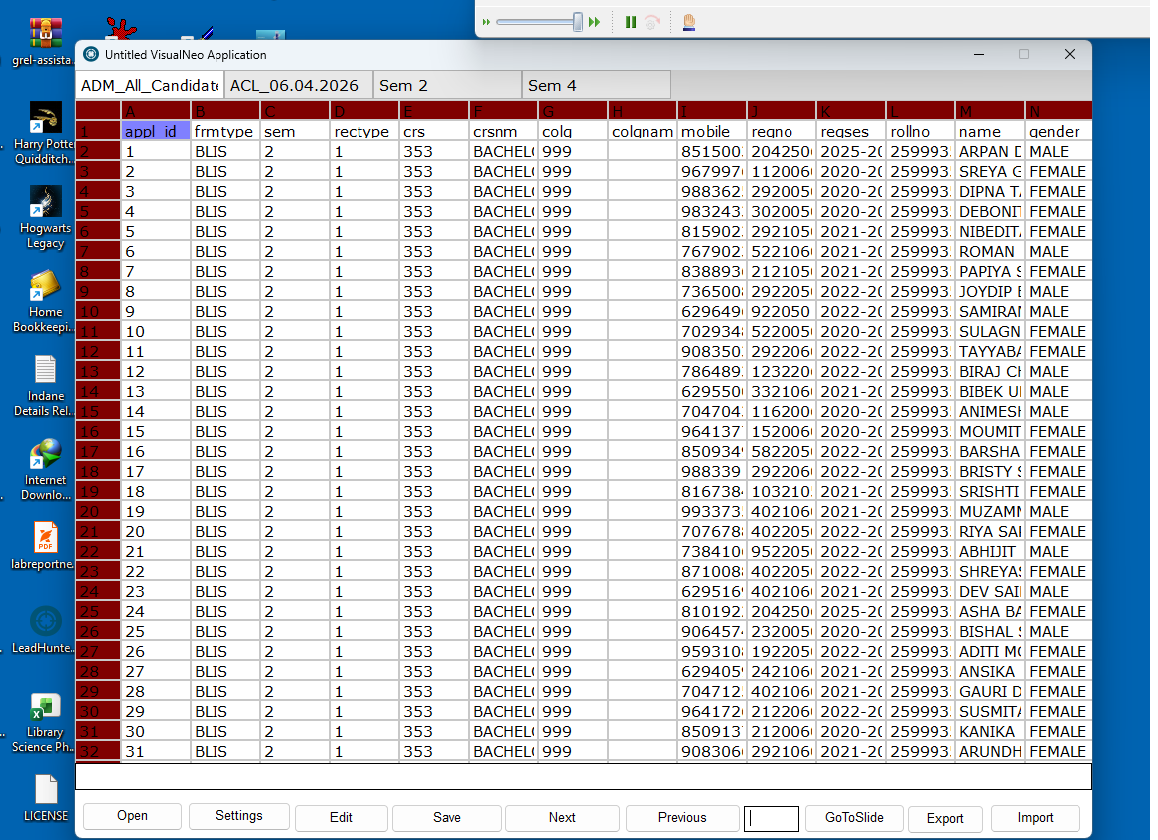
sgExcelPages is a VisualNEO Win plug-in that opens a Microsoft Excel workbook (.xlsx) and displays its worksheets as a live, editable grid inside a VisualNEO publication. The grid is drawn natively over a Rectangle object you place on a page, so it behaves like a real spreadsheet — scrollable rows and columns, cell selection, in-place editing, per-cell highlighting, saving changes back to the file, and exporting to CSV, Text, HTML, an XML Spreadsheet, Word, or PDF.TWO WAYS TO USE IT
-------------------
1. Direct viewing (sgExcelPagesOpen) — attach one live workbook viewer to a Rectangle on a single page. The whole workbook stays open behind that page; Prev/Next switch between its worksheets on the same page.2. Page import (sgExcelPagesImport) — generate a brand-new VisualNEO page for every selected worksheet in one step, each with its own Rectangle and its own Page Enter/Exit actions already wired up. Moving between worksheets then means moving between real VisualNEO pages, using genuine VisualNEO page-navigation commands (Gotonextpage/GotoPrevpage), so each page's own Enter/Exit logic fires normally.
BUILT-IN TOOLBAR
-----------------
Both routes share an optional on-screen toolbar (Prev, Next, Edit, Highlight, Save) drawn along the top of the grid, switched on per viewer.ELEVEN ACTIONS
----------------
sgExcelPagesOpen, sgExcelPagesNext, sgExcelPagesPrev, sgExcelPagesGoto, sgExcelPagesClose, sgExcelPagesSave, sgExcelPagesExport, sgExcelPagesImport,
sgExcelPagesEdit, sgExcelPagesHighlight, sgExcelPagesSettings.Full parameter-by-parameter documentation and worked examples for each of these are in sgExcelPages_Help.pdf.
TYPICAL USE
------------
Load a workbook for browsing/editing on a single page, or import an entire workbook as a ready-to-use set of pages in one action — either way, the resulting pages need no manual grid setup: the Rectangle, the open/close actions and the toolbar are already in place.Disclaimer: The plugin is still in development. I am trying to integrate full spreadsheet actions, and you will find a redundant tool menu when you open sgExcelPagesOpen and choose Show toolbar. It will show the toolbar, but no code is wired into it yet. Will finish it ASAP.
sgExcelPages — Plug-in Annotation
==================================
Publisher: Saptarshi Ghosh
Platform: VisualNEO Win(Latest)
WHAT IT IS
----------
sgExcelPages is a VisualNEO Win plug-in that opens a Microsoft Excel workbook (.xlsx) and displays its worksheets as a live, editable grid inside a VisualNEO publication. The grid is drawn natively over a Rectangle object you place on a page, so it behaves like a real spreadsheet — scrollable rows and columns, cell selection, in-place editing, per-cell highlighting, saving changes back to the file, and exporting to CSV, Text, HTML, an XML Spreadsheet, Word, or PDF.
TWO WAYS TO USE IT
-------------------
1. Direct viewing (sgExcelPagesOpen) — attach one live workbook viewer to a Rectangle on a single page. The whole workbook stays open behind that page; Prev/Next switch between its worksheets on the same page.
2. Page import (sgExcelPagesImport) — generate a brand-new VisualNEO page for every selected worksheet in one step, each with its own Rectangle and its own Page Enter/Exit actions already wired up. Moving between worksheets then means moving between real VisualNEO pages, using genuine VisualNEO page-navigation commands (Gotonextpage/GotoPrevpage), so each page's own Enter/Exit logic fires normally.
BUILT-IN TOOLBAR
-----------------
Both routes share an optional on-screen toolbar (Prev, Next, Edit, Highlight, Save) drawn along the top of the grid, switched on per viewer.
ELEVEN ACTIONS
----------------
sgExcelPagesOpen, sgExcelPagesNext, sgExcelPagesPrev, sgExcelPagesGoto, sgExcelPagesClose, sgExcelPagesSave, sgExcelPagesExport, sgExcelPagesImport,
sgExcelPagesEdit, sgExcelPagesHighlight, sgExcelPagesSettings.
Full parameter-by-parameter documentation and worked examples for each of these are in sgExcelPages_Help.pdf.
TYPICAL USE
------------
Load a workbook for browsing/editing on a single page, or import an entire workbook as a ready-to-use set of pages in one action — either way, the resulting pages need no manual grid setup: the Rectangle, the open/close actions and the toolbar are already in place.
Disclaimer: The plugin is still in development. I am trying to integrate full spreadsheet actions, and you will find a redundant tool menu when you open sgExcelPagesOpen and choose Show toolbar. It will show the toolbar, but no code is wired into it yet. Will finish it ASAP.
Uploaded files: