
[SOLVED] Show Container from other page in another page

Quote from noyzen on July 6, 2022, 4:44 pmIn sample picture attached, I have many pages with same containers.
I need to show content of a container in all pages... so when i edit 1 every page changes.
I tried to use front page and background page master pages, but that wont help me because of my responsive design...
(I have neo-row and neo-col in page and menu is inside them, master pages can not be inside a page row)I need a container with specific position on page inside another container use content of a container from another page...
Any idea? :)
In sample picture attached, I have many pages with same containers.
I need to show content of a container in all pages... so when i edit 1 every page changes.
I tried to use front page and background page master pages, but that wont help me because of my responsive design...
(I have neo-row and neo-col in page and menu is inside them, master pages can not be inside a page row)
I need a container with specific position on page inside another container use content of a container from another page...
Any idea? :)
Uploaded files: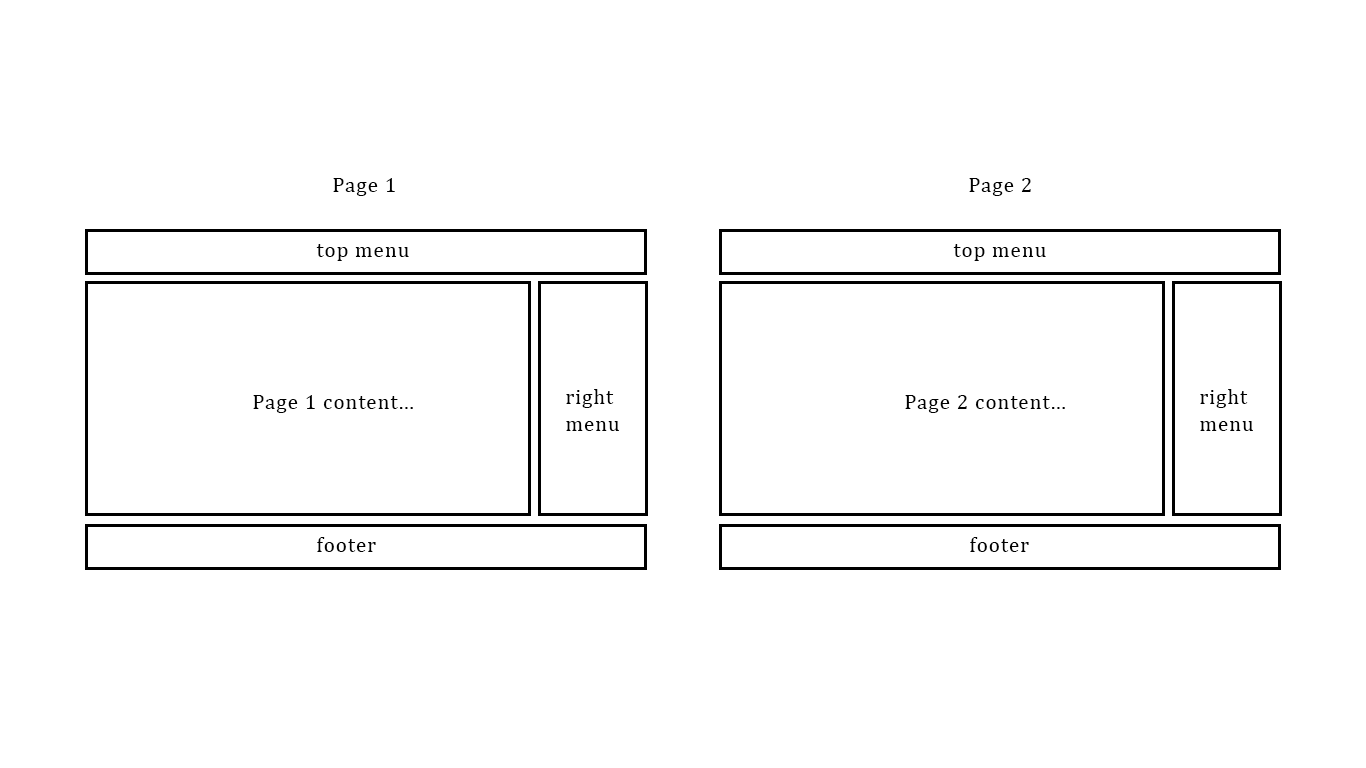

Quote from luishp on July 7, 2022, 9:40 amHi @noyzen, not sure if I'm understanding you correctly.
What I usually do when using responsive designs is using MasterPages for the top menu and header and for the right sidebar and footer.
The header is just the background-masterpage and the right sidebar and footer the foreground-masterpage.
Please take a look at the attached sample app.Regards.
Hi @noyzen, not sure if I'm understanding you correctly.
What I usually do when using responsive designs is using MasterPages for the top menu and header and for the right sidebar and footer.
The header is just the background-masterpage and the right sidebar and footer the foreground-masterpage.
Please take a look at the attached sample app.
Regards.
Uploaded files:Quote from noyzen on July 7, 2022, 10:04 amHi Luis!
Yes I know that, I think my post is cofusing sorry... Forground and Background pages don't help me on my case.
Look,
I just want to show content of a container in other containers at other pages
I need a "Master Container" not master page. Exactly same functionality as Forground and Background Master pages!
Is there any trick using container html property? I want container 1 to be like container 2 and when i change 1 other one also change.
Thanks!
Hi Luis!
Yes I know that, I think my post is cofusing sorry... Forground and Background pages don't help me on my case.
Look,
I just want to show content of a container in other containers at other pages
I need a "Master Container" not master page. Exactly same functionality as Forground and Background Master pages!
Is there any trick using container html property? I want container 1 to be like container 2 and when i change 1 other one also change.
Thanks!
Quote from luishp on July 7, 2022, 10:13 am@noyzen I think that's what I'm doing with the right SideBar on the sample app.
You can get the Container HTML content into a variable whenever you need. Then show that HTML in another Container using ng-bind-html advanced property.Regards
@noyzen I think that's what I'm doing with the right SideBar on the sample app.
You can get the Container HTML content into a variable whenever you need. Then show that HTML in another Container using ng-bind-html advanced property.
Regards
Quote from noyzen on July 7, 2022, 10:15 amLet me try that and I will give feedback. Thank you very much for your help.
Let me try that and I will give feedback. Thank you very much for your help.
Quote from noyzen on July 7, 2022, 10:33 amOkay, It's not working for me I tried GetObjectHTML and SetObjectHTML too.
Maybe because Master Container is On other page? or maybe because It has a lot of containers and objects inside it?
Not sure.Another problem is this method is unusable at design time... But master Pages will show at design time so you can see what you working on specialy when page has a lot of objects.
I think what i need It's exactly like Master page but a Master Container which can be shown on all pages,
A master page (forground or background) shows same content for many pages, but as a layer to whole page.
I need to show content of Master page or a Master Container on my pages but at the place i choose, Inside a container.Should be easy, Not for me :D
Okay, It's not working for me I tried GetObjectHTML and SetObjectHTML too.
Maybe because Master Container is On other page? or maybe because It has a lot of containers and objects inside it?
Not sure.
Another problem is this method is unusable at design time... But master Pages will show at design time so you can see what you working on specialy when page has a lot of objects.
I think what i need It's exactly like Master page but a Master Container which can be shown on all pages,
A master page (forground or background) shows same content for many pages, but as a layer to whole page.
I need to show content of Master page or a Master Container on my pages but at the place i choose, Inside a container.
Should be easy, Not for me :D
Quote from luishp on July 7, 2022, 1:46 pm@noyzen ng-bind-html should work as I have shown on my sample. Please share with me a basic project so I can work on it and better understand you.
Thank you!
@noyzen ng-bind-html should work as I have shown on my sample. Please share with me a basic project so I can work on it and better understand you.
Thank you!
Quote from noyzen on July 7, 2022, 2:17 pmAnd here is another sample which half works? hmm...
The box wont go inside the Container.
And here is another sample which half works? hmm...
The box wont go inside the Container.
Uploaded files:Quote from luishp on July 8, 2022, 8:40 amHi @noyzen you are right with my method you can only add HTML within the Container, no other objects.
I will explore the possibility of a "Master Container", not sure if it's possible but I will try.Regards.
Hi @noyzen you are right with my method you can only add HTML within the Container, no other objects.
I will explore the possibility of a "Master Container", not sure if it's possible but I will try.
Regards.
Quote from noyzen on July 8, 2022, 9:09 amThanks, I think mechanics are like forground and background master pages If you find how they work you can use to make master container.
Thanks, I think mechanics are like forground and background master pages If you find how they work you can use to make master container.
Quote from luishp on July 10, 2022, 2:00 pmHi @noyzen, I have found an easy way to do what you need using MoveObjectIntoContainer command :)
- Include your Container into a MasterPage
- On the destination page page-enter event add this:
MoveObjectIntoContainer "ContainerSource" "ContainerTarget"This will put ContainerSource into ContainerTarget.
Please seee attached sample.
Hi @noyzen, I have found an easy way to do what you need using MoveObjectIntoContainer command :)
- Include your Container into a MasterPage
- On the destination page page-enter event add this:
MoveObjectIntoContainer "ContainerSource" "ContainerTarget"
This will put ContainerSource into ContainerTarget.
Please seee attached sample.
Quote from noyzen on July 10, 2022, 8:14 pmSeems like It works for me too. I will use it in a complex page also and I think It will be OK...
Thank you very much Luis for the solution!
I hope I can do some job here with VisualNEO now... :)
Regards.
Seems like It works for me too. I will use it in a complex page also and I think It will be OK...
Thank you very much Luis for the solution!
I hope I can do some job here with VisualNEO now... :)
Regards.