
Shuffle (Randomize) letters in a word.

Quote from impactband4u on January 25, 2022, 8:50 pmHi, does anyone know of a plugin or code that can shuffle (randomize) letters in a word?
Example: If i type the word "tomorrow" in a TextEntry and click a button to shuffle (randomize) the word, it must look something like this: "orwmtoro
Thank You!
Hi, does anyone know of a plugin or code that can shuffle (randomize) letters in a word?
Example: If i type the word "tomorrow" in a TextEntry and click a button to shuffle (randomize) the word, it must look something like this: "orwmtoro
Thank You!

Quote from DaviddeArgentina on January 25, 2022, 9:24 pmhttps://stackoverflow.com/questions/46477781/how-to-scramble-characters-in-a-string
my 0.01
https://stackoverflow.com/questions/46477781/how-to-scramble-characters-in-a-string
my 0.01

Quote from Vadim on January 26, 2022, 10:30 pm@impactband4u
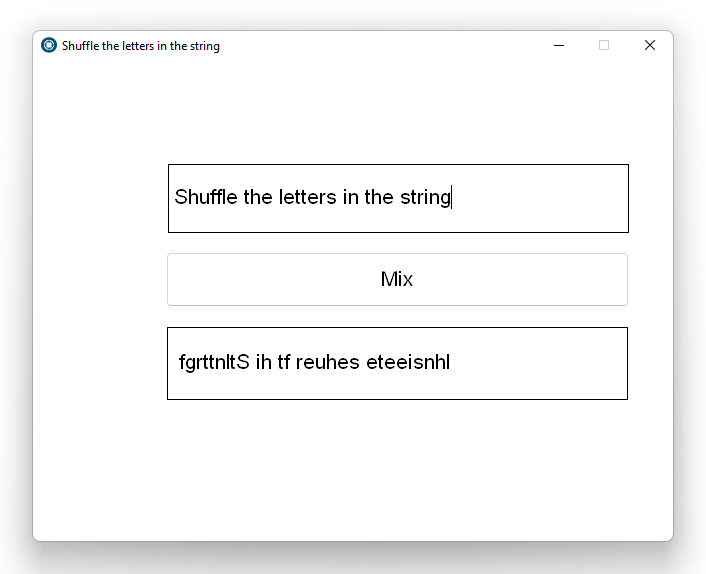
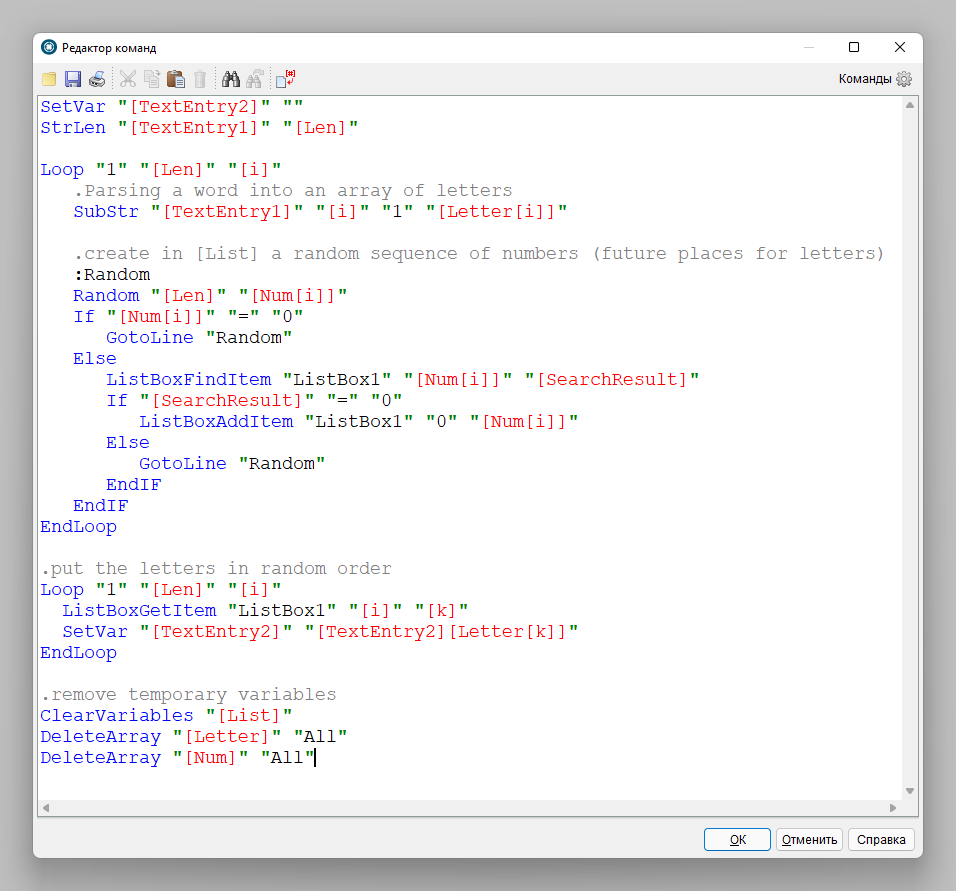
Here's a version of the code that does this.
Here's a version of the code that does this.
Uploaded files:
Quote from impactband4u on January 26, 2022, 10:52 pmThank you guys!
@vadim - Thank you for the sample. Exactly what I needed : )
Thank you guys!
@vadim - Thank you for the sample. Exactly what I needed : )
Quote from Vadim on January 27, 2022, 6:58 am@impactband4u
Happy to help!
I forgot to remind you that you can remove the ListBox1 object from the page (for example, place it on the left side of the page) if you don't want to show the process and only need the mixing result.
Happy to help!
I forgot to remind you that you can remove the ListBox1 object from the page (for example, place it on the left side of the page) if you don't want to show the process and only need the mixing result.

Quote from PaulJonestindall on January 27, 2022, 11:07 pmI believe this will work:
SetVar "[NewText]" ""
StrLen "[TextEntry1]" "[Length]"
Loop "1" "[Length]" "[LengthLoop]"
StrLen "[TextEntry1]" "[NewLength]"
Random "[NewLength]" "[RandNum]"
If "[RandNum]" "=" "0"
SetVar "[RandNum]" "1"
EndIf
SubStr "[TextEntry1]" "[RandNum]" "1" "[RandChar]"
StrDel "[TextEntry1]" "[RandNum]" "1" "[TextEntry1]"
SetVar "[NewText]" "[NewText][RandChar]"
EndLoop
I believe this will work:
SetVar "[NewText]" ""
StrLen "[TextEntry1]" "[Length]"
Loop "1" "[Length]" "[LengthLoop]"
StrLen "[TextEntry1]" "[NewLength]"
Random "[NewLength]" "[RandNum]"
If "[RandNum]" "=" "0"
SetVar "[RandNum]" "1"
EndIf
SubStr "[TextEntry1]" "[RandNum]" "1" "[RandChar]"
StrDel "[TextEntry1]" "[RandNum]" "1" "[TextEntry1]"
SetVar "[NewText]" "[NewText][RandChar]"
EndLoop
Quote from Gaev on January 28, 2022, 3:15 amEdited later :
PLEASE IGNORE THIS POST ... I mistakenly thought it was an enquiry for VisualNEOWeb
@impactband4u
@vadim
@pauljonestindallThere is a native VisualNEOWeb command for doing this ... only, it is for shuffling items inside an array ... so you need to parse the string variable before deploying the command ... and combine the shuffled array items into a string afterwards ... this works ...
SetVar "[OriginalText]" "typewriter"

... make array of one character each
StrParse "[originalText]" "" "[originalArray]"

... do the shuffle
CreateEmptyArray [shuffledArray]
ArrayShuffle [originalArray] [shuffledArray]

... merge shuffled array items into a text variable
ArrayLen [shuffledArray] [shuffledArrayLen]
Math "[shuffledArrayLen]-1" 0 [shuffledArrayMax]

SetVar [shuffledText] ""
Loop 0 [shuffledArrayMax] [thisShuffledArrayItem]
SetVar "[thisShuffledItemText]" "[shuffledArray([thisShuffledArrayItem])"
SetVar [shuffledText] "[shuffledText][thisShuffledItemText]"
EndLoop

AlertBox "shuffledText" "[shuffledText]" ""
Note that Javascript has a .join() method for arrays that would reduce the 'array to text string' code ... but I could not find a corresponding VisualNEOWeb command.
Edited later :
PLEASE IGNORE THIS POST ... I mistakenly thought it was an enquiry for VisualNEOWeb
@impactband4u
@vadim
@pauljonestindall
There is a native VisualNEOWeb command for doing this ... only, it is for shuffling items inside an array ... so you need to parse the string variable before deploying the command ... and combine the shuffled array items into a string afterwards ... this works ...
SetVar "[OriginalText]" "typewriter"

... make array of one character each
StrParse "[originalText]" "" "[originalArray]"

... do the shuffle
CreateEmptyArray [shuffledArray]
ArrayShuffle [originalArray] [shuffledArray]

... merge shuffled array items into a text variable
ArrayLen [shuffledArray] [shuffledArrayLen]
Math "[shuffledArrayLen]-1" 0 [shuffledArrayMax]

SetVar [shuffledText] ""
Loop 0 [shuffledArrayMax] [thisShuffledArrayItem]
SetVar "[thisShuffledItemText]" "[shuffledArray([thisShuffledArrayItem])"
SetVar [shuffledText] "[shuffledText][thisShuffledItemText]"
EndLoop

AlertBox "shuffledText" "[shuffledText]" ""
Note that Javascript has a .join() method for arrays that would reduce the 'array to text string' code ... but I could not find a corresponding VisualNEOWeb command.
Quote from Vadim on January 28, 2022, 4:52 am@pauljonestindall
It works great! Your code came out much shorter! Thanks for sharing!
@gaev
Glad to know that VisualNEO Web has such a specialized command! Thank you!
It works great! Your code came out much shorter! Thanks for sharing!
Glad to know that VisualNEO Web has such a specialized command! Thank you!
Quote from PaulJonestindall on January 28, 2022, 12:47 pm@impactband4u
@vadim
@gaevUnfortunately the StrParse doesn't work in NVWin the same as NVWeb. I've tried using nothing as a delimiter before.
I figured the easiest way was to just remove the characters from the original string that were already selected. And repeat.
Unfortunately the StrParse doesn't work in NVWin the same as NVWeb. I've tried using nothing as a delimiter before.
I figured the easiest way was to just remove the characters from the original string that were already selected. And repeat.
Quote from Vadim on January 28, 2022, 1:49 pm@pauljonestindall
In my project VisualNEO Win command StrParse works fine with different delimiters, in particular I use semicolon and equal sign.
In my project VisualNEO Win command StrParse works fine with different delimiters, in particular I use semicolon and equal sign.
Quote from PaulJonestindall on January 28, 2022, 2:08 pm@vadim
In @gaev example for NVWeb the StrParse action has nothing as a delimiter, or, has no delimiter.
StrParse "[originalText]" "" "[originalArray]"
This action command would not work in NVWin. In this exercise, you can't have nothing as a delimiter.
In @gaev example for NVWeb the StrParse action has nothing as a delimiter, or, has no delimiter.
StrParse "[originalText]" "" "[originalArray]"
This action command would not work in NVWin. In this exercise, you can't have nothing as a delimiter.
Quote from Vadim on January 28, 2022, 2:21 pmAnd in this problem, yes, this command will not help. I got it wrong at first. I thought we were talking about the functionality of the command ))
Translation difficulties. Sorry.
And in this problem, yes, this command will not help. I got it wrong at first. I thought we were talking about the functionality of the command ))
Translation difficulties. Sorry.
Quote from Gaev on January 28, 2022, 2:37 pm@impactband4u
@vadim
@pauljonestindallSorry guys, I messed up big time ... I was thinking this was a query in VisualNEOWeb.
Excuses for this brain freeze ...
- it was late in the night over here
- we have had two weeks of extreme cold and snow
- add to it, two years of self isolation related to covid
- could even be a new strain of covid... and I am sticking to them.
I will edit my original post to reflect this messup.
@impactband4u
@vadim
@pauljonestindall
Sorry guys, I messed up big time ... I was thinking this was a query in VisualNEOWeb.
Excuses for this brain freeze ...
- it was late in the night over here
- we have had two weeks of extreme cold and snow
- add to it, two years of self isolation related to covid
- could even be a new strain of covid
... and I am sticking to them.
I will edit my original post to reflect this messup.
Quote from Vadim on January 28, 2022, 3:01 pm@gaev
That's okay. Your message made it clear from the start that you were talking about VisualNEO Web. It is useful to know if there are any differences in the syntax of these programming environments.
That's okay. Your message made it clear from the start that you were talking about VisualNEO Web. It is useful to know if there are any differences in the syntax of these programming environments.
Quote from PaulJonestindall on January 28, 2022, 4:14 pm@gaev
@vadimVadim is correct. I haven't fully explored NVW a whole lot, but it is interesting to know and have more of the extra features and action commands like the ArrayShuffle and being able to parse by nothing. It does however make the two platforms a bit more dissimilar than I would like.
Vadim is correct. I haven't fully explored NVW a whole lot, but it is interesting to know and have more of the extra features and action commands like the ArrayShuffle and being able to parse by nothing. It does however make the two platforms a bit more dissimilar than I would like.
Quote from PaulJonestindall on January 28, 2022, 4:52 pm@vadim
It seems to me that instead of the If...Then statement to change a random number of zero to one, you could use a StrReplace action.
For example:SetVar "[NewText]" "" StrLen "[TextEntry1]" "[Length]" Loop "1" "[Length]" "[LengthLoop]" StrLen "[TextEntry1]" "[NewLength]" Random "[NewLength]" "[RandNum]" StrReplace "[RandNum]" "0" "1" "[RandNum]" "" .If "[RandNum]" "=" "0" .SetVar "[RandNum]" "1" .EndIf SubStr "[TextEntry1]" "[RandNum]" "1" "[RandChar]" StrDel "[TextEntry1]" "[RandNum]" "1" "[TextEntry1]" SetVar "[NewText]" "[NewText][RandChar]" EndLoopIt works most every time, but it doesn't work every time.
It seems to me that instead of the If...Then statement to change a random number of zero to one, you could use a StrReplace action.
For example:
SetVar "[NewText]" ""
StrLen "[TextEntry1]" "[Length]"
Loop "1" "[Length]" "[LengthLoop]"
StrLen "[TextEntry1]" "[NewLength]"
Random "[NewLength]" "[RandNum]"
StrReplace "[RandNum]" "0" "1" "[RandNum]" ""
.If "[RandNum]" "=" "0"
.SetVar "[RandNum]" "1"
.EndIf
SubStr "[TextEntry1]" "[RandNum]" "1" "[RandChar]"
StrDel "[TextEntry1]" "[RandNum]" "1" "[TextEntry1]"
SetVar "[NewText]" "[NewText][RandChar]"
EndLoop
It works most every time, but it doesn't work every time.
Quote from PaulJonestindall on January 28, 2022, 7:46 pm@vadim
But it doesn't work every single time and I cannot figure out why.
But it doesn't work every single time and I cannot figure out why.
Quote from Vadim on January 28, 2022, 7:53 pm@pauljonestindall
I've checked several times, it works great! At what point do you notice the error? What exactly is not working?
I've checked several times, it works great! At what point do you notice the error? What exactly is not working?
Quote from PaulJonestindall on January 28, 2022, 8:13 pm@vadim
I'm including my test PUB. I added two lines just to get the information, one to capture any [LastError] and one to confirm the "shuffled" text length.
If you enter 0123456789 in the text entry, copy it to the clipboard and hit enter it goes through the process. paste the 0123456789 into the text entry and hit enter... repeat this several times...
I never get an error but just some times it will leave the last character in the entry box. Not always the same character and not always after the same number of repeats.
I know this may seem like a rabbit hole and you may be wondering how I found this out but the fact is it doesn't always work correctly and that's a bit concerning.
I'm including my test PUB. I added two lines just to get the information, one to capture any [LastError] and one to confirm the "shuffled" text length.
If you enter 0123456789 in the text entry, copy it to the clipboard and hit enter it goes through the process. paste the 0123456789 into the text entry and hit enter... repeat this several times...
I never get an error but just some times it will leave the last character in the entry box. Not always the same character and not always after the same number of repeats.
I know this may seem like a rabbit hole and you may be wondering how I found this out but the fact is it doesn't always work correctly and that's a bit concerning.
Uploaded files: