
Using Apache Cordova Plugins and Cordova Build APK

Quote from shahram on January 5, 2021, 11:18 amHello there
I want to use Cordova plugins in my project. Although I go according to the Cordova documentation, but after building the program, the plugin does not work.
Does anyone know how to do this?
I put the required code to install the plugin in the project in the config.xml file.
Please share your information if anyone is familiar with this issue.
Hello there
I want to use Cordova plugins in my project. Although I go according to the Cordova documentation, but after building the program, the plugin does not work.
Does anyone know how to do this?
I put the required code to install the plugin in the project in the config.xml file.
Please share your information if anyone is familiar with this issue.
Quote from shahram on February 7, 2021, 8:39 amQuote from shahram on January 5, 2021, 11:18 amHello there
I want to use Cordova plugins in my project. Although I go according to the Cordova documentation, but after building the program, the plugin does not work.
Does anyone know how to do this?
I put the required code to install the plugin in the project in the config.xml file.
Please share your information if anyone is familiar with this issue.Finally I found the solution.
We can talk more about building mobile apps using Phonegap and Cordova. If anyone has a question or problem in this regard, raise it in this topic.
We can also share our information and experiences in this topic.
Quote from shahram on January 5, 2021, 11:18 amHello there
I want to use Cordova plugins in my project. Although I go according to the Cordova documentation, but after building the program, the plugin does not work.
Does anyone know how to do this?
I put the required code to install the plugin in the project in the config.xml file.
Please share your information if anyone is familiar with this issue.
Finally I found the solution.
We can talk more about building mobile apps using Phonegap and Cordova. If anyone has a question or problem in this regard, raise it in this topic.
We can also share our information and experiences in this topic.

Quote from shahram on February 7, 2021, 5:56 pmQuote from CDY@44 on February 7, 2021, 2:39 pmPlease, share your experience, thank you.
About the previous two posts:
You need to put a file called cordova.js next to the index.html file. I will put this file below for download.
Quote from CDY@44 on February 7, 2021, 2:39 pmPlease, share your experience, thank you.
About the previous two posts:
You need to put a file called cordova.js next to the index.html file. I will put this file below for download.
Uploaded files:
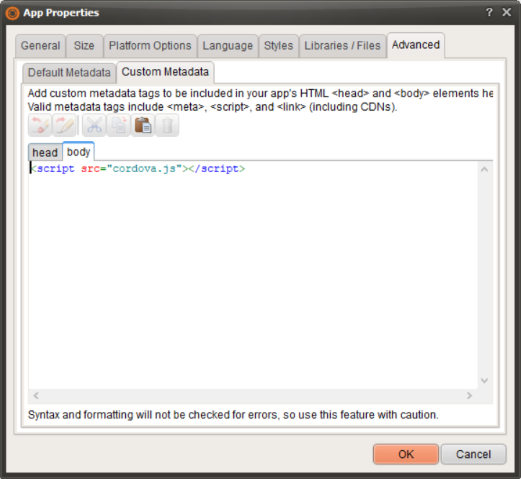
Quote from Darbdenral on February 10, 2021, 10:29 amIf you want to try another method.. I just added the cordova.js link to the body metadata in my VisualNeoWeb App properties.. Like so ..
<script src="cordova.js"></script>Compile in VisualNeoWeb, then run your app with Cordova and the installed cordova.js file is included automatically by Cordova and works fine.
If you want to try another method.. I just added the cordova.js link to the body metadata in my VisualNeoWeb App properties.. Like so .. <script src="cordova.js"></script> Compile in VisualNeoWeb, then run your app with Cordova and the installed cordova.js file is included automatically by Cordova and works fine.
Uploaded files:
Quote from shahram on February 10, 2021, 10:50 amQuote from Darbdenral on February 10, 2021, 10:29 amIf you want to try another method.. I just added the cordova.js link to the body metadata in my VisualNeoWeb App properties.. Like so ..
<script src="cordova.js"></script>
<script src="cordova.js"></script>Compile in VisualNeoWeb, then run your app with Cordova and the installed cordova.js file is included automatically by Cordova and works fine.
Thanks @darbdenral
So I did, but it doesn't work for me. I will try again.
Quote from Darbdenral on February 10, 2021, 10:29 amIf you want to try another method.. I just added the cordova.js link to the body metadata in my VisualNeoWeb App properties.. Like so ..
<script src="cordova.js"></script>
<script src="cordova.js"></script>Compile in VisualNeoWeb, then run your app with Cordova and the installed cordova.js file is included automatically by Cordova and works fine.
Thanks @darbdenral
So I did, but it doesn't work for me. I will try again.
Quote from shahram on February 10, 2021, 11:04 amQuote from Darbdenral on February 10, 2021, 10:29 amIf you want to try another method.. I just added the cordova.js link to the body metadata in my VisualNeoWeb App properties.. Like so ..
<script src="cordova.js"></script>
<script src="cordova.js"></script>Compile in VisualNeoWeb, then run your app with Cordova and the installed cordova.js file is included automatically by Cordova and works fine.
Dear @darbdenral
You were right. I probably did not notice.
As you said, the cordova.js file will be added to the resources automatically.
Quote from Darbdenral on February 10, 2021, 10:29 amIf you want to try another method.. I just added the cordova.js link to the body metadata in my VisualNeoWeb App properties.. Like so ..
<script src="cordova.js"></script>
<script src="cordova.js"></script>Compile in VisualNeoWeb, then run your app with Cordova and the installed cordova.js file is included automatically by Cordova and works fine.
Dear @darbdenral
You were right. I probably did not notice.
As you said, the cordova.js file will be added to the resources automatically.
Quote from Darbdenral on February 10, 2021, 11:50 amQuote from shahram on February 10, 2021, 11:04 amQuote from Darbdenral on February 10, 2021, 10:29 amIf you want to try another method.. I just added the cordova.js link to the body metadata in my VisualNeoWeb App properties.. Like so ..
<script src="cordova.js"></script>
<script src="cordova.js"></script>Compile in VisualNeoWeb, then run your app with Cordova and the installed cordova.js file is included automatically by Cordova and works fine.
Dear @darbdenral
You were right. I probably did not notice.
As you said, the cordova.js file will be added to the resources automatically.Excellent!
I'm glad it worked for you.. :)
Quote from shahram on February 10, 2021, 11:04 amQuote from Darbdenral on February 10, 2021, 10:29 amIf you want to try another method.. I just added the cordova.js link to the body metadata in my VisualNeoWeb App properties.. Like so ..
<script src="cordova.js"></script>
<script src="cordova.js"></script>Compile in VisualNeoWeb, then run your app with Cordova and the installed cordova.js file is included automatically by Cordova and works fine.
Dear @darbdenral
You were right. I probably did not notice.
As you said, the cordova.js file will be added to the resources automatically.
Excellent!
I'm glad it worked for you.. :)
Quote from CDY@44 on February 10, 2021, 12:23 pmHi,
Can you describe in detail the process to use this in a VisualNeo Web App ?I have ni idea how to proceed....
Thank you !
Hi,
Can you describe in detail the process to use this in a VisualNeo Web App ?
I have ni idea how to proceed....
Thank you !
Quote from Darbdenral on February 10, 2021, 1:16 pmIt's a pretty large task to get setup ..
The first steps.. is to install Android Studio, Node.js and Cordova.
Android Studio Download
https://developer.android.com/studio/installNode.js
https://nodejs.org/en/download/Cordova
https://cordova.apache.org/docs/en/10.x/guide/cli/index.html
C:\>npm install -g cordovaAfter that I've attached here a sample Hello World VisualNeoWeb app that should jumpstart you on your way..
Unpack the app where you store your VisualNeoWeb apps.Next create a folder for the App output..
HelloWorld
open a cmd console in the HelloWorld folderRun: cordova create helloWorld org.apache.cordova.helloWorld helloWorld
Run: cordova platform add androidNow go into VisualNeoWeb
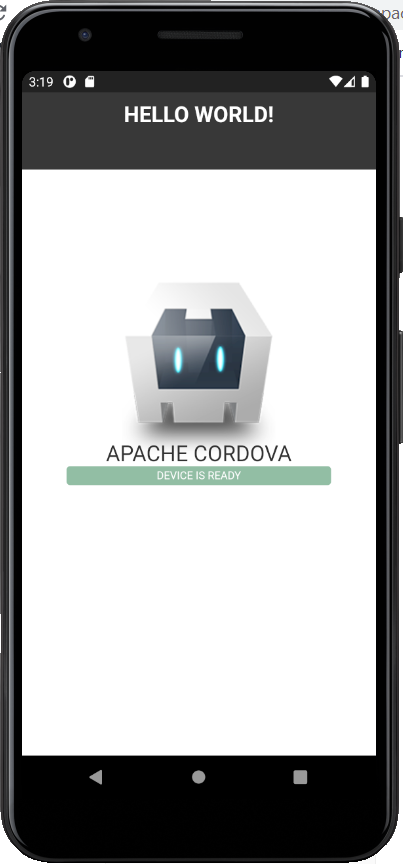
Compile the app to the HelloWorld/www folder that you just created with CordovaNow in the console lets run it
cordova run androidIf you did everything correct, the app should come up inside the emulator.. If the emulator never starts, start it manually then try again.
I wrote this kind of fast.. I may do a video later.. getting late here now..
let me know how it goes..
It's a pretty large task to get setup ..
The first steps.. is to install Android Studio, Node.js and Cordova.
Android Studio Download
https://developer.android.com/studio/install
Node.js
https://nodejs.org/en/download/
Cordova
https://cordova.apache.org/docs/en/10.x/guide/cli/index.html
C:\>npm install -g cordova
After that I've attached here a sample Hello World VisualNeoWeb app that should jumpstart you on your way..
Unpack the app where you store your VisualNeoWeb apps.
Next create a folder for the App output..
HelloWorld
open a cmd console in the HelloWorld folder
Run: cordova create helloWorld org.apache.cordova.helloWorld helloWorld
Run: cordova platform add android
Now go into VisualNeoWeb
Compile the app to the HelloWorld/www folder that you just created with Cordova
Now in the console lets run it
cordova run android
If you did everything correct, the app should come up inside the emulator.. If the emulator never starts, start it manually then try again.
I wrote this kind of fast.. I may do a video later.. getting late here now..
let me know how it goes..
Uploaded files:
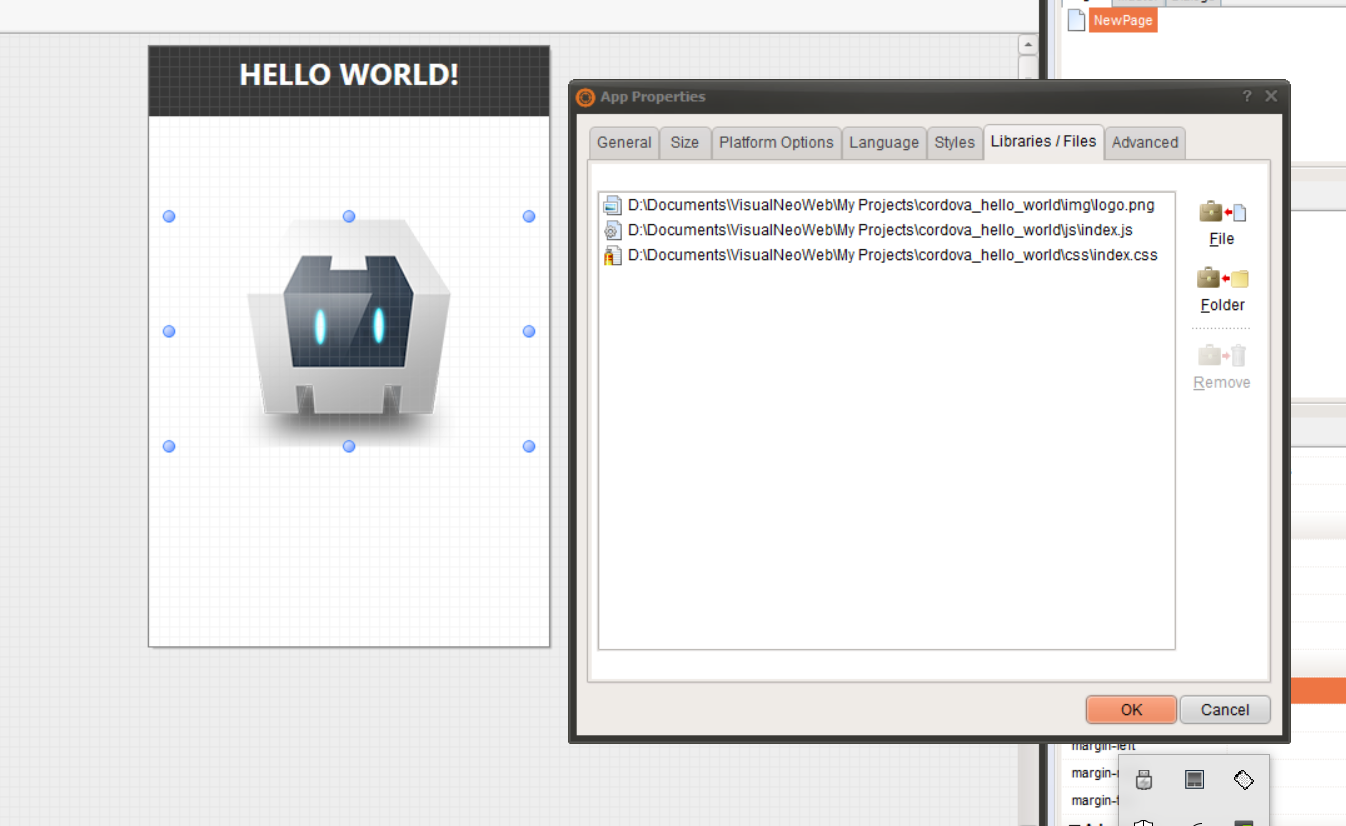
Quote from Darbdenral on February 10, 2021, 1:29 pmAlso check the following attached file paths and correct as needed for your system, then save and compile..
Also check the following attached file paths and correct as needed for your system, then save and compile..
Uploaded files:
Quote from CDY@44 on February 10, 2021, 1:51 pmThank you so much @darbdenral, I will see all of that !
Best regards,
Thank you so much @darbdenral, I will see all of that !
Best regards,

Quote from luishp on February 10, 2021, 2:07 pmI have moved this thread to a new specific forum section.
I'm very interested in optimizing VisualNEO Web for Apache Cordova deployment.Thank you @darbdenral and @shahram!!
I have moved this thread to a new specific forum section.
I'm very interested in optimizing VisualNEO Web for Apache Cordova deployment.
Thank you @darbdenral and @shahram!!
Quote from shahram on February 10, 2021, 4:19 pmQuote from luishp on February 10, 2021, 2:07 pmI have moved this thread to a new specific forum section.
I'm very interested in optimizing VisualNEO Web for Apache Cordova deployment.Thank you @darbdenral and @shahram!!
Thank you @luis
Quote from luishp on February 10, 2021, 2:07 pmI have moved this thread to a new specific forum section.
I'm very interested in optimizing VisualNEO Web for Apache Cordova deployment.Thank you @darbdenral and @shahram!!
Thank you @luis
Quote from shahram on February 10, 2021, 4:33 pmQuote from Darbdenral on February 10, 2021, 1:16 pmIt's a pretty large task to get setup ..
The first steps.. is to install Android Studio, Node.js and Cordova.
Android Studio Download
https://developer.android.com/studio/installNode.js
https://nodejs.org/en/download/Cordova
https://cordova.apache.org/docs/en/10.x/guide/cli/index.html
C:\>npm install -g cordovaAfter that I've attached here a sample Hello World VisualNeoWeb app that should jumpstart you on your way..
Unpack the app where you store your VisualNeoWeb apps.Next create a folder for the App output..
HelloWorld
open a cmd console in the HelloWorld folderRun: cordova create helloWorld org.apache.cordova.helloWorld helloWorld
Run: cordova platform add androidNow go into VisualNeoWeb
Compile the app to the HelloWorld/www folder that you just created with CordovaNow in the console lets run it
cordova run androidIf you did everything correct, the app should come up inside the emulator.. If the emulator never starts, start it manually then try again.
I wrote this kind of fast.. I may do a video later.. getting late here now..
let me know how it goes..
Thanks @darbdenral
but I think its not necessary to install visual studio.
I've just installed these packages:
Android SDK
Java Development Kit 8 (Its important to install version 8)
NodeJS.exe- v 14.15 (latest version have some bugs)
Git.exe
Gradle (it seems it depends on Android API but I'm not sure)
then you have to set Environment Variable System for ANDROID SDK, JDK and GRADLE path.
as well as you need to make some changes in config.xml.
Quote from Darbdenral on February 10, 2021, 1:16 pmIt's a pretty large task to get setup ..
The first steps.. is to install Android Studio, Node.js and Cordova.
Android Studio Download
https://developer.android.com/studio/installNode.js
https://nodejs.org/en/download/Cordova
https://cordova.apache.org/docs/en/10.x/guide/cli/index.html
C:\>npm install -g cordovaAfter that I've attached here a sample Hello World VisualNeoWeb app that should jumpstart you on your way..
Unpack the app where you store your VisualNeoWeb apps.Next create a folder for the App output..
HelloWorld
open a cmd console in the HelloWorld folderRun: cordova create helloWorld org.apache.cordova.helloWorld helloWorld
Run: cordova platform add androidNow go into VisualNeoWeb
Compile the app to the HelloWorld/www folder that you just created with CordovaNow in the console lets run it
cordova run androidIf you did everything correct, the app should come up inside the emulator.. If the emulator never starts, start it manually then try again.
I wrote this kind of fast.. I may do a video later.. getting late here now..
let me know how it goes..
Thanks @darbdenral
but I think its not necessary to install visual studio.
I've just installed these packages:
Android SDK
Java Development Kit 8 (Its important to install version 8)
NodeJS.exe- v 14.15 (latest version have some bugs)
Git.exe
Gradle (it seems it depends on Android API but I'm not sure)
then you have to set Environment Variable System for ANDROID SDK, JDK and GRADLE path.
as well as you need to make some changes in config.xml.
Quote from shahram on February 10, 2021, 5:12 pmHere are the things I do to build an app using Cordova: (PART 1)
- Download and unzip Android SDK Packages on hard drive*(Also you can use SDK Manager)
- Install JDK version 8
- Install Git.exe
- Install NodeJs.exe version 14.15
- Download Gradle (I'm using version 6.8), and unzip.
- Set ANDROID_HOME, JAVA_HOME and GRADLE environment system variables path based on the guide in this link
- Restart system
- open CMD and type: npm install -g cordova (It will install Cordova on your system)
- you can check if these package are installed on your system, by type (cordova -v, java -v, gradle -v) in the cmd.
Here are the things I do to build an app using Cordova: (PART 1)
- Download and unzip Android SDK Packages on hard drive*(Also you can use SDK Manager)
- Install JDK version 8
- Install Git.exe
- Install NodeJs.exe version 14.15
- Download Gradle (I'm using version 6.8), and unzip.
- Set ANDROID_HOME, JAVA_HOME and GRADLE environment system variables path based on the guide in this link
- Restart system
- open CMD and type: npm install -g cordova (It will install Cordova on your system)
- you can check if these package are installed on your system, by type (cordova -v, java -v, gradle -v) in the cmd.
Quote from shahram on February 10, 2021, 6:17 pmHere are the things I do to build an app using Cordova: (PART 2)
- Add this tag in body: <script src="cordova.js"></script>
Compile project for Mobile Application by Project> Compile\Publish
2. After Compile you will have a Zip file named your project.
3. Unzip Zip file and Rename the folder to "www"
4. move config.xml from www folder, next to the "www" folder. so you will have a structure like this:
and inside www folder we'll have:
5. Open config.xml and change contents with below : You can change the red texts with the desired information. as well as other settings based on the guide in this link
.....................................................................................
<?xml version="1.0" encoding="UTF-8" ?>
<widget id="com.cordova.VisualNeo" version="0.0.1" android-versionCode="13" xmlns="http://www.w3.org/ns/widgets" xmlns:cdv="http://cordova.apache.org/ns/1.0"><name short="APP SHORT NAME">APP FULL NAME</name>
<author email="YOUR EMAIL" href="YOUR WEBSITE">YOUR NAME</author>
<icon src="www/img/ICONNAME.png" />
<content src="index.html"/>
<access origin="*"/>
<cdv:platform name="android"/><preference name="orientation" value="default" />
<preference name="android-targetSdkVersion" value="29" />
<preference name="android-minSdkVersion" value="22" />
<preference name="fullscreen" value="false" />
<preference name="StatusBarOverlaysWebView" value="false" />
<preference name="AndroidPersistentFileLocation" value="Compatibility" /><allow-intent href="http://*/*" />
<allow-intent href="https://*/*" />
<allow-intent href="tel:*" />
<allow-intent href="sms:*" />
<allow-intent href="mailto:*" />
<allow-intent href="geo:*" />
<platform name="android">
<allow-intent href="market:*" />
</platform>
</widget>..............................................................................................
5. make a simple text file named compile next to the config.xml and www folder, and add these commands in it. then save it as a "bat" file (compile.bat): "Take a look at this link for more information."
....................................................................................
@ECHO OFF
CLSCD %~dp0
CALL cordova platform add android
CALL cordova plugin add cordova-plugin-device
CALL cordova plugin cordova-plugin-statusbar
CALL cordova plugin add cordova-plugin-whitelist
CALL cordova build android
PAUSE
............................................................................
6. now run "compile.bat". If there is no problem, an APK file will be created after the compilation process.
Here are the things I do to build an app using Cordova: (PART 2)
- Add this tag in body: <script src="cordova.js"></script>

Compile project for Mobile Application by Project> Compile\Publish

2. After Compile you will have a Zip file named your project.
3. Unzip Zip file and Rename the folder to "www"
4. move config.xml from www folder, next to the "www" folder. so you will have a structure like this:

and inside www folder we'll have:

5. Open config.xml and change contents with below : You can change the red texts with the desired information. as well as other settings based on the guide in this link
.....................................................................................
<?xml version="1.0" encoding="UTF-8" ?>
<widget id="com.cordova.VisualNeo" version="0.0.1" android-versionCode="13" xmlns="http://www.w3.org/ns/widgets" xmlns:cdv="http://cordova.apache.org/ns/1.0">
<name short="APP SHORT NAME">APP FULL NAME</name>
<author email="YOUR EMAIL" href="YOUR WEBSITE">YOUR NAME</author>
<icon src="www/img/ICONNAME.png" />
<content src="index.html"/>
<access origin="*"/>
<cdv:platform name="android"/>
<preference name="orientation" value="default" />
<preference name="android-targetSdkVersion" value="29" />
<preference name="android-minSdkVersion" value="22" />
<preference name="fullscreen" value="false" />
<preference name="StatusBarOverlaysWebView" value="false" />
<preference name="AndroidPersistentFileLocation" value="Compatibility" />
<allow-intent href="http://*/*" />
<allow-intent href="https://*/*" />
<allow-intent href="tel:*" />
<allow-intent href="sms:*" />
<allow-intent href="mailto:*" />
<allow-intent href="geo:*" />
<platform name="android">
<allow-intent href="market:*" />
</platform>
</widget>
..............................................................................................
5. make a simple text file named compile next to the config.xml and www folder, and add these commands in it. then save it as a "bat" file (compile.bat): "Take a look at this link for more information."
....................................................................................
@ECHO OFF
CLS
CD %~dp0
CALL cordova platform add android
CALL cordova plugin add cordova-plugin-device
CALL cordova plugin cordova-plugin-statusbar
CALL cordova plugin add cordova-plugin-whitelist
CALL cordova build android
PAUSE
............................................................................
6. now run "compile.bat". If there is no problem, an APK file will be created after the compilation process.

Quote from farhad2008 on February 11, 2021, 1:56 pmHi,
Please up a Compiled Apk with Cordova
Thank You
Hi,
Please up a Compiled Apk with Cordova
Thank You
Quote from shahram on February 11, 2021, 4:46 pmQuote from farhad2008 on February 11, 2021, 1:56 pmHi,
Please up a Compiled Apk with Cordova
Thank You
Hi Farhad
here you go...
Minimum android Version: 5.1
Quote from farhad2008 on February 11, 2021, 1:56 pmHi,
Please up a Compiled Apk with Cordova
Thank You
Hi Farhad
here you go...
Minimum android Version: 5.1