
VisualNEO Web. Version 21.4.29 released

Quote from See_Half on June 17, 2021, 12:07 pmVisualNeoweb program's version 20.3.9 is done 32bit
Can be run on Windows Experience 32bit fine
I still using this..
Great !
VisualNeoweb program's version 20.3.9 is done 32bit
Can be run on Windows Experience 32bit fine
I still using this..
Great !

Quote from See_Half on June 17, 2021, 3:57 pm@luishp
I already download and using windows xp service pack 3 32bit
When i run Getting error says"Warning Invalid installed win 32" but version 20.3.9 really work great.
I don't know why ..so i can't try new update version.
Please check out the version old and new of machine, i think is there something wrong development version Visualneoweb.
My suggestion You better make it with Visualneoweb under Windows XP Service Pack 3.
On Microsoft Edge Operating Systems X86 is not called windows 32bit again they are used Chromium or the Monster that big memory !!!
As far as I know,
Regards,
I already download and using windows xp service pack 3 32bit
When i run Getting error says"Warning Invalid installed win 32" but version 20.3.9 really work great.
I don't know why ..so i can't try new update version.
Please check out the version old and new of machine, i think is there something wrong development version Visualneoweb.
My suggestion You better make it with Visualneoweb under Windows XP Service Pack 3.
On Microsoft Edge Operating Systems X86 is not called windows 32bit again they are used Chromium or the Monster that big memory !!!
As far as I know,
Regards,
Quote from See_Half on June 17, 2021, 4:09 pmAll this because of google born!
That issue,google remove all that thing 32bit and X86 in plant has Morpheus to machine new world.
A lot of people are now confused about downloading software because of the weirdness of 32bit or X86 everywhere nowadays, so I have an old and new multiboot bios.
So be fun,thats all
All this because of google born!
That issue,google remove all that thing 32bit and X86 in plant has Morpheus to machine new world.
A lot of people are now confused about downloading software because of the weirdness of 32bit or X86 everywhere nowadays, so I have an old and new multiboot bios.
So be fun,thats all
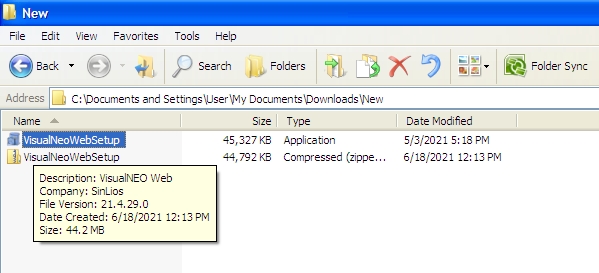
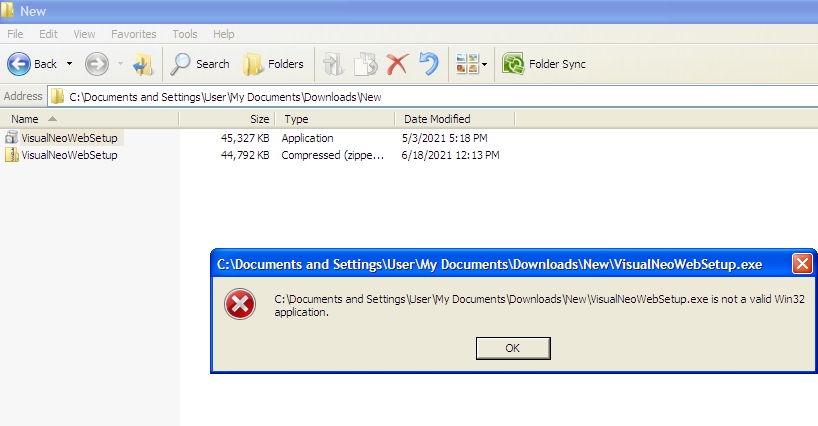
Quote from luishp on June 18, 2021, 11:55 am@see_half ok, I understand. It's the installer, not the main program executable. I will check it.
Thank you!
@see_half ok, I understand. It's the installer, not the main program executable. I will check it.
Thank you!
Quote from luishp on June 22, 2021, 12:05 pm@see_half according to InnoSetup (the software we use to generate the installer):
Change in default behavior: Starting with Inno Setup 6.1 the [Setup] section directive MinVersion defaults to 6.1sp1, so by default Setup will not run on Windows Vista or on versions of Windows 7 and Windows Server 2008 R2 which have not been updated. Setting MinVersion to 6.0 to allow Setup to run on Windows Vista is supported but not recommended: Windows Vista doesn't support some of Setup's security measures against potential DLL preloading attacks so these have to be removed by the compiler if MinVersion is below 6.1 making your installer less secure on all versions of Windows.
@see_half according to InnoSetup (the software we use to generate the installer):
Change in default behavior: Starting with Inno Setup 6.1 the [Setup] section directive MinVersion defaults to 6.1sp1, so by default Setup will not run on Windows Vista or on versions of Windows 7 and Windows Server 2008 R2 which have not been updated. Setting MinVersion to 6.0 to allow Setup to run on Windows Vista is supported but not recommended: Windows Vista doesn't support some of Setup's security measures against potential DLL preloading attacks so these have to be removed by the compiler if MinVersion is below 6.1 making your installer less secure on all versions of Windows.
Quote from See_Half on June 22, 2021, 2:50 pm@luishp
How do I find out MinVersion defaults to 6.1sp1 in inno setup, or is there anything extra to install it?
So far I only use the version on Microsoft Msi installer or called standard windows installer for protection on preload installation or install shield, I still don't understand the inno setup installer can you give me a download link for installing programs with windows XP SP3 32bit?
For the Vusual Neo brand currently only booting with Windows XP 32bit operating system and apart from that they don't work well, for example windows 7 memory is very long when running the Visual neo brand program and there are oddities when compiling such as compitable windows 7 bugs or crashes .so that's it i found fo Visual Neo Branded.
Best Regards,
How do I find out MinVersion defaults to 6.1sp1 in inno setup, or is there anything extra to install it?
So far I only use the version on Microsoft Msi installer or called standard windows installer for protection on preload installation or install shield, I still don't understand the inno setup installer can you give me a download link for installing programs with windows XP SP3 32bit?
For the Vusual Neo brand currently only booting with Windows XP 32bit operating system and apart from that they don't work well, for example windows 7 memory is very long when running the Visual neo brand program and there are oddities when compiling such as compitable windows 7 bugs or crashes .so that's it i found fo Visual Neo Branded.
Best Regards,

Quote from dglojnar on June 22, 2021, 4:28 pm@see_half
InnoSetup is not a rocket science, so, take a little bit time and RFM if it's important for you :-)
According VisualNeo/Neobook installations and productivity - I have all possible Windows from XP to 11 with both flavor 32/64 -bit and don't have any problems on real nor virtual machines - installing, running, compiling, debugging etc...
All VisualNeo/Neobook instance work fast without problems, so, if you experience some problems, probably you have to look on your computer and find what's going wrong.
I found some of your posts you post recently - IMHO you have to try better explain what is your problem/dilemma/whatever, so the other forum members can help you:-)
Regards:-)
InnoSetup is not a rocket science, so, take a little bit time and RFM if it's important for you :-)
According VisualNeo/Neobook installations and productivity - I have all possible Windows from XP to 11 with both flavor 32/64 -bit and don't have any problems on real nor virtual machines - installing, running, compiling, debugging etc...
All VisualNeo/Neobook instance work fast without problems, so, if you experience some problems, probably you have to look on your computer and find what's going wrong.
I found some of your posts you post recently - IMHO you have to try better explain what is your problem/dilemma/whatever, so the other forum members can help you:-)
Regards:-)
Quote from See_Half on June 23, 2021, 7:47 am@dglojnar
Windows Experience 32bit Service Pack 3 Excluded in the installer is the only one I know of other forums.
https://jrsoftware.org/ishelp/topic_setup_minversion.htm
Minimum version is windows vista,7,8,10.
Regards,
Windows Experience 32bit Service Pack 3 Excluded in the installer is the only one I know of other forums.
https://jrsoftware.org/ishelp/topic_setup_minversion.htm
Minimum version is windows vista,7,8,10.
Regards,

Quote from rcohen on July 8, 2021, 9:31 am@dglonjnar, I believe she is saying that the installer for VNW itself is using inno and that she can't install VNW because of that. She is trying to find a get-around for her problem, that is caused by Inno not working on her platform.
@dglonjnar, I believe she is saying that the installer for VNW itself is using inno and that she can't install VNW because of that. She is trying to find a get-around for her problem, that is caused by Inno not working on her platform.