
VisualNEO Win and Web working together!

Quote from luishp on January 24, 2020, 6:28 pmIMPORTANT: This sample app will be online only for limited time
I have just published the very first VisualNEO Win Server Side Powered web application created with VisualNEO Web.
It's made with only a few lines of code. This is what I have done to publish it on the Internet:
- Start neoServer (beta)
- Open port 80 in my router.
- Redirect the domain notitas.xyz to my IP
Check it out here: http://notitas.xyz
The app will work meanwhile the server is running on my side.
You can visit the app from your desktop, tablet or mobile :)@cdy44-2 @gaev @vadim @farhad2008 @asmat @mazzu001
IMPORTANT: This sample app will be online only for limited time
I have just published the very first VisualNEO Win Server Side Powered web application created with VisualNEO Web.
It's made with only a few lines of code. This is what I have done to publish it on the Internet:
- Start neoServer (beta)
- Open port 80 in my router.
- Redirect the domain notitas.xyz to my IP
Check it out here: http://notitas.xyz
The app will work meanwhile the server is running on my side.
You can visit the app from your desktop, tablet or mobile :)
@cdy44-2 @gaev @vadim @farhad2008 @asmat @mazzu001
Uploaded files: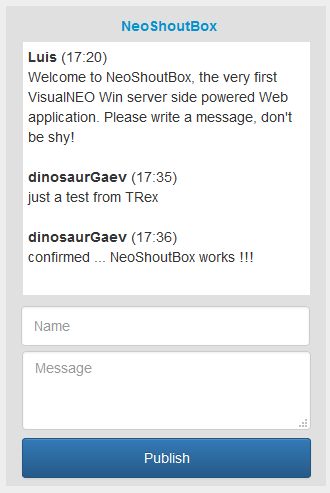


Quote from mazzu001 on January 25, 2020, 6:50 amVery cool, if I am understanding everything correctly then this opens up a lot of possibilities for sure
Very cool, if I am understanding everything correctly then this opens up a lot of possibilities for sure

Quote from luishp on January 25, 2020, 1:51 pmThank you all for helping me test the application!
It worked very well although it lacks some security and error handling functionality. This is a very good project to learn about how client-server apps work. Take a look at the attached files (includes NeoWeb and NeoWin source code) It works with just a few lines of code and a really small and easy to use Web Server I will include in next release.Very cool, if I am understanding everything correctly then this opens up a lot of possibilities for sure
Yes, I think so :)
It turns out that the web application uses the server on the home computer?
Yes, from my home computer to the world :)
You can already do that with NeoPhpServer. Just use your local IP as Binding Adress and open port 80 in your router. You will access your App from everywhere using your external IP.By the way, I'm thinking about doing a lot of videotutorials in the near future. They will probably be in Spanish (my spoken english is terrible) so I hope automatic translation will do a good job in Youtube.
Thank you all for helping me test the application!
It worked very well although it lacks some security and error handling functionality. This is a very good project to learn about how client-server apps work. Take a look at the attached files (includes NeoWeb and NeoWin source code) It works with just a few lines of code and a really small and easy to use Web Server I will include in next release.
Very cool, if I am understanding everything correctly then this opens up a lot of possibilities for sure
Yes, I think so :)
It turns out that the web application uses the server on the home computer?
Yes, from my home computer to the world :)
You can already do that with NeoPhpServer. Just use your local IP as Binding Adress and open port 80 in your router. You will access your App from everywhere using your external IP.
By the way, I'm thinking about doing a lot of videotutorials in the near future. They will probably be in Spanish (my spoken english is terrible) so I hope automatic translation will do a good job in Youtube.
Uploaded files: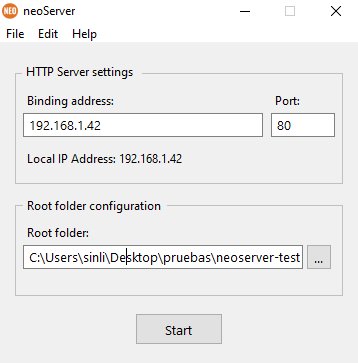

Quote from Gaev on January 25, 2020, 4:02 pm@luishp
I will download and study the files later.
It worked very well although it lacks some security and error handling functionality.
In the mean time, developers could setup an isolated PC just to service requests using (CGI) programs built with VisualNEOWin (and/or NeoDBPro plugin).
Idea: Would it be possible to set up a Windows PC at neoCloud (or any willing web host) such that VisualNEO customers could run this configuration in the cloud ? ... if you could run multiple copies of the tiny server (one for each developer, in a separate folder), it could be cost effective.
I will download and study the files later.
It worked very well although it lacks some security and error handling functionality.
In the mean time, developers could setup an isolated PC just to service requests using (CGI) programs built with VisualNEOWin (and/or NeoDBPro plugin).
Idea: Would it be possible to set up a Windows PC at neoCloud (or any willing web host) such that VisualNEO customers could run this configuration in the cloud ? ... if you could run multiple copies of the tiny server (one for each developer, in a separate folder), it could be cost effective.