
VisualNEO Win Suggestions and Wishes

Quote from luishp on July 27, 2026, 3:03 pmHi everyone,
Please share here all your suggestions and wishes for the coming versions.
Thank you!
Hi everyone,
Please share here all your suggestions and wishes for the coming versions.
Thank you!

Quote from Anthony LaTorre on July 27, 2026, 3:41 pmIt would be nice to have an updated listbox, with drag and drop functionality... Also listbox item rows with checkboxes...
Also a rich text edit control to replace / compliment the Article Object...Ok Luis get to work... Lol...
I'm really enjoying the new version... And thanks for all the updates...
It would be nice to have an updated listbox, with drag and drop functionality... Also listbox item rows with checkboxes...
Also a rich text edit control to replace / compliment the Article Object...
Ok Luis get to work... Lol...
I'm really enjoying the new version... And thanks for all the updates...

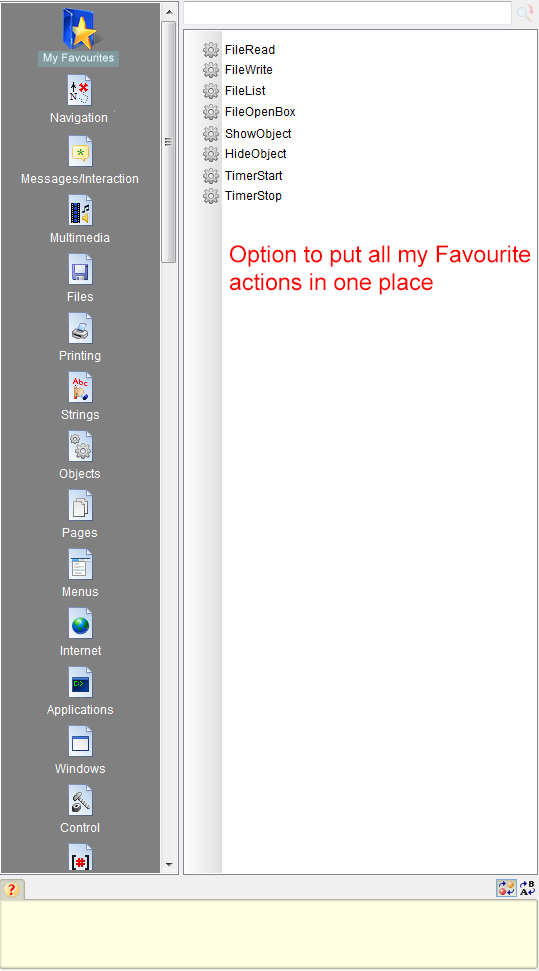
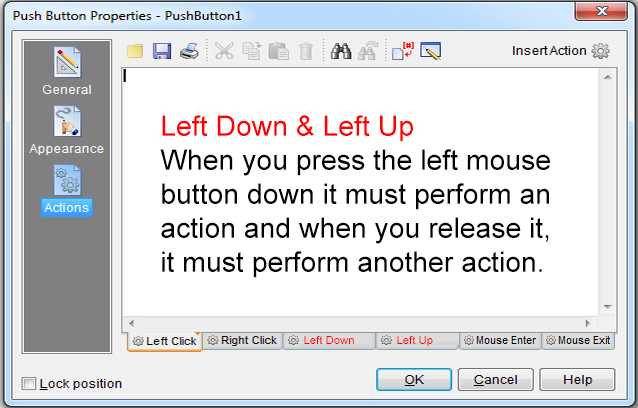
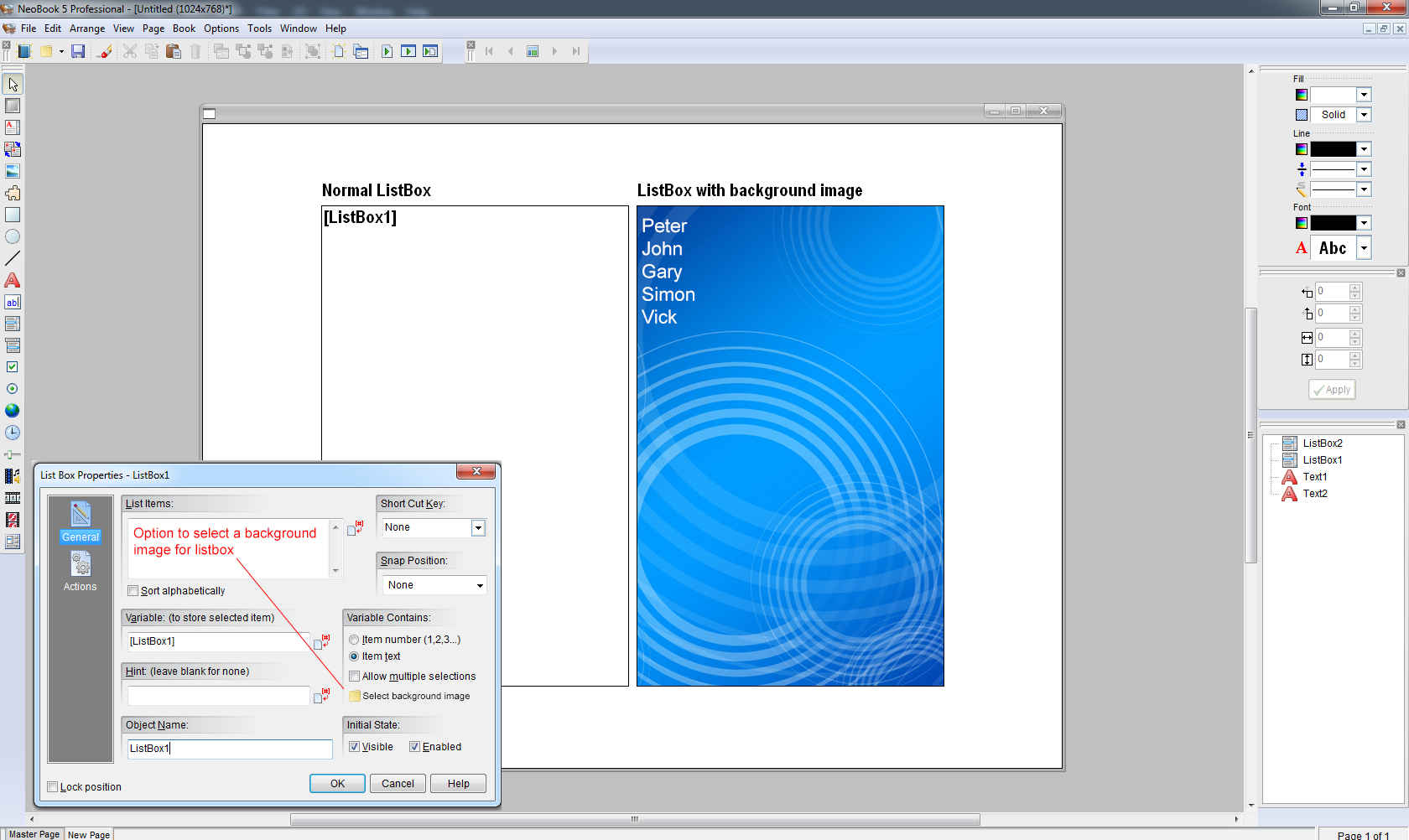
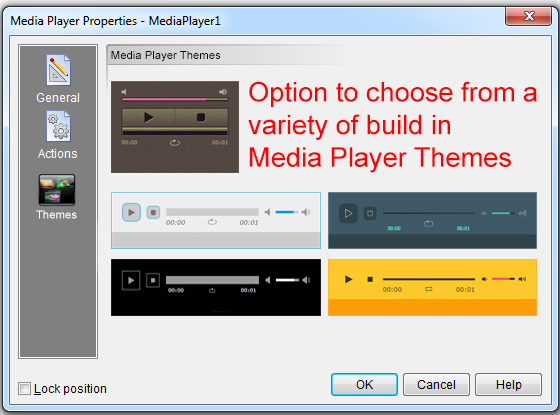
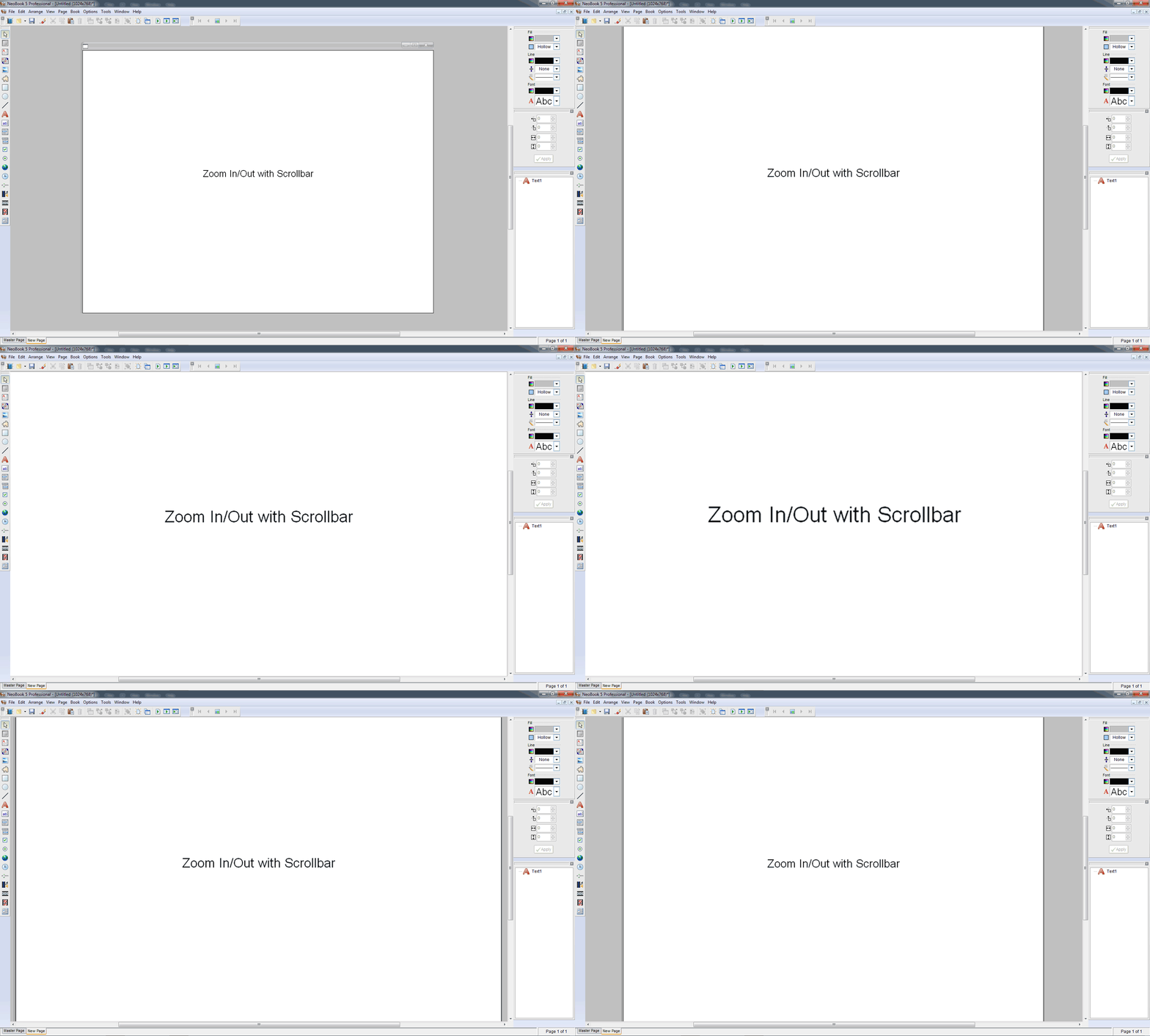
Quote from impactband4u on July 27, 2026, 6:25 pmThis was updates I ask from 2019. Maybe some of them can be useful for others also. (See pictures)
Other options for my Wishlist
- If free plugins and functions can be implemented into VisualNeo Win, it will make a huge update.
- Modern designs for setup program and installation disk(s)
This was updates I ask from 2019. Maybe some of them can be useful for others also. (See pictures)
Other options for my Wishlist
- If free plugins and functions can be implemented into VisualNeo Win, it will make a huge update.
- Modern designs for setup program and installation disk(s)
Quote from luishp on July 27, 2026, 6:52 pm@impactband4u I take note :)
Please note that we have already implemented a modern design for setup program. VisualNEO Win now detects InnoSetup and creates an installer for your application automatically, very similar to the one we use for VisualNEO Win itself (check the version 26.7.19 update thread for more information)
@impactband4u I take note :)
Please note that we have already implemented a modern design for setup program. VisualNEO Win now detects InnoSetup and creates an installer for your application automatically, very similar to the one we use for VisualNEO Win itself (check the version 26.7.19 update thread for more information)
Quote from mishem on July 28, 2026, 2:27 pm1. Need to anchor objects to the left + right, top + bottom, etc.
So that when the window is resized, the object's dimensions change.
2. Need to drag and drop files into the window.
3. Need to retrieve and paste images, files, etc. from/to the clipboard.
4. Need a container splitter.
5. Need tabs, a tree view.
The list is endless.
1. Need to anchor objects to the left + right, top + bottom, etc.
So that when the window is resized, the object's dimensions change.
2. Need to drag and drop files into the window.
3. Need to retrieve and paste images, files, etc. from/to the clipboard.
4. Need a container splitter.
5. Need tabs, a tree view.
The list is endless.
Quote from Anthony LaTorre on July 28, 2026, 2:55 pmMishemn, here are some plugins that I created that may help you:
NeoFit. Anchor and / or resize objects:
https://visualneo.com/forum/topic/new-plugin-neofit-6-7-26Splitter Control. Resize 2 container objects:
https://visualneo.com/forum/topic/new-plugin-splitter-control-1-5-26Hope you find them useful...
Mishemn, here are some plugins that I created that may help you:
NeoFit. Anchor and / or resize objects:
https://visualneo.com/forum/topic/new-plugin-neofit-6-7-26
Splitter Control. Resize 2 container objects:
https://visualneo.com/forum/topic/new-plugin-splitter-control-1-5-26
Hope you find them useful...
Quote from mishem on July 28, 2026, 4:28 pm@anthony-latorre
The discussion here is not about which plugins are available, but about what needs to be added to the program.
@anthony-latorre
The discussion here is not about which plugins are available, but about what needs to be added to the program.

Quote from alangonzalez91 on July 28, 2026, 4:30 pmDesde el editor de codigo, si hay una funcion gosub
gosub "...my sub"
- Que se permita abrir ese gosub para editarlo, sin tener que cerrar el editor, e ir a la seccion de la subrutina...
- Ademas, si se coloca el mouse encima del gosub, que muestre un Hint con las 3 o 4 primeras lineas del codigo del gosub que es donde normalmente se coloca la descripcion y forma de uso de la subrutina en forma de comentarios
Desde el editor de codigo, si hay una funcion gosub
gosub "...my sub"
- Que se permita abrir ese gosub para editarlo, sin tener que cerrar el editor, e ir a la seccion de la subrutina...
- Ademas, si se coloca el mouse encima del gosub, que muestre un Hint con las 3 o 4 primeras lineas del codigo del gosub que es donde normalmente se coloca la descripcion y forma de uso de la subrutina en forma de comentarios
Quote from Anthony LaTorre on July 28, 2026, 4:45 pmMishem, I listed the plugins because I was under the impression you needed a splitter and something to scale and reposition objects...
Just trying to be helpful...
Mishem, I listed the plugins because I was under the impression you needed a splitter and something to scale and reposition objects...
Just trying to be helpful...

Quote from Sinesi Giuseppe on July 29, 2026, 12:16 amOther suggestions.
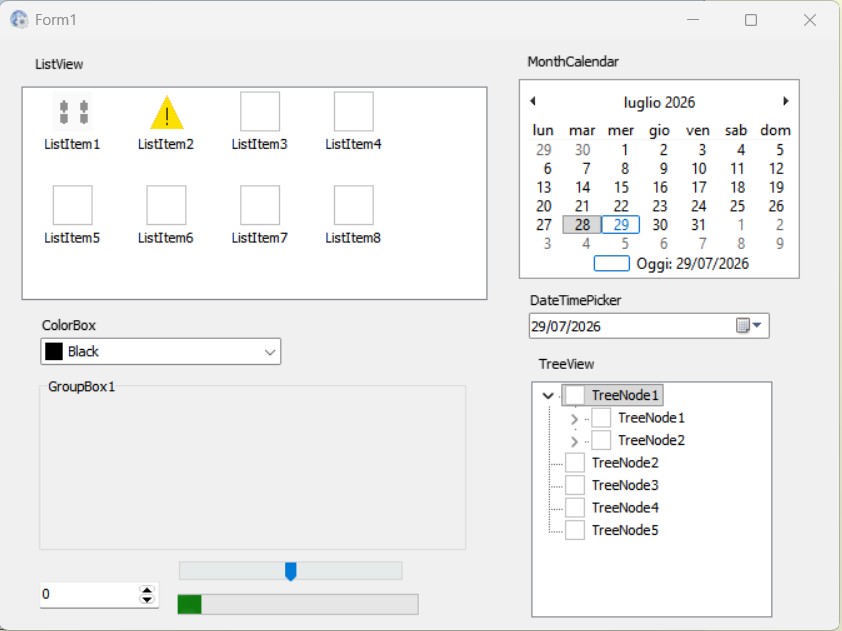
Quote from luishp on July 29, 2026, 5:57 pm@sinesi-giuseppe I have just published a new update with progress bar, calendar and file drop tools.
I have also updated the tabs tool as you asked :)
@sinesi-giuseppe I have just published a new update with progress bar, calendar and file drop tools.
I have also updated the tabs tool as you asked :)
Quote from no1g8tor96 on July 30, 2026, 2:32 amCrazy question but why not? I dont know what language this creates in the background but is there a way to EXPORT the code to a Language like PureBasic etc where we can compile for Mac and Linux. I know that WEB is for that but this is so much easier to use. LOL. The more I use it the more I like it.....I know the majority of people use Windows, but Mac and Linux are growing leaps and bounds and I use all 3.
You created a MONSTER with updating this. I had no interest in this and only Web but the more i use it the ease and stuff you have added are making my interest more and more in using VN. Keep it up. This is cool stuff. Especially for the novices, like me who have a hard time with WEB unless I use ChatGPT, but this I can do so much so easy on my own. This is what will make VN blow up and be Renewed to the world.
Thanks so much.
Crazy question but why not? I dont know what language this creates in the background but is there a way to EXPORT the code to a Language like PureBasic etc where we can compile for Mac and Linux. I know that WEB is for that but this is so much easier to use. LOL. The more I use it the more I like it.....I know the majority of people use Windows, but Mac and Linux are growing leaps and bounds and I use all 3.
You created a MONSTER with updating this. I had no interest in this and only Web but the more i use it the ease and stuff you have added are making my interest more and more in using VN. Keep it up. This is cool stuff. Especially for the novices, like me who have a hard time with WEB unless I use ChatGPT, but this I can do so much so easy on my own. This is what will make VN blow up and be Renewed to the world.
Thanks so much.

Quote from Darbdenral on July 30, 2026, 2:46 am@luishp
Requesting documentation updates for the new modern actions and any new global variables, etc.. if available..
thanks!
Brad
Requesting documentation updates for the new modern actions and any new global variables, etc.. if available..
thanks!
Brad
Quote from markuspr on July 30, 2026, 2:00 pmPerhaps it would be possible to integrate a file explorer — maybe with a starting directory, storing the selected folder in a variable, and so on. That would be great.
Perhaps it would be possible to integrate a file explorer — maybe with a starting directory, storing the selected folder in a variable, and so on. That would be great.
Quote from impactband4u on July 31, 2026, 10:05 amHi Luishp
Other small suggestions for future updates. (see demo pictures)
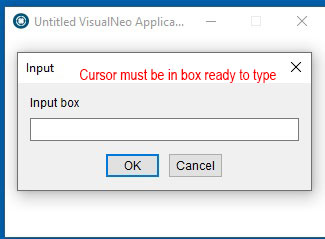
1. When you click "Input box button, the cursor should be in the box, ready to type. Now you have to select the input box everytime.
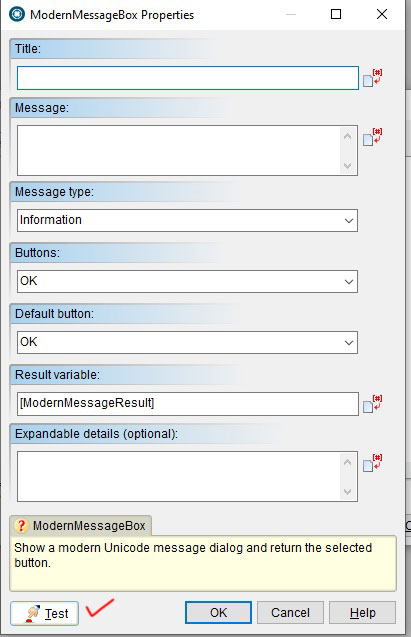
2. ModernMessageBox and ModernToast, it will be nice to have a 'Test' button also. Same as InputBox.
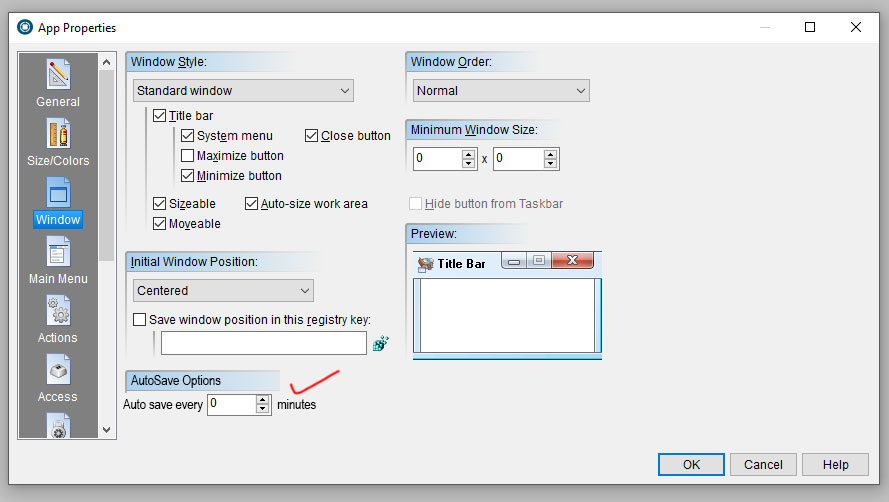
3. If VisualNeo Win can have an "Auto Save" option box to Save every 0 minutes (that will be off by default) or every 1,5,10,20,30 minutes.
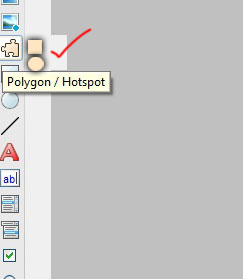
4. Rectangle + Ellipse (round) Polygon/Hotspots
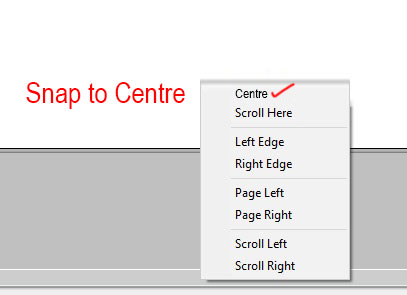
5. Snap potition for Vertical & Horizontal bars
Hi Luishp
Other small suggestions for future updates. (see demo pictures)
1. When you click "Input box button, the cursor should be in the box, ready to type. Now you have to select the input box everytime.
2. ModernMessageBox and ModernToast, it will be nice to have a 'Test' button also. Same as InputBox.
3. If VisualNeo Win can have an "Auto Save" option box to Save every 0 minutes (that will be off by default) or every 1,5,10,20,30 minutes.
4. Rectangle + Ellipse (round) Polygon/Hotspots
5. Snap potition for Vertical & Horizontal bars
Quote from Sinesi Giuseppe on August 1, 2026, 12:03 amThanks for all the updates you are implementing, I created a small app with some ideas to take for the VNW, now after this fantastic update you can consider updating NeoDBpro as well.
Thanks for all the updates you are implementing, I created a small app with some ideas to take for the VNW, now after this fantastic update you can consider updating NeoDBpro as well.
Uploaded files:Quote from Darbdenral on August 1, 2026, 12:46 amRequesting the Modern Web Browser have the following actions and settings.
1.) browser cache-clearing action.
2.) browser data folder removal action.
3.) browser data folder location over-ride setting (handy for portable apps).
thanks!
Requesting the Modern Web Browser have the following actions and settings.
1.) browser cache-clearing action.
2.) browser data folder removal action.
3.) browser data folder location over-ride setting (handy for portable apps).
thanks!
Quote from no1g8tor96 on August 1, 2026, 1:05 amGrid Tool.
Would like to be able to not be a blind plugin and make a Text based grid with and without lines that could be used for text with tabs and could get data by calling say line 1 object 3 and put it into a variable to process.
Yes I know there are plugins but they all are hard to use. They need a lot of code to make a simple grid.
Could even be a text field that can set tabs and just go line to line tab to tab to create the grid and could choose lines or no lines.
A lot of languages have this and makes it easy to create small grids of text. I tried the Grid In VN Web and its just too complicated for quick list grids.
Thanks for listening
Grid Tool.
Would like to be able to not be a blind plugin and make a Text based grid with and without lines that could be used for text with tabs and could get data by calling say line 1 object 3 and put it into a variable to process.
Yes I know there are plugins but they all are hard to use. They need a lot of code to make a simple grid.
Could even be a text field that can set tabs and just go line to line tab to tab to create the grid and could choose lines or no lines.
A lot of languages have this and makes it easy to create small grids of text. I tried the Grid In VN Web and its just too complicated for quick list grids.
Thanks for listening
Quote from alangonzalez91 on August 3, 2026, 1:07 pmNew command control IfMatch - To check for the existence of a string in an array of strings directly, without going through searchstr..., the separator symbol should be optionally indicated.
.example
setvar "[my car]" "Audi"

Ifmatch "[my car]" "Ford;Toyota;Rnault"
  alertbox "Car" "Car match!"
Else
    alertbox "Car" "Car not match!"
Endif

......

Ifmatch "[option selec]" "Export PDF;Export IMG"
  filesaveBox "Save as..." "D:".....
Endif
New command control IfMatch - To check for the existence of a string in an array of strings directly, without going through searchstr..., the separator symbol should be optionally indicated.
.example
setvar "[my car]" "Audi"

Ifmatch "[my car]" "Ford;Toyota;Rnault"
  alertbox "Car" "Car match!"
Else
    alertbox "Car" "Car not match!"
Endif

......

Ifmatch "[option selec]" "Export PDF;Export IMG"
  filesaveBox "Save as..." "D:".....
Endif

Quote from naglieri on August 4, 2026, 12:03 pmNew or different Plugin viewer
Another thing that would be interesting is to have a different view of the plugins in the "Plugin Installer."
Let me explain: to see who created a specific plugin, all of my folders are sorted by author.
While in the program, even though I have to move them one by one manually, they're all listed.A button with a dual view would be handy: a list with folders by developer and a sequential list like now.
The "Find" button within the "Insert Action" also doesn't make much sense.
It would make more sense to find the words within the plugin description rather than the plugin name itself.There are two external plugins: PluginReader by Mathsoft and zmPluginInfo by Peter Pavlov, which partially do what I'm looking for (but they don't analyze all the plugins properly).
Thanks
New or different Plugin viewer
Another thing that would be interesting is to have a different view of the plugins in the "Plugin Installer."
Let me explain: to see who created a specific plugin, all of my folders are sorted by author.
While in the program, even though I have to move them one by one manually, they're all listed.
A button with a dual view would be handy: a list with folders by developer and a sequential list like now.
The "Find" button within the "Insert Action" also doesn't make much sense.
It would make more sense to find the words within the plugin description rather than the plugin name itself.
There are two external plugins: PluginReader by Mathsoft and zmPluginInfo by Peter Pavlov, which partially do what I'm looking for (but they don't analyze all the plugins properly).
Thanks