
Write .rtf file

Quote from Scott_Chegg on March 11, 2026, 9:16 pmI am trying to silently write an .rtf file to a folder as a "report".
The host .rtf file was created within the text editor & contains tables that are populated with variables entered by the user. I have used the "PrintTextFile" command to prove it populates as required, but that opens a dialogue box where I /the user has to use the print to PDF function. but this defeats the whole idea of doing this "silently" without the users interaction.If I write the report using the "FileWrite" command line by line, the results are just lines of boring text, which is not really a presentable / proffesional document.
I'm guessing that this is not possible, but any help would be most appreciated.
Thanks for reading !
I am trying to silently write an .rtf file to a folder as a "report".
The host .rtf file was created within the text editor & contains tables that are populated with variables entered by the user. I have used the "PrintTextFile" command to prove it populates as required, but that opens a dialogue box where I /the user has to use the print to PDF function. but this defeats the whole idea of doing this "silently" without the users interaction.
If I write the report using the "FileWrite" command line by line, the results are just lines of boring text, which is not really a presentable / proffesional document.
I'm guessing that this is not possible, but any help would be most appreciated.
Thanks for reading !

Quote from alangonzalez91 on March 12, 2026, 3:04 pmCheck this!
Check this!
Quote from Scott_Chegg on March 12, 2026, 11:38 pmMany thanks alangonzalez91 any help is welcome....
But I need to do this blind /silently without any user interaction.
Thank you all the same !
Many thanks alangonzalez91 any help is welcome....
But I need to do this blind /silently without any user interaction.
Thank you all the same !

Quote from dglojnar on March 13, 2026, 2:14 pm@scott_chegg
Try Edit>Create/Edit>New Text file - this open a built in RTF editor so you can silently do whatever you want - I use this all the time
Just be careful - what you see in editor IS NOT THE same as result !!!
So you have to make some adjustements...But everything works - tables,images,formatting, variables,images...
Once you create a "base" file you can do whatever you want...Hope this help, at least work perfectly for me - and i also silently convert RTF to PDF,HTML etc....
Cheers!
Try Edit>Create/Edit>New Text file - this open a built in RTF editor so you can silently do whatever you want - I use this all the time
Just be careful - what you see in editor IS NOT THE same as result !!!
So you have to make some adjustements...
But everything works - tables,images,formatting, variables,images...
Once you create a "base" file you can do whatever you want...
Hope this help, at least work perfectly for me - and i also silently convert RTF to PDF,HTML etc....
Cheers!
Quote from alangonzalez91 on March 13, 2026, 4:01 pmSorry, you misunderstood... That component, WK, automatically generates images and PDFs without any intervention... What I added to the development is the display of that generated PDF file... So you only need to use the component to generate the PDF from HTML and omit the display. Regards
Sorry, you misunderstood... That component, WK, automatically generates images and PDFs without any intervention... What I added to the development is the display of that generated PDF file... So you only need to use the component to generate the PDF from HTML and omit the display. Regards

Quote from Vadim on March 16, 2026, 8:24 pm@alangonzalez91
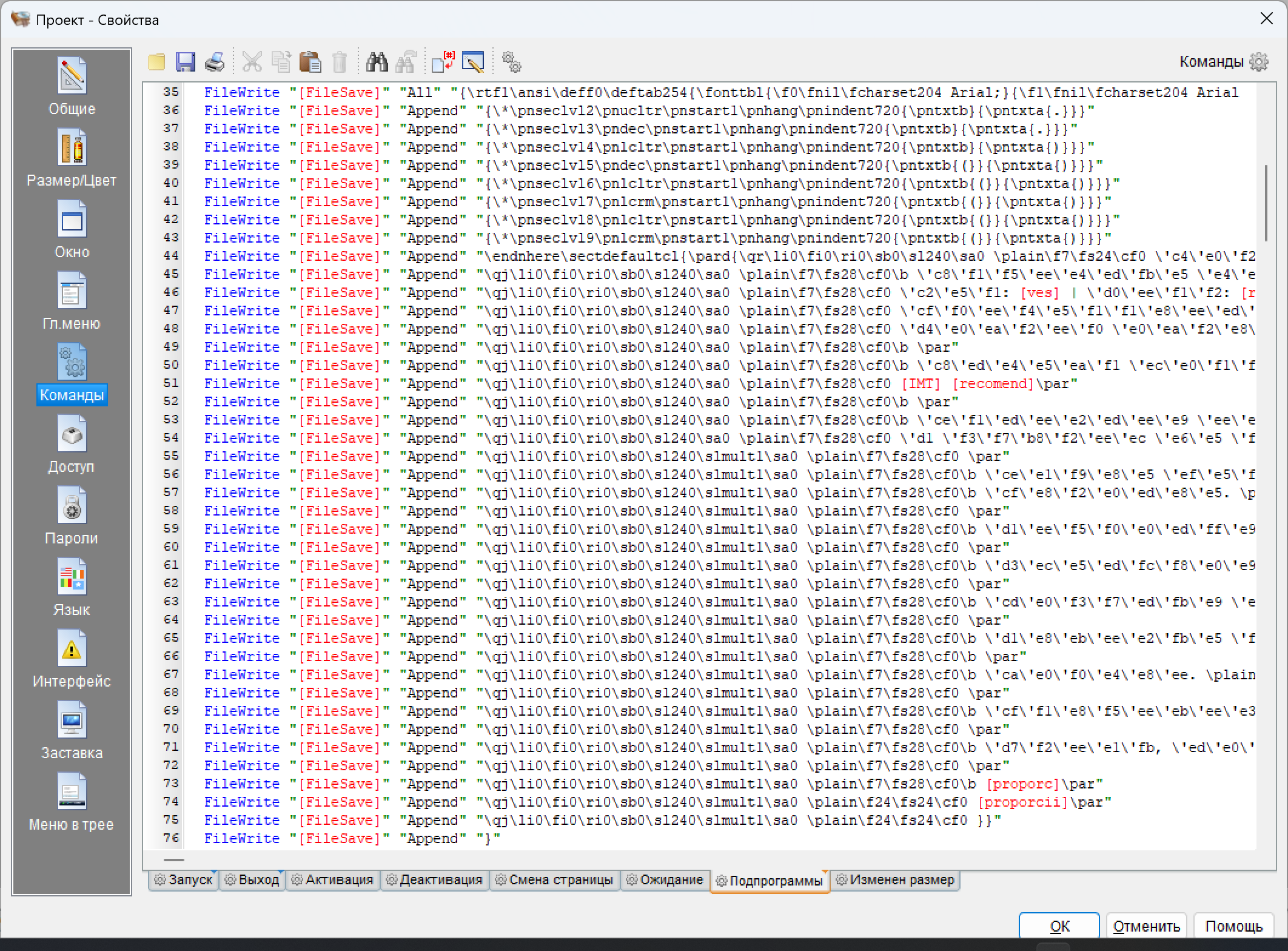
You can also use the "FileWrite" command to create a formatted document by creating a template of strings using RTF code and inserting variable names. However, this is not very convenient. Here's an example of how it looks in my screenshot.
You can also try my vlWord plugin, which allows you to create documents with any formatting.
You can also use the "FileWrite" command to create a formatted document by creating a template of strings using RTF code and inserting variable names. However, this is not very convenient. Here's an example of how it looks in my screenshot.
You can also try my vlWord plugin, which allows you to create documents with any formatting.
Uploaded files:

Quote from fkapnist on March 18, 2026, 9:53 amQuote from Vadim on March 16, 2026, 8:24 pm@alangonzalez91
You can also use the "FileWrite" command to create a formatted document by creating a template of strings using RTF code and inserting variable names. However, this is not very convenient. Here's an example of how it looks in my screenshot.
You can also try my vlWord plugin, which allows you to create documents with any formatting.
You can use @Vadim method of writing and appending each line, one by one. Or you can embed a pre-written rtf file with variable keyword placeholders to change with the user's input. Use the string utility StrReplace.
.
Quote from Vadim on March 16, 2026, 8:24 pmYou can also use the "FileWrite" command to create a formatted document by creating a template of strings using RTF code and inserting variable names. However, this is not very convenient. Here's an example of how it looks in my screenshot.
You can also try my vlWord plugin, which allows you to create documents with any formatting.
You can use @Vadim method of writing and appending each line, one by one. Or you can embed a pre-written rtf file with variable keyword placeholders to change with the user's input. Use the string utility StrReplace.
.
Quote from fkapnist on March 18, 2026, 10:12 amQuote from Scott_Chegg on March 11, 2026, 9:16 pmI am trying to silently write an .rtf file to a folder as a "report".
The host .rtf file was created within the text editor & contains tables that are populated with variables entered by the user. I have used the "PrintTextFile" command to prove it populates as required, but that opens a dialogue box where I /the user has to use the print to PDF function. but this defeats the whole idea of doing this "silently" without the users interaction.If I write the report using the "FileWrite" command line by line, the results are just lines of boring text, which is not really a presentable / proffesional document.
I'm guessing that this is not possible, but any help would be most appreciated.
Thanks for reading !source rtf reads: "It was a KEYWORD1 and stormy KEYWORD2."
SetVar "[UserInput1]" "dark"
SetVar "[UserInput2]" "night"

StrReplace "[source]" "KEYWORD1" "[UserInput1]" "[sourcetmp]" ""
StrReplace "[sourcetmp]" "KEYWORD2" "[UserInput2]" "[sourcefinal]" ""
sourcefinal rtf will then read: "It was a dark and stormy night."
.
Quote from Scott_Chegg on March 11, 2026, 9:16 pmI am trying to silently write an .rtf file to a folder as a "report".
The host .rtf file was created within the text editor & contains tables that are populated with variables entered by the user. I have used the "PrintTextFile" command to prove it populates as required, but that opens a dialogue box where I /the user has to use the print to PDF function. but this defeats the whole idea of doing this "silently" without the users interaction.If I write the report using the "FileWrite" command line by line, the results are just lines of boring text, which is not really a presentable / proffesional document.
I'm guessing that this is not possible, but any help would be most appreciated.
Thanks for reading !
source rtf reads: "It was a KEYWORD1 and stormy KEYWORD2."
SetVar "[UserInput1]" "dark"
SetVar "[UserInput2]" "night"

StrReplace "[source]" "KEYWORD1" "[UserInput1]" "[sourcetmp]" ""
StrReplace "[sourcetmp]" "KEYWORD2" "[UserInput2]" "[sourcefinal]" ""
sourcefinal rtf will then read: "It was a dark and stormy night."
.
Quote from Vadim on March 22, 2026, 4:17 pm@mishem
An elegant solution! Perhaps this is exactly what the author of the topic needs.
An elegant solution! Perhaps this is exactly what the author of the topic needs.
Quote from fkapnist on March 22, 2026, 4:40 pmQuote from Vadim on March 22, 2026, 4:17 pm@mishem
An elegant solution! Perhaps this is exactly what the author of the topic needs.
with "PrintTextFile" you have to include all the format code for tables, fonts, colors, etc.
with "StrReplace" you only change the desired text values.
.
Quote from Vadim on March 22, 2026, 4:17 pmAn elegant solution! Perhaps this is exactly what the author of the topic needs.
with "PrintTextFile" you have to include all the format code for tables, fonts, colors, etc.
with "StrReplace" you only change the desired text values.
.
Quote from mishem on March 24, 2026, 3:13 pmQuote from fkapnist on March 22, 2026, 4:40 pwith "StrReplace" you only change the desired text values.The "PopulateStr" function also populates only the required variables.
But both your example and mine have potential issues, and the developer should take them into account.
The text itself may contain the words KEYWORD1, KEYWORD2, etc. The text itself may also contain square brackets, in which case the text within the square brackets will be deleted, as NEO will consider it a variable. Since there is no such variable, it will be considered empty, and a blank space will be inserted instead of the text.The author of the topic needs to make their own decision and consider all the nuances that may arise. Our job is simply to present all possible options.
Quote from fkapnist on March 22, 2026, 4:40 pwith "StrReplace" you only change the desired text values.
The "PopulateStr" function also populates only the required variables.
But both your example and mine have potential issues, and the developer should take them into account.
The text itself may contain the words KEYWORD1, KEYWORD2, etc. The text itself may also contain square brackets, in which case the text within the square brackets will be deleted, as NEO will consider it a variable. Since there is no such variable, it will be considered empty, and a blank space will be inserted instead of the text.
The author of the topic needs to make their own decision and consider all the nuances that may arise. Our job is simply to present all possible options.
Quote from mishem on March 24, 2026, 3:16 pmQuote from fkapnist on March 22, 2026, 4:40 pmwith "PrintTextFile" you have to include all the format code for tables, fonts, colors, etc.
In the example, I specifically created a table and color text so that it would be clear that all formatting is not lost.
Quote from fkapnist on March 22, 2026, 4:40 pm
with "PrintTextFile" you have to include all the format code for tables, fonts, colors, etc.
In the example, I specifically created a table and color text so that it would be clear that all formatting is not lost.