
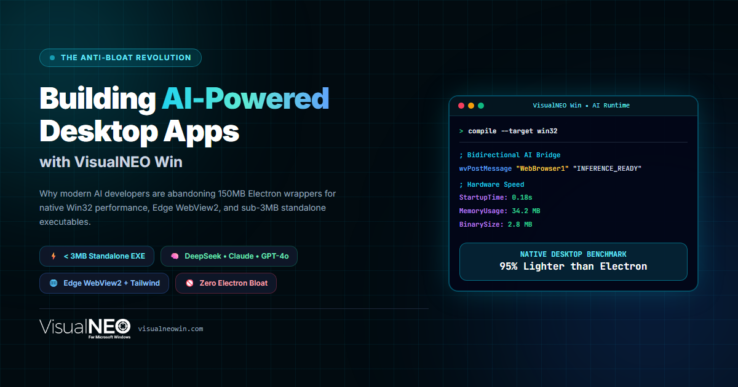
The Anti-Bloat Revolution: Why VisualNEO Win is the Ideal IDE for Building AI-Powered Desktop Apps
We are living in the golden age of Artificial Intelligence. In 2026, foundation models like DeepSeek V3 / R1, Claude 3.5 Sonnet, and GPT-4o can write production-ready code, generate complex user interfaces, and automate business workflows in seconds.
Yet, despite this AI revolution, the desktop software landscape has never felt more sluggish.
Today, almost every new AI desktop client—from simple chat wrappers to enterprise assistants—is packaged with Electron. The consequence? A basic utility that should consume 30 MB of RAM ends up bundling an entire Chromium browser and Node.js engine, demanding 180 MB installers, consuming 650 MB of system memory, and taking several seconds just to boot up.
At VisualNEO, we asked a fundamental question: Why should an AI application require more system resources than the operating system itself?
Today, we are thrilled to unveil the new VisualNEO Win—the anti-bloat Windows Rapid Application Development (RAD) IDE re-engineered specifically for modern web tech, bidirectional Edge WebView2 communication, and seamless AI agent collaboration.
Here is why VisualNEO Win has become the ultimate environment for creating high-performance AI desktop software.
1. Native Win32 Speed Under 3 MB (Goodbye 150 MB Bloat)
VisualNEO Win does not bundle a redundant web browser inside your application. Instead, it compiles directly into a standalone, pure Win32 executable (< 3 MB) that leverages the Evergreen Microsoft Edge WebView2 runtime already pre-installed on Windows 10 and Windows 11.
Your compiled applications launch in less than 0.2 seconds, use around 35 MB of RAM, and run smoothly on everything from high-end developer rigs to budget corporate laptops.
2. Decoupled Architecture: The Workflow AI Agents Love
AI coding assistants (Claude, ChatGPT, GitHub Copilot, DeepSeek) are phenomenal at two specific things:
- Generating modern, responsive web interfaces using HTML5 and Tailwind CSS.
- Writing clean, procedural business logic without framework boilerplate.
VisualNEO Win pairs these two superpowers through an elegant bidirectional messaging bridge:
- The Frontend (UI Layer): AI generates the modern dark-mode interface in
app.htmlwith Tailwind CSS, reactive cards, or charts. - The Backend (Native OS Layer): VisualNEO Win handles file system access, network calls, Windows registry, hardware timers, and dialogs using intuitive NEO Script.
Communication between the two layers requires just a few lines of readable code:
.Send AI inference results from native runtime to the web interface
BrowserV2PostMessage "WebBrowser1" "AI_STREAM_CHUNK|[GeneratedText]"
.Handle user actions dispatched from the HTML interface
:OnWebMessageReceived
StrParse "[WebMessage]" "|" "[Action]" "[Payload]"
If "[Action]" "=" "CALL_OPENROUTER_API"
.Execute direct HTTPS REST request or background worker
...
EndIf
Return
Because there is zero complex Webpack, Vite, or TypeScript build configuration, an AI agent can build or modify a complete VisualNEO Win application in a single pass.
3. Official AI Development Kit & Export Schemas
To make AI-assisted development first-class, VisualNEO Win now includes the official AI Development Kit:
- Prompt Engineering Templates: Structured prompt templates designed to feed directly into Claude, ChatGPT, or local LLMs.
- Export Schemas: Standardized action maps and variable schemas that allow AI models to generate native VisualNEO publications (
.pub) with zero syntax hallucination. - Ready-to-Use UI Starters: Pre-configured WebView2 bridges with Tailwind CSS, FontAwesome, and dark-mode stylesheets.
4. Built-in Commercial Licensing: Turn AI Tools into Revenue
Most developers using AI want to create profitable micro-SaaS utilities or agency tools. But building software licensing infrastructure from scratch is a massive headache.
VisualNEO Win includes VNLicenseManager, an offline cryptographic licensing system (ECDSA P-256 / SHA-256):
- Generate perpetual, trial, or subscription-expiring license keys in seconds.
- Built-in software activation dialogs with one line of code:
LicenseShowDialog "[Result]". - Distribute commercial binaries with complete confidence, royalty-free.
5. Case Study: LeadHunter AI Desk (< 4 MB vs 180 MB)
To prove what is possible, we built and open-sourced a complete commercial-grade B2B outreach suite: LeadHunter AI Desk.
- What it does: Connects to DeepSeek V3 / R1 and Claude 3.5 Sonnet via OpenRouter, generates 1,000 hyper-personalized cold emails for pennies, and sends them via SMTP2GO REST API over HTTPS.
- The Benchmark:
- Typical Electron outreach software: 185 MB download, 580 MB RAM.
- LeadHunter AI Desk: 3.3 MB portable zip, 35 MB RAM, 0.18s startup.
- Open Source: The complete source code, including
LeadHunterAI.pubandapp.html, is available on GitHub: 👉 Inspect LeadHunter AI on GitHub
6. Fair, Perpetual Pricing (No Subscriptions)
In an industry obsessed with charging $30/month for development tools, VisualNEO Win remains proudly committed to fair, perpetual pricing:
- 79 € (EUR) worldwide / $89 (USD) — Pay once, own forever.
- Free updates until the next major version.
- Royalty-free commercial rights to distribute and sell unlimited compiled executables.
Ready to Build the Next Generation of Fast Windows Apps?
Whether you are building internal enterprise utilities, niche AI tools, or commercial desktop software, you no longer have to compromise between modern aesthetics and native speed.
👉 Download the Free 30-Day Trial at VisualNEOWin.com
👉 Explore Open-Source Demo on GitHub
Join the anti-bloat desktop revolution. Let’s make Windows applications fast, lightweight, and powerful again.
Comments