About FabricJS and objects.

Quote from sakismor on February 4, 2022, 7:05 pmI try to find if FabricJS have a way to know every object type. Image, Text , Shape and others.
I check the plugin but I don't find that.
Can you help me?
I try to find if FabricJS have a way to know every object type. Image, Text , Shape and others.
I check the plugin but I don't find that.
Can you help me?

Quote from luishp on February 5, 2022, 8:04 am@sakismor when you create a new FabricJS object you can assign a name to it. Just use the name to include the object type. For example txt1, txt2, txt3...
I hope it helps.
@sakismor when you create a new FabricJS object you can assign a name to it. Just use the name to include the object type. For example txt1, txt2, txt3...
I hope it helps.
Quote from luishp on February 5, 2022, 9:15 am@sakismor sorry. It's better to use fabGetProperty. Use property name "type" to get the object type: text, circle, rect...
Regards.
@sakismor sorry. It's better to use fabGetProperty. Use property name "type" to get the object type: text, circle, rect...
Regards.
Quote from sakismor on February 19, 2022, 9:19 pmI have 2 questions for the fabricJS plugin.
- Can I select exactly dimension like 1200X800 px for the canvas of the fabricJS?
- How can I have a list of all the objects from a canvas with the right order from front to back?
Thank you for your time?
I have 2 questions for the fabricJS plugin.
- Can I select exactly dimension like 1200X800 px for the canvas of the fabricJS?
- How can I have a list of all the objects from a canvas with the right order from front to back?
Thank you for your time?
Quote from luishp on February 20, 2022, 1:02 pm@sakismor
Can I select exactly dimension like 1200X800 px for the canvas of the fabricJS?
By default itt takes the Contaniner dimensions but you can try this (change "Container1" with your container name)
BeginJS
window["Canvas"+"Container1"].setDimensions({width:300, height:200});
EndJS
How can I have a list of all the objects from a canvas with the right order from front to back?
Try this to get an Array with all the objects information:
fabSaveAsJSON "Container1" [result]
ParseJSON "[result]" [result]
Consolelog [result.objects]
Take a look at the console to see all the properties you can get from each object. For example this code will get left position from first object:
SetVar [left] [result.objects(0).left]Regards.
Can I select exactly dimension like 1200X800 px for the canvas of the fabricJS?
By default itt takes the Contaniner dimensions but you can try this (change "Container1" with your container name)
BeginJS
window["Canvas"+"Container1"].setDimensions({width:300, height:200});
EndJS
How can I have a list of all the objects from a canvas with the right order from front to back?
Try this to get an Array with all the objects information:
fabSaveAsJSON "Container1" [result]
ParseJSON "[result]" [result]
Consolelog [result.objects]
Take a look at the console to see all the properties you can get from each object. For example this code will get left position from first object:
SetVar [left] [result.objects(0).left]
Regards.
Quote from luishp on February 20, 2022, 1:07 pm@sakismor please download and install the attached plugin update. It includes a new command: fabSetCanvasSize
Best regards.
@sakismor please download and install the attached plugin update. It includes a new command: fabSetCanvasSize
Best regards.
Uploaded files:Quote from sakismor on February 21, 2022, 9:05 amI am really thank you!!!
I am really sorry for asking something new now but I start working with fabricjs and I have many questions.
- Can I change in an image object the photo? I need to have the same object and only to change the image.
- Can I disable the right click so nobody can download the images?
- In my example that I send you in the cropping post I have a center container and a second container inside that is for the fabricjs. I resize the canvas successful but I need to resize and the container so when I resize again to change and the container. So every time the container have the same dimension with the canvas. Is that possible?
A real example what I want to do you can see in this link https://www.corjl.com/d/4D5ON0 . So if you make it smaller the explorer you will se that the canvas change and get the new dimensions.
Best regards
I am really thank you!!!
I am really sorry for asking something new now but I start working with fabricjs and I have many questions.
- Can I change in an image object the photo? I need to have the same object and only to change the image.
- Can I disable the right click so nobody can download the images?
- In my example that I send you in the cropping post I have a center container and a second container inside that is for the fabricjs. I resize the canvas successful but I need to resize and the container so when I resize again to change and the container. So every time the container have the same dimension with the canvas. Is that possible?
A real example what I want to do you can see in this link https://www.corjl.com/d/4D5ON0 . So if you make it smaller the explorer you will se that the canvas change and get the new dimensions.
Best regards
Quote from luishp on February 21, 2022, 6:42 pmCan I change in an image object the photo? I need to have the same object and only to change the image.
I don't think so, but you can check the original Fabricjs JavaScript library.
Can I disable the right click so nobody can download the images?
Take a look at this same question on Stack Overflow
In my example that I send you in the cropping post I have a center container and a second container inside that is for the fabricjs. I resize the canvas successful but I need to resize and the container so when I resize again to change and the container. So every time the container have the same dimension with the canvas. Is that possible?
I don't understand very well your question but I think you are probably asking for some kind of responsive design.
Regards.
Can I change in an image object the photo? I need to have the same object and only to change the image.
I don't think so, but you can check the original Fabricjs JavaScript library.
Can I disable the right click so nobody can download the images?
Take a look at this same question on Stack Overflow
In my example that I send you in the cropping post I have a center container and a second container inside that is for the fabricjs. I resize the canvas successful but I need to resize and the container so when I resize again to change and the container. So every time the container have the same dimension with the canvas. Is that possible?
I don't understand very well your question but I think you are probably asking for some kind of responsive design.
Regards.
Quote from sakismor on November 7, 2022, 7:12 pmHello again,
I come back to this forum to ask again if I can change the image that is load before to fabricjs. Please I need a solution to can finished my project.
And a new question about fabric. I have a canvas that is 2000 X 1200 px and when i download the image I take the image smaller 1000 X 600 px like the zoom that I make. Is the fabric save the image like a screenshot or can I have the real resolution of the canvas?
Please answer ASAP.
Best regards
Hello again,
I come back to this forum to ask again if I can change the image that is load before to fabricjs. Please I need a solution to can finished my project.
And a new question about fabric. I have a canvas that is 2000 X 1200 px and when i download the image I take the image smaller 1000 X 600 px like the zoom that I make. Is the fabric save the image like a screenshot or can I have the real resolution of the canvas?
Please answer ASAP.
Best regards
Quote from luishp on November 8, 2022, 1:12 pm@sakismor try this:
BeginJS
  var myimg=new Image();
  myimg.onload=function(){
    window["objectName"].setElement(myimg);
  }
  myimg.src="https://images.unsplash.com/reserve/bOvf94dPRxWu0u3QsPjF_tree.jpg?ixlib=rb-4.0.3&ixid=MnwxMjA3fDB8MHxwaG90by1wYWdlfHx8fGVufDB8fHx8&auto=format&fit=crop&w=350&q=80";
EndJS
Just change "objectName" with the name of your previously created image object using FabricJS command FabLoadImage.
And a new question about fabric. I have a canvas that is 2000 X 1200 px and when i download the image I take the image smaller 1000 X 600 px like the zoom that I make. Is the fabric save the image like a screenshot or can I have the real resolution of the canvas?
Place the canvas inside a Container and apply the scale to the Container (using transform CSS property), not the canvas. You will get the full size.
Regards.
@sakismor try this:
BeginJS
  var myimg=new Image();
  myimg.onload=function(){
    window["objectName"].setElement(myimg);
  }
  myimg.src="https://images.unsplash.com/reserve/bOvf94dPRxWu0u3QsPjF_tree.jpg?ixlib=rb-4.0.3&ixid=MnwxMjA3fDB8MHxwaG90by1wYWdlfHx8fGVufDB8fHx8&auto=format&fit=crop&w=350&q=80";
EndJS
Just change "objectName" with the name of your previously created image object using FabricJS command FabLoadImage.
And a new question about fabric. I have a canvas that is 2000 X 1200 px and when i download the image I take the image smaller 1000 X 600 px like the zoom that I make. Is the fabric save the image like a screenshot or can I have the real resolution of the canvas?
Place the canvas inside a Container and apply the scale to the Container (using transform CSS property), not the canvas. You will get the full size.
Regards.
Quote from sakismor on November 8, 2022, 7:10 pmI am really thank you for the solution. The only problem is that have to click the image to see the new one after I am running the javascript.
And about the transform CSS property is it possible ot have an example?
I really don't know how to do it.
Thank you
I am really thank you for the solution. The only problem is that have to click the image to see the new one after I am running the javascript.
And about the transform CSS property is it possible ot have an example?
I really don't know how to do it.
Thank you
Quote from luishp on November 8, 2022, 8:21 pmThe only problem is that have to click the image to see the new one after I am running the javascript.
@sakismor just add this inside the funcion:
window["Canvas"+"Container1"].renderAll();BeginJS var myimg=new Image(); myimg.onload=function(){ window["objectName"].setElement(myimg); window["Canvas"+"Container1"].renderAll(); } myimg.src="https://images.unsplash.com/reserve/bOvf94dPRxWu0u3QsPjF_tree.jpg?ixlib=rb-4.0.3&ixid=MnwxMjA3fDB8MHxwaG90by1wYWdlfHx8fGVufDB8fHx8&auto=format&fit=crop&w=350&q=80"; EndJSChange "Container1" with your Container name.
And about the transform CSS property is it possible ot have an example?
I have no time right now, sorry. Think about a Container inside another Container (the inner one will be scaled and contains the canvas) the outer one will have the scrollbars if necessary. This is from a real project I'm working on (ContainerFab is the inner Container):
CreateEmptyObject [myCSS] SetVar [myCSS.transformOrigin] "top left" SetVar [myCSS.transform] "scale([theScale])" Math "[scale]*100" 0 [scalePercent] SetObjectCSS "ContainerFab" [myCSS] SetVar [scalePercent] [theScale]*100 RefreshRegards.
The only problem is that have to click the image to see the new one after I am running the javascript.
@sakismor just add this inside the funcion:
window["Canvas"+"Container1"].renderAll();
BeginJS
  var myimg=new Image();
  myimg.onload=function(){
    window["objectName"].setElement(myimg);
    window["Canvas"+"Container1"].renderAll();
  }
  myimg.src="https://images.unsplash.com/reserve/bOvf94dPRxWu0u3QsPjF_tree.jpg?ixlib=rb-4.0.3&ixid=MnwxMjA3fDB8MHxwaG90by1wYWdlfHx8fGVufDB8fHx8&auto=format&fit=crop&w=350&q=80";
EndJS
Change "Container1" with your Container name.
And about the transform CSS property is it possible ot have an example?
I have no time right now, sorry. Think about a Container inside another Container (the inner one will be scaled and contains the canvas) the outer one will have the scrollbars if necessary. This is from a real project I'm working on (ContainerFab is the inner Container):
CreateEmptyObject [myCSS]
SetVar [myCSS.transformOrigin] "top left"
SetVar [myCSS.transform] "scale([theScale])"
Math "[scale]*100" 0 [scalePercent]
SetObjectCSS "ContainerFab" [myCSS]
SetVar [scalePercent] [theScale]*100
Refresh
Regards.
Quote from sakismor on November 13, 2022, 9:20 amThank you for the solution. Delete this link.
I have new questions.
- How to set the zoom exactly to the canvas size? So everytime the canvas size change to change and the zoom and the canvas fit to the rectangle.
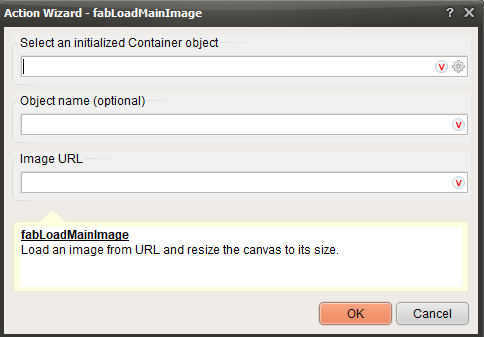
- How is working the fabLoadMainImage? In the help file is says that is having 3 parameters. When I try to use it I see that is having only 2 parameters. Can I have and an examples how to load and image background that is in images folder?
Thank you
Thank you for the solution. Delete this link.
I have new questions.
- How to set the zoom exactly to the canvas size? So everytime the canvas size change to change and the zoom and the canvas fit to the rectangle.
- How is working the fabLoadMainImage? In the help file is says that is having 3 parameters. When I try to use it I see that is having only 2 parameters. Can I have and an examples how to load and image background that is in images folder?
Thank you
Quote from luishp on November 13, 2022, 2:13 pmHow to set the zoom exactly to the canvas size? So everytime the canvas size change to change and the zoom and the canvas fit to the rectangle.
@sakismor you will need to do some maths, as you need to apply the zoom as a scale percentage of your original Container size.
How is working the fabLoadMainImage?
It has 3 parameters (see attached screenshot). This is a sample code:
fabInitialize "Container1"
SetVar [imgURL] "https://images.unsplash.com/photo-1659535844436-64344882b939?ixlib=rb-4.0.3&ixid=MnwxMjA3fDF8MHxwaG90by1wYWdlfHx8fGVufDB8fHx8&auto=format&fit=crop&w=600&q=80"
fabLoadMainImage "Container1" "image1" "[imgURL]"
Regards.
How to set the zoom exactly to the canvas size? So everytime the canvas size change to change and the zoom and the canvas fit to the rectangle.
@sakismor you will need to do some maths, as you need to apply the zoom as a scale percentage of your original Container size.
How is working the fabLoadMainImage?
It has 3 parameters (see attached screenshot). This is a sample code:
fabInitialize "Container1"
SetVar [imgURL] "https://images.unsplash.com/photo-1659535844436-64344882b939?ixlib=rb-4.0.3&ixid=MnwxMjA3fDF8MHxwaG90by1wYWdlfHx8fGVufDB8fHx8&auto=format&fit=crop&w=600&q=80"
fabLoadMainImage "Container1" "image1" "[imgURL]"
Regards.
Uploaded files: