
About image resize from rectangle to square

Quote from sakismor on November 17, 2024, 9:58 pmHello
I would like to make a software that will change from a rectangle image (jpg or png) to square. Please check the photo what exactly I want to do.
Is it an easy way to change all the images at the folder or any other way?
Maybe a plugin?
Hello
I would like to make a software that will change from a rectangle image (jpg or png) to square. Please check the photo what exactly I want to do.
Is it an easy way to change all the images at the folder or any other way?
Maybe a plugin?
Uploaded files: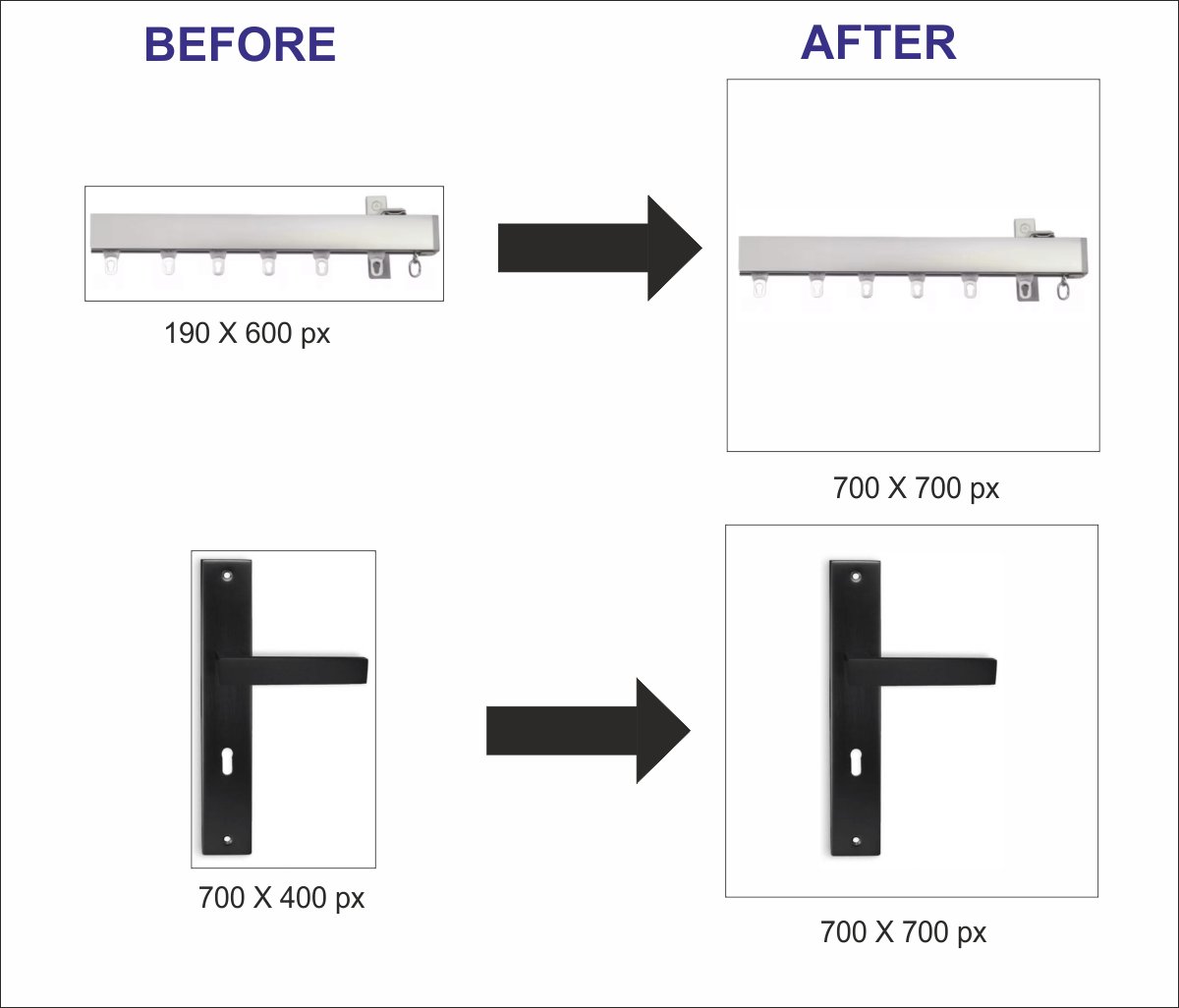
Quote from mishem on November 18, 2024, 4:48 pmQuote from sakismor on November 17, 2024, 9:58 pmIs it an easy way to change all the images at the folder or any other way?
Maybe a plugin?
plugin
hpwImage (Hans-Peter Wickern)
NeoDouble 1.0.6 (David Esperalta)
NeoResize 1.0.0 (David de Argentina)
There are others too...
Console programs
ImageMagick
NConvert
Quote from sakismor on November 17, 2024, 9:58 pmIs it an easy way to change all the images at the folder or any other way?
Maybe a plugin?
plugin
hpwImage (Hans-Peter Wickern)
NeoDouble 1.0.6 (David Esperalta)
NeoResize 1.0.0 (David de Argentina)
There are others too...
Console programs
ImageMagick
NConvert
Quote from sakismor on November 19, 2024, 10:06 amThank you very much for your answer. I check the plugins no solution.
Did any know how to do it that?
Thank you very much for your answer. I check the plugins no solution.
Did any know how to do it that?

Quote from DaviddeArgentina on November 19, 2024, 5:05 pmI don't imagine there is any commercial plugin that works for what you need.
In fact, what I imagine you need is to adjust the size of the image with content, so that it fits appropriately into a larger rectangle, so that it is then pasted to remain as a new image.
Maybe it is possible to think about making some development that solves all this.
You should consider whether the production cost justifies the number of images you have to process.
I don't imagine there is any commercial plugin that works for what you need.
In fact, what I imagine you need is to adjust the size of the image with content, so that it fits appropriately into a larger rectangle, so that it is then pasted to remain as a new image.
Maybe it is possible to think about making some development that solves all this.
You should consider whether the production cost justifies the number of images you have to process.

Quote from as3856 on November 19, 2024, 7:17 pmThe asPicture 3.0 plugin solves the problem perfectly. Apply the "asPictureResample" command. The plugin is completely free and solves most problems related to drawing.
Regards
as3856
The asPicture 3.0 plugin solves the problem perfectly. Apply the "asPictureResample" command. The plugin is completely free and solves most problems related to drawing.
Regards
as3856
Quote from sakismor on November 19, 2024, 8:09 pmHello
Thank you for your answers. I try your plugin.
I forget it the asPicture 3.0 plugin.
I am really thank you.
Hello
Thank you for your answers. I try your plugin.
I forget it the asPicture 3.0 plugin.
I am really thank you.
Quote from mishem on November 19, 2024, 10:55 pm@sakismor
The file in the folder 1.jpg has the size 600x190. After clicking the button, the file Resized.jpg with the dimensions 700x700 will be created.
The file in the folder 1.jpg has the size 600x190. After clicking the button, the file Resized.jpg with the dimensions 700x700 will be created.
Uploaded files:Quote from sakismor on November 20, 2024, 7:15 pmHello my friend,
You are magician. Exactly what I want!!!!
I am really thank you for your time.
Best regards
Hello my friend,
You are magician. Exactly what I want!!!!
I am really thank you for your time.
Best regards
Quote from sakismor on November 20, 2024, 7:52 pmOne more help if of course is posible.
If I have an image bigger than 700 px is it possible first to make 650 px and then make it square?
Thank you.
One more help if of course is posible.
If I have an image bigger than 700 px is it possible first to make 650 px and then make it square?
Thank you.
Quote from mishem on November 20, 2024, 7:54 pm@sakismor
Check out the NConvert options. This example is just a sketch.
If this is all you need, then maybe you shouldn't reinvent the wheel and use ready-made applications built on top of this program.
XnView and/or xnconvert.
Check out the NConvert options. This example is just a sketch.
If this is all you need, then maybe you shouldn't reinvent the wheel and use ready-made applications built on top of this program.
XnView and/or xnconvert.
Quote from mishem on November 20, 2024, 7:59 pmQuote from sakismor on November 20, 2024, 7:52 pmIf I have an image bigger than 700 px is it possible first to make 650 px and then make it square?
Yes, you can. Check out the NConvert parameters. Look at the examples on the Internet. Use the programs I wrote above. They can generate parameters based on your wishes.
Quote from sakismor on November 20, 2024, 7:52 pmIf I have an image bigger than 700 px is it possible first to make 650 px and then make it square?
Yes, you can. Check out the NConvert parameters. Look at the examples on the Internet. Use the programs I wrote above. They can generate parameters based on your wishes.
Quote from sakismor on November 24, 2024, 10:58 amThank you for all.
I just find the solution and I want to share with you.
Just change the first line of the button code and put this:
SetVar "[CommandString]" "-resize longest 650 -bgcolor 255 255 255 -canvas 700 700 center"It works perfect.
Thank you for all.
I just find the solution and I want to share with you.
Just change the first line of the button code and put this:
SetVar "[CommandString]" "-resize longest 650 -bgcolor 255 255 255 -canvas 700 700 center"
It works perfect.