
Action Command Summary

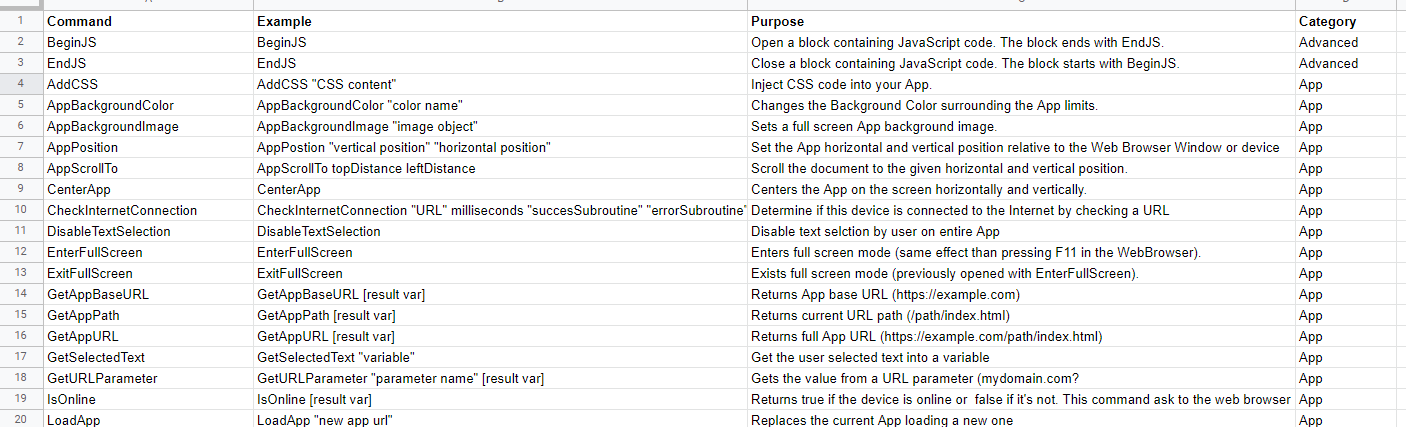
Quote from susan on October 20, 2021, 11:14 pmI made a summary of the built-in action commands. I use it as an overview while learning the tool. As a bonus you can sort the columns by the Command or Category, for easy browsing (when I am not sure what I am looking for.)
Here is the Sheets link.
I would love to make a similar list for the plugins, but I haven't figured out an easy way to scrape/extract that information.
I made a summary of the built-in action commands. I use it as an overview while learning the tool. As a bonus you can sort the columns by the Command or Category, for easy browsing (when I am not sure what I am looking for.)
Here is the Sheets link.
I would love to make a similar list for the plugins, but I haven't figured out an easy way to scrape/extract that information.
Uploaded files:


Quote from luishp on October 21, 2021, 6:52 amHi @susan, thank so much for sharing!
I would love to make a similar list for the plugins, but I haven't figured out an easy way to scrape/extract that information.
As plugins source code are .xml files I think it's possible to generate a small tool to scrape the important information from them in a similar way as you have done. Let me think about it. By the way, I'm very open to opensource the plugins source code. Just not enough time to manage the best way to do such thing...
Best regards.
Hi @susan, thank so much for sharing!
I would love to make a similar list for the plugins, but I haven't figured out an easy way to scrape/extract that information.
As plugins source code are .xml files I think it's possible to generate a small tool to scrape the important information from them in a similar way as you have done. Let me think about it. By the way, I'm very open to opensource the plugins source code. Just not enough time to manage the best way to do such thing...
Best regards.
Quote from susan on October 21, 2021, 7:18 amHi @luishp.
I am able to spend the time making a tool that can extract what is necessary from the *.nabpsrc files to make a basic set of documentation for them.
Whether the plugins are open source or not, does not interest me. So if you don't want to make the source open right now, or you are unable to. That's fine.
I know you are busy (which from reading the forums, that is very clear!) but if I was given copies of the xml files with the <code></code> section removed to protect the plugin creators, I could make a tool that extracts what is needed to document each plugin?
And then share the results?
Hi @luishp.
I am able to spend the time making a tool that can extract what is necessary from the *.nabpsrc files to make a basic set of documentation for them.
Whether the plugins are open source or not, does not interest me. So if you don't want to make the source open right now, or you are unable to. That's fine.
I know you are busy (which from reading the forums, that is very clear!) but if I was given copies of the xml files with the <code></code> section removed to protect the plugin creators, I could make a tool that extracts what is needed to document each plugin?
And then share the results?
Quote from luishp on October 22, 2021, 9:57 amHi @susan,
I will try to send you all the .nabpsrc files this weekend by email.
I will not include the JavaScript files, just the .nabpsrc files so you can extract the relevant content.
Note that, as you are using Google Sheets we will be able to use neoGSheets plugin to create a search app.Some time ago I did a proof of concept using Google Sheets to share VisualNEO Web snippets:
https://visualneo.com/forum/topic/neosnippets-app-to-share-html-codeThanks so much!
Hi @susan,
I will try to send you all the .nabpsrc files this weekend by email.
I will not include the JavaScript files, just the .nabpsrc files so you can extract the relevant content.
Note that, as you are using Google Sheets we will be able to use neoGSheets plugin to create a search app.
Some time ago I did a proof of concept using Google Sheets to share VisualNEO Web snippets:
https://visualneo.com/forum/topic/neosnippets-app-to-share-html-code
Thanks so much!
Quote from susan on October 23, 2021, 12:41 amHi @luishp,
Only when you have the time (!), and yes, the actual code is not needed.
I don't think my NEO skills are ready to produce a viewer in it. That would be a great learning exercise, but I plan to use the tool I am most familiar with for text processing (Python) to do the conversion, and we can take it from there. I might make a PDF doc as well as the spreadsheet.
But yes, a custom online viewer would be nice. I will look at that snippets app.
Hi @luishp,
Only when you have the time (!), and yes, the actual code is not needed.
I don't think my NEO skills are ready to produce a viewer in it. That would be a great learning exercise, but I plan to use the tool I am most familiar with for text processing (Python) to do the conversion, and we can take it from there. I might make a PDF doc as well as the spreadsheet.
But yes, a custom online viewer would be nice. I will look at that snippets app.
Quote from luishp on October 24, 2021, 12:20 pmHi @susan,
I have just sent them to you. By the way, if anyone needs to copy files from multiple folders with the same extension in another location in one single step, this old MS-DOS command will do the trick:
xcopy *.ext destination /sThank you again!
Hi @susan,
I have just sent them to you. By the way, if anyone needs to copy files from multiple folders with the same extension in another location in one single step, this old MS-DOS command will do the trick:
xcopy *.ext destination /s
Thank you again!

Quote from Gaev on October 24, 2021, 3:12 pm@susan
I don't think my NEO skills are ready to produce a viewer in it.
In your VisualNEOWeb environment, under the neoGSheets subfolder of Sample Apps, there are a couple of sample .neoapp files that will help accelerate your skills.
I don't think my NEO skills are ready to produce a viewer in it.
In your VisualNEOWeb environment, under the neoGSheets subfolder of Sample Apps, there are a couple of sample .neoapp files that will help accelerate your skills.