
AI upscale images

Quote from smartmedia on June 27, 2023, 9:40 pmHi..
I have found a real good upscale AI free page that upscale yours images up to 8x with excellent quality. Check it out here. Is really fast two.
https://replicate.com/cjwbw/real-esrgan
Hi..
I have found a real good upscale AI free page that upscale yours images up to 8x with excellent quality. Check it out here. Is really fast two.
https://replicate.com/cjwbw/real-esrgan

Quote from emo on September 1, 2023, 7:39 pmYou can use Real-ESGRAN AI portable to upscale images.
https://github.com/xinntao/Real-ESRGAN-ncnn-vulkan
And a visualneo WIN program using it drag&drop:
https://github.com/emo44/Simple-drag-and-drop-interface-for-Real_ESRGAN-for-windows/releases
You can use Real-ESGRAN AI portable to upscale images.
https://github.com/xinntao/Real-ESRGAN-ncnn-vulkan
And a visualneo WIN program using it drag&drop:
https://github.com/emo44/Simple-drag-and-drop-interface-for-Real_ESRGAN-for-windows/releases
Uploaded files: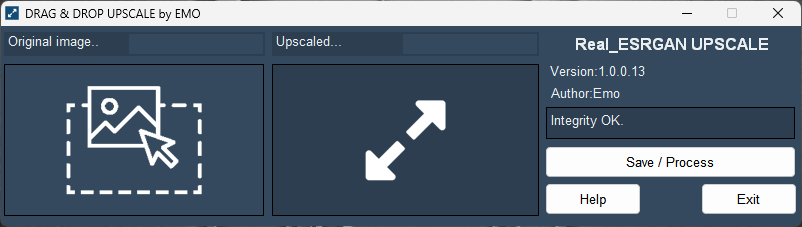

Quote from sakismor on November 18, 2024, 8:27 amHello
Is it possible to have the source code (pub file) from visualneo WIN program ?
Because I need to use it in one of my project.
Thank you
Hello
Is it possible to have the source code (pub file) from visualneo WIN program ?
Because I need to use it in one of my project.
Thank you
Quote from emo on November 18, 2024, 7:59 pm@sakismor
Basically, it's about downloading the executables and models from here:
https://github.com/xinntao/Real-ESRGAN-ncnn-vulkan/releases
and in your application, call the executable with the appropriate parameters:Usage: realesrgan-ncnn-vulkan.exe -i infile -o outfile [options]...
-h show this help"
-i input-path input image path (jpg/png/webp) or directory"
-o output-path output image path (jpg/png/webp) or directory"
-s scale upscale ratio (can be 2, 3, 4. default=4)"
-t tile-size tile size (>=32/0=auto, default=0) can be 0,0,0 for multi-gpu"
-m model-path folder path to the pre-trained models. default=models"
-n model-name model name (default=realesr-animevideov3, can be realesr-animevideov3 | realesrgan-x4plus | realesrgan-x4plus-anime | realesrnet-x4plus)"
-g gpu-id gpu device to use (default=auto) can be 0,1,2 for multi-gpu"
-j load:proc:save thread count for load/proc/save (default=1:2:2) can be 1:2,2,2:2 for multi-gpu"
-x enable tta mode"
-f format output image format (jpg/png/webp, default=ext/png)"
-v verbose output"In my case, I think I used the following plugin for that application:
dmCMDline 1.4
so, simply with:
dmRun "[CurrentDir]realesrgan-ncnn-vulkan.exe" "-i [#34][ksDropFile0][#34] -o [#34][CurrentDir]upscale_output.png[#34] -s 4" "[log]" "True" "False"
you would get the conversion.Greetings
Basically, it's about downloading the executables and models from here:
https://github.com/xinntao/Real-ESRGAN-ncnn-vulkan/releases
and in your application, call the executable with the appropriate parameters:
Usage: realesrgan-ncnn-vulkan.exe -i infile -o outfile [options]...
-h show this help"
-i input-path input image path (jpg/png/webp) or directory"
-o output-path output image path (jpg/png/webp) or directory"
-s scale upscale ratio (can be 2, 3, 4. default=4)"
-t tile-size tile size (>=32/0=auto, default=0) can be 0,0,0 for multi-gpu"
-m model-path folder path to the pre-trained models. default=models"
-n model-name model name (default=realesr-animevideov3, can be realesr-animevideov3 | realesrgan-x4plus | realesrgan-x4plus-anime | realesrnet-x4plus)"
-g gpu-id gpu device to use (default=auto) can be 0,1,2 for multi-gpu"
-j load:proc:save thread count for load/proc/save (default=1:2:2) can be 1:2,2,2:2 for multi-gpu"
-x enable tta mode"
-f format output image format (jpg/png/webp, default=ext/png)"
-v verbose output"
In my case, I think I used the following plugin for that application:
dmCMDline 1.4
so, simply with:
dmRun "[CurrentDir]realesrgan-ncnn-vulkan.exe" "-i [#34][ksDropFile0][#34] -o [#34][CurrentDir]upscale_output.png[#34] -s 4" "[log]" "True" "False"
you would get the conversion.
Greetings