Alertbox

Quote from fkapnist on December 13, 2021, 9:51 amHow do you change the colors of a "themed" Alertbox? How do you create a line break in the Alertbox's message? Where are the theme settings located?
Thanks.
How do you change the colors of a "themed" Alertbox? How do you create a line break in the Alertbox's message? Where are the theme settings located?
Thanks.

Quote from luishp on December 13, 2021, 3:18 pmHi @fkapnist, please take a look here:
https://www.youtube.com/watch?v=X93MoFYuNHwYou can use the Tools > neoThemeManager utility to change your current theme.
Themes are located under:
My Documents\VisualNeoWeb\Libraries\themesThe soon to be released next version default theme will be quite easier to customize.
Best regards.
Hi @fkapnist, please take a look here:
https://www.youtube.com/watch?v=X93MoFYuNHw
You can use the Tools > neoThemeManager utility to change your current theme.
Themes are located under:
My Documents\VisualNeoWeb\Libraries\themes
The soon to be released next version default theme will be quite easier to customize.
Best regards.
Quote from luishp on December 13, 2021, 6:10 pm@fkapnist I have added a new command AlertBoxEx to open centered custumized Alert Boxes (size is customizable too).
Dialogs will appear centered too :)
This command will be available on next VisualNEO Web version.
By the way, you can add a line break using <br> within your message text.AlertBoxEx Sample App:
https://visualneo.com/tutorials/alertboxexLet me know if you like it.
Regards.
@fkapnist I have added a new command AlertBoxEx to open centered custumized Alert Boxes (size is customizable too).
Dialogs will appear centered too :)
This command will be available on next VisualNEO Web version.
By the way, you can add a line break using <br> within your message text.
AlertBoxEx Sample App:
https://visualneo.com/tutorials/alertboxex
Let me know if you like it.
Regards.


Quote from Gaev on December 13, 2021, 11:10 pm@luishp
A very welcome addition ... questions ...
a) AlertBoxEx to open centered custumized Alert Boxes (size is customizable too).
Dialogs will appear centered too :)I am assuming that this implies that the Dialog Box will be horizontally and vertically centered.
Or did you also imply that the text will be centered within the custom sized dialog box ? ... in the sample, the text was left justified.
b) By the way, you can add a line break using <br> within your message text.
Are there any other rich text tags supported ? ... like <center>, <b>, <i>, <u>, font names, sizes and colours ? ... just asking.
A very welcome addition ... questions ...
a) AlertBoxEx to open centered custumized Alert Boxes (size is customizable too).
Dialogs will appear centered too :)
I am assuming that this implies that the Dialog Box will be horizontally and vertically centered.
Or did you also imply that the text will be centered within the custom sized dialog box ? ... in the sample, the text was left justified.
b) By the way, you can add a line break using <br> within your message text.
Are there any other rich text tags supported ? ... like <center>, <b>, <i>, <u>, font names, sizes and colours ? ... just asking.
Quote from fkapnist on December 14, 2021, 3:20 amQuote from luishp on December 13, 2021, 3:18 pmHi @fkapnist, please take a look here:
https://www.youtube.com/watch?v=X93MoFYuNHwYou can use the Tools > neoThemeManager utility to change your current theme.
Themes are located under:
My Documents\VisualNeoWeb\Libraries\themesThe soon to be released next version default theme will be quite easier to customize.
Best regards.
I tried to modify an existing theme and create a new one, but the program does not recognize it.
Quote from luishp on December 13, 2021, 3:18 pmHi @fkapnist, please take a look here:
https://www.youtube.com/watch?v=X93MoFYuNHwYou can use the Tools > neoThemeManager utility to change your current theme.
Themes are located under:
My Documents\VisualNeoWeb\Libraries\themesThe soon to be released next version default theme will be quite easier to customize.
Best regards.
I tried to modify an existing theme and create a new one, but the program does not recognize it.
Quote from fkapnist on December 14, 2021, 3:37 amQuote from luishp on December 13, 2021, 6:10 pm@fkapnist I have added a new command AlertBoxEx to open centered custumized Alert Boxes (size is customizable too).
Dialogs will appear centered too :)
This command will be available on next VisualNEO Web version.
By the way, you can add a line break using <br> within your message text.AlertBoxEx Sample App:
https://visualneo.com/tutorials/alertboxexLet me know if you like it.
Regards.
Changing the theme affects all elements of my app. I only want to modify the alertbox...
Quote from luishp on December 13, 2021, 6:10 pm@fkapnist I have added a new command AlertBoxEx to open centered custumized Alert Boxes (size is customizable too).
Dialogs will appear centered too :)
This command will be available on next VisualNEO Web version.
By the way, you can add a line break using <br> within your message text.AlertBoxEx Sample App:
https://visualneo.com/tutorials/alertboxexLet me know if you like it.
Regards.
Changing the theme affects all elements of my app. I only want to modify the alertbox...
Quote from luishp on December 14, 2021, 9:14 amI am assuming that this implies that the Dialog Box will be horizontally and vertically centered.
@gaev, yes. That's it.
Are there any other rich text tags supported ? ... like <center>, <b>, <i>, <u>, font names, sizes and colours ? ... just asking.
Yes, all of them. You can use any HTML tag (although I'm going to disable the <script> one for security reasons).
Changing the theme affects all elements of my app. I only want to modify the alertbox...
@fkapnist what do you want to do exactly?
Have you seen the SweetAlert plugin?Regards.
I am assuming that this implies that the Dialog Box will be horizontally and vertically centered.
@gaev, yes. That's it.
Are there any other rich text tags supported ? ... like <center>, <b>, <i>, <u>, font names, sizes and colours ? ... just asking.
Yes, all of them. You can use any HTML tag (although I'm going to disable the <script> one for security reasons).
Changing the theme affects all elements of my app. I only want to modify the alertbox...
@fkapnist what do you want to do exactly?
Have you seen the SweetAlert plugin?
Regards.
Quote from fkapnist on December 14, 2021, 5:46 pmQuote from luishp on December 14, 2021, 9:14 amI am assuming that this implies that the Dialog Box will be horizontally and vertically centered.
@gaev, yes. That's it.
Are there any other rich text tags supported ? ... like <center>, <b>, <i>, <u>, font names, sizes and colours ? ... just asking.
Yes, all of them. You can use any HTML tag (although I'm going to disable the <script> one for security reasons).
Changing the theme affects all elements of my app. I only want to modify the alertbox...
@fkapnist what do you want to do exactly?
Have you seen the SweetAlert plugin?Regards.
RE: what do you want to do exactly?
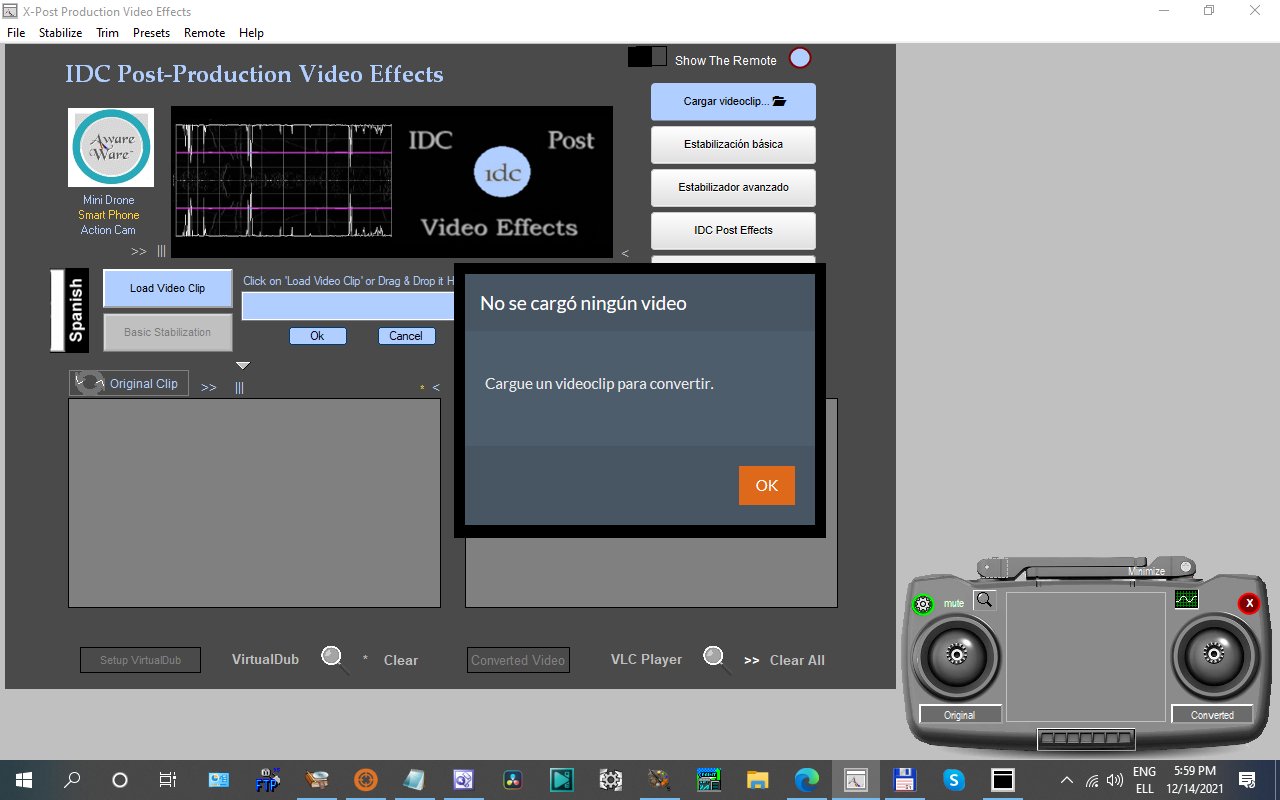
I want to use the alerts from NEO Web in a NEO Win publication - because they look much better. If embedded in a CustomWindow they can be centered or popup anywhere on the page. (I think the pending release of Windows 11 will rekindle a market interest in Windows apps... Adding "Made for Windows 11" to your advertising may increase product sales...)
Quote from luishp on December 14, 2021, 9:14 amI am assuming that this implies that the Dialog Box will be horizontally and vertically centered.
@gaev, yes. That's it.
Are there any other rich text tags supported ? ... like <center>, <b>, <i>, <u>, font names, sizes and colours ? ... just asking.
Yes, all of them. You can use any HTML tag (although I'm going to disable the <script> one for security reasons).
Changing the theme affects all elements of my app. I only want to modify the alertbox...
@fkapnist what do you want to do exactly?
Have you seen the SweetAlert plugin?Regards.
RE: what do you want to do exactly?
I want to use the alerts from NEO Web in a NEO Win publication - because they look much better. If embedded in a CustomWindow they can be centered or popup anywhere on the page. (I think the pending release of Windows 11 will rekindle a market interest in Windows apps... Adding "Made for Windows 11" to your advertising may increase product sales...)
Quote from fkapnist on December 14, 2021, 6:03 pmAnother good thing about NEO Web alerts is that they can display any language
Another good thing about NEO Web alerts is that they can display any language
Uploaded files: