
Android apk and local database in a mobile

Quote from sakismor on July 7, 2022, 5:56 pmHello
I like to start a project and I need some advices.
The project is a normal android application that I would like to use a local database with all the data. Is that possible because I need my application to work even is not online.
The other question .. is it possible to update the local database when the application start? To check if it is connect to internet and if it is having a new update to download the new version of the database.
Thank you for your time.
Hello
I like to start a project and I need some advices.
The project is a normal android application that I would like to use a local database with all the data. Is that possible because I need my application to work even is not online.
The other question .. is it possible to update the local database when the application start? To check if it is connect to internet and if it is having a new update to download the new version of the database.
Thank you for your time.

Quote from luishp on July 7, 2022, 6:53 pmThe project is a normal android application that I would like to use a local database with all the data. Is that possible because I need my application to work even is not online.
@sakismor for easy implementation, if you don't need a huge database, you can use neoLocalStorage plugin and store the data in JSON format using neoSQL plugin to search, update, etc. all the data. If you want a real database (SQLite) you will need to use a Cordova plugin (I have no experience using it but it shuld be possible).
is it possible to update the local database when the application start?
If you use neoLocalStorage it's quite easy. Just download the online content to a variable using FileToVar and store it using neoSetItem.
To check if it is connect to internet
Use neoDeviceIsOnline to check for an Internet connection
Regards.
The project is a normal android application that I would like to use a local database with all the data. Is that possible because I need my application to work even is not online.
@sakismor for easy implementation, if you don't need a huge database, you can use neoLocalStorage plugin and store the data in JSON format using neoSQL plugin to search, update, etc. all the data. If you want a real database (SQLite) you will need to use a Cordova plugin (I have no experience using it but it shuld be possible).
is it possible to update the local database when the application start?
If you use neoLocalStorage it's quite easy. Just download the online content to a variable using FileToVar and store it using neoSetItem.
To check if it is connect to internet
Use neoDeviceIsOnline to check for an Internet connection
Regards.

Quote from CDY@44 on July 7, 2022, 10:09 pmExcuse me @luishp, if you have time, can you please post an example of how to use neoSQL with a JSON file ? Things are not clear to me...
Excuse me @luishp, if you have time, can you please post an example of how to use neoSQL with a JSON file ? Things are not clear to me...
Quote from luishp on July 8, 2022, 8:52 amHi @cdy44-2, have you exlored the neoSQL sample app included with VisualNEO Web?
It uses an Excel file as a data source but you can use JSON data exactly the same but instead of using neoSqlExcel use neoSqlJson.
This way you can query JSON data as if it was a real database using standard SQL.
Try this:
CreateEmptyObject [myjson]
neoSqlJson [myjson] "CREATE TABLE test (language INT, hello STRING)" [myjson] ""
neoSqlJson [myjson] "INSERT INTO test VALUES (1,'Hello!')" [myjson] ""
neoSqlJson [myjson] "INSERT INTO test VALUES (2,'Aloha!')" [myjson] ""
neoSqlJson [myjson] "INSERT INTO test VALUES (3,'Bonjour!')" [myjson] ""
neoSqlJson [myjson] "SELECT * FROM test WHERE language > 1" [mydata] ""
Wait 100
  jsAlert [mydata(0).hello]
  jsAlert [mydata(1).hello]
EndWait
Regards.
Hi @cdy44-2, have you exlored the neoSQL sample app included with VisualNEO Web?
It uses an Excel file as a data source but you can use JSON data exactly the same but instead of using neoSqlExcel use neoSqlJson.
This way you can query JSON data as if it was a real database using standard SQL.
Try this:
CreateEmptyObject [myjson]
neoSqlJson [myjson] "CREATE TABLE test (language INT, hello STRING)" [myjson] ""
neoSqlJson [myjson] "INSERT INTO test VALUES (1,'Hello!')" [myjson] ""
neoSqlJson [myjson] "INSERT INTO test VALUES (2,'Aloha!')" [myjson] ""
neoSqlJson [myjson] "INSERT INTO test VALUES (3,'Bonjour!')" [myjson] ""
neoSqlJson [myjson] "SELECT * FROM test WHERE language > 1" [mydata] ""
Wait 100
  jsAlert [mydata(0).hello]
  jsAlert [mydata(1).hello]
EndWait
Regards.
Quote from CDY@44 on July 8, 2022, 12:45 pm"have you exlored the neoSQL sample app included with VisualNEO Web? "--- Yes ! There are so much things to learn with samples ! It is my first reaction before asking...but sometimes my (poor) mind is stuck in front of a question...
Thank you so much for the support you give to us !
Have a good day @luishp !
"have you exlored the neoSQL sample app included with VisualNEO Web? "--- Yes ! There are so much things to learn with samples ! It is my first reaction before asking...but sometimes my (poor) mind is stuck in front of a question...
Thank you so much for the support you give to us !
Have a good day @luishp !
Quote from sakismor on July 10, 2022, 8:36 amThank you for your solutions!!
- I have to tell you that I try the real database (SQLite) as a Cordova plugin put is not working well. And the man that makes this is not support any more. Do you have any other solution for a real database that can work without server?
- About the JSON solution I will like to know if I can have multi tables to one JSON file. And what is the easiest way to put all the data that I need? Maybe is it possible to collect all the data in a excel file with multi sheets and then to convert it to JSON file?
- At last prefer a new easy way solution that will be a full ready to use plugin like the one that I use for many years with Neobook. Is that possible?
I am really thank you for your support. Best regards
Thank you for your solutions!!
- I have to tell you that I try the real database (SQLite) as a Cordova plugin put is not working well. And the man that makes this is not support any more. Do you have any other solution for a real database that can work without server?
- About the JSON solution I will like to know if I can have multi tables to one JSON file. And what is the easiest way to put all the data that I need? Maybe is it possible to collect all the data in a excel file with multi sheets and then to convert it to JSON file?
- At last prefer a new easy way solution that will be a full ready to use plugin like the one that I use for many years with Neobook. Is that possible?
I am really thank you for your support. Best regards
Quote from luishp on July 10, 2022, 9:53 amDo you have any other solution for a real database that can work without server?
@sakismor online databases are your best bet. You can locally store information whenever there is not an Internet connection and store it online later when Internet is available again. Due to security restrictions for web applications, the only way to use a real local database is using a Cordova plugin.
About the JSON solution I will like to know if I can have multi tables to one JSON file.
Note that this solution is not a real database, but allows you to store and manage data locally in a similar way. Just remember all the data is loaded into memory so is not a good idea for big databases. But yes, you can have as many "tables" as you need in a single JSON object.
And what is the easiest way to put all the data that I need? Maybe is it possible to collect all the data in a excel file with multi sheets and then to convert it to JSON file?
It depends on how are you getting the data. Note that neoPhp plugin, for example, already loads all the data from SQLite or MySQL into a JSON object you can store locally or export as a file. neoSQL can load data from an Excel or .csv file into a JSON object too (even from Google Sheets)
At last prefer a new easy way solution that will be a full ready to use plugin like the one that I use for many years with Neobook. Is that possible?
Note that local databases are not possible on pure web applications but probably a plugin similar to NeoDbPro for online databases should be possible with a huge effort.
I very much recommend online databases or even neoCms for most situations where a database is necessary.
Best regards.
Do you have any other solution for a real database that can work without server?
@sakismor online databases are your best bet. You can locally store information whenever there is not an Internet connection and store it online later when Internet is available again. Due to security restrictions for web applications, the only way to use a real local database is using a Cordova plugin.
About the JSON solution I will like to know if I can have multi tables to one JSON file.
Note that this solution is not a real database, but allows you to store and manage data locally in a similar way. Just remember all the data is loaded into memory so is not a good idea for big databases. But yes, you can have as many "tables" as you need in a single JSON object.
And what is the easiest way to put all the data that I need? Maybe is it possible to collect all the data in a excel file with multi sheets and then to convert it to JSON file?
It depends on how are you getting the data. Note that neoPhp plugin, for example, already loads all the data from SQLite or MySQL into a JSON object you can store locally or export as a file. neoSQL can load data from an Excel or .csv file into a JSON object too (even from Google Sheets)
At last prefer a new easy way solution that will be a full ready to use plugin like the one that I use for many years with Neobook. Is that possible?
Note that local databases are not possible on pure web applications but probably a plugin similar to NeoDbPro for online databases should be possible with a huge effort.
I very much recommend online databases or even neoCms for most situations where a database is necessary.
Best regards.
Quote from carlos Saldaña on August 16, 2022, 5:58 amuna pregunta al ejecutar el neosql me pueden dar un ejemplo de lo que debo de escribir en el cuadro de texto porque cuando doy clic en el boton sql me marca error en terminal y no puedo hacer que aparezca ningún dato
una pregunta al ejecutar el neosql me pueden dar un ejemplo de lo que debo de escribir en el cuadro de texto porque cuando doy clic en el boton sql me marca error en terminal y no puedo hacer que aparezca ningún dato
Quote from luishp on August 16, 2022, 9:34 am@carlos-saldana no entiendo tu pregunta. ¿Te refieres a alguno de los ejemplos incluidos? Si es así, en el cuadro de texto debes escribir una sentencia SQL válida.
@carlos-saldana no entiendo tu pregunta. ¿Te refieres a alguno de los ejemplos incluidos? Si es así, en el cuadro de texto debes escribir una sentencia SQL válida.
Quote from carlos Saldaña on August 16, 2022, 10:06 amAsí es me puedes proporcionar un ejemplo de una sentencia sql valida ya que no la puedo hacer que me muestre nada
en el cuadro aparece esto al ejecutarlo
SELECT * FROM ? WHERE City LIKE 'Ba%' ORDER BY FirstName me puedes mostrar un ejemplo de lo que debo poner o como lo debo poner por que al dar clic en boton sql no me parece nada en la pantalla ni
Así es me puedes proporcionar un ejemplo de una sentencia sql valida ya que no la puedo hacer que me muestre nada
en el cuadro aparece esto al ejecutarlo
SELECT * FROM ? WHERE City LIKE 'Ba%' ORDER BY FirstName me puedes mostrar un ejemplo de lo que debo poner o como lo debo poner por que al dar clic en boton sql no me parece nada en la pantalla ni
Uploaded files:
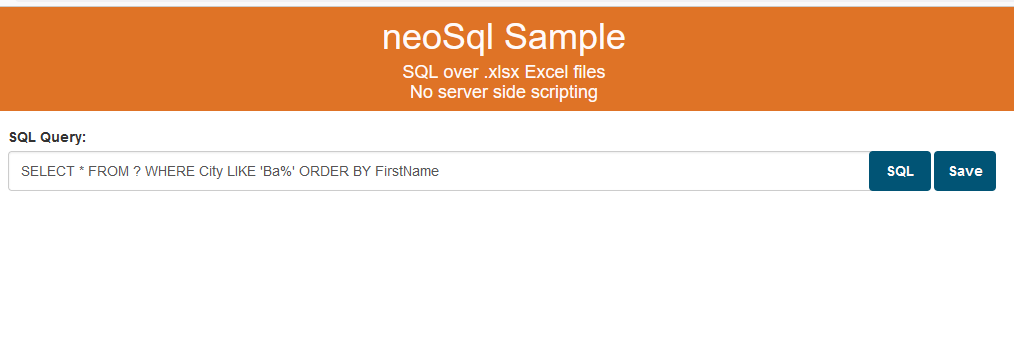
Quote from luishp on August 16, 2022, 11:08 am@carlos-saldana ¿lo estás ejecutando en un servidor web? Puedes utilizar neoPhp o cualquier otro. Si no lo haces, como la aplicación necesita acceder a un archivo local, habrá un bloqueo de seguridad del tipo CORS y no podrás ejecutarlo. Fíjate también que pulsando F12 puedes ver la Consola del navegador donde aparecen descritos los errores. De este modo tendrás muchas más pistas de lo que puede estar sucediendo cuando algo no funciona correctamente.
Esta sentencia SQL debe funcionar correctamente:
SELECT * FROM ? WHERE City LIKE 'Ba%' ORDER BY FirstNameEl ejemplo online, donde puedes comprobar como funciona lo tienes en este enlace:
https://visualneo.com/tutorials/neosql/
Saludos.
@carlos-saldana ¿lo estás ejecutando en un servidor web? Puedes utilizar neoPhp o cualquier otro. Si no lo haces, como la aplicación necesita acceder a un archivo local, habrá un bloqueo de seguridad del tipo CORS y no podrás ejecutarlo. Fíjate también que pulsando F12 puedes ver la Consola del navegador donde aparecen descritos los errores. De este modo tendrás muchas más pistas de lo que puede estar sucediendo cuando algo no funciona correctamente.
Esta sentencia SQL debe funcionar correctamente:
SELECT * FROM ? WHERE City LIKE 'Ba%' ORDER BY FirstName
El ejemplo online, donde puedes comprobar como funciona lo tienes en este enlace:
https://visualneo.com/tutorials/neosql/
Saludos.