
Aspect ratio of a picture in Design tab

Quote from Wood on September 14, 2020, 11:00 amHi,
maybe someone can help me with a little hint. Searching "Aspect ratio" in the forum only leads to answers related to compiled or deployed projects. What I need is a simple solution to resize a picture in the design tab without losing aspect ratio. Neither pressed key "Shift" nor "Ctrl" during resizing with mouse does work.
How can this be done without manually calculating width and hight?Regards
Wood
Hi,
maybe someone can help me with a little hint. Searching "Aspect ratio" in the forum only leads to answers related to compiled or deployed projects. What I need is a simple solution to resize a picture in the design tab without losing aspect ratio. Neither pressed key "Shift" nor "Ctrl" during resizing with mouse does work.
How can this be done without manually calculating width and hight?
Regards
Wood

Quote from asmat on September 14, 2020, 12:04 pmFirst resize your image then set width or height of image "auto"
First resize your image then set width or height of image "auto"
Uploaded files: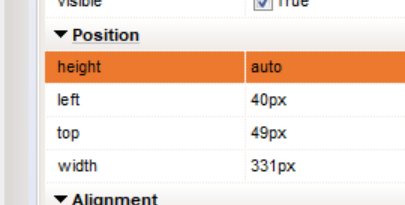
Quote from Wood on September 14, 2020, 5:10 pmThis works and helps a lot, although this is not exactly what I wanted.
What I wanted is to take the picture with the mouse and zoom in or out, no matter what height or width it is.
But I suspect your solution will be the only one, that works. :-)
Thank you for your quick response and help!Regards
Wood
This works and helps a lot, although this is not exactly what I wanted.
What I wanted is to take the picture with the mouse and zoom in or out, no matter what height or width it is.
But I suspect your solution will be the only one, that works. :-)
Thank you for your quick response and help!
Regards
Wood

Quote from luishp on September 14, 2020, 5:33 pm@wood if you use SVG graphic files they will usually keep aspect ratio. I very much recommend using them when using icons and vector images for responsive designs. When they are inserted "inline" they can be manipulated through code (using neoSVG plugin for example) opening a wide range of possibilities. Take a look here:
https://www.youtube.com/watch?v=czfLxAqFz0k&t=3sBest regards.
@wood if you use SVG graphic files they will usually keep aspect ratio. I very much recommend using them when using icons and vector images for responsive designs. When they are inserted "inline" they can be manipulated through code (using neoSVG plugin for example) opening a wide range of possibilities. Take a look here:
https://www.youtube.com/watch?v=czfLxAqFz0k&t=3s
Best regards.
Quote from Wood on September 14, 2020, 7:55 pm@luishp:
Well, it's a completely other way to handle grafic files, but I'll try it out.
I always enjoy learning. Thanks for this additional hint!Regards
Wood
@luishp:
Well, it's a completely other way to handle grafic files, but I'll try it out.
I always enjoy learning. Thanks for this additional hint!
Regards
Wood
