
Ayuda para analizar este archivo

Quote from josevdr95 on June 5, 2024, 4:46 pmHola, estoy intentado obtener datos de este archivo DB (http://www.linux-usb.org/usb.ids) pero tiene una Syntax muy compleja que no logro obtener datos, analizarlo línea por línea no es una opción ya que es muy extenso, alguna idea de como hacerlo ?En resumen lo que quiero lograr es que atreves del VID y PID obtener los datos del dispositivo

Quote from DaviddeArgentina on June 5, 2024, 6:29 pmHola @josevdr95
¿Podrías poner algún eiemplo de resultado aceptable, porque veo muchos valores VID y PID?
Un abrazo!
Hola @josevdr95
¿Podrías poner algún eiemplo de resultado aceptable, porque veo muchos valores VID y PID?
Un abrazo!

Quote from mishem on June 5, 2024, 8:25 pm@josevdr95
- Provide Internet access. In the page properties the action is: InternetGet "http://www.linux-usb.org/usb.ids" "[TextEntry1]" "HideProgress"
- Wait for the text to load into the first text field.
- Click the button below.
Then you can sort by brute force what you need.
- Provide Internet access. In the page properties the action is: InternetGet "http://www.linux-usb.org/usb.ids" "[TextEntry1]" "HideProgress"
- Wait for the text to load into the first text field.
- Click the button below.
Then you can sort by brute force what you need.
Uploaded files:Quote from josevdr95 on June 7, 2024, 3:50 pm@mishem
Hola gracia por la ayuda e estado haciendo algunas pruebas pero devuelve resultados incorrectos y en algunos casos no devuelve nada. La foto que adjunto debería devolver:
Víd= 040a Kodak Co.
Pid= 0100 DC-220
Seria un dispositivo del fabricante Kodak Co. del tipo DC-220
Talvez estoy haciendo algo mal.
Hola gracia por la ayuda e estado haciendo algunas pruebas pero devuelve resultados incorrectos y en algunos casos no devuelve nada. La foto que adjunto debería devolver:
Víd= 040a Kodak Co.
Pid= 0100 DC-220
Seria un dispositivo del fabricante Kodak Co. del tipo DC-220
Talvez estoy haciendo algo mal.
Uploaded files:
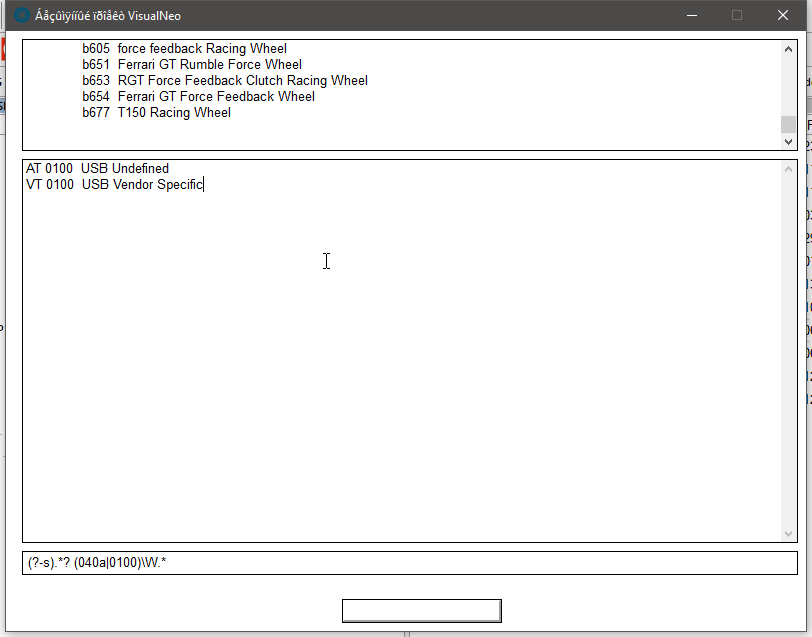
Quote from mishem on June 7, 2024, 6:06 pm@josevdr95
This regular expression is not universal. Moreover, it needs to be improved. I just showed an example of how you can quickly find certain results. For each search you need to create a separate regular expression. You should take the time to study regular expressions, at least to understand the general meaning.
https://regex.sorokin.engineer/regular_expressions/
This regular expression is not universal. Moreover, it needs to be improved. I just showed an example of how you can quickly find certain results. For each search you need to create a separate regular expression. You should take the time to study regular expressions, at least to understand the general meaning.
https://regex.sorokin.engineer/regular_expressions/
Quote from mishem on June 7, 2024, 6:27 pmI don't know what VID and PID are. To me they are just strings and the regex was made to find the strings that contain the VID and PID text.
La foto que adjunto debería devolver:
Víd= 040a Kodak Co.
Pid= 0100 DC-220
These lines are not in the text. There are lines:
040a Kodak Co.
0100 DC-220
You need to understand in detail what exactly you need to look for. For example, if you need to find all lines starting with 0100, then you can use, for example, the regex (?-s)0100.*
(?-s) - indicates that the text is multi-line. For some reason it doesn’t work (?m), so I use it in reverse (?-s)
0100 - text to find
. - any character following the text above including spaces, etc.
* - repetition of any character an unlimited number of times.
I don't know what VID and PID are. To me they are just strings and the regex was made to find the strings that contain the VID and PID text.
La foto que adjunto debería devolver:
Víd= 040a Kodak Co.
Pid= 0100 DC-220
These lines are not in the text. There are lines:
040a Kodak Co.
0100 DC-220
You need to understand in detail what exactly you need to look for. For example, if you need to find all lines starting with 0100, then you can use, for example, the regex (?-s)0100.*
(?-s) - indicates that the text is multi-line. For some reason it doesn’t work (?m), so I use it in reverse (?-s)
0100 - text to find
. - any character following the text above including spaces, etc.
* - repetition of any character an unlimited number of times.
Quote from mishem on June 7, 2024, 6:30 pmI'm trying to explain to you through a translator. It’s better if you figure it out yourself, or if there is someone who can explain it in a language you understand. If I explain in Russian, not every Russian will understand what I am telling him. :)
I'm trying to explain to you through a translator. It’s better if you figure it out yourself, or if there is someone who can explain it in a language you understand. If I explain in Russian, not every Russian will understand what I am telling him. :)
Quote from josevdr95 on June 7, 2024, 6:37 pmQuote from mishem on June 7, 2024, 6:27 pmI don't know what VID and PID are. To me they are just strings and the regex was made to find the strings that contain the VID and PID text.
VID y PID son dos acrónimos que se utilizan para identificar de forma única un dispositivo USB conectado a una computadora.
VID significa ID de proveedor (Vendor ID en inglés). Es un número asignado al fabricante del dispositivo. Por ejemplo, el VID de Dell es 0x05AC.
PID significa ID de producto (Product ID en inglés). Es un número asignado por el fabricante al modelo específico del dispositivo. Por ejemplo, el PID del teclado inalámbrico Dell KM636 es 0x026F.
Juntos, el VID y el PID forman una combinación única que identifica inequívocamente un dispositivo USB. Esta información se puede utilizar para varios propósitos
Quote from mishem on June 7, 2024, 6:27 pmI don't know what VID and PID are. To me they are just strings and the regex was made to find the strings that contain the VID and PID text.
VID y PID son dos acrónimos que se utilizan para identificar de forma única un dispositivo USB conectado a una computadora.
VID significa ID de proveedor (Vendor ID en inglés). Es un número asignado al fabricante del dispositivo. Por ejemplo, el VID de Dell es 0x05AC.
PID significa ID de producto (Product ID en inglés). Es un número asignado por el fabricante al modelo específico del dispositivo. Por ejemplo, el PID del teclado inalámbrico Dell KM636 es 0x026F.
Juntos, el VID y el PID forman una combinación única que identifica inequívocamente un dispositivo USB. Esta información se puede utilizar para varios propósitos
Quote from mishem on June 7, 2024, 10:13 pm@josevdr95
If I get you right...
Wait for the lists to load.
Click on the first list (vendor).
If I get you right...
Wait for the lists to load.
Click on the first list (vendor).
Uploaded files: