
Calling function(object as parameter)

Quote from asmat on March 11, 2020, 12:36 amI set the this code for a button.
CreateEmptyObject [collect]

setvar [collect('name')] "asmat"
setvar [collect('lastname')] "qatea"
setvar [collect('age')] 21
call "[collect]"
And The below code is for "call" subroutine with [result] parameter:
StringifyJSON [result] [t]
SetVar [n] [t('name')]
SetVar [m] [t('lastname')]
MessageBox "hello" "name:[n] lastname:[m]" "ok" ""
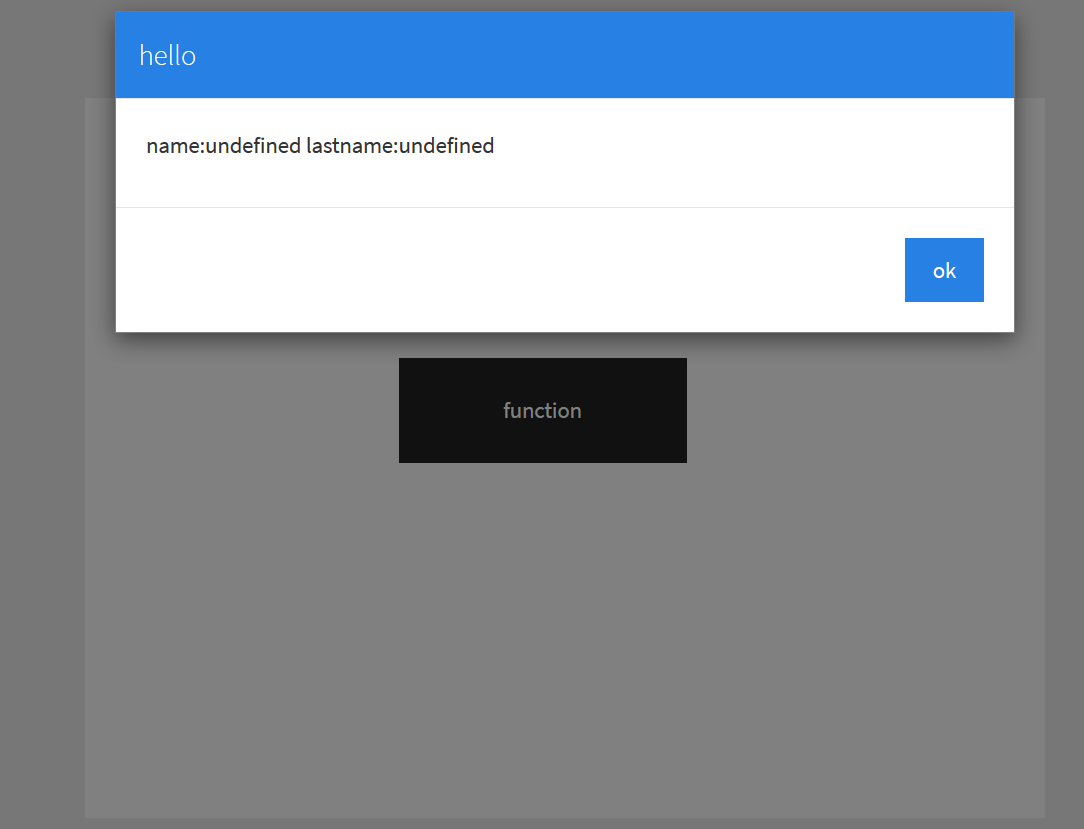
I got undefined error for variable [n] and [m] , How can I solve this problem ?
I set the this code for a button.
CreateEmptyObject [collect]

setvar [collect('name')] "asmat"
setvar [collect('lastname')] "qatea"
setvar [collect('age')] 21
call "[collect]"
And The below code is for "call" subroutine with [result] parameter:
StringifyJSON [result] [t]
SetVar [n] [t('name')]
SetVar [m] [t('lastname')]
MessageBox "hello" "name:[n] lastname:[m]" "ok" ""
I got undefined error for variable [n] and [m] , How can I solve this problem ?
Uploaded files: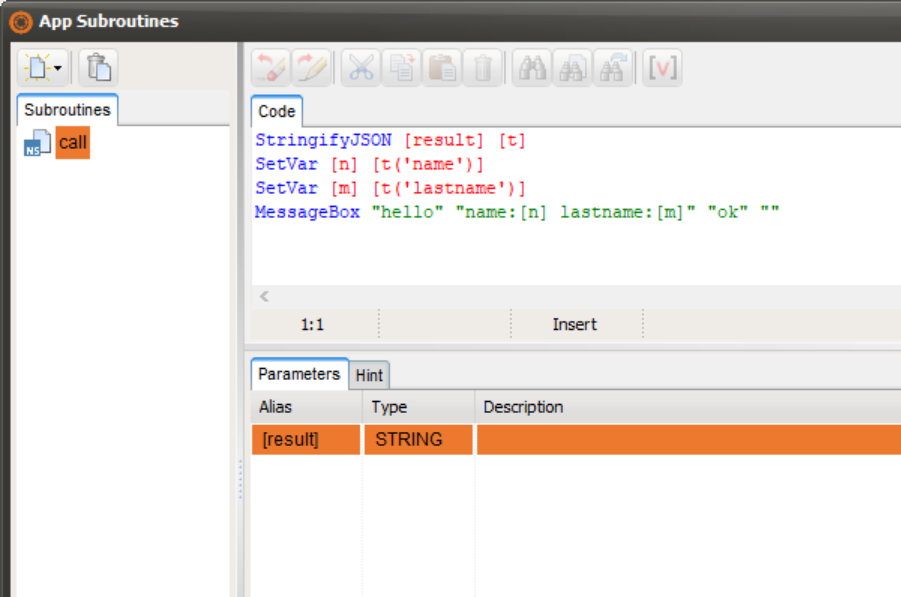

Quote from Gaev on March 11, 2020, 1:47 am@asmat
The subroutine named call is expecting a string in the first parameter [result] ... but you are attempting to pass a JSON object.
I think you need to Stringify [collect], and pass the stringified string to the subroutine ... inside the subroutine, do a ParseJSON to re-create theJSON object from the string.
This worked for me ...
CreateEmptyObject [collect]
setvar [collect('name')] "asmat"
setvar [collect('lastname')] "qatea"
setvar [collect('age')] 21
StringifyJSON [collect] [collectString]
call "[collectString]"
... and ...
ParseJSON [result] [t]
SetVar [n] [t('name')]
SetVar [m] [t('lastname')]
MessageBox "hello" "name:[n] lastname:[m]" "ok" ""
The subroutine named call is expecting a string in the first parameter [result] ... but you are attempting to pass a JSON object.
I think you need to Stringify [collect], and pass the stringified string to the subroutine ... inside the subroutine, do a ParseJSON to re-create theJSON object from the string.
This worked for me ...
CreateEmptyObject [collect]
setvar [collect('name')] "asmat"
setvar [collect('lastname')] "qatea"
setvar [collect('age')] 21
StringifyJSON [collect] [collectString]
call "[collectString]"
... and ...
ParseJSON [result] [t]
SetVar [n] [t('name')]
SetVar [m] [t('lastname')]
MessageBox "hello" "name:[n] lastname:[m]" "ok" ""
Quote from asmat on March 11, 2020, 2:15 amHi @Gaev
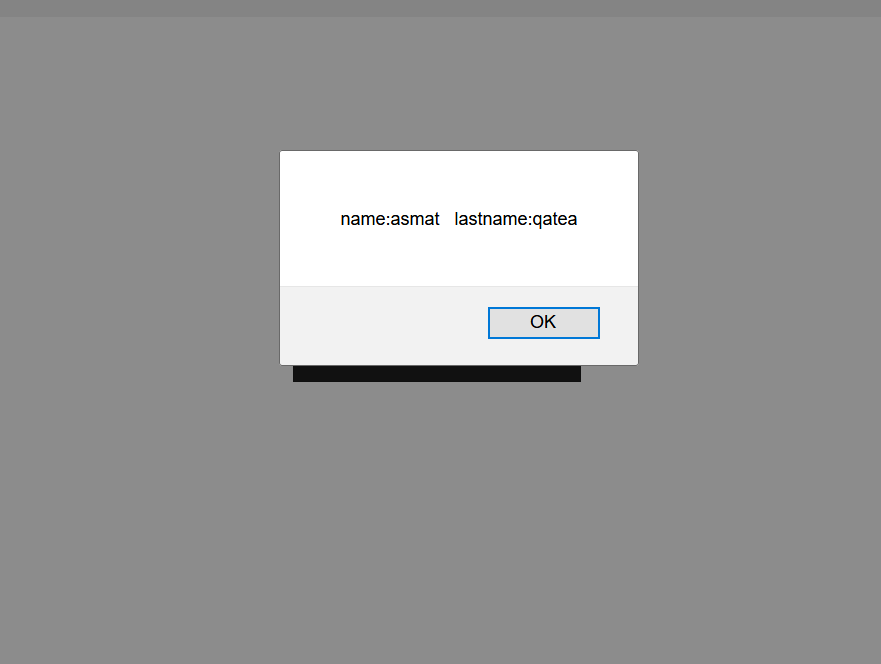
I tested the same code in javascript subroutine it works fine.
CreateEmptyObject [collect]

setvar [collect('name')] "asmat"
setvar [collect('lastname')] "qatea"
setvar [collect('age')] 21

mytest "[collect]"
and for subroutine mytest with test parameter
alert('name:'+test.name +' lastname:'+test.lastname);I want to do same thing for neoscript, without stringifyJSON, it is possible?
Hi @Gaev
I tested the same code in javascript subroutine it works fine.
CreateEmptyObject [collect]

setvar [collect('name')] "asmat"
setvar [collect('lastname')] "qatea"
setvar [collect('age')] 21

mytest "[collect]"
and for subroutine mytest with test parameter
alert('name:'+test.name +' lastname:'+test.lastname);
I want to do same thing for neoscript, without stringifyJSON, it is possible?
Uploaded files: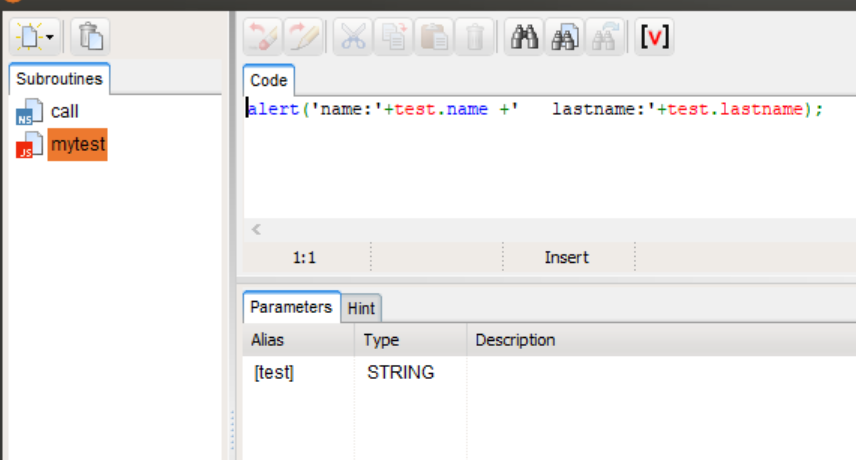
Quote from Gaev on March 11, 2020, 4:01 am@asmat
I tested the same code in javascript subroutine it works fine.
I don't know why the parameter support for NeoScript subroutines is different from that for JavaScript subroutines.
And there is insufficient descriptive information about all of the available 'Parameter Types' for me to say if one of the others will work.
I want to do same thing for neoscript, without stringifyJSON, it is possible?
Perhaps, if you tell us why you do NOT want to use StringifyJSON, there might be work arounds e.g. ...
a) since VisualNEOWeb variables are global in nature, you can directly access them inside your NeoScript subroutines ... so, this code inside a subroutine (with no parameters) ...
SetVar [n] [collect('name')]
SetVar [m] [collectresult('lastname')]
MessageBox "hello" "name:[n] lastname:[m]" "ok" ""
... works ... but at the cost of losing flexibility ... it will always access the [collect] json variable.
b) you might consider calling a JavaScript subroutine ... which does the stringify ... and then calls the NeoScript subroutine ... like so ...
... your button code
CreateEmptyObject [collect]
setvar [collect('name')] "asmat"
setvar [collect('lastname')] "qatea"
setvar [collect('age')] 21
calljs [collect]
//calljs; javascript subroutine; parameter asmatJSON is defined as type:string var asmatString = JSON.stringify(asmatJSON); //alert(asmatString); $scope.call(asmatString);... call; neoscript subroutine; parameter result is defined as type:string ParseJSON [result] [t] SetVar [n] [t('name')] SetVar [m] [t('lastname')] MessageBox "hello" "name:[n] lastname:[m]" "ok" ""
I tested the same code in javascript subroutine it works fine.
I don't know why the parameter support for NeoScript subroutines is different from that for JavaScript subroutines.
And there is insufficient descriptive information about all of the available 'Parameter Types' for me to say if one of the others will work.
I want to do same thing for neoscript, without stringifyJSON, it is possible?
Perhaps, if you tell us why you do NOT want to use StringifyJSON, there might be work arounds e.g. ...
a) since VisualNEOWeb variables are global in nature, you can directly access them inside your NeoScript subroutines ... so, this code inside a subroutine (with no parameters) ...
SetVar [n] [collect('name')]
SetVar [m] [collectresult('lastname')]
MessageBox "hello" "name:[n] lastname:[m]" "ok" ""
... works ... but at the cost of losing flexibility ... it will always access the [collect] json variable.
b) you might consider calling a JavaScript subroutine ... which does the stringify ... and then calls the NeoScript subroutine ... like so ...
... your button code
CreateEmptyObject [collect]
setvar [collect('name')] "asmat"
setvar [collect('lastname')] "qatea"
setvar [collect('age')] 21
calljs [collect]
//calljs; javascript subroutine; parameter asmatJSON is defined as type:string
var asmatString = JSON.stringify(asmatJSON);
//alert(asmatString);
$scope.call(asmatString);
... call; neoscript subroutine; parameter result is defined as type:string
ParseJSON [result] [t]
SetVar [n] [t('name')]
SetVar [m] [t('lastname')]
MessageBox "hello" "name:[n] lastname:[m]" "ok" ""
Quote from asmat on March 11, 2020, 8:46 amThanks @Gaev
last night during making a tutorial for PhoneGape dialog plugin I met above issue.
See the Below image, probability you will realize me better.
Thanks @Gaev
last night during making a tutorial for PhoneGape dialog plugin I met above issue.
See the Below image, probability you will realize me better.
Uploaded files: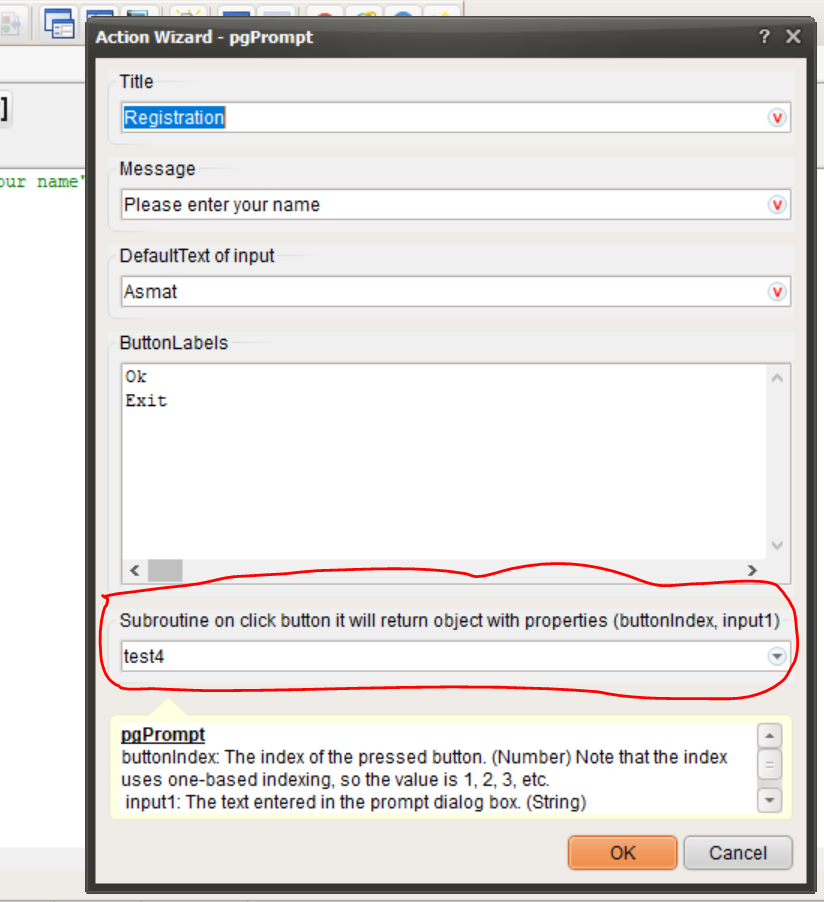

Quote from luishp on March 11, 2020, 12:43 pmHi @asmat. I think you need to use StringifyJSON and ParseJSON.
Please takle a look at the attached sample.
Regards.
Hi @asmat. I think you need to use StringifyJSON and ParseJSON.
Please takle a look at the attached sample.
Regards.
Quote from Gaev on March 11, 2020, 4:27 pm@asmat
last night during making a tutorial for PhoneGape dialog plugin I met above issue.
See the Below image, probability you will realize me better.I am assuming that this is a somewhat different issue/query than what was stated in earlier posts i.e. you are asking about the way pgPrompt command works.
I could not find this command .. probably because this is a command for which I don't have the necessary plugin on my machine.
However, it is similar to other dialog commands ... so I will take a stab at how it should work ...
a) you have asked of this dialog box to contain 2 buttons ... Ok and Cancel
b) you have specified hat when the user clicks on one of the buttons, information from this dialog is to be passed to your subroutine named test4... what is required is for you to setup a subroutine named test4 with 2 parameters ...
- the first one is to be of Type: Integer; let us say you give it an Alias of [buttonNumber]
- the second one is to be of Type: String; let us say you give it an Alias of [userText]... now, when the user enters some text and presses/touches one of the buttons, your subroutine (test4) will be invoked ...
- [buttonNumber] will be 1 (if Ok button was touched) or 2 (if Exit button was touched)
- [userText] will be what ever the user entered in the Dialog's InputBox... using the info in the two (alias) variables, you can construct your logic for processing the user's request.
If you already knew all this, please expand on what your enquiry is about (and if/how it relates to the initial query about passing json objects to a NeoScript subroutine).
@luishp - it might be helpful to setup a sample App that illustrates the use of all the different types of Parameter Types that appear in the dropdown box at design time ... for both NeoScript and JavaScript subroutines ... some (like String, Integer etc.) are obvious, some can be determined by some trial and error and the remainder are a mystery (I did not know where to begin to experiment with them) ... in the past, you have answered related queries, but this is scattered over different posts on this forum ... a sample App would allow all queries to be directed to such a sample App ... if you provide me with explanations, I can create such a sample App.
last night during making a tutorial for PhoneGape dialog plugin I met above issue.
See the Below image, probability you will realize me better.
I am assuming that this is a somewhat different issue/query than what was stated in earlier posts i.e. you are asking about the way pgPrompt command works.
I could not find this command .. probably because this is a command for which I don't have the necessary plugin on my machine.
However, it is similar to other dialog commands ... so I will take a stab at how it should work ...
a) you have asked of this dialog box to contain 2 buttons ... Ok and Cancel
b) you have specified hat when the user clicks on one of the buttons, information from this dialog is to be passed to your subroutine named test4
... what is required is for you to setup a subroutine named test4 with 2 parameters ...
- the first one is to be of Type: Integer; let us say you give it an Alias of [buttonNumber]
- the second one is to be of Type: String; let us say you give it an Alias of [userText]
... now, when the user enters some text and presses/touches one of the buttons, your subroutine (test4) will be invoked ...
- [buttonNumber] will be 1 (if Ok button was touched) or 2 (if Exit button was touched)
- [userText] will be what ever the user entered in the Dialog's InputBox
... using the info in the two (alias) variables, you can construct your logic for processing the user's request.
If you already knew all this, please expand on what your enquiry is about (and if/how it relates to the initial query about passing json objects to a NeoScript subroutine).
@luishp - it might be helpful to setup a sample App that illustrates the use of all the different types of Parameter Types that appear in the dropdown box at design time ... for both NeoScript and JavaScript subroutines ... some (like String, Integer etc.) are obvious, some can be determined by some trial and error and the remainder are a mystery (I did not know where to begin to experiment with them) ... in the past, you have answered related queries, but this is scattered over different posts on this forum ... a sample App would allow all queries to be directed to such a sample App ... if you provide me with explanations, I can create such a sample App.
Quote from asmat on March 11, 2020, 6:23 pm@Hi luishp and @gaev
Take a look to the below link.
@luishp when the button of pgPrompt command press it will return an object, the object come directly to parameter of subroutine how can stringify that?
@Hi luishp and @gaev
Take a look to the below link.
@luishp when the button of pgPrompt command press it will return an object, the object come directly to parameter of subroutine how can stringify that?
Quote from luishp on March 11, 2020, 9:20 pm@asmat I think it should come already stringified so you should just parse (ParseJSON) it.
@gaev I want to create some tutorials but will need some help in doing a theme index.
I'm thinking about some kind of Wiki editor so anyone can enhance the tutorials.
@asmat I think it should come already stringified so you should just parse (ParseJSON) it.
@gaev I want to create some tutorials but will need some help in doing a theme index.
I'm thinking about some kind of Wiki editor so anyone can enhance the tutorials.