
Can't compile to HTML any more

Quote from Wood on July 19, 2021, 2:52 pmHi,
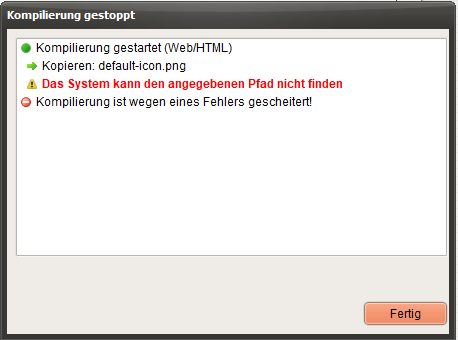
since I installed the new version 21.7.9 some days ago, ever trial of compiling to HTML fails with "cannot find Path of Default-Icon.png" - no matter which project I try.
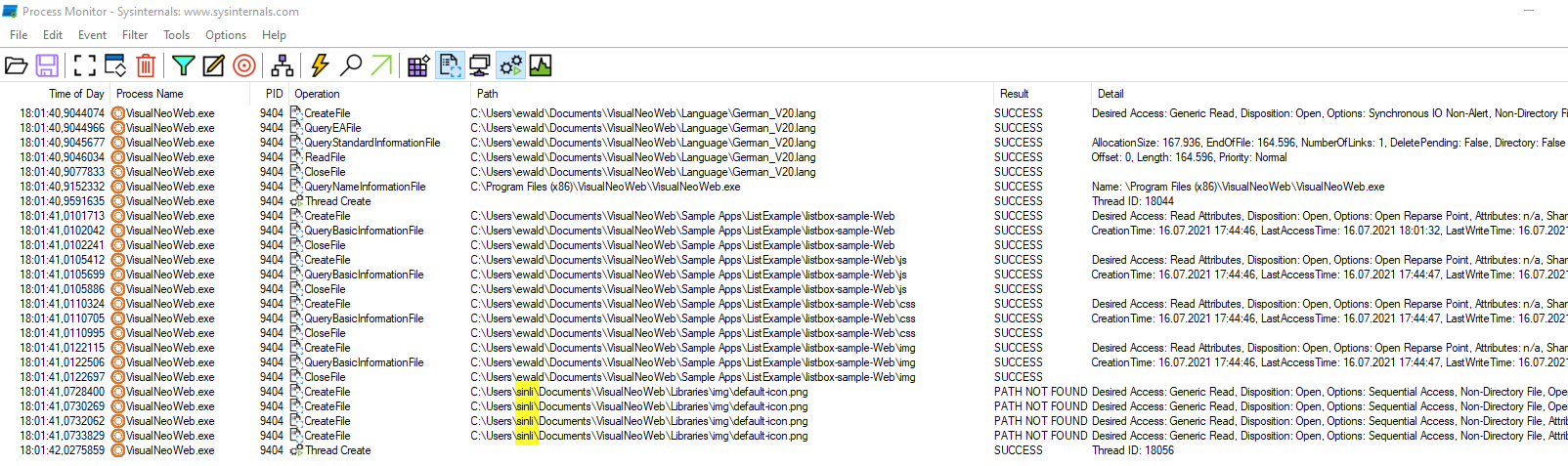
I monitored the file access and found that the compiler allways tries to copy the file out of "C:\users\SINLI\Documents...."
I cannot find any settings for libraries where I could possibly correct this path.Can you give me a hint?
Kind Regards
Wood
Hi,
since I installed the new version 21.7.9 some days ago, ever trial of compiling to HTML fails with "cannot find Path of Default-Icon.png" - no matter which project I try.
I monitored the file access and found that the compiler allways tries to copy the file out of "C:\users\SINLI\Documents...."
I cannot find any settings for libraries where I could possibly correct this path.
Can you give me a hint?
Kind Regards
Wood
Uploaded files:

Quote from luishp on July 19, 2021, 6:43 pmHi @wood
That's because you are trying to compile projects whose default icon is not located properly.
Just go to Project > Properties > General and delete the default icon or choose another one.Regards.
Hi @wood
That's because you are trying to compile projects whose default icon is not located properly.
Just go to Project > Properties > General and delete the default icon or choose another one.
Regards.
Quote from luishp on July 20, 2021, 6:59 amHi @wood, I'm glad you have found a solution.
I'm doing some test with no icon at all and it compiles with no problem.
Currently the default icon is taken from "MyDocuments" folder. As it has a different path on every computer, it will get lost when sharing a .neoapp source code file. I will try to include a fix in the next release so it gets the default icon from a common folder.Thank you.
Best reagrds.
Hi @wood, I'm glad you have found a solution.
I'm doing some test with no icon at all and it compiles with no problem.
Currently the default icon is taken from "MyDocuments" folder. As it has a different path on every computer, it will get lost when sharing a .neoapp source code file. I will try to include a fix in the next release so it gets the default icon from a common folder.
Thank you.
Best reagrds.