
Change Idle Event Seconds

Quote from Bonez on August 27, 2023, 6:46 amJust wondering if there is a way to change the seconds setting for Book/Actions/Idle Event time from within an application so a user could select his/her own idle time.
I found this post from Gaev at archive.visualneo but I'm not understanding it.
Could I please have a code snippet.
Just wondering if there is a way to change the seconds setting for Book/Actions/Idle Event time from within an application so a user could select his/her own idle time.
I found this post from Gaev at archive.visualneo but I'm not understanding it.
Could I please have a code snippet.
Quote from Gaev on August 27, 2023, 4:59 pm@bonez
I trust you are referring to this post from 2018 ... https://archive.visualneo.com/viewtopic.php?p=11223217&hilit=Idle+Time#p11223217 ... where I responded to an enquiry with this possible solution ...
if all else fails, you might consider doing your own timing within the "Idle Event Handler" (subroutine).
1) set the NeoBook Idle Time value to the smallest allowable value e.g. 15 seconds
2) reserve a variable (say IdleLoopMax) where you store a value that represents a multiple of the NeoBook Idle Time value (e.g 1,2,3,4,5 etc.).
You can present the user with a ListBox that allows him/her to select these values (1,2,3,4,5 etc.) ... or multiples of the NeoBook Idle Time (e.g. 15, 30, 45, 60 , 75 etc.) and then divide the user's selection by the NeoBook Idle Time value
3) reserve another variable (say IdleLoopCounter) ... when a user changes the value of IdleLoopMax, set the same value to IdleLoopCounter
4) At the start of the "Idle Event Handler" (subroutine) ...
a) subtract one from IdleLoopCounter
b) if the new value is 1 or more, Return from the subroutine
c) else, set IdleLoopCounter to IdleLoopMax ... and perform the desired commands before doing a ReturnIf a more fine grained control of the "Idle Time" is required, variables can be used to store actual times (instead of using the simpler loop counters).
I can prepare a pub to meet your requirement to set up an idle time period at run time ... but first can you tell me what range and increments of intervals you would want to permit the user e.g. 20 second intervals starting at (say) 30 seconds and going all the way to 130 seconds.
Once you study the concept, you should be able to alter it to support any ranges that are NOT an integer multiple of the intervals.
I trust you are referring to this post from 2018 ... https://archive.visualneo.com/viewtopic.php?p=11223217&hilit=Idle+Time#p11223217 ... where I responded to an enquiry with this possible solution ...
if all else fails, you might consider doing your own timing within the "Idle Event Handler" (subroutine).
1) set the NeoBook Idle Time value to the smallest allowable value e.g. 15 seconds
2) reserve a variable (say IdleLoopMax) where you store a value that represents a multiple of the NeoBook Idle Time value (e.g 1,2,3,4,5 etc.).
You can present the user with a ListBox that allows him/her to select these values (1,2,3,4,5 etc.) ... or multiples of the NeoBook Idle Time (e.g. 15, 30, 45, 60 , 75 etc.) and then divide the user's selection by the NeoBook Idle Time value
3) reserve another variable (say IdleLoopCounter) ... when a user changes the value of IdleLoopMax, set the same value to IdleLoopCounter
4) At the start of the "Idle Event Handler" (subroutine) ...
a) subtract one from IdleLoopCounter
b) if the new value is 1 or more, Return from the subroutine
c) else, set IdleLoopCounter to IdleLoopMax ... and perform the desired commands before doing a ReturnIf a more fine grained control of the "Idle Time" is required, variables can be used to store actual times (instead of using the simpler loop counters).
I can prepare a pub to meet your requirement to set up an idle time period at run time ... but first can you tell me what range and increments of intervals you would want to permit the user e.g. 20 second intervals starting at (say) 30 seconds and going all the way to 130 seconds.
Once you study the concept, you should be able to alter it to support any ranges that are NOT an integer multiple of the intervals.
Quote from Bonez on August 27, 2023, 11:22 pmHi Gaev.
Yes that is correct. I couldn't quite get my head around what you meant. I'm using the ACTIVATE/DEACTIVATE setting along side the IDLE EVENT as two additional security features in my application.
The IDLE EVENT will be set up so the user can choose an idle timeout period from their settings page of 180, 300 or 600 seconds. If the application is left unattended and the selected timeout period is reached, the application will revert back to the login page.
Hi Gaev.
Yes that is correct. I couldn't quite get my head around what you meant. I'm using the ACTIVATE/DEACTIVATE setting along side the IDLE EVENT as two additional security features in my application.
The IDLE EVENT will be set up so the user can choose an idle timeout period from their settings page of 180, 300 or 600 seconds. If the application is left unattended and the selected timeout period is reached, the application will revert back to the login page.

Quote from Gaev on August 28, 2023, 9:33 pm@bonez
For the future, when addressing a response to a forum member, you might want to use the member's id (the one that starts with the @ sign) ... this will send an email to the member ... e.g. I check my emails continuously, while I visit the Forum just 2 or 3 times a day.
Thank you for providing the additional information ... however, in order to NOT provide the right solution to the wrong requirement, I need some clarification before I develop/deliver the promised pub.
1) the ACTIVATE/DEACTIVATE setting
I need to understand what your Activate/Deactivate events do i.e. what are they intended to prevent ?
f.y.i. I have never used these events, and I am not sure how the Idle time is affected when an Application is Deactivated.
2) The IDLE EVENT will be set up so the user can choose an idle timeout period from their settings page of 180, 300 or 600 seconds. If the application is left unattended and the selected timeout period is reached, the application will revert back to the login page.
a) Setting up an Idle event does not prevent the user from working on different pages/objects within the Application ... any mouse click or keyboard input resets the idle period.
b) What happens after the user sets his own settings ?
Perhaps you can provide some context about what you are trying to achieve with all these controls.
For the future, when addressing a response to a forum member, you might want to use the member's id (the one that starts with the @ sign) ... this will send an email to the member ... e.g. I check my emails continuously, while I visit the Forum just 2 or 3 times a day.
Thank you for providing the additional information ... however, in order to NOT provide the right solution to the wrong requirement, I need some clarification before I develop/deliver the promised pub.
1) the ACTIVATE/DEACTIVATE setting
I need to understand what your Activate/Deactivate events do i.e. what are they intended to prevent ?
f.y.i. I have never used these events, and I am not sure how the Idle time is affected when an Application is Deactivated.
2) The IDLE EVENT will be set up so the user can choose an idle timeout period from their settings page of 180, 300 or 600 seconds. If the application is left unattended and the selected timeout period is reached, the application will revert back to the login page.
a) Setting up an Idle event does not prevent the user from working on different pages/objects within the Application ... any mouse click or keyboard input resets the idle period.
b) What happens after the user sets his own settings ?
Perhaps you can provide some context about what you are trying to achieve with all these controls.
Quote from Bonez on August 28, 2023, 11:37 pmThe "Book/Book Properties/Actions/Deactivate" event will fire if the user selects the option to do so via a checkbox using a variable called [PubDeactivate]. It will take the pub back to the "login page" if the pub looses focus. For the minute the Activate Event will not be used.
The code I'm using for my Deactivate Event (user option) is as follows.If "[PubDeactivate]" "=" "1"
GotoPage "Login"
EndIf
f.y.i. I have never used these events, and I am not sure how the Idle time is affected when an Application is Deactivated.
If the Idle Event fires (or doesn't) while the pub is "Deactivated" that's ok because if it does, it will simply reload the "Login page".
a) Setting up an Idle event does not prevent the user from working on different pages/objects within the Application ... any mouse click or keyboard input resets the idle period.
Because the pub will be on the Login page, no actions/navigation by a user can be achieved unless a password is entered.
The whole objective is to lock down the application if it looses focus or becomes inactive.
I have set up check box options of 3, 5, and 10 minutes (180, 300 and 600 seconds) for the user to select idle time from.
Thanks.
The "Book/Book Properties/Actions/Deactivate" event will fire if the user selects the option to do so via a checkbox using a variable called [PubDeactivate]. It will take the pub back to the "login page" if the pub looses focus. For the minute the Activate Event will not be used.
The code I'm using for my Deactivate Event (user option) is as follows.
If "[PubDeactivate]" "=" "1"
GotoPage "Login"
EndIf
f.y.i. I have never used these events, and I am not sure how the Idle time is affected when an Application is Deactivated.
If the Idle Event fires (or doesn't) while the pub is "Deactivated" that's ok because if it does, it will simply reload the "Login page".
a) Setting up an Idle event does not prevent the user from working on different pages/objects within the Application ... any mouse click or keyboard input resets the idle period.
Because the pub will be on the Login page, no actions/navigation by a user can be achieved unless a password is entered.
The whole objective is to lock down the application if it looses focus or becomes inactive.
I have set up check box options of 3, 5, and 10 minutes (180, 300 and 600 seconds) for the user to select idle time from.
Thanks.
Quote from Gaev on August 29, 2023, 3:43 am@bonez
Thank you for the detailed explanation.
The "Book/Book Properties/Actions/Deactivate" event will fire if the user selects the option to do so via a checkbox using a variable called [PubDeactivate].
I am not entirely sure I understand this, but it does not matter as your code for the Deactivate event will fire no matter how your Application is deactivated.
I have set up check box options of 3, 5, and 10 minutes (180, 300 and 600 seconds) for the user to select idle time from.
Perhaps you meant Radio Buttons ... because CheckBoxes allow selection of more than one option while Radio Buttons only allow one.
It is late in the night here in Toronto ... tomorrow, I will post a Publication that handles the Idle event as described by you.
Thank you for the detailed explanation.
The "Book/Book Properties/Actions/Deactivate" event will fire if the user selects the option to do so via a checkbox using a variable called [PubDeactivate].
I am not entirely sure I understand this, but it does not matter as your code for the Deactivate event will fire no matter how your Application is deactivated.
I have set up check box options of 3, 5, and 10 minutes (180, 300 and 600 seconds) for the user to select idle time from.
Perhaps you meant Radio Buttons ... because CheckBoxes allow selection of more than one option while Radio Buttons only allow one.
It is late in the night here in Toronto ... tomorrow, I will post a Publication that handles the Idle event as described by you.
Quote from Bonez on August 29, 2023, 7:07 amYes you are right on both.
I am not entirely sure I understand this, but it does not matter as your code for the Deactivate event will fire no matter how your Application is deactivated.
Yes you are correct.
FYI: So I have an option for the user to select from as in the below image. If they select "Yes" ([PubDeactivate] = 1), then when the pub looses focus, the "Deactivate Event" will fire running the below code. If they select "No" ([PubDeactivate] = 0), the "Deactivate Event" will simply have no effect.
If "[PubDeactivate]" "=" "1"
GotoPage "Login"
EndIfEither way the "Deactivate Event" will have no effect on the "Idle Event" and vice versa.
I have tried to use a loop in the "Idle Event" but it needs to somehow be reset when the mouse moves or keyboard activity gets detected.
Thank you for doing this. I hope it makes it a bit clearer.
BTW I think you are about 12 hours behind us here down under in Melbourne.
Yes you are right on both.
I am not entirely sure I understand this, but it does not matter as your code for the Deactivate event will fire no matter how your Application is deactivated.
Yes you are correct.
FYI: So I have an option for the user to select from as in the below image. If they select "Yes" ([PubDeactivate] = 1), then when the pub looses focus, the "Deactivate Event" will fire running the below code. If they select "No" ([PubDeactivate] = 0), the "Deactivate Event" will simply have no effect.
If "[PubDeactivate]" "=" "1"
GotoPage "Login"
EndIf
Either way the "Deactivate Event" will have no effect on the "Idle Event" and vice versa.
I have tried to use a loop in the "Idle Event" but it needs to somehow be reset when the mouse moves or keyboard activity gets detected.
Thank you for doing this. I hope it makes it a bit clearer.
BTW I think you are about 12 hours behind us here down under in Melbourne.
Uploaded files: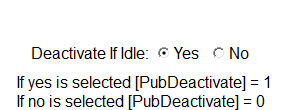
Quote from Gaev on August 30, 2023, 1:16 am@bonez
I have uploaded a pub file.
It is not complete ... I still need to reset the IdleLoopCounter whenever the user is not idle.
1) I have placed appropriate commands in the PageEnter sections of AppPage1 and AppPage2.
2) I can setup a Timer object that checks a change in [FocusedObject] and the Mouse Position.
3) I am still looking for a way to detect a keyboard entry.
Please advise me of the type of objects you expect within your App, so I can suggest an appropriate check.
Note that, for testing purposes, I have ...
- the VNWin Idle Time to 15 seconds (instead of 60) and user options to smaller numbers as well ... otherwise, testing was taking too long.
- loaded the MasterPage with a Text object that shows you how the various variables change over time.
I have uploaded a pub file.
It is not complete ... I still need to reset the IdleLoopCounter whenever the user is not idle.
1) I have placed appropriate commands in the PageEnter sections of AppPage1 and AppPage2.
2) I can setup a Timer object that checks a change in [FocusedObject] and the Mouse Position.
3) I am still looking for a way to detect a keyboard entry.
Please advise me of the type of objects you expect within your App, so I can suggest an appropriate check.
Note that, for testing purposes, I have ...
- the VNWin Idle Time to 15 seconds (instead of 60) and user options to smaller numbers as well ... otherwise, testing was taking too long.
- loaded the MasterPage with a Text object that shows you how the various variables change over time.
Quote from Bonez on August 30, 2023, 2:18 amThanks Gaev. I will check it out and get back to you.
2) I can setup a Timer object that checks a change in [FocusedObject] and the Mouse Position.
I think timers running in the background maybe classed as activity, so no Idle Event will be registered while they are running.
Please advise me of the type of objects you expect within your App, so I can suggest an appropriate check.
Objects used ATM are ListBox, TextEntry, PushButtons, CheckBox and RadioButtons.
Thanks Gaev. I will check it out and get back to you.
2) I can setup a Timer object that checks a change in [FocusedObject] and the Mouse Position.
I think timers running in the background maybe classed as activity, so no Idle Event will be registered while they are running.
Please advise me of the type of objects you expect within your App, so I can suggest an appropriate check.
Objects used ATM are ListBox, TextEntry, PushButtons, CheckBox and RadioButtons.
Quote from Gaev on August 30, 2023, 3:32 am@bonez
I think timers running in the background maybe classed as activity, so no Idle Event will be registered while they are running.
After posting this, I thought of a better method i.e. have this checked at the start of the Idle Event subroutine ... if changed, reset the counter.
Objects used ATM are ListBox, TextEntry, PushButtons, CheckBox and RadioButtons.
Thanks ... checking for changes to [PageTitle], Mouse Position and [FocusedObject] will enable detection of all non-idle scenarios except one ... a user who ONLY uses the keyboard to navigate and enter data .. is there such a beast ?
I will await your feedback before sending v2.0 with the proposed enhancements.
I think timers running in the background maybe classed as activity, so no Idle Event will be registered while they are running.
After posting this, I thought of a better method i.e. have this checked at the start of the Idle Event subroutine ... if changed, reset the counter.
Objects used ATM are ListBox, TextEntry, PushButtons, CheckBox and RadioButtons.
Thanks ... checking for changes to [PageTitle], Mouse Position and [FocusedObject] will enable detection of all non-idle scenarios except one ... a user who ONLY uses the keyboard to navigate and enter data .. is there such a beast ?
I will await your feedback before sending v2.0 with the proposed enhancements.
Quote from Bonez on August 30, 2023, 4:46 amI think timers running in the background maybe classed as activity, so no Idle Event will be registered while they are running.
I did say this without checking...
As soon as I posted that comment I thought I better check to be sure. It seems I maybe wrong.
I have uploaded a crude example.
I think timers running in the background maybe classed as activity, so no Idle Event will be registered while they are running.
I did say this without checking...
As soon as I posted that comment I thought I better check to be sure. It seems I maybe wrong.
I have uploaded a crude example.
Uploaded files:
Quote from Gaev on August 30, 2023, 2:32 pm@bonez
I did say this without checking...
You and me both :-))
As soon as I posted that comment I thought I better check to be sure. It seems I maybe wrong.
I still think that it may be unnecessary to use a Timer object ... as mentioned in my earlier post, the script to check for changes to [PageTitle], Mouse Position and [FocusedObject] can be placed at the start of VNWin Idle Event subroutine.
I have uploaded a crude example.
I will check it out later today ... for now, I await your feedback on the sample pub (v1) that I uploaded yesterday.
I did say this without checking...
You and me both :-))
As soon as I posted that comment I thought I better check to be sure. It seems I maybe wrong.
I still think that it may be unnecessary to use a Timer object ... as mentioned in my earlier post, the script to check for changes to [PageTitle], Mouse Position and [FocusedObject] can be placed at the start of VNWin Idle Event subroutine.
I have uploaded a crude example.
I will check it out later today ... for now, I await your feedback on the sample pub (v1) that I uploaded yesterday.
Quote from Bonez on August 30, 2023, 10:32 pmRE. IdleBonez.pub. Works as you say.
1) I have placed appropriate commands in the PageEnter sections of AppPage1 and AppPage2.
It would be a pity to add "SetVar "[IdleLoopCounter]" "[IdleLoopMax]"" to all clickable and usable objects, but it may have to be done. But as you say, that still wont detect mouse click/movement and I would rather not use a plugin for that part.
3) I am still looking for a way to detect a keyboard entry.
I noticed all activity was detected. When it is "[IdleLoopCounter]" resets to the start of the 15 seconds.
On a side note.
Maybe a new GLOBAL VARIABLE is needed called [PubIdle].
Where if mouse and keyboard are idle, then [PubIdle] = 1 or if mouse and keyboard are active, then [PubIdle] = 0.
Then you could simply do a 10 minute (600sec) loop with a 3 min (the required Idle Time) variable "something like"...(You may have to click to expand blockquote)
SetVar "ReqIdleTime" "180"
If "[PubIdle]" "=" "1"
Loop "1" "60" "[PubIdleTime]"
If "[PubIdle]" "=" "0"
SetVar "[PubIdleTime]" "0"
ExitLoop
EndIfIfEx "[PubIdle] = 1 AND [PubIdleTime] = [ReqIdleTime]"
SetVar "[PubIdleTime]" "0"
GotoPage "Login"
ExitLoop
EndIfDelay "1000"
EndLoopEndIf
Looking forward to V2.0
RE. IdleBonez.pub. Works as you say.
1) I have placed appropriate commands in the PageEnter sections of AppPage1 and AppPage2.
It would be a pity to add "SetVar "[IdleLoopCounter]" "[IdleLoopMax]"" to all clickable and usable objects, but it may have to be done. But as you say, that still wont detect mouse click/movement and I would rather not use a plugin for that part.
3) I am still looking for a way to detect a keyboard entry.
I noticed all activity was detected. When it is "[IdleLoopCounter]" resets to the start of the 15 seconds.
On a side note.
Maybe a new GLOBAL VARIABLE is needed called [PubIdle].
Where if mouse and keyboard are idle, then [PubIdle] = 1 or if mouse and keyboard are active, then [PubIdle] = 0.
Then you could simply do a 10 minute (600sec) loop with a 3 min (the required Idle Time) variable "something like"...
(You may have to click to expand blockquote)
SetVar "ReqIdleTime" "180"
If "[PubIdle]" "=" "1"
Loop "1" "60" "[PubIdleTime]"
If "[PubIdle]" "=" "0"
SetVar "[PubIdleTime]" "0"
ExitLoop
EndIfIfEx "[PubIdle] = 1 AND [PubIdleTime] = [ReqIdleTime]"
SetVar "[PubIdleTime]" "0"
GotoPage "Login"
ExitLoop
EndIfDelay "1000"
EndLoopEndIf
Looking forward to V2.0
Quote from Gaev on August 31, 2023, 12:41 am@bonez
It would be a pity to add "SetVar "[IdleLoopCounter]" "[IdleLoopMax]"" to all clickable and usable objects, but it may have to be done. But as you say, that still wont detect mouse click/movement
I do not think it would be necessary; as you will see in version 2, comparing Page Titles AND Focused Objects AND Mouse Positions will detect almost all instances of "non idleness" ... the only thing that won't be caught is when a user chooses to operate in "a 100% keyboard activity" mode (while staying within the same object on the same page AND not disturbing the mouse position) ... a pretty rare instance, if you ask me.
Looking forward to V2.0
Hopefully by the end of day (over here).
It would be a pity to add "SetVar "[IdleLoopCounter]" "[IdleLoopMax]"" to all clickable and usable objects, but it may have to be done. But as you say, that still wont detect mouse click/movement
I do not think it would be necessary; as you will see in version 2, comparing Page Titles AND Focused Objects AND Mouse Positions will detect almost all instances of "non idleness" ... the only thing that won't be caught is when a user chooses to operate in "a 100% keyboard activity" mode (while staying within the same object on the same page AND not disturbing the mouse position) ... a pretty rare instance, if you ask me.
Looking forward to V2.0
Hopefully by the end of day (over here).
Quote from Bonez on August 31, 2023, 12:49 am... the only thing that won't be caught is when a user chooses to operate in "a 100% keyboard activity" mode (while staying within the same object on the same page AND not disturbing the mouse position) ... a pretty rare instance, if you ask me.
One of the TextEnrty objects I am using is for writing notes. So a user could be only using key strokes for an extended amount of time.
... the only thing that won't be caught is when a user chooses to operate in "a 100% keyboard activity" mode (while staying within the same object on the same page AND not disturbing the mouse position) ... a pretty rare instance, if you ask me.
One of the TextEnrty objects I am using is for writing notes. So a user could be only using key strokes for an extended amount of time.
Quote from Gaev on August 31, 2023, 1:45 am@bonez
I have completed the scripts to check for changes to [PageTitle], [FocusedObject] and Mouse Positions ... along the way, I restructured everything into 2 subroutines for easier maintenance.
One of the TextEnrty objects I am using is for writing notes. So a user could be only using key strokes for an extended amount of time.
It would be hard to keep typing for 3, 5 or 10 minutes without disturbing the mouse.
However, for the once in a blue moon case, there might be a way around.
How many of these TextEntry objects do you envisage within your App ?
I ask because there is a TextChange event for such objects; this is where a Special Variable could be set to indicate keyboard entry, which could then be checked in the IdleEvent subroutine.
Let me know if this is acceptable.
I have completed the scripts to check for changes to [PageTitle], [FocusedObject] and Mouse Positions ... along the way, I restructured everything into 2 subroutines for easier maintenance.
One of the TextEnrty objects I am using is for writing notes. So a user could be only using key strokes for an extended amount of time.
It would be hard to keep typing for 3, 5 or 10 minutes without disturbing the mouse.
However, for the once in a blue moon case, there might be a way around.
How many of these TextEntry objects do you envisage within your App ?
I ask because there is a TextChange event for such objects; this is where a Special Variable could be set to indicate keyboard entry, which could then be checked in the IdleEvent subroutine.
Let me know if this is acceptable.
Quote from Bonez on August 31, 2023, 2:15 amHow many of these TextEntry objects do you envisage within your App ?
All up atm I have 42 off over 4 pages.
I have ListBoxes where the user adds entries. Once one of the entries is selected, they add data via multiple TextEntry fields. One of which is for taking notes.
It would be hard to keep typing for 3, 5 or 10 minutes without disturbing the mouse.
Also on another page, one of the ListBoxes is set up for adding items specifically for note taking via a multi line TextEntry object.
So a user would be using keystrokes for an extended amount of time (depending how creative they may be).
How many of these TextEntry objects do you envisage within your App ?
All up atm I have 42 off over 4 pages.
I have ListBoxes where the user adds entries. Once one of the entries is selected, they add data via multiple TextEntry fields. One of which is for taking notes.
It would be hard to keep typing for 3, 5 or 10 minutes without disturbing the mouse.
Also on another page, one of the ListBoxes is set up for adding items specifically for note taking via a multi line TextEntry object.
So a user would be using keystrokes for an extended amount of time (depending how creative they may be).
Quote from Gaev on August 31, 2023, 2:41 am@bonez
All up atm I have 42 off over 4 pages.
So a user would be using keystrokes for an extended amount of time (depending how creative they may be).If you have TextEntry Boxes where a user would type for 3, 5 or 10 minutes in any one of them, then the only solution (short of someone developing a plugin to handle your unique requirement) would be to have you script something like ...
SetVar "[IdleTextChange]" "Yes"... in the TextChange event of each of these TextEntry Boxes.
Let me know your decision.
All up atm I have 42 off over 4 pages.
So a user would be using keystrokes for an extended amount of time (depending how creative they may be).
If you have TextEntry Boxes where a user would type for 3, 5 or 10 minutes in any one of them, then the only solution (short of someone developing a plugin to handle your unique requirement) would be to have you script something like ...
SetVar "[IdleTextChange]" "Yes"
... in the TextChange event of each of these TextEntry Boxes.
Let me know your decision.
Quote from Bonez on August 31, 2023, 3:41 am... in the TextChange event of each of these TextEntry Boxes.
Yes (or something similar) that would be correct.
It would be a pity to add "SetVar "[IdleLoopCounter]" "[IdleLoopMax]"" to all clickable and usable objects, but it may have to be done.
As I said, it's a pity but there maybe no other way.
I have already played with this method in the past and it works fine for TextEntry and PushButtons, but doesn't address the mouse issue.
The plugin "zmFunctions" could address the mouse issue, but I was trying to avoid unnecessary plugins, especially using them for only one function.
Another workaround would be to use something like the timer script in the pub I uploaded, but that doesn't sit easy with me either.
... in the TextChange event of each of these TextEntry Boxes.
Yes (or something similar) that would be correct.
It would be a pity to add "SetVar "[IdleLoopCounter]" "[IdleLoopMax]"" to all clickable and usable objects, but it may have to be done.
As I said, it's a pity but there maybe no other way.
I have already played with this method in the past and it works fine for TextEntry and PushButtons, but doesn't address the mouse issue.
The plugin "zmFunctions" could address the mouse issue, but I was trying to avoid unnecessary plugins, especially using them for only one function.
Another workaround would be to use something like the timer script in the pub I uploaded, but that doesn't sit easy with me either.
Quote from Gaev on August 31, 2023, 3:53 am@bonez
It would be a pity to add "SetVar "[IdleLoopCounter]" "[IdleLoopMax]"" to all clickable and usable objects, but it may have to be done.
I think you are missing the point ... checking for changes to PageTitles, Focused objects and Mouse Positions handles every case except the TextEntry object ... so you only need to add one line of script only in each of the TextEntry Boxes.
I have already played with this method in the past and it works fine for TextEntry, but doesn't address the mouse issue.
The mouse issue is handled ... check out the GetMousePos command
Another workaround would be to use something like the timer script in the pub I uploaded, but that doesn't sit easy with me either.
I will check it out tomorrow ... perhaps you can summarize what the Timer script can do to detect a user who spends 3, 5 or 10 minutes inside a single TextEntry Box.
I will check your response tomorrow morning.
It would be a pity to add "SetVar "[IdleLoopCounter]" "[IdleLoopMax]"" to all clickable and usable objects, but it may have to be done.
I think you are missing the point ... checking for changes to PageTitles, Focused objects and Mouse Positions handles every case except the TextEntry object ... so you only need to add one line of script only in each of the TextEntry Boxes.
I have already played with this method in the past and it works fine for TextEntry, but doesn't address the mouse issue.
The mouse issue is handled ... check out the GetMousePos command
Another workaround would be to use something like the timer script in the pub I uploaded, but that doesn't sit easy with me either.
I will check it out tomorrow ... perhaps you can summarize what the Timer script can do to detect a user who spends 3, 5 or 10 minutes inside a single TextEntry Box.
I will check your response tomorrow morning.