
Character Color Plugin

Quote from Gaev on March 1, 2020, 7:57 pm@rrey
How can I pay you?
No charge ... I help out in order to make these products as useful as possible.
It could be a very interesting pluguin
If there is wide interest, it can be made into a plugin ... but a one-command-plugin might not be appropriate ... perhaps it could be amalgamated into some general utility plugin ... @luishp would be best placed to advise where this command can be added into an existing plugin.
If this is to made into a plugin ...
- an additional custom option that might be considered would be the ? character (when user String2 is shorter than String1) ... others might want to use something different
- also, the css (for good and bad compares) could be specified via a command ... so the style classes do not conflict with same names used else where
How can I pay you?
No charge ... I help out in order to make these products as useful as possible.
It could be a very interesting pluguin
If there is wide interest, it can be made into a plugin ... but a one-command-plugin might not be appropriate ... perhaps it could be amalgamated into some general utility plugin ... @luishp would be best placed to advise where this command can be added into an existing plugin.
If this is to made into a plugin ...
- an additional custom option that might be considered would be the ? character (when user String2 is shorter than String1) ... others might want to use something different
- also, the css (for good and bad compares) could be specified via a command ... so the style classes do not conflict with same names used else where


Quote from luishp on March 1, 2020, 9:11 pmPlease @gaev and @rrey remind me about this in a few days. Would like to add it into an exiting plugin. A bit exhausted now :)
Please @gaev and @rrey remind me about this in a few days. Would like to add it into an exiting plugin. A bit exhausted now :)
Quote from Gaev on March 1, 2020, 10:25 pm@luishp
remind me about this in a few days. Would like to add it into an exiting plugin.
OK ... in the mean time, I will make improvements noted earlier ... so it is even more versatile.
remind me about this in a few days. Would like to add it into an exiting plugin.
OK ... in the mean time, I will make improvements noted earlier ... so it is even more versatile.
Quote from rrey on March 4, 2020, 4:52 pm@luishp
Te recuerdo lo que comentabas sobre hacer un complemento del esta función de color de caracteres.
Roger
Te recuerdo lo que comentabas sobre hacer un complemento del esta función de color de caracteres.
Roger
Quote from Gaev on March 4, 2020, 8:19 pm@rrey
@luishpI have given some more thoughts on how to offer additional features for this plugin ... allow developers to ...
1) specify options via a separate command ... something like ...
neoCompareTextSetup "[Setup ID]" "[style for match]" "[style for no match]" "[text when missing character]" "[text when extra character]"
... for example ...
neoCompareTextSetup "Setup1" "class='abcd'" "color='red'" "?" "#"
2) invoke the compare with ...
neoCompare "[TextString1]" "[TextString2]" "[Setup ID to be used]" "[Resulting HTML]"
I am also thinking of another command that would be invoked after each character was typed/entered ... users might deploy it to give the impression that the TextInput Box (hidden from user, but retaining Focus) was being echoed with (rich) text.
All other ideas welcome.
I have given some more thoughts on how to offer additional features for this plugin ... allow developers to ...
1) specify options via a separate command ... something like ...
neoCompareTextSetup "[Setup ID]" "[style for match]" "[style for no match]" "[text when missing character]" "[text when extra character]"
... for example ...
neoCompareTextSetup "Setup1" "class='abcd'" "color='red'" "?" "#"
2) invoke the compare with ...
neoCompare "[TextString1]" "[TextString2]" "[Setup ID to be used]" "[Resulting HTML]"
I am also thinking of another command that would be invoked after each character was typed/entered ... users might deploy it to give the impression that the TextInput Box (hidden from user, but retaining Focus) was being echoed with (rich) text.
All other ideas welcome.
Quote from rrey on March 4, 2020, 10:12 pm@luishp
Pues esto es excelente. Es una de las funciones que siempre he querido tener.
Pero si quieres más caña propongo uno nuevo. Este seguro que es complicado de programar. Te explico
Se trataría de hacer lo mismo pero con frases. Esto quiere decir que se corrige palabra por palabra.
Ejemplo:
Respuesta correcta: La casa de mi madre.
Repuesta de usuario: L casita de mi madrasta.
Corrección del programa: L? casita de mi madrasta
Si te fijas esta función identifica primero las palabras y las corrige separadamente. Tiene una ventaja
sobre la otra función, y es que esta es capaz de corregir frases enteras al aislar la corrección en cada palabra.
No sé si me he explicado bien.
Pues esto es excelente. Es una de las funciones que siempre he querido tener.
Pero si quieres más caña propongo uno nuevo. Este seguro que es complicado de programar. Te explico
Se trataría de hacer lo mismo pero con frases. Esto quiere decir que se corrige palabra por palabra.
Ejemplo:
Respuesta correcta: La casa de mi madre.
Repuesta de usuario: L casita de mi madrasta.
Corrección del programa: L? casita de mi madrasta
Si te fijas esta función identifica primero las palabras y las corrige separadamente. Tiene una ventaja
sobre la otra función, y es que esta es capaz de corregir frases enteras al aislar la corrección en cada palabra.
No sé si me he explicado bien.
Quote from luishp on March 4, 2020, 10:48 pm@rrey, fíjate que me nombras a mi pero es @gaev quien está haciendo el trabajo.
@gaev I think it will be an excelent plugin. Please let me know if you need anything from me.
@rrey, fíjate que me nombras a mi pero es @gaev quien está haciendo el trabajo.
@gaev I think it will be an excelent plugin. Please let me know if you need anything from me.
Quote from Gaev on March 5, 2020, 12:42 am@rrey
@luishpIf you look at this function, first identify the words and correct them separately. Has an advantage on the other function, and that is that it is able to correct whole sentences by isolating the correction in each word.
The functionality you requested is not difficult to implement; just have to parse the sentence into words (separated by one/more spaces), and then apply the original logic to each word.
I will make an attempt to include it in the plugin.
If you look at this function, first identify the words and correct them separately. Has an advantage on the other function, and that is that it is able to correct whole sentences by isolating the correction in each word.
The functionality you requested is not difficult to implement; just have to parse the sentence into words (separated by one/more spaces), and then apply the original logic to each word.
I will make an attempt to include it in the plugin.

Quote from farhad2008 on March 5, 2020, 4:06 pmhi,
I made the 2-string comparison plugin and put it here to test.
Regards
hi,
I made the 2-string comparison plugin and put it here to test.
Regards
Uploaded files:
Quote from rrey on March 5, 2020, 10:10 pm
Funciona bien con una palabra pero no con varias palabras. En la nueva propuesta
que hice para una nueva versión del programa el objetivo es corregir cada palabra por separado.
Ejemplo:
Respuesta correcta: La casa de mi madre.
Repuesta de usuario: La casita de mi madrasta.
Corrección del programa: L? casita de mi madrasta.
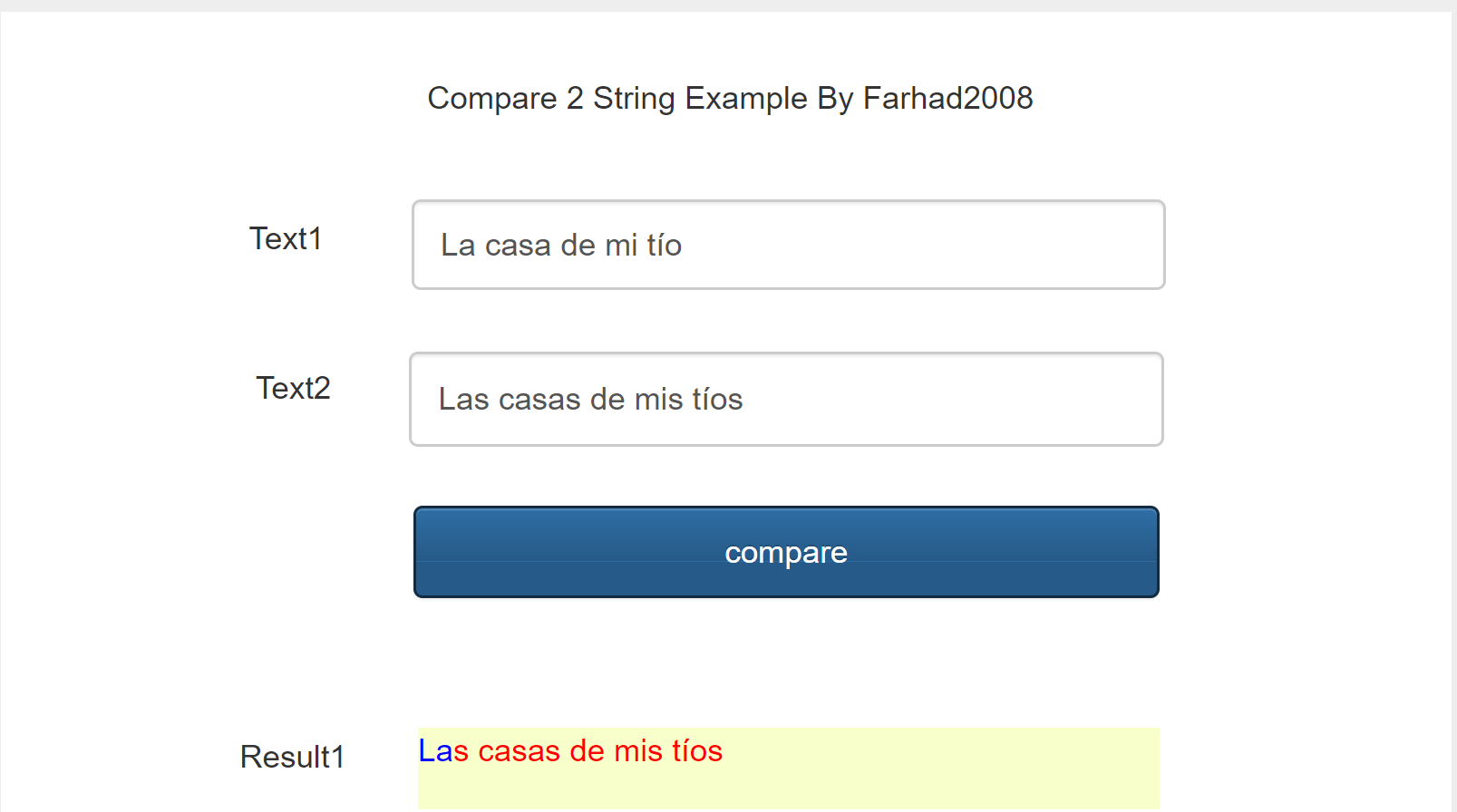
Te adjunto captura del resultado de tu programa.
Funciona bien con una palabra pero no con varias palabras. En la nueva propuesta
que hice para una nueva versión del programa el objetivo es corregir cada palabra por separado.
Ejemplo:
Respuesta correcta: La casa de mi madre.
Repuesta de usuario: La casita de mi madrasta.
Corrección del programa: L? casita de mi madrasta.
Te adjunto captura del resultado de tu programa.
Uploaded files:
Quote from farhad2008 on March 5, 2020, 10:44 pm
@rrey
Apparently you need word-by-word comparison? it's true?
Regards
Apparently you need word-by-word comparison? it's true?
Regards