
Coming soon: advanced user interface designs with neoSVG

Quote from luishp on December 9, 2019, 5:43 pmI have been thinking a lot about how to use complex designs with VisualNEO Web and how to make them interactive.
In next version we will add a new plugin called neoSVG and some enhancements to the already existing drawing commands.
The idea is to allow using an external software to generate vector graphics in such a way that VisualNEO Web can interact with each graphic element as if they were normal objects. So we can add mouse events, animations, change text, colors and even add new drawings through scripting. neoSVG plugin will fill the gap to achieve this.
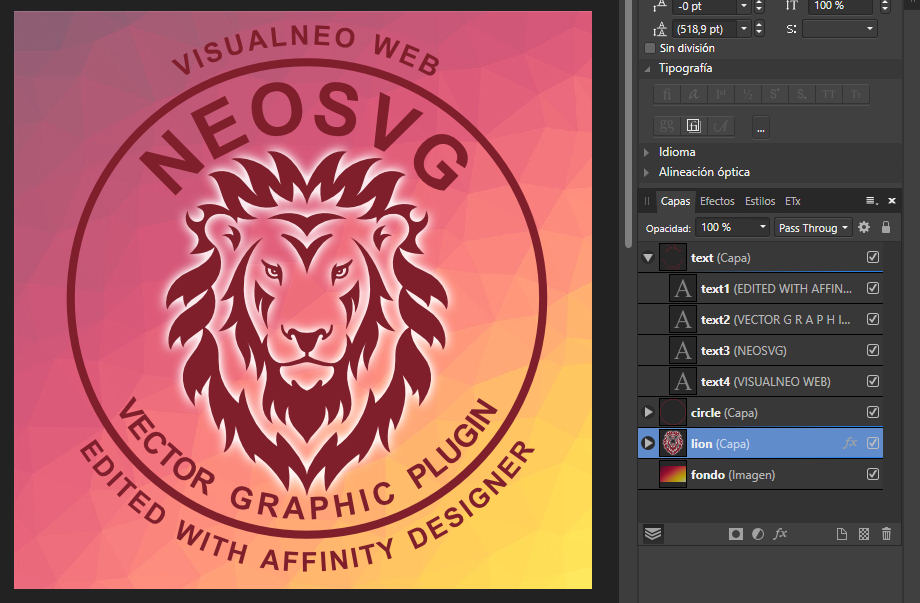
I have been testing Affinity Designer (a very chip alternative to Adobe Illustrator) and using the "Layers" panel to add a different "id" to each graphic element (see attached image). If I export the image in SVG format, open it in a plain text editor and copy paste the code into a Container, as if it was HTML, I get a coplex design ready to use within VisualNEO Web.
Best of all, it can be resized to any size without losing quality and with no deformation.
I'm also adding Collision detection, so it will be a great way for programming simple games.This is the first test with an unfinished version:
https://visualneo.com/tutorials/neosvg1This is all the code you need for this sample App (once imported the SVG code into the Container) :
.Set all the graphic elements invisible
neoSvgSetOpacity "lion" 0
neoSvgSetOpacity "text1" 0
neoSvgSetOpacity "text2" 0
neoSvgSetOpacity "text3" 0
neoSvgSetOpacity "text4" 0
neoSvgSetOpacity "circle" 0

.Animated opacity to see the elements again
neoSvgSetOpacityAnimated "lion" 1 2000 "EaseOut" 0 ""
neoSvgSetOpacityAnimated "circle" 1 2000 "EaseOut" 500 ""
neoSvgSetOpacityAnimated "text" 1 2000 "EaseOut" 500 ""

.Text rotation animation
neoSvgRotateRelativeAnimated "text" 360 3500 "EaseOut" 0 ""

.Each text element appears in a different moment with an opacity animation delay.
neoSvgSetOpacityAnimated "text1" 1 2000 "EaseOut" 1000 ""
neoSvgSetOpacityAnimated "text2" 1 2000 "EaseOut" 1500 ""
neoSvgSetOpacityAnimated "text3" 1 2000 "EaseOut" 2000 ""
neoSvgSetOpacityAnimated "text4" 1 2000 "EaseOut" 2500 ""
Please, share your thoughts and let me know if have explained it well enough :)
Thanks!
I have been thinking a lot about how to use complex designs with VisualNEO Web and how to make them interactive.
In next version we will add a new plugin called neoSVG and some enhancements to the already existing drawing commands.
The idea is to allow using an external software to generate vector graphics in such a way that VisualNEO Web can interact with each graphic element as if they were normal objects. So we can add mouse events, animations, change text, colors and even add new drawings through scripting. neoSVG plugin will fill the gap to achieve this.
I have been testing Affinity Designer (a very chip alternative to Adobe Illustrator) and using the "Layers" panel to add a different "id" to each graphic element (see attached image). If I export the image in SVG format, open it in a plain text editor and copy paste the code into a Container, as if it was HTML, I get a coplex design ready to use within VisualNEO Web.
Best of all, it can be resized to any size without losing quality and with no deformation.
I'm also adding Collision detection, so it will be a great way for programming simple games.
This is the first test with an unfinished version:
https://visualneo.com/tutorials/neosvg1
This is all the code you need for this sample App (once imported the SVG code into the Container) :
.Set all the graphic elements invisible
neoSvgSetOpacity "lion" 0
neoSvgSetOpacity "text1" 0
neoSvgSetOpacity "text2" 0
neoSvgSetOpacity "text3" 0
neoSvgSetOpacity "text4" 0
neoSvgSetOpacity "circle" 0

.Animated opacity to see the elements again
neoSvgSetOpacityAnimated "lion" 1 2000 "EaseOut" 0 ""
neoSvgSetOpacityAnimated "circle" 1 2000 "EaseOut" 500 ""
neoSvgSetOpacityAnimated "text" 1 2000 "EaseOut" 500 ""

.Text rotation animation
neoSvgRotateRelativeAnimated "text" 360 3500 "EaseOut" 0 ""

.Each text element appears in a different moment with an opacity animation delay.
neoSvgSetOpacityAnimated "text1" 1 2000 "EaseOut" 1000 ""
neoSvgSetOpacityAnimated "text2" 1 2000 "EaseOut" 1500 ""
neoSvgSetOpacityAnimated "text3" 1 2000 "EaseOut" 2000 ""
neoSvgSetOpacityAnimated "text4" 1 2000 "EaseOut" 2500 ""
Please, share your thoughts and let me know if have explained it well enough :)
Thanks!


Quote from CDY@44 on December 9, 2019, 5:52 pmHi Luis,
I also use Affinity Designer. Very good software !!Very impressive the demo you've done !!
Hi Luis,
I also use Affinity Designer. Very good software !!
Very impressive the demo you've done !!