
Coming soon: neoThemeManager

Quote from luishp on February 27, 2020, 11:51 pmIn VisualNEO Web next release will possible to change the default BootStrap theme thanks to a new included tool: neoThemeManager. There will be up to 16 new themes available to choose from. The choosen theme will be applied at a program scope. This means, if you change the theme, the new design options will be reflected in every project you edit or open. As some themes are flat designs, it will be possible to change the buttons background color from the properties panel, much more easier than with the current default theme, wich uses gradients.
You can preview the new available themes here: https://bootswatch.com/3/
In VisualNEO Web next release will possible to change the default BootStrap theme thanks to a new included tool: neoThemeManager. There will be up to 16 new themes available to choose from. The choosen theme will be applied at a program scope. This means, if you change the theme, the new design options will be reflected in every project you edit or open. As some themes are flat designs, it will be possible to change the buttons background color from the properties panel, much more easier than with the current default theme, wich uses gradients.
You can preview the new available themes here: https://bootswatch.com/3/
Uploaded files: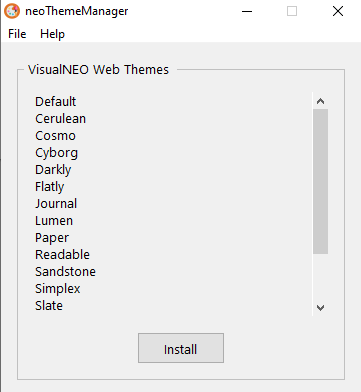

Quote from asmat on February 28, 2020, 3:01 amVery nice luishp!
Is these theme only will apply on button or for all widgets? like: listbox, fileinput, dropdown, progressBar, neotable...etc
Very nice luishp!
Is these theme only will apply on button or for all widgets? like: listbox, fileinput, dropdown, progressBar, neotable...etc
Quote from luishp on February 28, 2020, 8:05 amIs these theme only will apply on button or for all widgets? like: listbox, fileinput, dropdown, progressBar, neotable...etc
Yes, it will apply to most objects or widgets.
Is these theme only will apply on button or for all widgets? like: listbox, fileinput, dropdown, progressBar, neotable...etc
Yes, it will apply to most objects or widgets.

Quote from Palamar on February 28, 2020, 6:06 pmPues venía a postear para que me dieran una mano haciendo esto justamente, así que este plugin será una maravilla. ¿Hay posibilidades de hacerlo hoy de forma manual mediante estílos?, puntualmente estoy tratando con la tabla que genera neoTable sin buenos resultados.
Saludos!
Pues venía a postear para que me dieran una mano haciendo esto justamente, así que este plugin será una maravilla. ¿Hay posibilidades de hacerlo hoy de forma manual mediante estílos?, puntualmente estoy tratando con la tabla que genera neoTable sin buenos resultados.
Saludos!

Quote from smartmedia on January 11, 2023, 1:49 pmHi..
Is possible to have 2 or more themes or a modified dark theme so the user can change theme on the fly ? I mean after compilation of Neo app.
Hi..
Is possible to have 2 or more themes or a modified dark theme so the user can change theme on the fly ? I mean after compilation of Neo app.
Quote from luishp on January 12, 2023, 11:49 amIs possible to have 2 or more themes or a modified dark theme so the user can change theme on the fly ? I mean after compilation of Neo app.
@smartmedia it should be possible but currently there is not any facility within VisualNEO Web to help with this.
Please check these links:
https://ultimatecourses.com/blog/applying-dark-mode-styles-in-css
https://css-tricks.com/a-complete-guide-to-dark-mode-on-the-web/Regards
Is possible to have 2 or more themes or a modified dark theme so the user can change theme on the fly ? I mean after compilation of Neo app.
@smartmedia it should be possible but currently there is not any facility within VisualNEO Web to help with this.
Please check these links:
https://ultimatecourses.com/blog/applying-dark-mode-styles-in-css
https://css-tricks.com/a-complete-guide-to-dark-mode-on-the-web/
Regards