
compile Windows exe

Quote from fkapnist on July 27, 2022, 3:57 amVisualNEO Web used to be able to compile Windows exe files.
But the newer versions removed that feature.
Why is that?
VisualNEO Web used to be able to compile Windows exe files.
But the newer versions removed that feature.
Why is that?
Quote from fkapnist on July 27, 2022, 5:21 amWhat are the "Windows EXE Apps Only" settings in the Desktop App Properties used for? If VisualNEO Web can't compile a self-extracting exe file, that is quite a setback for newcomers. Since everyone uses VisualNEO on a Windows platform, most beginners would naturally expect to be able to produce common exe files without worry. Does VisualNEO still support a user-friendly approach?
What are the "Windows EXE Apps Only" settings in the Desktop App Properties used for? If VisualNEO Web can't compile a self-extracting exe file, that is quite a setback for newcomers. Since everyone uses VisualNEO on a Windows platform, most beginners would naturally expect to be able to produce common exe files without worry. Does VisualNEO still support a user-friendly approach?
Uploaded files: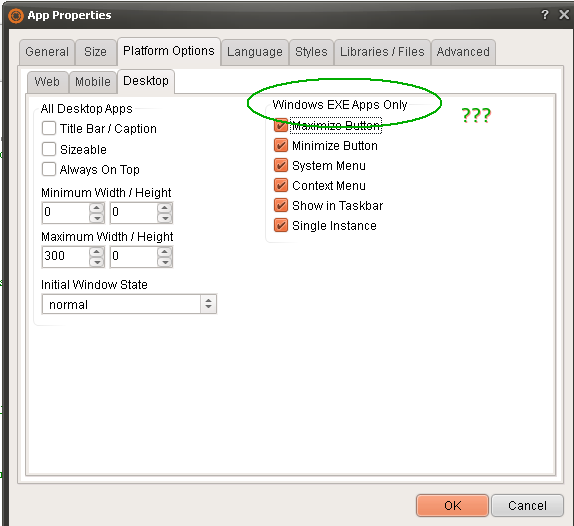
Quote from fkapnist on July 27, 2022, 7:03 amSince the original feature was removed, Anyone care to create a "compile to EXE" plugin for VisualNEO Web, using Windows system iExpress? I remember when Neopaint and Neobook were among the best PC programs in the world (at any price)...
IExpress (IEXPRESS.EXE) can be used for distributing self-contained installation packages (INF-based setup executables) to multiple local or remote Windows computers. It creates a self-extracting executable (.EXE) or a compressed Cabinet (.CAB) file using either the provided front end interface (IExpress Wizard), or a custom Self Extraction Directive (SED) file.[1] SED files can be modified with any plain text/ASCII editor, like Notepad. All self-extracting files created by IExpress use CAB compression algorithms, are compressed using the Cabinet Maker (MAKECAB.EXE) tool,[2] and are extracted using the WExtract (WEXTRACT.EXE) tool.

IEXPRESS.EXE is located in the SYSTEM32 folder of both 32 and 64-bit installations of Windows. The front end interface (IExpress Wizard) can be started by manually navigating to the respective directory and opening the executable (IExpress.exe), or by typing IExpress into the Run window of the Start Menu. It can also be used from the command line (Windows Command Prompt or batch file) to create custom installation packages, eventually unattended (automated operation):

IEXPRESS /N drive_letter:\directory_name\file_name.SED

IExpress Wizard interface guides the user through the process of creating a self-extracting package. It asks what the package should do: extract files and then run a program, or just extract files. It then allows the user to specify a title for the package, add a confirmation prompt, add a license agreement that the end-user must accept in order to allow extraction, select files to be archived, set display options for the progress window, and finally, specify a message to display upon completion.

If the option to create an archive and run a program is selected, then there will be an additional step, prompting the user to select the program that will be run upon extraction.
It is easy to create a self-extracting EXE from any VisualNEO Web pub. It is not so easy to make sure the code runs in Chromium or Edge and not in (the now defunct) Internet Explorer... Some abstract solution is required....
..
Since the original feature was removed, Anyone care to create a "compile to EXE" plugin for VisualNEO Web, using Windows system iExpress? I remember when Neopaint and Neobook were among the best PC programs in the world (at any price)...
IExpress (IEXPRESS.EXE) can be used for distributing self-contained installation packages (INF-based setup executables) to multiple local or remote Windows computers. It creates a self-extracting executable (.EXE) or a compressed Cabinet (.CAB) file using either the provided front end interface (IExpress Wizard), or a custom Self Extraction Directive (SED) file.[1] SED files can be modified with any plain text/ASCII editor, like Notepad. All self-extracting files created by IExpress use CAB compression algorithms, are compressed using the Cabinet Maker (MAKECAB.EXE) tool,[2] and are extracted using the WExtract (WEXTRACT.EXE) tool.

IEXPRESS.EXE is located in the SYSTEM32 folder of both 32 and 64-bit installations of Windows. The front end interface (IExpress Wizard) can be started by manually navigating to the respective directory and opening the executable (IExpress.exe), or by typing IExpress into the Run window of the Start Menu. It can also be used from the command line (Windows Command Prompt or batch file) to create custom installation packages, eventually unattended (automated operation):

IEXPRESS /N drive_letter:\directory_name\file_name.SED

IExpress Wizard interface guides the user through the process of creating a self-extracting package. It asks what the package should do: extract files and then run a program, or just extract files. It then allows the user to specify a title for the package, add a confirmation prompt, add a license agreement that the end-user must accept in order to allow extraction, select files to be archived, set display options for the progress window, and finally, specify a message to display upon completion.

If the option to create an archive and run a program is selected, then there will be an additional step, prompting the user to select the program that will be run upon extraction.
It is easy to create a self-extracting EXE from any VisualNEO Web pub. It is not so easy to make sure the code runs in Chromium or Edge and not in (the now defunct) Internet Explorer... Some abstract solution is required....
..

Quote from luishp on July 27, 2022, 7:54 amVisualNEO Web used to be able to compile Windows exe files.
But the newer versions removed that feature. Why is that?@fkapnist it was removed a few versions ago due to its dependance of Internet Explorer
What are the "Windows EXE Apps Only" settings in the Desktop App Properties used for?
They are used for NWjs based aplications.
It is easy to create a self-extracting EXE from any VisualNEO Web pub. It is not so easy to make sure the code runs in Chromium or Edge and not in (the now defunct) Internet Explorer... Some abstract solution is required....
I will take a look at it. Thank you!
VisualNEO Web used to be able to compile Windows exe files.
But the newer versions removed that feature. Why is that?
@fkapnist it was removed a few versions ago due to its dependance of Internet Explorer
What are the "Windows EXE Apps Only" settings in the Desktop App Properties used for?
They are used for NWjs based aplications.
It is easy to create a self-extracting EXE from any VisualNEO Web pub. It is not so easy to make sure the code runs in Chromium or Edge and not in (the now defunct) Internet Explorer... Some abstract solution is required....
I will take a look at it. Thank you!
Quote from fkapnist on July 27, 2022, 8:39 amQuote from luishp on July 27, 2022, 7:54 amVisualNEO Web used to be able to compile Windows exe files.
But the newer versions removed that feature. Why is that?@fkapnist it was removed a few versions ago due to its dependance of Internet Explorer
What are the "Windows EXE Apps Only" settings in the Desktop App Properties used for?
They are used for NWjs based aplications.
It is easy to create a self-extracting EXE from any VisualNEO Web pub. It is not so easy to make sure the code runs in Chromium or Edge and not in (the now defunct) Internet Explorer... Some abstract solution is required....
I will take a look at it. Thank you!
First, figure out how get all your project folders into the iExpress Wizard (I think it expects everything in one folder). The program that will be run upon extraction should be :

"C:\Program Files\Google\Chrome\Application\chrome.exe" "index.html"

OR

"C:\Program Files (x86)\Microsoft\Edge\Application\msedge.exe" "index.html"


For more control over the window, you can try:

"C:\Program Files (x86)\Microsoft\Edge\Application\msedge.exe" "--window-size=900x650 --app-shell-host-window-size=900x650 --app=index.html"

Since most users already have either Chrome or Edge, they will not have to download WebView2Loader.dll
Good Luck!
Quote from luishp on July 27, 2022, 7:54 amVisualNEO Web used to be able to compile Windows exe files.
But the newer versions removed that feature. Why is that?@fkapnist it was removed a few versions ago due to its dependance of Internet Explorer
What are the "Windows EXE Apps Only" settings in the Desktop App Properties used for?
They are used for NWjs based aplications.
It is easy to create a self-extracting EXE from any VisualNEO Web pub. It is not so easy to make sure the code runs in Chromium or Edge and not in (the now defunct) Internet Explorer... Some abstract solution is required....
I will take a look at it. Thank you!
First, figure out how get all your project folders into the iExpress Wizard (I think it expects everything in one folder). The program that will be run upon extraction should be :

"C:\Program Files\Google\Chrome\Application\chrome.exe" "index.html"

OR

"C:\Program Files (x86)\Microsoft\Edge\Application\msedge.exe" "index.html"


For more control over the window, you can try:

"C:\Program Files (x86)\Microsoft\Edge\Application\msedge.exe" "--window-size=900x650 --app-shell-host-window-size=900x650 --app=index.html"

Since most users already have either Chrome or Edge, they will not have to download WebView2Loader.dll
Good Luck!
Quote from fkapnist on July 27, 2022, 9:11 amHow to package a NW.js application on Windows For this purpose, you can use https://github.com/nwjs/nw-builder Lets you build your NW.js apps for mac, win and linux via cli. It will download the prebuilt binaries for a newest version, unpacks it, creates a release folder, create the app.nw file for a specified directory and copies the app.nw file where it belongs. Build a project (executable file ( .exe )) for Win32 or/and Win64 platforms: $ nwbuild -v [version of your nw.js] -p win32,win64 /path/to/the/project ........................... You're welcome to my batch file that automates everything. It compiles, updates time stamps of all files to be included, and runs your app for testing. Works perfect under XP or W7. NB: Just search & replace all instances of "SourceDir", "DestinDir", and "ProgName" as required. @echo off title ProgName Compile & Run Script (c) 2016 cls set FILETOZIP=C:\SourceDir\*.* set TEMPDIR=C:\temp : rmdir %TEMPDIR% mkdir %TEMPDIR% xcopy /s %FILETOZIP% %TEMPDIR% cd C:\temp copy /b *.* +,, cd C:\DestinDir echo Set objArgs = WScript.Arguments > Temp.vbs echo InputFolder = objArgs(0) >> Temp.vbs echo ZipFile = objArgs(1) >> Temp.vbs echo CreateObject("Scripting.FileSystemObject").CreateTextFile(ZipFile, True).Write "PK" ^& Chr(5) ^& Chr(6) ^& String(18, vbNullChar) >> Temp.vbs echo Set objShell = CreateObject("Shell.Application") >> Temp.vbs echo Set source = objShell.NameSpace(InputFolder).Items >> Temp.vbs echo objShell.NameSpace(ZipFile).CopyHere(source) >> Temp.vbs echo wScript.Sleep 2000 >> Temp.vbs del C:\DestinDir\ProgName.exe /f /s CScript Temp.vbs %TEMPDIR% C:\DestinDir\ProgName.zip ren C:\DestinDir\ProgName.zip ProgName.nw copy /b nw.exe+ProgName.nw ProgName.exe del C:\DestinDir\Temp.vbs /f /s del C:\DestinDir\ProgName.nw /f /s rmdir C:\temp /s /q start ProgName.exe
How to package a NW.js application on Windows

For this purpose, you can use https://github.com/nwjs/nw-builder

Lets you build your NW.js apps for mac, win and linux via cli. It will download the prebuilt binaries for a newest version, unpacks it, creates a release folder, create the app.nw file for a specified directory and copies the app.nw file where it belongs. Build a project (executable file ( .exe )) for Win32 or/and Win64 platforms:

$ nwbuild -v [version of your nw.js] -p win32,win64 /path/to/the/project

...........................

You're welcome to my batch file that automates everything. It compiles, updates time stamps of all files to be included, and runs your app for testing.

Works perfect under XP or W7.

NB: Just search & replace all instances of "SourceDir", "DestinDir", and "ProgName" as required.

@echo off
title ProgName Compile & Run Script (c) 2016
cls
set FILETOZIP=C:\SourceDir\*.*
set TEMPDIR=C:\temp
: rmdir %TEMPDIR%
mkdir %TEMPDIR%
xcopy /s %FILETOZIP% %TEMPDIR%
cd C:\temp
copy /b *.* +,,
cd C:\DestinDir
echo Set objArgs = WScript.Arguments > Temp.vbs
echo InputFolder = objArgs(0) >> Temp.vbs
echo ZipFile = objArgs(1) >> Temp.vbs
echo CreateObject("Scripting.FileSystemObject").CreateTextFile(ZipFile, True).Write "PK" ^& Chr(5) ^& Chr(6) ^& String(18, vbNullChar) >> Temp.vbs
echo Set objShell = CreateObject("Shell.Application") >> Temp.vbs
echo Set source = objShell.NameSpace(InputFolder).Items >> Temp.vbs
echo objShell.NameSpace(ZipFile).CopyHere(source) >> Temp.vbs
echo wScript.Sleep 2000 >> Temp.vbs
del C:\DestinDir\ProgName.exe /f /s
CScript Temp.vbs  %TEMPDIR%  C:\DestinDir\ProgName.zip
ren C:\DestinDir\ProgName.zip ProgName.nw
copy /b nw.exe+ProgName.nw ProgName.exe
del C:\DestinDir\Temp.vbs /f /s
del C:\DestinDir\ProgName.nw /f /s
rmdir C:\temp /s /q
start ProgName.exe