
Consulta sobre neo QR

Quote from Gustavo1973 on November 3, 2022, 10:05 pmcomo puedo descargar el QR generado en el container a un archivo local con formato .png o .jpg al presionar un boton
como puedo descargar el QR generado en el container a un archivo local con formato .png o .jpg al presionar un boton

Quote from luishp on November 4, 2022, 1:53 pm@gustavo1973 prueba este ejemplo:
neoQR "Container1" "Hello!" "#000000" "#ffffff"
Wait 300
  ImgToBase64Png "Container1 img" [base64]
  Base64ToLocalFile [base64] "qrcode.png"
EndWait
Saludos!
@gustavo1973 prueba este ejemplo:
neoQR "Container1" "Hello!" "#000000" "#ffffff"
Wait 300
  ImgToBase64Png "Container1 img" [base64]
  Base64ToLocalFile [base64] "qrcode.png"
EndWait
Saludos!
Quote from Gustavo1973 on November 4, 2022, 5:22 pm@luishp funciona perfecto de esa manera
pregunta a modo de aprender un poco, porque le agregas "img" al nombre del container? es para especificarle que hay una imagen dentro de el o da lo mismo ponerlo a eso
@luishp funciona perfecto de esa manera
pregunta a modo de aprender un poco, porque le agregas "img" al nombre del container? es para especificarle que hay una imagen dentro de el o da lo mismo ponerlo a eso
Quote from luishp on November 4, 2022, 6:54 pmpregunta a modo de aprender un poco, porque le agregas "img" al nombre del container? es para especificarle que hay una imagen dentro de el o da lo mismo ponerlo a eso
Es un selector (en este caso de etiqueta <img> dentro del Container1). La mayoría de comandos en VisualNEO Web soportan selectores CSS ya que se basan en JQuery.
pregunta a modo de aprender un poco, porque le agregas "img" al nombre del container? es para especificarle que hay una imagen dentro de el o da lo mismo ponerlo a eso
Es un selector (en este caso de etiqueta <img> dentro del Container1). La mayoría de comandos en VisualNEO Web soportan selectores CSS ya que se basan en JQuery.

Quote from smartmedia on September 21, 2023, 8:15 amHi @luishp
I want to use plugin to create QR code of a profile card. I notice that there is a limit on the characters can produce the qrcode. I think after 50 characters is not working. Also tried to create an image after qr is created using the above example but is not working also.
Any updated version to generate more characters ?
Hi @luishp
I want to use plugin to create QR code of a profile card. I notice that there is a limit on the characters can produce the qrcode. I think after 50 characters is not working. Also tried to create an image after qr is created using the above example but is not working also.
Any updated version to generate more characters ?
Quote from luishp on September 21, 2023, 8:25 pm@smartmedia, neoQR is based in this JavaScript library:
https://github.com/davidshimjs/qrcodejs
It has not been updated in years.
Perhaps we can try this one or any other more modern library to create a new plugin:
@smartmedia, neoQR is based in this JavaScript library:
https://github.com/davidshimjs/qrcodejs
It has not been updated in years.
Perhaps we can try this one or any other more modern library to create a new plugin:
Quote from smartmedia on September 21, 2023, 10:12 pm@luishp
I have found this one
https://github.com/kozakdenys/qr-code-styling
what do you thing about this ?
I have found this one
https://github.com/kozakdenys/qr-code-styling
what do you thing about this ?
Quote from luishp on September 22, 2023, 9:39 am@smartmedia I like it, I'm working on the new plugin right now :)
I will publish it as soon as possible.
Thank you!
@smartmedia I like it, I'm working on the new plugin right now :)
I will publish it as soon as possible.
Thank you!
Quote from luishp on September 22, 2023, 10:45 am@smartmedia please check the attached plugin. I have simplified the options to make it very easy to use.
Please let me know if you think more options would be better.
Thank you!
@smartmedia please check the attached plugin. I have simplified the options to make it very easy to use.
Please let me know if you think more options would be better.
Thank you!
Quote from smartmedia on September 22, 2023, 6:56 pmHi @luishp
I check it and looks fine but it seems that is not recognize Greek characters.
Also it could be better if we have the option to change individually the shape and color of the corners and also to add a picture in the middle of the QR.
Thanks
Hi @luishp
I check it and looks fine but it seems that is not recognize Greek characters.
Also it could be better if we have the option to change individually the shape and color of the corners and also to add a picture in the middle of the QR.
Thanks
Quote from luishp on September 23, 2023, 11:24 am@smartmedia please check the attached updated plugin. I have included an additional command with extended options.
I have used greek characters with no problem. Please check it here:neoQR2 sample app (source code attached):
https://visualneo.com/tutorials/neoqr2Regards.
@smartmedia please check the attached updated plugin. I have included an additional command with extended options.
I have used greek characters with no problem. Please check it here:
neoQR2 sample app (source code attached):
https://visualneo.com/tutorials/neoqr2
Regards.
Uploaded files:Quote from smartmedia on September 23, 2023, 5:25 pmHi @luishp
The latest version of the plugin is not playing at all at my machine. When i try the sample app on your server with greek characters i can't read the result from the scanner. I tried 3 different QR code scanners include the Google lens.
Hi @luishp
The latest version of the plugin is not playing at all at my machine. When i try the sample app on your server with greek characters i can't read the result from the scanner. I tried 3 different QR code scanners include the Google lens.
Uploaded files:
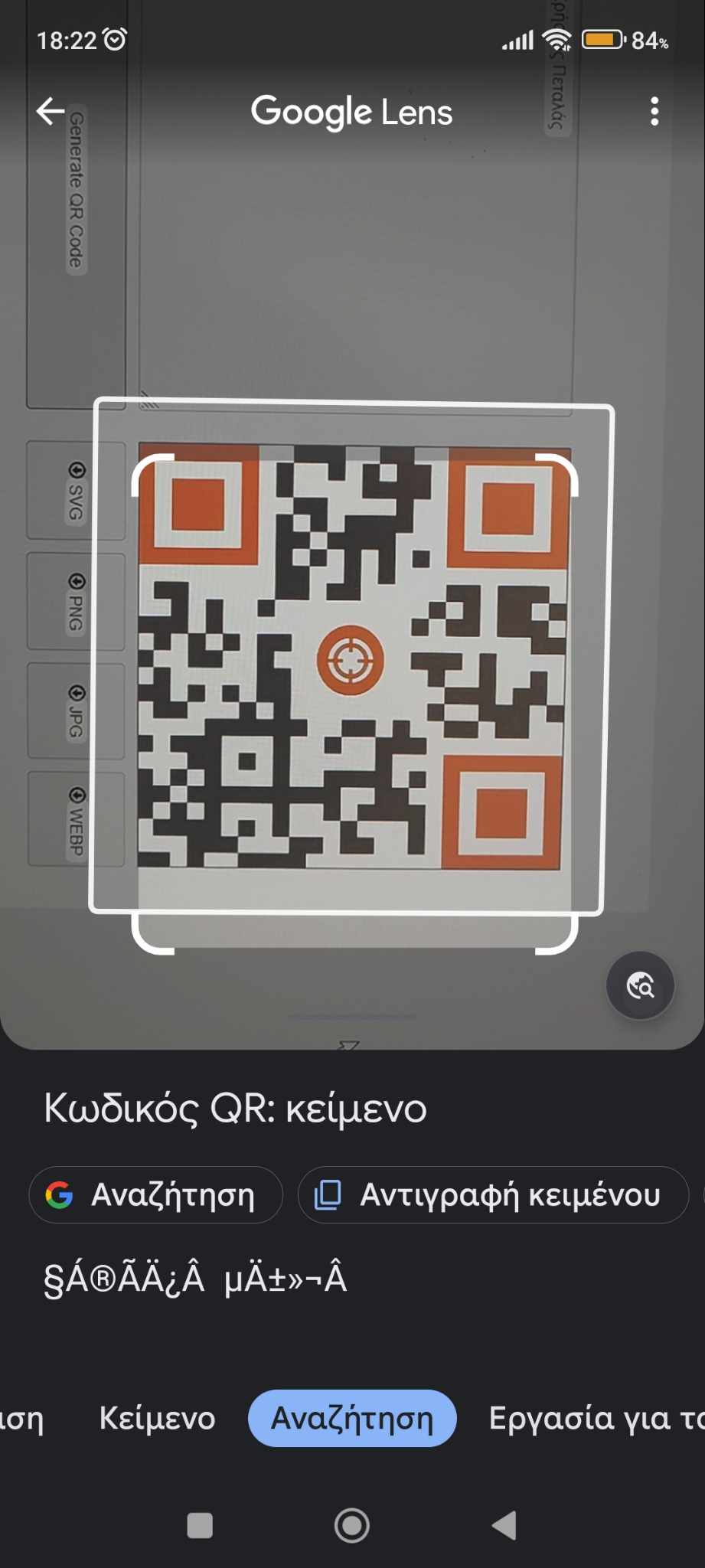
Quote from luishp on September 24, 2023, 2:32 pm@smartmedia, note that you need a web server to use the neoQR2Plus command.
Does the original sample JavaScript library work for you with greek characters?:
@smartmedia, note that you need a web server to use the neoQR2Plus command.
Does the original sample JavaScript library work for you with greek characters?:
Quote from smartmedia on September 25, 2023, 7:17 amHi @luishp,
Unfortunately before i propose it, i didn't test it for combability with greek characters. My main goal was to create a VCard with client information. I will try to find a compatible one and try to create a plugin from my own.
Hi @luishp,
Unfortunately before i propose it, i didn't test it for combability with greek characters. My main goal was to create a VCard with client information. I will try to find a compatible one and try to create a plugin from my own.
Quote from smartmedia on September 25, 2023, 1:20 pm@luishp
I found this
GitHub - soldair/node-qrcode: qr code generatorthat is says that is support for chinese, cyrillic, greek and japanese characters. Any help on the frame of plugin to start with ?
I found this
GitHub - soldair/node-qrcode: qr code generator
that is says that is support for chinese, cyrillic, greek and japanese characters. Any help on the frame of plugin to start with ?
Quote from luishp on September 26, 2023, 8:53 am@smartmedia, I think we are missing something regarding extended characters...
The previous library also offers 4 modes: numeric, alphanumeric, byte and kanji/kana.
I have used "byte" as it seems to be the more flexible, but perhaps I'm wrong.This information is included in the last library you have pointed out:
Multibyte characters
Support for multibyte characters isn't present in the initial QR Code standard, but is possible to encode UTF-8 characters in Byte mode.
QR Codes provide a way to specify a different type of character set through ECI (Extended Channel Interpretation), but it's not fully implemented in this lib yet. Most QR Code readers, however, are able to recognize multibyte characters even without ECI.
Note that a single Kanji/Kana or Emoji can take up to 4 bytes.
@smartmedia, I think we are missing something regarding extended characters...
The previous library also offers 4 modes: numeric, alphanumeric, byte and kanji/kana.
I have used "byte" as it seems to be the more flexible, but perhaps I'm wrong.
This information is included in the last library you have pointed out:
Multibyte characters
Support for multibyte characters isn't present in the initial QR Code standard, but is possible to encode UTF-8 characters in Byte mode.
QR Codes provide a way to specify a different type of character set through ECI (Extended Channel Interpretation), but it's not fully implemented in this lib yet. Most QR Code readers, however, are able to recognize multibyte characters even without ECI.
Note that a single Kanji/Kana or Emoji can take up to 4 bytes.
Quote from smartmedia on September 26, 2023, 5:50 pmHi @luishp
From the description text i understand ECI is not added in the library. so you think that you can make it happen ?
Hi @luishp
From the description text i understand ECI is not added in the library. so you think that you can make it happen ?
Quote from luishp on September 27, 2023, 10:40 am@smartmedia I don't even know what's that. Sorry.
@smartmedia I don't even know what's that. Sorry.
Quote from smartmedia on October 5, 2023, 11:48 amHi @luishp
Can you try make this into plugin or at least give me some information to do it own my own ?
https://github.com/soldair/node-qrcode QR-code
Thanks
Hi @luishp
Can you try make this into plugin or at least give me some information to do it own my own ?
https://github.com/soldair/node-qrcode QR-code
Thanks
Quote from Gustavo1973 on October 5, 2023, 4:31 pm@luishp
ya que volvio el tema de QR estaria bueno alguna actualizacion de este plugin y tambien del lector de codigo de barras que sea mas funcional, poder leer desde nuestras aplicaciones estos codigos de manera mas dinamica si es que se puede obvio, hoy dia el plugin lector de codigo de barras solo lee de una imagen capturada lo cual da error siempre porque la camara no permite hacer foco al intentar capturar el codigo, he visto otros lectores que leen al vuelo el codigo
seria muy util para poder hacer busqueda de articulos en stock y demas usos,
Gracias desde ya
ya que volvio el tema de QR estaria bueno alguna actualizacion de este plugin y tambien del lector de codigo de barras que sea mas funcional, poder leer desde nuestras aplicaciones estos codigos de manera mas dinamica si es que se puede obvio, hoy dia el plugin lector de codigo de barras solo lee de una imagen capturada lo cual da error siempre porque la camara no permite hacer foco al intentar capturar el codigo, he visto otros lectores que leen al vuelo el codigo
seria muy util para poder hacer busqueda de articulos en stock y demas usos,
Gracias desde ya