
Consulta sobre NeoMap

Quote from Gustavo1973 on November 16, 2021, 4:35 pm@luishp
Tengo ganas de experimentar este plugin un poco, no encontre ninguna app de muestra
Me pregunto se podria hacer un seguimiento tipo rastreador del recorrido desde un punto a otro , poniendo marcas que se vayan guardando?, saber la distancia? y luego poder ver esos puntos guardados en el mapa?
Tipo las aplicaciones que se usan para running o seguimiento vehicular, que se puede ver el recorrido hecho en el mapa
Tengo ganas de experimentar este plugin un poco, no encontre ninguna app de muestra
Me pregunto se podria hacer un seguimiento tipo rastreador del recorrido desde un punto a otro , poniendo marcas que se vayan guardando?, saber la distancia? y luego poder ver esos puntos guardados en el mapa?
Tipo las aplicaciones que se usan para running o seguimiento vehicular, que se puede ver el recorrido hecho en el mapa

Quote from luishp on November 16, 2021, 7:18 pm@gustavo1973 aquí hay información de interés y ejemplos:
https://visualneo.com/forum/topic/neomap-plugin-coming-soon
@gustavo1973 aquí hay información de interés y ejemplos:
https://visualneo.com/forum/topic/neomap-plugin-coming-soon
Quote from Gustavo1973 on November 17, 2021, 3:57 am@luishp
estoy mirando los ejemplos, lo que intento hacer es correr la aplicacion en el movil, para tomar el gps del mismo, tomar las coordenadas de latitud y longitud mediante "neoGetPosition" cada tantos segundos y agregando marcadores en el mapa con estas coordenadas recibidas.
El problema es que las agrega no en lugares exactos, si voy caminando de a ratos agrega marcadores en otros lugares y no donde deberia hacerlo, hay que convertir estos valores antes de mostrarlos?
Detalle, al agregar los marcadores dejo los datos recibidos con todos sus valores despues de la coma, supongo que esto le da mas exactitud?
estoy mirando los ejemplos, lo que intento hacer es correr la aplicacion en el movil, para tomar el gps del mismo, tomar las coordenadas de latitud y longitud mediante "neoGetPosition" cada tantos segundos y agregando marcadores en el mapa con estas coordenadas recibidas.
El problema es que las agrega no en lugares exactos, si voy caminando de a ratos agrega marcadores en otros lugares y no donde deberia hacerlo, hay que convertir estos valores antes de mostrarlos?
Detalle, al agregar los marcadores dejo los datos recibidos con todos sus valores despues de la coma, supongo que esto le da mas exactitud?
Quote from luishp on November 17, 2021, 7:57 am@gustavo1973 es importante entender que al dispositivo puede tomarle algún tiempo detectar una posición correcta desde que se le concede permiso al GPS. Esto es crucial para conseguir mejor precisión.
Seguramente, para lo que tu quieres hacer, sería interesante explorar watchPosition() de JavaScript en lugar de neoGetPosition, ya que la primera toma coordenadas de posición constantemente y la precisión después de unos segundos proporciona estimaciones de unos pocos metros.
Más información aquí:
https://dev.to/m3h0w/how-to-get-an-accurate-position-estimate-from-the-geolocation-api-in-javascript-1njfSaludos.
@gustavo1973 es importante entender que al dispositivo puede tomarle algún tiempo detectar una posición correcta desde que se le concede permiso al GPS. Esto es crucial para conseguir mejor precisión.
Seguramente, para lo que tu quieres hacer, sería interesante explorar watchPosition() de JavaScript en lugar de neoGetPosition, ya que la primera toma coordenadas de posición constantemente y la precisión después de unos segundos proporciona estimaciones de unos pocos metros.
Más información aquí:
https://dev.to/m3h0w/how-to-get-an-accurate-position-estimate-from-the-geolocation-api-in-javascript-1njf
Saludos.
Quote from Gustavo1973 on November 17, 2021, 5:57 pm@luishp
Mis conocimientos de Java son nulos por desgracia, Deberia usar esos codigos mediante "BeginJS" aqui en Visual Neo?
Mis conocimientos de Java son nulos por desgracia, Deberia usar esos codigos mediante "BeginJS" aqui en Visual Neo?

Quote from roccocogliano on November 17, 2021, 6:15 pmHi @gustavo1973
use this code in a button for example (output in consolelog):
beginjs
if (navigator.geolocation) {
//navigator.geolocation.getCurrentPosition(mostraPosizione);
navigator.geolocation.watchPosition(mostraPosizione);
}function mostraPosizione(posizione) {
console.log("Latitudine: " + posizione.coords.latitude);
console.log("Longitudine: " + posizione.coords.longitude);
}
endjs
Hi @gustavo1973
use this code in a button for example (output in consolelog):
beginjs
if (navigator.geolocation) {
//navigator.geolocation.getCurrentPosition(mostraPosizione);
navigator.geolocation.watchPosition(mostraPosizione);
}
function mostraPosizione(posizione) {
console.log("Latitudine: " + posizione.coords.latitude);
console.log("Longitudine: " + posizione.coords.longitude);
}
endjs
Quote from roccocogliano on November 17, 2021, 6:31 pm@gustavo1973 try this sample app in attach
"
watchPosition()method is used to register a handler function that will be called automatically each time the position of the device changes. You can also, optionally, specify an error handling callback function."from https://developer.mozilla.org/en-US/docs/Web/API/Geolocation/watchPosition
@gustavo1973 try this sample app in attach
"watchPosition() method is used to register a handler function that will be called automatically each time the position of the device changes. You can also, optionally, specify an error handling callback function."
from https://developer.mozilla.org/en-US/docs/Web/API/Geolocation/watchPosition
Uploaded files:Quote from luishp on November 17, 2021, 11:13 pmThanks @roccocogliano, I will add this command to the next version.
Best regards.
Thanks @roccocogliano, I will add this command to the next version.
Best regards.
Quote from Gustavo1973 on November 18, 2021, 2:34 am@roccocogliano @luishp
Gracias por la ayuda, hize un demo ahi con tu codigo y funciona, pero no de la manera esperada
en teoria al ir moviendote con el mocil se va creando la linea de movimiento
fijate aqui:
Gracias por la ayuda, hize un demo ahi con tu codigo y funciona, pero no de la manera esperada
en teoria al ir moviendote con el mocil se va creando la linea de movimiento
fijate aqui:
Uploaded files:Quote from luishp on November 18, 2021, 7:50 am@gustavo1973 esto es lo que veo en la consola:
Error: Invalid LatLng object: (undefined, undefined)
@gustavo1973 esto es lo que veo en la consola:
Error: Invalid LatLng object: (undefined, undefined)
Quote from roccocogliano on November 18, 2021, 12:01 pmHi @gustavo1973 you don't need a timer. "watchPosition" updates the position itself when it changes.
Look at this simple example.
New markers are added each time the position changes.
Hi @gustavo1973 you don't need a timer. "watchPosition" updates the position itself when it changes.
Look at this simple example.
New markers are added each time the position changes.
Uploaded files:
Quote from Gustavo1973 on November 19, 2021, 8:53 pm@roccocogliano
Gracias por tu ayuda, funciona muy bien asi
Gracias por tu ayuda, funciona muy bien asi
Quote from roccocogliano on November 19, 2021, 9:12 pm@gustavo1973
Well. I'm glad
Well. I'm glad
Quote from Gustavo1973 on November 25, 2021, 3:05 pm@luishp @roccocogliano
Sigo haciendo pruebas y me encuentro con lo siguiente que no se si tiene solucion
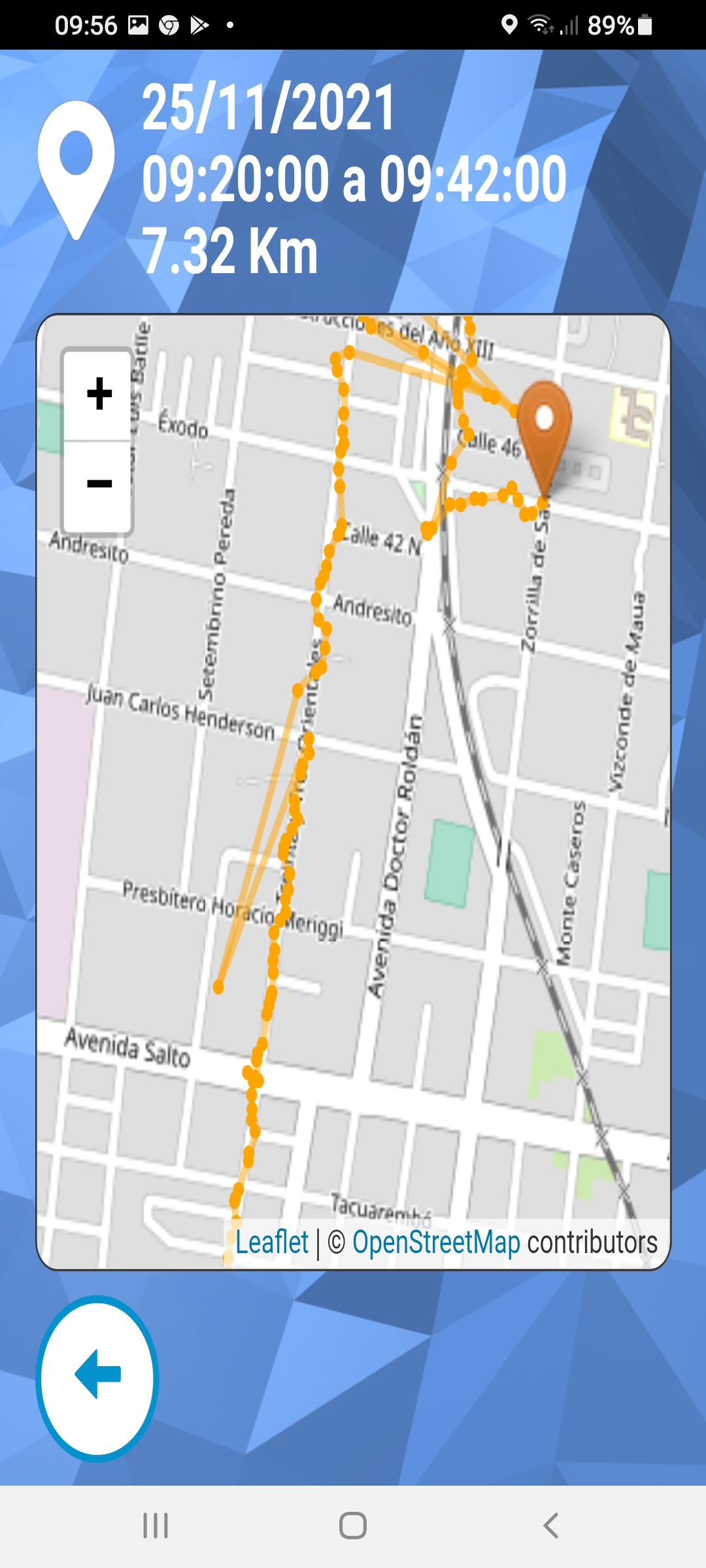
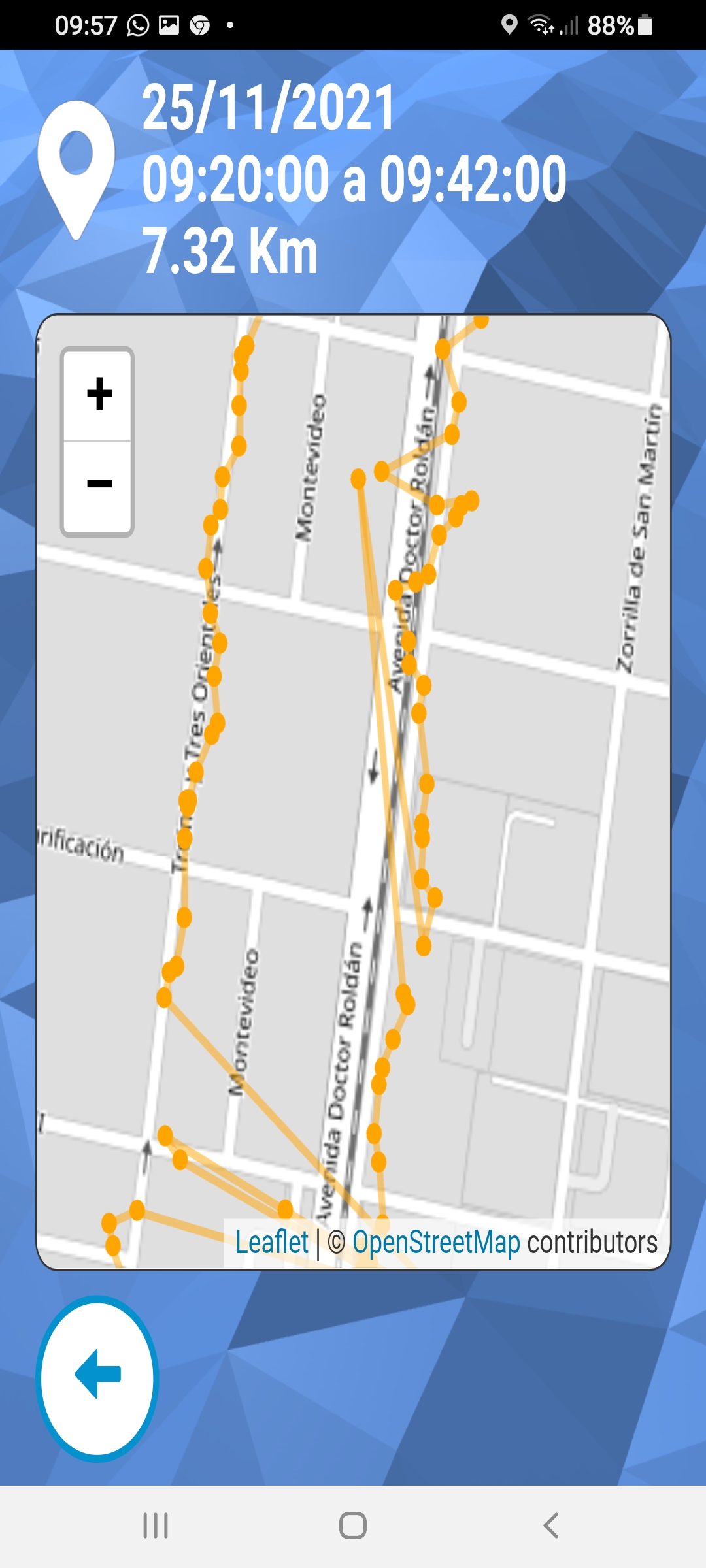
el rastreo si bien lo hace relativamente bien, de a ratos pega como saltos raros a coordenadas que no son, en las imagenes que adjunto se puede ver ese problema
Tambien pasa que si dejo la app en segundo plano corriendo mientras hago otra cosa, ya no marca las coordenadas, al ingresar a ella nuevamente me hace una linea recta entre la ultima posicion y la nueva, puede tener solucion eso?
Vi en el ejemplo que se subio al principio del post en el link donde se mostraba el codigo java para poder tomar la posicion que tenia en cuenta la exactitud al momento de mostrar el dato o no, algo asi como que mide la intensidad de la señal
I keep doing tests and I find the following that I do not know if it has a solution

The tracking although it does it relatively well, from time to time it hits like strange
jumps to coordinates that are not, in the images that I attach you can see that problem

It also happens that if I leave the app in the background running while I do something else,
it no longer marks the coordinates, when entering it again it makes me a straight line between
the last position and the new one, can that have a solution?

I saw in the example that was uploaded at the beginning of the post in the link where
the java code was shown to be able to take the position that took into account the accuracy
at the time of displaying the data or not, something like that measures the intensity of the signal
Sigo haciendo pruebas y me encuentro con lo siguiente que no se si tiene solucion
el rastreo si bien lo hace relativamente bien, de a ratos pega como saltos raros a coordenadas que no son, en las imagenes que adjunto se puede ver ese problema
Tambien pasa que si dejo la app en segundo plano corriendo mientras hago otra cosa, ya no marca las coordenadas, al ingresar a ella nuevamente me hace una linea recta entre la ultima posicion y la nueva, puede tener solucion eso?
Vi en el ejemplo que se subio al principio del post en el link donde se mostraba el codigo java para poder tomar la posicion que tenia en cuenta la exactitud al momento de mostrar el dato o no, algo asi como que mide la intensidad de la señal
I keep doing tests and I find the following that I do not know if it has a solution

The tracking although it does it relatively well, from time to time it hits like strange
jumps to coordinates that are not, in the images that I attach you can see that problem

It also happens that if I leave the app in the background running while I do something else,
it no longer marks the coordinates, when entering it again it makes me a straight line between
the last position and the new one, can that have a solution?

I saw in the example that was uploaded at the beginning of the post in the link where
the java code was shown to be able to take the position that took into account the accuracy
at the time of displaying the data or not, something like that measures the intensity of the signal
Uploaded files:
Quote from roccocogliano on November 25, 2021, 3:40 pm@gustavo1973 @luishp
The fact that the app registers incorrect coordinates I think depends on the device. Probably the localization takes place via agps and therefore uses both gps and internet and therefore, perhaps, when it does not retrieve the coordinates from the gps it does so through the cell to which it is connected. The fact that when the app is in the background it does not record the coordinates is perhaps due to the fact that the apps are not normally active in the background. For example, it happens to me that if I use google maps in the background it does not update automatically but only when I reopen it.
But these are just my assumptions and I have no solution about it,I'm sorry.
The fact that the app registers incorrect coordinates I think depends on the device. Probably the localization takes place via agps and therefore uses both gps and internet and therefore, perhaps, when it does not retrieve the coordinates from the gps it does so through the cell to which it is connected. The fact that when the app is in the background it does not record the coordinates is perhaps due to the fact that the apps are not normally active in the background. For example, it happens to me that if I use google maps in the background it does not update automatically but only when I reopen it.
But these are just my assumptions and I have no solution about it,
I'm sorry.
Quote from luishp on November 25, 2021, 9:20 pm@gustavo1973 creo que es posible obtener junto con las coordenadas una estimación del error de posicionamiento, pero tengo que investigarlo. Me lo apunto para cuando tenga tiempo y ver así si se puede mejorar la funcionalidad de geoposicionamiento.
Dejo este artículo como referencia de lo que es posible hacer:
https://www.atyantik.com/geolocation-using-javascript/Saludos!
@gustavo1973 creo que es posible obtener junto con las coordenadas una estimación del error de posicionamiento, pero tengo que investigarlo. Me lo apunto para cuando tenga tiempo y ver así si se puede mejorar la funcionalidad de geoposicionamiento.
Dejo este artículo como referencia de lo que es posible hacer:
https://www.atyantik.com/geolocation-using-javascript/
Saludos!
Quote from roccocogliano on November 26, 2021, 11:18 amHello @gustavo1973 ,
for better accuracy you can use "highaccurancy"
in the watchposition options (take a look at https://developer.mozilla.org/en-US/docs/Web/API/Geolocation/getCurrentPosition) but for the problem of not detecting when the app is in the background I have no idea how to solve.
Hello @gustavo1973 ,
for better accuracy you can use "highaccurancy"
in the watchposition options (take a look at https://developer.mozilla.org/en-US/docs/Web/API/Geolocation/getCurrentPosition) but for the problem of not detecting when the app is in the background I have no idea how to solve.
Quote from luishp on December 2, 2021, 11:03 am@gustavo1973 @roccocogliano I have updated the geolocation plugin to include additional commands and options.
Please, if you have time, take a moment to test it (attached) and let me know if it works for you.
I have included high accuracy and watch for position change options.
Theorically it's possible to get altitude and speed too. Do you think those options are interesting enough to include them?Thank you!
@gustavo1973 @roccocogliano I have updated the geolocation plugin to include additional commands and options.
Please, if you have time, take a moment to test it (attached) and let me know if it works for you.
I have included high accuracy and watch for position change options.
Theorically it's possible to get altitude and speed too. Do you think those options are interesting enough to include them?
Thank you!
Uploaded files:Quote from luishp on December 2, 2021, 11:24 amI have just published a very simple testing app here:
https://visualneo.com/tutorials/geolocationSource code attached.
Regards.
I have just published a very simple testing app here:
https://visualneo.com/tutorials/geolocation
Source code attached.
Regards.
Uploaded files:Quote from roccocogliano on December 2, 2021, 4:07 pmHi luis, thank you very much.
I will try it as soon as possible for sure.
Hi luis, thank you very much.
I will try it as soon as possible for sure.