
Consulta sobre NeoPdf y Imagen

Quote from Gustavo1973 on November 3, 2020, 6:58 pmNo logro insertar en el PDF una imagen que puedo ver en pantalla
El detalle a tener en cuenta y no se si tiene incidencia es que la imagen en su estado inicial es un PNG transparente,
que luego la cambio a traves de "SetObjectAttribute" para mostrar una imagen que es la que necesito imprimir en el Pdf
La imagen cambiada se ve perfecto en la pantalla antes de presionar el boton que genera el archivo PDF
Si pruebo cragar otra imagen lo hace sin problemas, pero con esa en particular no lo hace
Aprovecho a preguntar, se puede agregar una imagen en formato "SVG"? porque el plugin solo da como opciones PNG o JPG
No logro insertar en el PDF una imagen que puedo ver en pantalla
El detalle a tener en cuenta y no se si tiene incidencia es que la imagen en su estado inicial es un PNG transparente,
que luego la cambio a traves de "SetObjectAttribute" para mostrar una imagen que es la que necesito imprimir en el Pdf
La imagen cambiada se ve perfecto en la pantalla antes de presionar el boton que genera el archivo PDF
Si pruebo cragar otra imagen lo hace sin problemas, pero con esa en particular no lo hace
Aprovecho a preguntar, se puede agregar una imagen en formato "SVG"? porque el plugin solo da como opciones PNG o JPG
Quote from Gaev on November 3, 2020, 7:43 pm@gustavo1973
Can you make up a small project to demonstrate what you are experiencing and upload it here ? (include the image in question)
Can you make up a small project to demonstrate what you are experiencing and upload it here ? (include the image in question)
Quote from Gustavo1973 on November 4, 2020, 3:45 am@Gaev
Here is the proyect
When the page is load , the "SetObjectAttribute" changue the source of de image and show this in the page
When i clic the button "Make PDF" the image not show in the PDF created.
Here is the proyect
When the page is load , the "SetObjectAttribute" changue the source of de image and show this in the page
When i clic the button "Make PDF" the image not show in the PDF created.
Uploaded files:Quote from Gaev on November 4, 2020, 5:14 am@gustavo1973
Thank you for the sample project.
After you Run the project (in Chrome) ... and again after you click on the button labelled MAKE PDF ..., right click in some part of your App window and then left-click on the context-menu item labelled Inspect ... then click on the Console Tab ... you will see a number of error messages related to CORS.
If you have correctly setup your CORS policies on the server where the image resides, then try and run your project from a server location (CORS only honors CORS policies when the calling party is using the https protocol (not file://).
Thank you for the sample project.
After you Run the project (in Chrome) ... and again after you click on the button labelled MAKE PDF ..., right click in some part of your App window and then left-click on the context-menu item labelled Inspect ... then click on the Console Tab ... you will see a number of error messages related to CORS.
If you have correctly setup your CORS policies on the server where the image resides, then try and run your project from a server location (CORS only honors CORS policies when the calling party is using the https protocol (not file://).
Quote from Gustavo1973 on November 4, 2020, 6:02 pm@gaev
Thank you for your Help
attach capture of the error obtained I did not understand much about the CORS privileges, do I have to give them to them from the server configuration? And if so, how do I do it because I have no idea. Another thing, because I should modify the privileges of the image on the server if I can see it on the page to the image, does that not mean that you have access to it?
Thank you for your Help
attach capture of the error obtained I did not understand much about the CORS privileges, do I have to give them to them from the server configuration? And if so, how do I do it because I have no idea. Another thing, because I should modify the privileges of the image on the server if I can see it on the page to the image, does that not mean that you have access to it?
Uploaded files: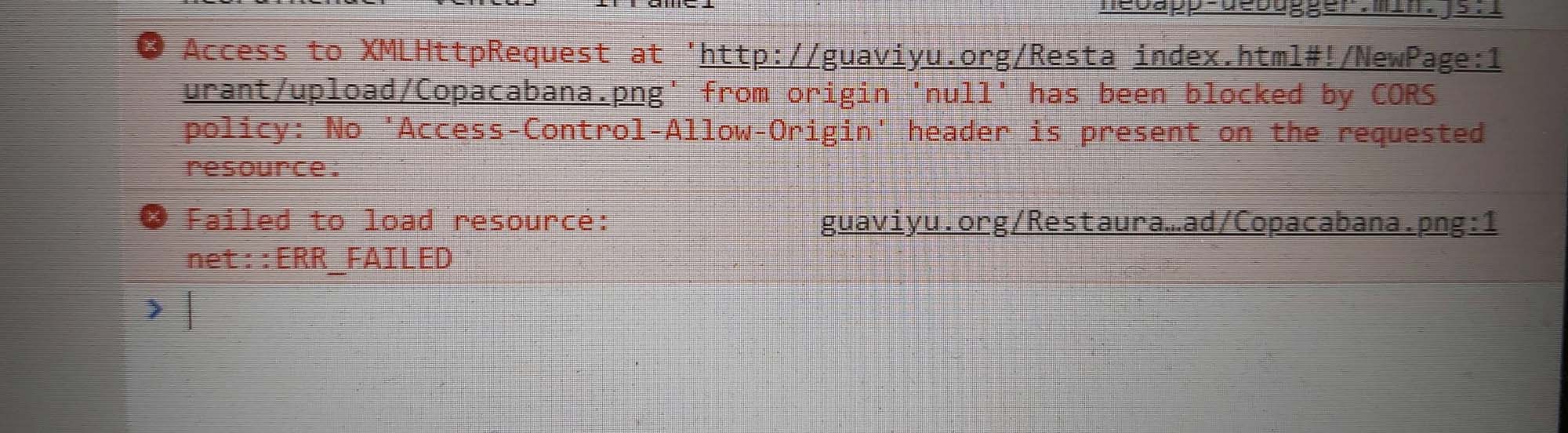
Quote from Gaev on November 4, 2020, 7:35 pm@gustavo1973
I did not understand much about the CORS privileges
I am often annoyed by the (security related) restrictions posed by CORS policies ... and frustrated in trying to get around it (especially during testing from my local disk).
do I have to give them to them from the server configuration?
And if so, how do I do it because I have no idea.
Another thing, because I should modify the privileges of the image
on the server if I can see it on the page to the image,
does that not mean that you have access to it?This is not an area where I have experience/expertise; so, I will have to leave it to someone more knowledgeable to assist you in your specific server configuration.
I did not understand much about the CORS privileges
I am often annoyed by the (security related) restrictions posed by CORS policies ... and frustrated in trying to get around it (especially during testing from my local disk).
do I have to give them to them from the server configuration?
And if so, how do I do it because I have no idea.
Another thing, because I should modify the privileges of the image
on the server if I can see it on the page to the image,
does that not mean that you have access to it?
This is not an area where I have experience/expertise; so, I will have to leave it to someone more knowledgeable to assist you in your specific server configuration.

Quote from luishp on November 5, 2020, 6:54 pm@gustavo1973 @gaev if you have problems configuring your server for allowing CORS (it should work if your app and images are hosted there) you can always use Imgur image hosting services. It's free and it offers CORS anabled links by default. Just upload your image and use mouse right-click to get the image URL.
Si teneis problemas configurando el CORS en vuestro servidor (debería funcionar bien si vuestra app y las imágenes están alojadas allí) siempre podéis utilizar el servicio de alojamiento de imágenes de Imgur. Es gratuito y permite CORS. Sólo hay que subir las imágenes y utilizar el boton derecho del ratón para obtener la URL.
Es muy útil para hacer pruebas en local.
Saludos!
@gustavo1973 @gaev if you have problems configuring your server for allowing CORS (it should work if your app and images are hosted there) you can always use Imgur image hosting services. It's free and it offers CORS anabled links by default. Just upload your image and use mouse right-click to get the image URL.
Si teneis problemas configurando el CORS en vuestro servidor (debería funcionar bien si vuestra app y las imágenes están alojadas allí) siempre podéis utilizar el servicio de alojamiento de imágenes de Imgur. Es gratuito y permite CORS. Sólo hay que subir las imágenes y utilizar el boton derecho del ratón para obtener la URL.
Es muy útil para hacer pruebas en local.
Saludos!
Quote from Gustavo1973 on November 5, 2020, 8:09 pm@luishp
Perdon por mi ignorancia, pero no tengo muy en claro esto de los CORS, nose si vistes el ejemplo que anexe mas arriba, con el porblema al generar el PDF, eso solo se da en las pruebas a nivel local? o si lo subo al servidor y no da ese problema.
Segunda duda, porque si al cargar la pagina actualiza la imagen, eso no significa que ya se tiene acceso a la imagen en el servidor
porque habria una restriccion CORS? en el servidor.
Pregunta, que deberia transladarle a los que me suministran el Hosting del problema que tengo para ver si me lo pueden solucionar
Perdon por mi ignorancia, pero no tengo muy en claro esto de los CORS, nose si vistes el ejemplo que anexe mas arriba, con el porblema al generar el PDF, eso solo se da en las pruebas a nivel local? o si lo subo al servidor y no da ese problema.
Segunda duda, porque si al cargar la pagina actualiza la imagen, eso no significa que ya se tiene acceso a la imagen en el servidor
porque habria una restriccion CORS? en el servidor.
Pregunta, que deberia transladarle a los que me suministran el Hosting del problema que tengo para ver si me lo pueden solucionar
Quote from luishp on November 5, 2020, 8:36 pm@gustavo1973 si subes tu app a un servidor web funcionará correctamente.
Te adjunto tu ejemplo modificado con una imagen subida a Imgur.CORS = Cross Origin Resource Sharing.
Esto significa que se bloquean los recursos provenientes de otro servidor. Los recursos locales cargados con el protocolo file:// también se consideran provenientes de otro servidor. Pero si utilizas neoPhp Server puedes probar tu aplicación en local sin problemas:
- Compila tu aplicación
- Abre neoPhp Server desde el menu Tools (Herramientas)
- Desmarca la opción "Copy config.php..."
- Pulsa el botón "Start"
- Abre el navegador y visita la dirección "localhost"
Cuando hagas una modificación:
- Compiula tu aplicación
- Ve al navegador y pulsa Ctrl-F5 (Recargar sin utilizar datos en caché)
Cuando termines de trabajar no olvides detener neoPhp Server pulsando "Stop".
Así evitarás problemas CORS trabajando en local.
Si no quieres utilizar neoPhp Server (u otro servidor web local) puedes utilizar Imgur para subir tus imágenes.
Una vez subas todo al servidor funcionará bien.Espero haberme explicado :)
@gustavo1973 si subes tu app a un servidor web funcionará correctamente.
Te adjunto tu ejemplo modificado con una imagen subida a Imgur.
CORS = Cross Origin Resource Sharing.
Esto significa que se bloquean los recursos provenientes de otro servidor. Los recursos locales cargados con el protocolo file:// también se consideran provenientes de otro servidor. Pero si utilizas neoPhp Server puedes probar tu aplicación en local sin problemas:
- Compila tu aplicación
- Abre neoPhp Server desde el menu Tools (Herramientas)
- Desmarca la opción "Copy config.php..."
- Pulsa el botón "Start"
- Abre el navegador y visita la dirección "localhost"
Cuando hagas una modificación:
- Compiula tu aplicación
- Ve al navegador y pulsa Ctrl-F5 (Recargar sin utilizar datos en caché)
Cuando termines de trabajar no olvides detener neoPhp Server pulsando "Stop".
Así evitarás problemas CORS trabajando en local.
Si no quieres utilizar neoPhp Server (u otro servidor web local) puedes utilizar Imgur para subir tus imágenes.
Una vez subas todo al servidor funcionará bien.
Espero haberme explicado :)
Uploaded files: