
cordova plugins...and javascript

Quote from CDY@44 on November 26, 2021, 9:57 pmHi to all,
Has anyone managed to use the cordova plugin to be able to access the phone's camera ( cordova-plugin-camera ), take a picture, display it in a container, all compiled in an apk file?
A page with a container and a button.
I know you have to use javascript, but that's the problem...!
Any hint for a help will be appreciated !
Best regards,I found this on the Internet, but not clear at all for me :
Hi to all,
Has anyone managed to use the cordova plugin to be able to access the phone's camera ( cordova-plugin-camera ), take a picture, display it in a container, all compiled in an apk file?
A page with a container and a button.
I know you have to use javascript, but that's the problem...!
Any hint for a help will be appreciated !
Best regards,
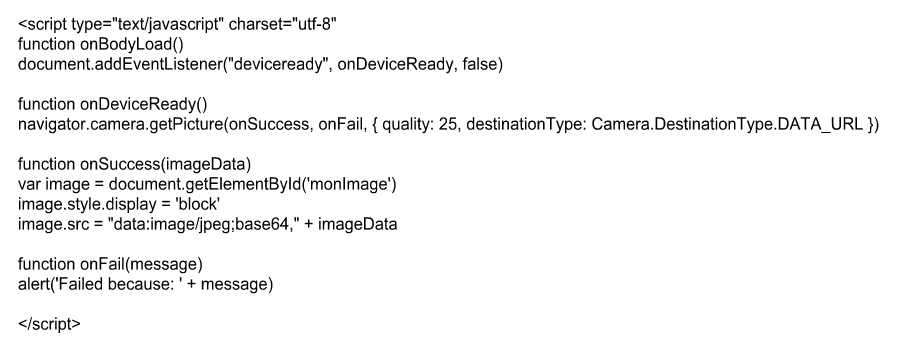
I found this on the Internet, but not clear at all for me :
Uploaded files:

Quote from asmat on December 19, 2021, 1:14 amStep 1 - Install Camera Plugin
Run the following code in the command prompt window to install this plugin.
C:\Users\username\Desktop\CordovaProject>cordova plugin add cordova-plugin-cameraStep 2 - Adding Button and Image
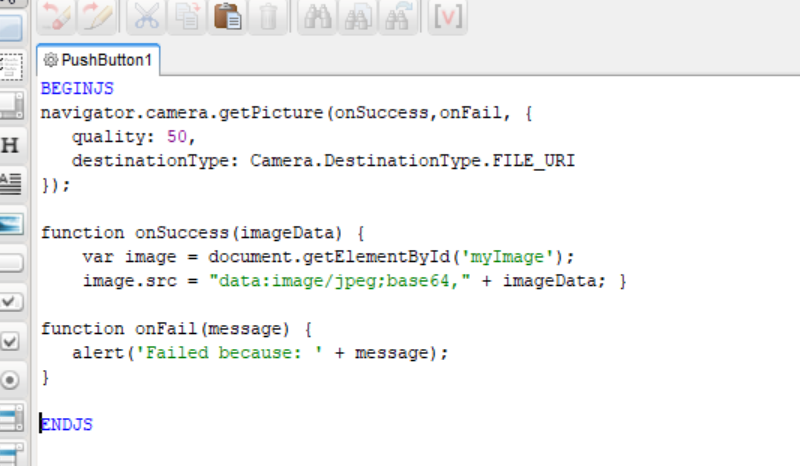
Now, we will create the button for calling the camera and img where the image will be displayed once taken. put the below code for the button
See the attached image!and put this code inside Container:
<img id = "myImage"></img>
Step 1 - Install Camera Plugin
Run the following code in the command prompt window to install this plugin.
C:\Users\username\Desktop\CordovaProject>cordova plugin add cordova-plugin-camera
Step 2 - Adding Button and Image
Now, we will create the button for calling the camera and img where the image will be displayed once taken. put the below code for the button
See the attached image!
and put this code inside Container:
<img id = "myImage"></img>
Uploaded files:

Quote from javadrajabihakami on December 19, 2021, 8:49 amQuote from asmat on December 19, 2021, 1:14 amHello dear friend, I am very happy to have you. It has been a long time since I heard from you ....Hello dear friend, I am very happy to have you. It has been a long time since I heard from you ....
Quote from asmat on December 19, 2021, 1:14 amHello dear friend, I am very happy to have you. It has been a long time since I heard from you ....
Hello dear friend, I am very happy to have you. It has been a long time since I heard from you ....

Quote from CDY@44 on December 19, 2021, 1:58 pmHello @asmat
Thank you so much for your answer !! I do appreciate it !! I will test is as soon as possible !!
Have a good day !
Hello @asmat
Thank you so much for your answer !! I do appreciate it !! I will test is as soon as possible !!
Have a good day !
Quote from CDY@44 on December 21, 2021, 5:48 pmHello @asmat,
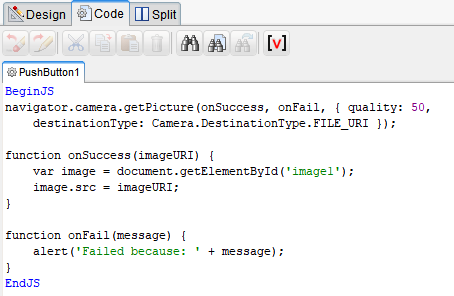
I have a problem with your suggestion : When I click the button, the camera is launched, I can take a photo, but it doesn't appear in the image...
So I have changed your code by this one found on the forum :So it works, but now my problem is to find how to convert the content of the image in Base64 to load the photo in a database...
Have you any suggestion ?
Hello @asmat,
I have a problem with your suggestion : When I click the button, the camera is launched, I can take a photo, but it doesn't appear in the image...
So I have changed your code by this one found on the forum :
So it works, but now my problem is to find how to convert the content of the image in Base64 to load the photo in a database...
Have you any suggestion ?
Uploaded files:
Quote from luishp on December 21, 2021, 9:31 pm@cdy44-2 note that now it's not necessary to use any Cordova plugin. Use the new FileInput property "capture" to access the camera in mobile devices directly (use "fuser" for the front camera and "fenvironment" for the rear camera).
Then you can use LocalBinaryFileToBase64Var to encode the picture to Base64.I hope it helps.
Regards.
@cdy44-2 note that now it's not necessary to use any Cordova plugin. Use the new FileInput property "capture" to access the camera in mobile devices directly (use "fuser" for the front camera and "fenvironment" for the rear camera).
Then you can use LocalBinaryFileToBase64Var to encode the picture to Base64.
I hope it helps.
Regards.
Quote from CDY@44 on December 21, 2021, 10:23 pmI just try it, but I don't access to camera but to "recent files" and I have to choose a picture... ( I used fenvironnement).
Probably I have done something wrong...
I just try it, but I don't access to camera but to "recent files" and I have to choose a picture... ( I used fenvironnement).
Probably I have done something wrong...
Uploaded files:Quote from CDY@44 on December 22, 2021, 12:38 amHi @luishp,
I just realized that indeed it has to be a PWA for it to work. The problem is that I would have liked to be able to create an apk file to put it on Google Play.
I've done some research on the Internet to see if it's possible to put PWA on Google Play, but I really don't see how. If there is a simple tutorial (for my little mind) I would be really interested.If it's not possible, I'd like to have a little tuto ( I managed to trigger the camera of the phone, display the picture in an image ( thanks to Asmat and Sharam ), but I don't see how to translate the obtained image in Base64 to send it in a database...
Best regards,
Hi @luishp,
I just realized that indeed it has to be a PWA for it to work. The problem is that I would have liked to be able to create an apk file to put it on Google Play.
I've done some research on the Internet to see if it's possible to put PWA on Google Play, but I really don't see how. If there is a simple tutorial (for my little mind) I would be really interested.
If it's not possible, I'd like to have a little tuto ( I managed to trigger the camera of the phone, display the picture in an image ( thanks to Asmat and Sharam ), but I don't see how to translate the obtained image in Base64 to send it in a database...
Best regards,
Quote from luishp on December 22, 2021, 10:01 amI've done some research on the Internet to see if it's possible to put PWA on Google Play, but I really don't see how. If there is a simple tutorial (for my little mind) I would be really interested.
@cdy44-2 It's not only possible: it's the RECOMMENDED WAY to put your web app in Google Play!
Just upload your PWA into a web hosting and use pwabuilder.com to transform your PWA URL into an Android app.
It's easy, convenient and updating your app is as simple as uploading the new version to your server.
Believe me, that's the best way!Best regards.
I've done some research on the Internet to see if it's possible to put PWA on Google Play, but I really don't see how. If there is a simple tutorial (for my little mind) I would be really interested.
@cdy44-2 It's not only possible: it's the RECOMMENDED WAY to put your web app in Google Play!
Just upload your PWA into a web hosting and use pwabuilder.com to transform your PWA URL into an Android app.
It's easy, convenient and updating your app is as simple as uploading the new version to your server.
Believe me, that's the best way!
Best regards.
Quote from CDY@44 on December 22, 2021, 3:02 pmHi @luishp,
Thank you for your answer. So I went through PWABuilder to get the *.apk file.
I install it on an ANDROID phone, but alas there is a problem because the address bar is displayed at the top of the app. I follow the procedure to remove this address bar (by creating a file assetlinks.json in a subdirectory / .well-known, but it does not change anything... I followed all the procedure given by PWABuilder, I emptied the cache of my app. but nothing changes, there is still the address bar displayed at the top...Can you tell me how to switch from a JAVASCRIPT variable (containing the picture taken) to a VISUALNEO WEB variable?
Have a nice day!
Hi @luishp,
Thank you for your answer. So I went through PWABuilder to get the *.apk file.
I install it on an ANDROID phone, but alas there is a problem because the address bar is displayed at the top of the app. I follow the procedure to remove this address bar (by creating a file assetlinks.json in a subdirectory / .well-known, but it does not change anything... I followed all the procedure given by PWABuilder, I emptied the cache of my app. but nothing changes, there is still the address bar displayed at the top...
Can you tell me how to switch from a JAVASCRIPT variable (containing the picture taken) to a VISUALNEO WEB variable?
Have a nice day!
Quote from luishp on December 22, 2021, 4:40 pmCan you tell me how to switch from a JAVASCRIPT variable (containing the picture taken) to a VISUALNEO WEB variable?
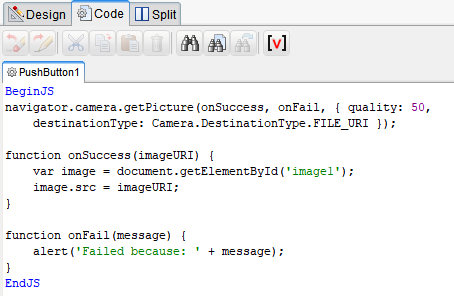
//Saves the imageURI into a VisualNEO Web variable [myvar]
$App.myvar = imageURI;
@cdy44-2 I hope it helps.
Can you tell me how to switch from a JAVASCRIPT variable (containing the picture taken) to a VISUALNEO WEB variable?
//Saves the imageURI into a VisualNEO Web variable [myvar]
$App.myvar = imageURI;
@cdy44-2 I hope it helps.