
Custom checkbox

Quote from asmat on July 15, 2022, 9:29 pmWhat is the best approach in VisualNEO Web to create a custom checkbox?
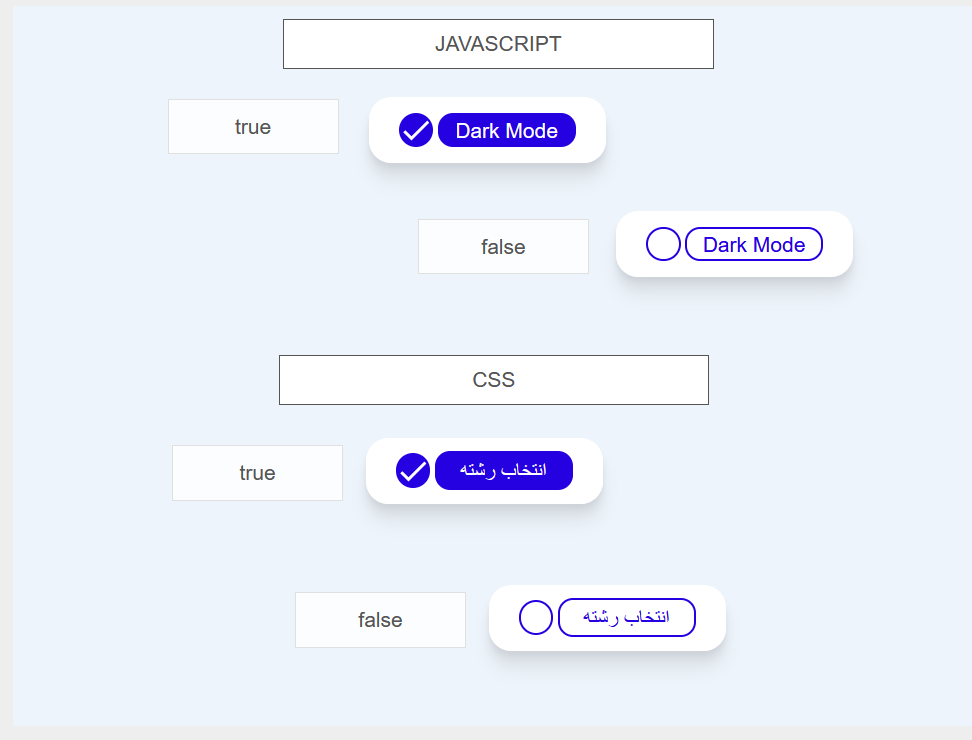
In my experience, I have created in two different ways (CSS & JS) but,
Is there a more way or better way to do it? I am looking for some standard things.
What is the best approach in VisualNEO Web to create a custom checkbox?
In my experience, I have created in two different ways (CSS & JS) but,
Is there a more way or better way to do it? I am looking for some standard things.
Uploaded files:

Quote from luishp on July 17, 2022, 9:59 am@asmat perhaps if you take a look at the .neocheckbox CSS class code it would help you:
/*---------Checkbox--------------*/

.neocheckbox [type="checkbox"]:not(:checked),
.neocheckbox [type="checkbox"]:checked {
  position: absolute;
  left: -9999px;
}
.neocheckbox [type="checkbox"]:not(:checked) + label,
.neocheckbox [type="checkbox"]:checked + label {
  position: relative;
  padding-left: 1.95em;
  cursor: pointer;
}

/* checkbox aspect */
.neocheckbox [type="checkbox"]:not(:checked) + label:before,
.neocheckbox [type="checkbox"]:checked + label:before {
  content: '';
  position: absolute;
  left: 0; top: 0;
  width: 1.25em; height: 1.25em;
  border: 0.15em solid #aaa;
  background: #fff;
  border-radius: 4px;
}
/* checked mark aspect */
.neocheckbox [type="checkbox"]:not(:checked) + label:after,
.neocheckbox [type="checkbox"]:checked + label:after {
  content: "✓";
  position: absolute;
  top: .2em; left: .2em;
  font-size: 1.1em;
  line-height: 0.8;
  color: #444444;
  transition: all .2s;
  font-family: 'Lucida Sans Unicode','Arial Unicode MS', Arial;
}
/* checked mark aspect changes */
.neocheckbox [type="checkbox"]:not(:checked) + label:after {
  opacity: 0;
  transform: scale(0);
}
.neocheckbox [type="checkbox"]:checked + label:after {
  opacity: 1;
  transform: scale(1);
}
/* disabled checkbox */
.neocheckbox [type="checkbox"]:disabled:not(:checked) + label:before,
.neocheckbox [type="checkbox"]:disabled:checked + label:before {
  box-shadow: none;
  border-color: #bbb;
  background-color: #ddd;
}
.neocheckbox [type="checkbox"]:disabled:checked + label:after {
  color: #999;
}
.neocheckbox [type="checkbox"]:disabled + label {
  color: #aaa;
}
/* hover style just for information */
.neocheckbox label:hover:before {
  border: 0.15em solid #888!important;
}
And this is the HTML code each checkbox object generates on the final project:
<div id="CheckBox1" class="checkbox-inline " ng-style="NAB.CheckBox1_style" ng-hide="NAB.CheckBox1_hidden">
  <input id="CheckBox1_checkbox" type="checkbox" ng-disabled="NAB.CheckBox1_disabled">
  <label id="CheckBox1_label" for="CheckBox1_checkbox">Caption</label>
</div>
As you can see it's a DIV (CheckBox1) with an INPUT (CheckBox1_checkbox) and a LABEL (CheckBox1_label)
I hope it helps.
Regards.
@asmat perhaps if you take a look at the .neocheckbox CSS class code it would help you:
/*---------Checkbox--------------*/

.neocheckbox [type="checkbox"]:not(:checked),
.neocheckbox [type="checkbox"]:checked {
  position: absolute;
  left: -9999px;
}
.neocheckbox [type="checkbox"]:not(:checked) + label,
.neocheckbox [type="checkbox"]:checked + label {
  position: relative;
  padding-left: 1.95em;
  cursor: pointer;
}

/* checkbox aspect */
.neocheckbox [type="checkbox"]:not(:checked) + label:before,
.neocheckbox [type="checkbox"]:checked + label:before {
  content: '';
  position: absolute;
  left: 0; top: 0;
  width: 1.25em; height: 1.25em;
  border: 0.15em solid #aaa;
  background: #fff;
  border-radius: 4px;
}
/* checked mark aspect */
.neocheckbox [type="checkbox"]:not(:checked) + label:after,
.neocheckbox [type="checkbox"]:checked + label:after {
  content: "✓";
  position: absolute;
  top: .2em; left: .2em;
  font-size: 1.1em;
  line-height: 0.8;
  color: #444444;
  transition: all .2s;
  font-family: 'Lucida Sans Unicode','Arial Unicode MS', Arial;
}
/* checked mark aspect changes */
.neocheckbox [type="checkbox"]:not(:checked) + label:after {
  opacity: 0;
  transform: scale(0);
}
.neocheckbox [type="checkbox"]:checked + label:after {
  opacity: 1;
  transform: scale(1);
}
/* disabled checkbox */
.neocheckbox [type="checkbox"]:disabled:not(:checked) + label:before,
.neocheckbox [type="checkbox"]:disabled:checked + label:before {
  box-shadow: none;
  border-color: #bbb;
  background-color: #ddd;
}
.neocheckbox [type="checkbox"]:disabled:checked + label:after {
  color: #999;
}
.neocheckbox [type="checkbox"]:disabled + label {
  color: #aaa;
}
/* hover style just for information */
.neocheckbox label:hover:before {
  border: 0.15em solid #888!important;
}
And this is the HTML code each checkbox object generates on the final project:
<div id="CheckBox1" class="checkbox-inline " ng-style="NAB.CheckBox1_style" ng-hide="NAB.CheckBox1_hidden">
  <input id="CheckBox1_checkbox" type="checkbox" ng-disabled="NAB.CheckBox1_disabled">
  <label id="CheckBox1_label" for="CheckBox1_checkbox">Caption</label>
</div>
As you can see it's a DIV (CheckBox1) with an INPUT (CheckBox1_checkbox) and a LABEL (CheckBox1_label)
I hope it helps.
Regards.