Date Input

Quote from CDY@44 on September 27, 2019, 3:04 pmHello,
In the "Date Input" element, is it possible to have the arrows up/down not visible ?
Regards,
Hello,
In the "Date Input" element, is it possible to have the arrows up/down not visible ?
Regards,
Quote from CDY@44 on September 27, 2019, 11:47 pmI found this solution, to put in "project", "properties", "styles" :
::-webkit-inner-spin-button { display: none; }
I found this solution, to put in "project", "properties", "styles" :
::-webkit-inner-spin-button { display: none; }Quote from CDY@44 on September 28, 2019, 12:03 amAn other question...
The result in my variable for a selected date : 07/09/2019 is
"2019-09-06T22:00:00.000Z"
Any idea ?May be a clue....https://github.com/akveo/nebular/issues/1360 ?
An other question...
The result in my variable for a selected date : 07/09/2019 is
Any idea ?

Quote from luishp on September 28, 2019, 7:49 amHi @cdy44-2,
Thats the way JavaScript manages dates.
Please take a look at the attached plugin and sample app.
Regards.
Hi @cdy44-2,
Thats the way JavaScript manages dates.
Please take a look at the attached plugin and sample app.
Regards.

Quote from rrey on October 14, 2019, 9:11 pm@luishp
Hola Luis,
Tengo el mismo problema con dateInput.
Elijo la fecha 14/10/2019
Y el contenido de la variable almacenada es:
2019-10-13T22:00:00.000Z
He intentado ejecutar tus ejemplos y me dan error: comando desconocido.
Mi intención es comparar la fecha introducida por el usuario con la fecha actual.
Saludos,
Roger Rey
Hola Luis,
Tengo el mismo problema con dateInput.
Elijo la fecha 14/10/2019
Y el contenido de la variable almacenada es:
2019-10-13T22:00:00.000Z
He intentado ejecutar tus ejemplos y me dan error: comando desconocido.
Mi intención es comparar la fecha introducida por el usuario con la fecha actual.
Saludos,
Roger Rey
Quote from luishp on October 14, 2019, 9:33 pm@rrey, fíjate que mi ejemplo viene junto con un plugin que tienes que instalar primero.
Saludos.
@rrey, fíjate que mi ejemplo viene junto con un plugin que tienes que instalar primero.
Saludos.
Quote from luishp on October 19, 2019, 5:42 pmHi @cdy44-2
Yes it's possible to add more languages.
I just need some help from the community to translate these strings:Datepicker.language['en'] = { days: ['Sunday', 'Monday', 'Tuesday', 'Wednesday', 'Thursday', 'Friday', 'Saturday'], daysShort: ['Sun', 'Mon', 'Tue', 'Wed', 'Thu', 'Fri', 'Sat'], daysMin: ['Su', 'Mo', 'Tu', 'We', 'Th', 'Fr', 'Sa'], months: ['January','February','March','April','May','June', 'July','August','September','October','November','December'], monthsShort: ['Jan', 'Feb', 'Mar', 'Apr', 'May', 'Jun', 'Jul', 'Aug', 'Sep', 'Oct', 'Nov', 'Dec'], today: 'Today', clear: 'Clear', dateFormat: format, firstDay: 0 };We can add as many languages as we want, just publish here the language translation you are interested in and I will add it to the list. Thank you!
Hi @cdy44-2
Yes it's possible to add more languages.
I just need some help from the community to translate these strings:
Datepicker.language['en'] = {
 days: ['Sunday', 'Monday', 'Tuesday', 'Wednesday', 'Thursday', 'Friday', 'Saturday'],
 daysShort: ['Sun', 'Mon', 'Tue', 'Wed', 'Thu', 'Fri', 'Sat'],
 daysMin: ['Su', 'Mo', 'Tu', 'We', 'Th', 'Fr', 'Sa'],
 months: ['January','February','March','April','May','June', 'July','August','September','October','November','December'],
 monthsShort: ['Jan', 'Feb', 'Mar', 'Apr', 'May', 'Jun', 'Jul', 'Aug', 'Sep', 'Oct', 'Nov', 'Dec'],
 today: 'Today',
 clear: 'Clear',
 dateFormat: format,
 firstDay: 0
};
We can add as many languages as we want, just publish here the language translation you are interested in and I will add it to the list. Thank you!
Quote from CDY@44 on October 19, 2019, 9:55 pmDatepicker.language['fr'] = { days: ['Dimanche', 'Lundi', 'Mardi', 'Mercredi', 'Jeudi', 'Vendredi', 'Samedi'], daysShort: ['Dim', 'Lun', 'Mar', 'Mer', 'Jeu', 'Ven', 'Sam'], daysMin: ['Di', 'Lu', 'Ma', 'Me', 'Je', 'Ve', 'Sa'], months: ['Janvier','Fevrier','Mars','Avril','Mai','Juin', 'Juillet','Aout','Septembre','Octobre','Novembre','Décembre'], monthsShort: ['Jan', 'Fév', 'Mar', 'Avr', 'Mai', 'Jun', 'Jui', 'Aou', 'Sep', 'Oct', 'Nov', 'Dec'], today: 'Aujourd'hui', clear: 'Effacer', dateFormat: format, firstDay: 0 };
Datepicker.language['fr'] = {
 days: ['Dimanche', 'Lundi', 'Mardi', 'Mercredi', 'Jeudi', 'Vendredi', 'Samedi'],
 daysShort: ['Dim', 'Lun', 'Mar', 'Mer', 'Jeu', 'Ven', 'Sam'],
 daysMin: ['Di', 'Lu', 'Ma', 'Me', 'Je', 'Ve', 'Sa'],
 months: ['Janvier','Fevrier','Mars','Avril','Mai','Juin', 'Juillet','Aout','Septembre','Octobre','Novembre','Décembre'],
 monthsShort: ['Jan', 'Fév', 'Mar', 'Avr', 'Mai', 'Jun', 'Jui', 'Aou', 'Sep', 'Oct', 'Nov', 'Dec'],
 today: 'Aujourd'hui',
 clear: 'Effacer',
 dateFormat: format,
 firstDay: 0
};
Quote from luishp on October 19, 2019, 11:10 pm@cdy44-2, please take a look here:
https://visualneo.com/forum/topic/neodatepicker-pluginThanks for the translation to french!
@cdy44-2, please take a look here:
https://visualneo.com/forum/topic/neodatepicker-plugin
Thanks for the translation to french!
Quote from rrey on October 22, 2019, 8:10 pmHola @luishp
Perdona por mi ignorancia. Quiero probar el programa date-sample.neoapp pero no sé cómo instalar
el pluguin date-picker2.nabp .
Saludos,
Roger Rey
Hola @luishp
Perdona por mi ignorancia. Quiero probar el programa date-sample.neoapp pero no sé cómo instalar
el pluguin date-picker2.nabp .
Saludos,
Roger Rey
Quote from luishp on October 23, 2019, 9:28 amHola @rrey, no te preocupes, es muy sencillo.
Se hace desde el menú Options > Add/Remove plugins...
Verás que se abre una ventana que te permite instalar y desinstalar plugins fácilmente.
Los archivos con extensión .nabp son plugins de VisualNEO Web.
El código correspondiente a un determinado plugin solo se añade a tu App si utilizas algún comando de ese plugin.
Por cierto, fíjate que el plugin date-picker2.nabp ha sido sustituido por este otro, más moderno, con más opciones y más fácil de utilizar:
Hola @rrey, no te preocupes, es muy sencillo.
Se hace desde el menú Options > Add/Remove plugins...
Verás que se abre una ventana que te permite instalar y desinstalar plugins fácilmente.
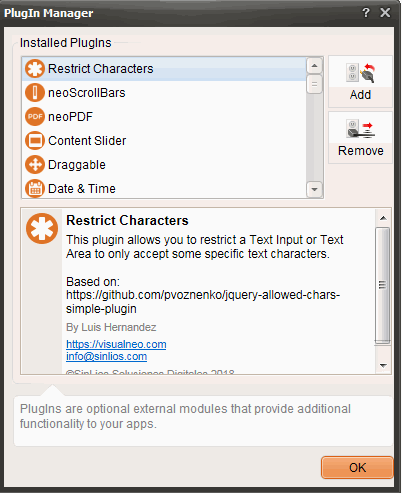
Los archivos con extensión .nabp son plugins de VisualNEO Web.
El código correspondiente a un determinado plugin solo se añade a tu App si utilizas algún comando de ese plugin.
Por cierto, fíjate que el plugin date-picker2.nabp ha sido sustituido por este otro, más moderno, con más opciones y más fácil de utilizar:

Quote from asmat on November 1, 2019, 1:49 amhi Luishp,
Datepicker.language['fa'] = { days: ['یکشنبه', 'دوشنبه', 'سهشنبه', 'چهارشنبه', 'پنجشنبه', 'جمعه', 'شنبه'], daysShort: ['یکشنبه', 'دوشنبه', 'سهشنبه', 'چهارشنبه', 'پنج شنبه', 'جمعه', 'شنبه'], daysMin: ['یکشنبه', 'دوشنبه', 'سهشنبه', 'چهارشنبه', 'پنجشنبه', 'جمعه', 'شنبه'], months: ['حمل','ثور','جوزا','سرطان','اسد','سنبله', 'میزان','عقرب','قوس','جدی','دلو','حوت'], monthsShort: ['حمل','ثور','جوزا','سرطان','اسد','سنبله', 'میزان','عقرب','قوس','جدی','دلو','حوت'], today: 'امروز', clear: 'پاک', dateFormat: format, firstDay: 6 };
hi Luishp,
Datepicker.language['fa'] = {
days: ['یکشنبه', 'دوشنبه', 'سهشنبه', 'چهارشنبه', 'پنجشنبه', 'جمعه', 'شنبه'],
daysShort: ['یکشنبه', 'دوشنبه', 'سهشنبه', 'چهارشنبه', 'پنج شنبه', 'جمعه', 'شنبه'],
daysMin: ['یکشنبه', 'دوشنبه', 'سهشنبه', 'چهارشنبه', 'پنجشنبه', 'جمعه', 'شنبه'],
months: ['حمل','ثور','جوزا','سرطان','اسد','سنبله', 'میزان','عقرب','قوس','جدی','دلو','حوت'],
monthsShort: ['حمل','ثور','جوزا','سرطان','اسد','سنبله', 'میزان','عقرب','قوس','جدی','دلو','حوت'],
today: 'امروز',
clear: 'پاک',
dateFormat: format,
firstDay: 6
};

Quote from farhad2008 on November 1, 2019, 6:39 pmhi asmat
The months mentioned are Arabic and not Persian
regards
hi asmat
The months mentioned are Arabic and not Persian
regards
Quote from luishp on November 1, 2019, 7:57 pm@asmat I have added your code for "fa" language.
Please check it's working fine
@farhad2008 should it be "ar" (Arabic) instead of "fa" (Persian)?
What's the correct code for "fa" (Persian) then?
Thank you both of you!
@asmat I have added your code for "fa" language.
Please check it's working fine
@farhad2008 should it be "ar" (Arabic) instead of "fa" (Persian)?
What's the correct code for "fa" (Persian) then?
Thank you both of you!
Quote from farhad2008 on November 1, 2019, 10:33 pmhi luishp
This is the Persian calendar list The name of the day and month shown
Datepicker.language['fa'] = {
days: ['یکشنبه', 'دوشنبه', 'سهشنبه', 'چهارشنبه', 'پنجشنبه', 'جمعه', 'شنبه'],
daysShort: ['یکشنبه', 'دوشنبه', 'سهشنبه', 'چهارشنبه', 'پنج شنبه', 'جمعه', 'شنبه'],
daysMin: ['یکشنبه', 'دوشنبه', 'سهشنبه', 'چهارشنبه', 'پنجشنبه', 'جمعه', 'شنبه'],
months: ['بهمن','اسفند','فروردین','اردیبهشت','خرداد','تیر', 'مرداد','شهریور','مهر','آبان','آذر','دی'],
monthsShort: ['بهمن','اسفند','فروردین','اردیبهشت','خرداد','تیر', 'مرداد','شهریور','مهر','آبان','آذر','دی'],
today: 'امروز',
clear: 'پاک',
dateFormat: format,
firstDay: 6
};
hi luishp
This is the Persian calendar list The name of the day and month shown
Datepicker.language['fa'] = {
days: ['یکشنبه', 'دوشنبه', 'سهشنبه', 'چهارشنبه', 'پنجشنبه', 'جمعه', 'شنبه'],
daysShort: ['یکشنبه', 'دوشنبه', 'سهشنبه', 'چهارشنبه', 'پنج شنبه', 'جمعه', 'شنبه'],
daysMin: ['یکشنبه', 'دوشنبه', 'سهشنبه', 'چهارشنبه', 'پنجشنبه', 'جمعه', 'شنبه'],
months: ['بهمن','اسفند','فروردین','اردیبهشت','خرداد','تیر', 'مرداد','شهریور','مهر','آبان','آذر','دی'],
monthsShort: ['بهمن','اسفند','فروردین','اردیبهشت','خرداد','تیر', 'مرداد','شهریور','مهر','آبان','آذر','دی'],
today: 'امروز',
clear: 'پاک',
dateFormat: format,
firstDay: 6
};
Quote from asmat on November 1, 2019, 11:30 pmHi @luishp thank you so much, it is great,
I tested the both commands in Mozilla and Android, the below command works perfectly:
neoDatePickerPlus "TextInput1" " dd-mm-yyyy" "fa" true "years" "days" "top left" true [x]
but this one does not work.(maybe something entered wrong )
neoDatePicker "TextInput1" "dd" "fa" true "[x]"
hi @farhoad2008,
I think for Iranic persian use this symbol "fa-ir"
@Luishp i have one more note:
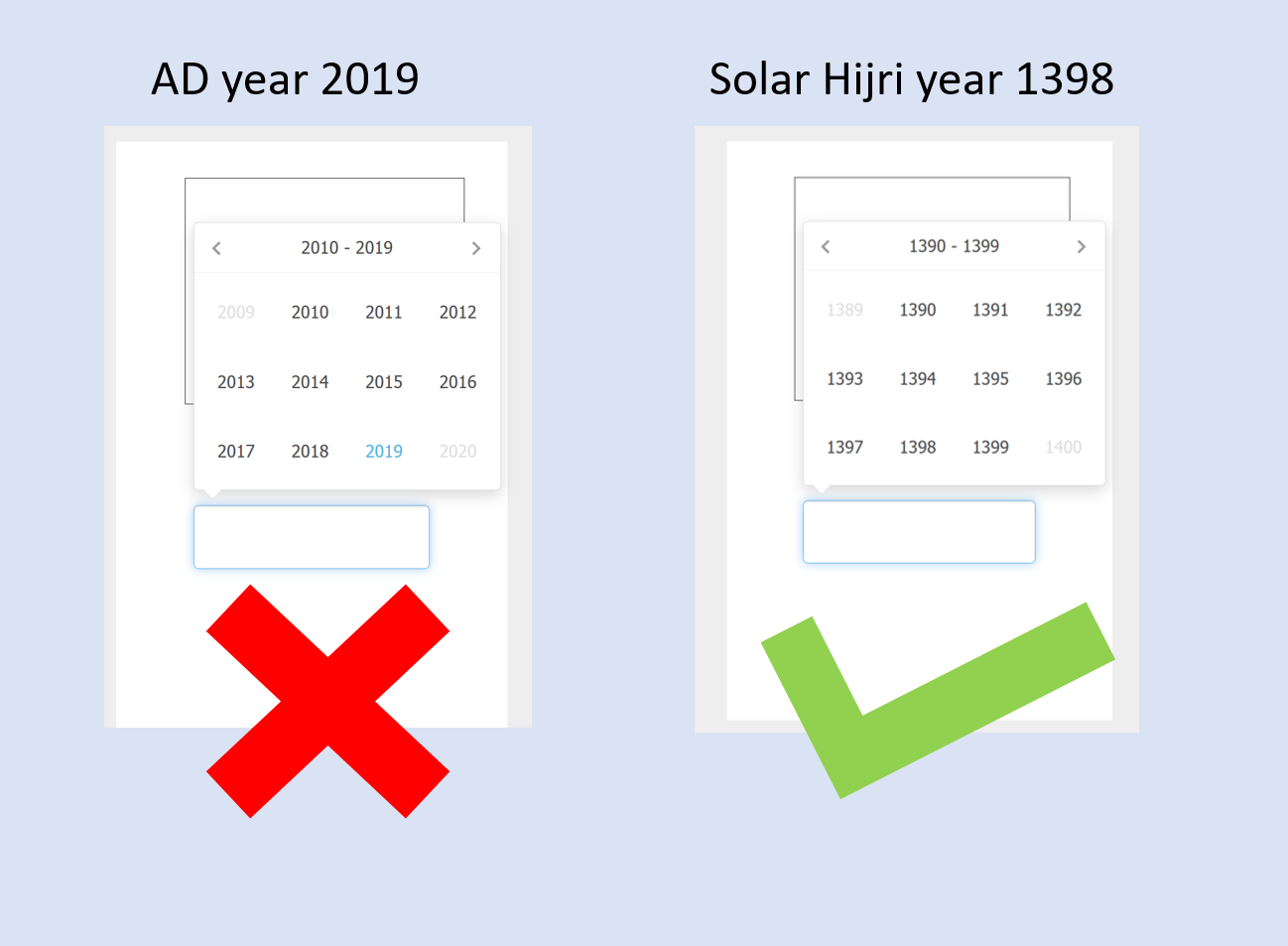
As you know some Asian countries use "Solar Hijri " years instead AD years in the calender. and current year in Solar Hijri is 1398.
I think if it possible then please make it for persain, such that prime preview for years be like below:
Hi @luishp thank you so much, it is great,
I tested the both commands in Mozilla and Android, the below command works perfectly:
neoDatePickerPlus "TextInput1" " dd-mm-yyyy" "fa" true "years" "days" "top left" true [x]
but this one does not work.(maybe something entered wrong )
neoDatePicker "TextInput1" "dd" "fa" true "[x]"
hi @farhoad2008,
I think for Iranic persian use this symbol "fa-ir"
@Luishp i have one more note:
As you know some Asian countries use "Solar Hijri " years instead AD years in the calender. and current year in Solar Hijri is 1398.
I think if it possible then please make it for persain, such that prime preview for years be like below:
Uploaded files: