
dbpquery

Quote from s7shanbe on November 26, 2021, 6:22 pmhello
in (dbpquery) Action
I use the variable in the table name.
dbpQuery "cmp" "[db.camp.num]n" "meli = [#34][cmpmeli][#34]"
But the query is not done.
What is the problem? in dbpquery Variable not usable?
hello
in (dbpquery) Action
I use the variable in the table name.
dbpQuery "cmp" "[db.camp.num]n" "meli = [#34][cmpmeli][#34]"
But the query is not done.
What is the problem? in dbpquery Variable not usable?

Quote from Gaev on November 26, 2021, 7:25 pm@s7shanbe
dbpQuery "cmp" "[db.camp.num]n" "meli = [#34][cmpmeli][#34]"
in dbpquery Variable not usable?
It could be that you can not use the special (reserved) variables in parameters of dbpQuery ... this might work ...
SetVar "[myTable]" "![db.camp.num]n"

AlertBox "db.camp.num, myTable, cmpmeli" "[db.camp.num],[myTable],[cmpeli]"

dbpQuery "cmp" "[myTable]" "meli = [#34][cmpmeli][#34]"
If it does not work, please post the result of the AlertBox command.
dbpQuery "cmp" "[db.camp.num]n" "meli = [#34][cmpmeli][#34]"
in dbpquery Variable not usable?
It could be that you can not use the special (reserved) variables in parameters of dbpQuery ... this might work ...
SetVar "[myTable]" "![db.camp.num]n"

AlertBox "db.camp.num, myTable, cmpmeli" "[db.camp.num],[myTable],[cmpeli]"

dbpQuery "cmp" "[myTable]" "meli = [#34][cmpmeli][#34]"
If it does not work, please post the result of the AlertBox command.
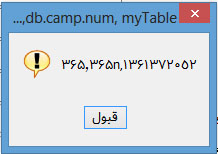
Quote from Gaev on November 26, 2021, 10:42 pm@s7shanbe
1) You left out an important piece of information i.e. you were working with data in a non-English language (I can not even tell what the language is).
So, I can not ask you to upload a small pub and .mdb file as I would not be able to properly run/examine it in my environment.
I am assuming that you have had previous success with using the underlying (MS Access) database using this language.
2) Upon closer examination of the AlertBox contents, I can see that ...
a) the resulting Table name is a mixture of this language and English (i.e. the suffix n), I doubt that you can mix languages like that ... when you created this Table using dbpCreateTable, were you able to mix languages ?
b) the third parameter produces some variable value, even though I made a mistake in spelling it ([cmpeli] instead of [cmpmeli]) ... could it be that the correct variable is [cmpeli] instead of the variable [cmpmeli] used in the dbpQuery command ? ... you might be getting unexpected results because the variable [cmpmeli] does not exist (has a null value), and therefore no match) ?
I await your responses.
1) You left out an important piece of information i.e. you were working with data in a non-English language (I can not even tell what the language is).
So, I can not ask you to upload a small pub and .mdb file as I would not be able to properly run/examine it in my environment.
I am assuming that you have had previous success with using the underlying (MS Access) database using this language.
2) Upon closer examination of the AlertBox contents, I can see that ...
a) the resulting Table name is a mixture of this language and English (i.e. the suffix n), I doubt that you can mix languages like that ... when you created this Table using dbpCreateTable, were you able to mix languages ?
b) the third parameter produces some variable value, even though I made a mistake in spelling it ([cmpeli] instead of [cmpmeli]) ... could it be that the correct variable is [cmpeli] instead of the variable [cmpmeli] used in the dbpQuery command ? ... you might be getting unexpected results because the variable [cmpmeli] does not exist (has a null value), and therefore no match) ?
I await your responses.
Quote from mishem on November 26, 2021, 10:53 pmCan field type and quotation marks have an effect?
If the field being searched is a String, Char or Memo type then the search string must be surrounded by quotes which, in VisualNEO for Windows, are specified using the special code: [#34].
https://neodbprohelp.visualneo.com/SearchQuery.html#dbpQuery
Can field type and quotation marks have an effect?
If the field being searched is a String, Char or Memo type then the search string must be surrounded by quotes which, in VisualNEO for Windows, are specified using the special code: [#34].
https://neodbprohelp.visualneo.com/SearchQuery.html#dbpQuery
Quote from s7shanbe on November 26, 2021, 11:06 pm@gaev
1- I edited the cmpeli variable to cmpmeli. Because I thought it is typing error.
At 365n
It is actually a combination of two tables.
365 is a field of a table (camp) and 365n is a table of a database (cmp)
like this[cmp.[db.camp.num]n.$reccount]
[db.camp.num] : Receives this part from the camp table in the db database
and open [db.camp.num]n table from cmp database.
1- I edited the cmpeli variable to cmpmeli. Because I thought it is typing error.
At 365n
It is actually a combination of two tables.
365 is a field of a table (camp) and 365n is a table of a database (cmp)
like this
[cmp.[db.camp.num]n.$reccount]
[db.camp.num] : Receives this part from the camp table in the db database
and open [db.camp.num]n table from cmp database.
Quote from Gaev on November 27, 2021, 12:08 am@s7shanbe
1- I edited the cmpeli variable to cmpmeli. Because I thought it is typing error.
Ok, great.
At 365n
It is actually a combination of two tables.
365 is a field of a table (camp) and 365n is a table of a database (cmp)
like this[cmp.[db.camp.num]n.$reccount]
[db.camp.num] : Receives this part from the camp table in the db database
and open [db.camp.num]n table from cmp database.
Sorry, I do not have experience with the use of neoDBPro/MS Access in foreign languages ... one last thing I can suggest is to try a hardcoded command i.e. using the mixed-language values for [db.camp.num]n and [cmpmeli] in the dbpQuery command ... and see if you get the expected result.
1- I edited the cmpeli variable to cmpmeli. Because I thought it is typing error.
Ok, great.
At 365n
It is actually a combination of two tables.
365 is a field of a table (camp) and 365n is a table of a database (cmp)
like this[cmp.[db.camp.num]n.$reccount]
[db.camp.num] : Receives this part from the camp table in the db database
and open [db.camp.num]n table from cmp database.
Sorry, I do not have experience with the use of neoDBPro/MS Access in foreign languages ... one last thing I can suggest is to try a hardcoded command i.e. using the mixed-language values for [db.camp.num]n and [cmpmeli] in the dbpQuery command ... and see if you get the expected result.