
DBPRO Grid Formatting

Quote from jappell on August 26, 2022, 6:49 amHello, I am new to dbpro and so far so good. Tonight I wanted to open a table and feed the contents into a grid. There
are a number of columns I do not want to display on grid. Trying to get an example of what I should try. Here is what I have and I am sure I am simply not doing it correctly.
- dbpOpenDatabase (SQL db)
- dbpOpenTable "epo" "OrionUsersMT" ""
- dbpShowGrid "epo" "OrionUsersMT" "Rectangle11"
No matter what I place in the middle of these commands such as dbpset columnproperties, my output to the grid are all columns.
What am I missing? If there were some examples to look at I might get a sense of what was intended to make it work.
Thoughts and examples would really be appreciated.
Thank You,
Jay
Hello, I am new to dbpro and so far so good. Tonight I wanted to open a table and feed the contents into a grid. There
are a number of columns I do not want to display on grid. Trying to get an example of what I should try. Here is what I have and I am sure I am simply not doing it correctly.
- dbpOpenDatabase (SQL db)
- dbpOpenTable "epo" "OrionUsersMT" ""
- dbpShowGrid "epo" "OrionUsersMT" "Rectangle11"
No matter what I place in the middle of these commands such as dbpset columnproperties, my output to the grid are all columns.
What am I missing? If there were some examples to look at I might get a sense of what was intended to make it work.
Thoughts and examples would really be appreciated.
Thank You,
Jay

Quote from ebear on August 26, 2022, 8:45 amHello Jappell
You are missing the following:
dbpSetColumnOrder "epo" "OrionUsersMT" "LastName;FirstName;City;Street;State;Zip;Country;Telephone;EMail "
With this command you can change the "order" how the field will be shown in the Grid and which fields will be shown in the list. Again the above is only an example, as I don't know which fields are in you table.
There are next to this more options:
dbpSetColumnWidths "epo" "OrionUsersMT" "FirstName=90;LastName=90;Street=150;City=90;State=90;Zip=90; Country=90;Telephone=90;EMail=90"
Sets the column width of the fields shown in the Grid
dbpSetColumnTitles "epo" "OrionUsersMT" "FirstName=First Name:;LastName=Last Name:;Street=Street:;City=City:;State=State:;Zip=Zip code:; Country=Country:;Telephone=Telephone Number:;EMail=E-mail addres:"
Sets the column header in the Grid, for example the field "FirstName" will be shown as "First Name:" etc.
Please take a look in the dBPro documentation Action Command Reference (visualneo.com) to find the possibilities.
Best regards,
Eric
Best regards,
Eric
Hello Jappell
You are missing the following:
dbpSetColumnOrder "epo" "OrionUsersMT" "LastName;FirstName;City;Street;State;Zip;Country;Telephone;EMail "
With this command you can change the "order" how the field will be shown in the Grid and which fields will be shown in the list. Again the above is only an example, as I don't know which fields are in you table.
There are next to this more options:
dbpSetColumnWidths "epo" "OrionUsersMT" "FirstName=90;LastName=90;Street=150;City=90;State=90;Zip=90; Country=90;Telephone=90;EMail=90"
Sets the column width of the fields shown in the Grid
dbpSetColumnTitles "epo" "OrionUsersMT" "FirstName=First Name:;LastName=Last Name:;Street=Street:;City=City:;State=State:;Zip=Zip code:; Country=Country:;Telephone=Telephone Number:;EMail=E-mail addres:"
Sets the column header in the Grid, for example the field "FirstName" will be shown as "First Name:" etc.
Please take a look in the dBPro documentation Action Command Reference (visualneo.com) to find the possibilities.
Best regards,
Eric
Best regards,
Eric
Quote from jappell on August 26, 2022, 2:29 pmHi Eric, Thanks very much for your response. Here is how I am approaching the issue, with your comments in mind, and perhaps you can see the errors in my approach. I have consulted the documentation and for some reason I'm not understanding if this is a code priority order kind of thing. Anyways here we go;
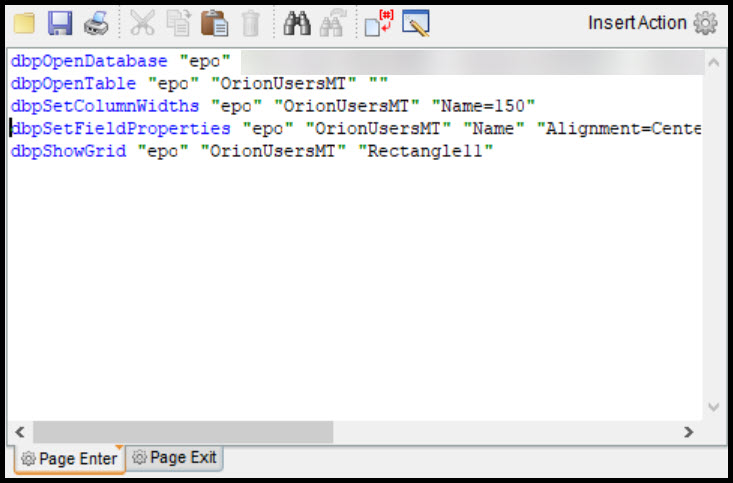
dbpOpenDatabase "epo" "Provider=SQLOLEDB.1;Password=xx;Persist Security Info=True;User ID=sa;Initial Catalog=ePO_xxx;Data Source=xxx"
dbpOpenTable "epo" "OrionUsersMT" ""
dbpSetColumnWidths "epo" "OrionUsersMT" "Name=150"
dbpSetFieldProperties "epo" "OrionUsersMT" "Name" "Alignment=Center"
dbpShowGrid "epo" "OrionUsersMT" "Rectangle11"Is the approach I am taking even correct? open the db, open the table, set the columns and then show the grid? I'm certain you will mention something that could resonate what I am doing wrong. The online guide is good but a few examples could really hammer home the command.
Thank You,
Jay
Hi Eric, Thanks very much for your response. Here is how I am approaching the issue, with your comments in mind, and perhaps you can see the errors in my approach. I have consulted the documentation and for some reason I'm not understanding if this is a code priority order kind of thing. Anyways here we go;
dbpOpenDatabase "epo" "Provider=SQLOLEDB.1;Password=xx;Persist Security Info=True;User ID=sa;Initial Catalog=ePO_xxx;Data Source=xxx"
dbpOpenTable "epo" "OrionUsersMT" ""
dbpSetColumnWidths "epo" "OrionUsersMT" "Name=150"
dbpSetFieldProperties "epo" "OrionUsersMT" "Name" "Alignment=Center"
dbpShowGrid "epo" "OrionUsersMT" "Rectangle11"
Is the approach I am taking even correct? open the db, open the table, set the columns and then show the grid? I'm certain you will mention something that could resonate what I am doing wrong. The online guide is good but a few examples could really hammer home the command.
Thank You,
Jay
Quote from jappell on August 26, 2022, 2:38 pmHere are a few screen shots to assist you. The end result is that I do not get just the Name column, but all of the other associated columns.
See if this helps
Here are a few screen shots to assist you. The end result is that I do not get just the Name column, but all of the other associated columns.
See if this helps
Uploaded files:
Quote from ebear on August 26, 2022, 3:42 pmHello Jappel,
First of all I don't know the names of the fields you have in the table, but you should use the example I already wrote before:
dbpSetColumnOrder "epo" "OrionUsersMT" "LastName;FirstName;City;Street;State;Zip;Country;Telephone;EMail "
Only replace in my example the with the fields in you table which you want to show in the Grid.
Best regards,
Eric
Hello Jappel,
First of all I don't know the names of the fields you have in the table, but you should use the example I already wrote before:
dbpSetColumnOrder "epo" "OrionUsersMT" "LastName;FirstName;City;Street;State;Zip;Country;Telephone;EMail "
Only replace in my example the with the fields in you table which you want to show in the Grid.
Best regards,
Eric
Quote from jappell on August 26, 2022, 4:04 pmMorning Eric,
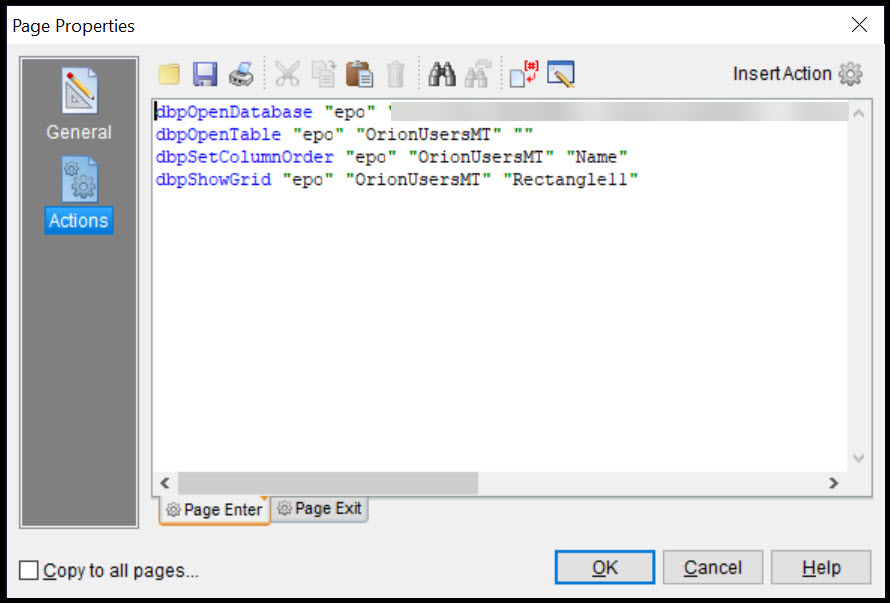
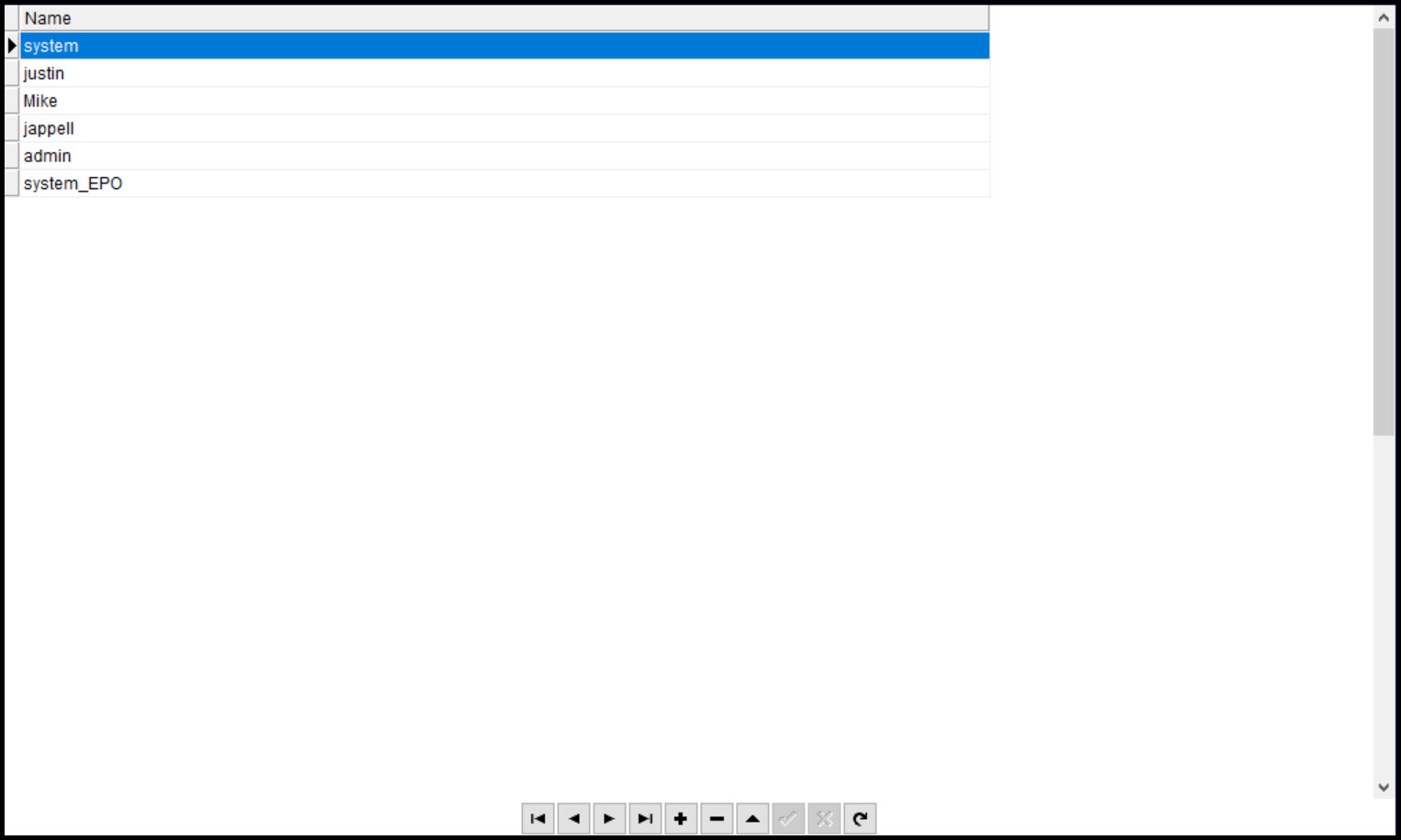
I was kicking the tires here and saw column order and voila, that took care of the issue. By the time I got back here to tell you, you had already answered the questions. Thanks for your help I really appreciate it.
So the end result for others who need it is:
Morning Eric,
I was kicking the tires here and saw column order and voila, that took care of the issue. By the time I got back here to tell you, you had already answered the questions. Thanks for your help I really appreciate it.
So the end result for others who need it is:
Uploaded files:
Quote from Gaev on August 26, 2022, 9:45 pm@jappell
There are a number of columns I do not want to display on grid. Trying to get an example of what I should try.
With the dbpSetFieldProperties command, you can specify in the properties parameter ...
Visible=yes/no
Yes = the field is displayed in the grid. No = the field does not appear in the grid.
For more information ... https://neodbprohelp.visualneo.com/Grids.html#dbpSetFieldProperties
There are a number of columns I do not want to display on grid. Trying to get an example of what I should try.
With the dbpSetFieldProperties command, you can specify in the properties parameter ...
Visible=yes/no
Yes = the field is displayed in the grid. No = the field does not appear in the grid.
For more information ... https://neodbprohelp.visualneo.com/Grids.html#dbpSetFieldProperties