
dbpro report designer

Quote from s7shanbe on May 1, 2020, 1:03 pmHello
What should be the composition of the partitions so that the information is printed correctly?
Hello
What should be the composition of the partitions so that the information is printed correctly?
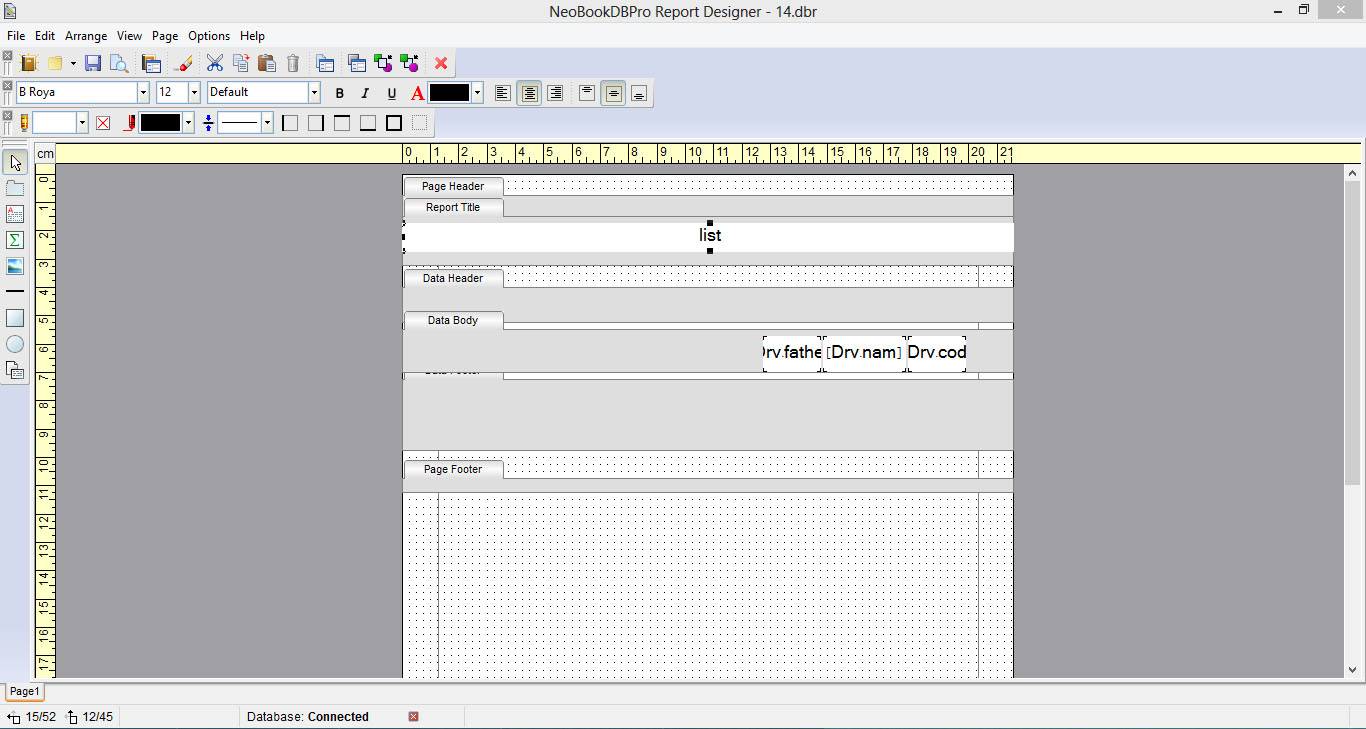

Quote from PaulJonestindall on May 1, 2020, 1:40 pmYour question is a bit vague. Perhaps you could describe a little more specifically what you need as your result.
I've had some experience with Report Designer and it can get a bit tricky and could take some trial and error to achieve the desired report. It doesn't have the most friendly UI.
Your question is a bit vague. Perhaps you could describe a little more specifically what you need as your result.
I've had some experience with Report Designer and it can get a bit tricky and could take some trial and error to achieve the desired report. It doesn't have the most friendly UI.
Quote from s7shanbe on May 1, 2020, 3:03 pm@pauljonestindall
The file designed with Reporter Design does not print any information from my database.
Please share if you have a sample file...
The file designed with Reporter Design does not print any information from my database.
Please share if you have a sample file...
Quote from PaulJonestindall on May 1, 2020, 3:25 pm@s7shanbe
Ok. So at this point I have to ask... Have you set up the report for your specific database in the Report Properties? (File>Report Properties) And have you specified the table your data is coming from in the Data Body? (Right click on the partition and you should have a drop down list of the available tables.) These are the first two basic connections to your DB and should spit out something.
Ok. So at this point I have to ask... Have you set up the report for your specific database in the Report Properties? (File>Report Properties) And have you specified the table your data is coming from in the Data Body? (Right click on the partition and you should have a drop down list of the available tables.) These are the first two basic connections to your DB and should spit out something.
Quote from PaulJonestindall on May 4, 2020, 7:14 pmHmm... If you want to ZIP up a small sample project I'd be happy to look at your coding. I know that Report Designer can be a bit tricky.
Hmm... If you want to ZIP up a small sample project I'd be happy to look at your coding. I know that Report Designer can be a bit tricky.
Quote from s7shanbe on May 24, 2020, 4:13 pm@pauljonestindall
Hello. I learned a little about Report designer. I have a question
How do I use a Report designer to print a variable table that is in a variable path? In Report designer, (report properties) does not accept neobook variables!
For example, I want to print table [n] from the database below using Reporter Design.
dbpCreateAccessDatabase "[pubdir]Data\[Slm]\FF.mdb" ""
Hello. I learned a little about Report designer. I have a question
How do I use a Report designer to print a variable table that is in a variable path? In Report designer, (report properties) does not accept neobook variables!
For example, I want to print table [n] from the database below using Reporter Design.
dbpCreateAccessDatabase "[pubdir]Data\[Slm]\FF.mdb" ""
Quote from PaulJonestindall on May 26, 2020, 10:50 amWell, first off, you're making me make a lot of assumptions. By variable table and variable path you mean that your table name is in a variable ([n]) and all or part of your database file path is in a variable ([PubDir]Data\[Slm]\FF.mdb)? Using variables in your path is fine. I've done this with user names, for instance [PubDir]Data\[UserName].mdb, where the DB file for each user has the exact same structure. I've never actually tried using a variable in place of a table or field name whether in a compound variable, a query or any other action. As you probably already know, Report Designer doesn't use the exact same DB variable structure as the plugin.
Typically table and field names are already known. To build your report file, the Report Designer needs to know the path of the MDB file (in Report Properties) in order to read the DB table and field structure, so to speak. The report is designed for that specific database ID no matter what it's eventual path or even it's name may be. When building your report you create partitions such as group headers, data headers, data body, etc. and all of these require pre-determined table and field names. I've never tried it but I wouldn't expect to be able to pass a variable ([n]) to the DBR file's partition properties.
Without knowing more about your project, what I might suggest is that at the time of printing you create a temporary DB file, pass all the required information to it in pre-determined tables and fields and build your report file to suit that temporary DB.
I hope this helps.
Well, first off, you're making me make a lot of assumptions. By variable table and variable path you mean that your table name is in a variable ([n]) and all or part of your database file path is in a variable ([PubDir]Data\[Slm]\FF.mdb)? Using variables in your path is fine. I've done this with user names, for instance [PubDir]Data\[UserName].mdb, where the DB file for each user has the exact same structure. I've never actually tried using a variable in place of a table or field name whether in a compound variable, a query or any other action. As you probably already know, Report Designer doesn't use the exact same DB variable structure as the plugin.
Typically table and field names are already known. To build your report file, the Report Designer needs to know the path of the MDB file (in Report Properties) in order to read the DB table and field structure, so to speak. The report is designed for that specific database ID no matter what it's eventual path or even it's name may be. When building your report you create partitions such as group headers, data headers, data body, etc. and all of these require pre-determined table and field names. I've never tried it but I wouldn't expect to be able to pass a variable ([n]) to the DBR file's partition properties.
Without knowing more about your project, what I might suggest is that at the time of printing you create a temporary DB file, pass all the required information to it in pre-determined tables and fields and build your report file to suit that temporary DB.
I hope this helps.