
dom-to-image-problem

Quote from asmat on July 31, 2020, 1:55 amI want create an image from div tag, I used dom-to-image plugin. It works fine but it generates an extra edge in left and top of image, is there any way to solve this problem?
I want create an image from div tag, I used dom-to-image plugin. It works fine but it generates an extra edge in left and top of image, is there any way to solve this problem?
Uploaded files: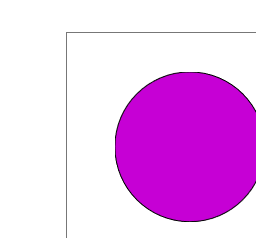

Quote from Gaev on July 31, 2020, 2:15 pm@asmat:
It looks like this is caused by the margin property of the dynamically created img (child) object.
When I ran your App (after changing the reference to the dom-to-image.js file), after doing ...
Right Click
Inspect
Console... I noticed this message in my Chrome Browser ...
Uncaught ReferenceError: domtoimage is not defined
at index.html:17However, it did perform the rendering (similar to that in your screenshot).
After I clicked on the Preview button, the Console showed these additional errors ...
Error while reading CSS rules from file:///C:/Users/Gaev%20Keeka/Documents/VisualNeoWeb/Libraries/css/bootstrap.min.css SecurityError: Failed to read the 'cssRules' property from 'CSSStyleSheet': Cannot access rules
dom-to-image.js:684 Error while reading CSS rules from file:///C:/Users/Gaev%20Keeka/Documents/VisualNeoWeb/Libraries/css/bootstrap-theme.min.css SecurityError: Failed to read the 'cssRules' property from 'CSSStyleSheet': Cannot access rules
dom-to-image.js:684 Error while reading CSS rules from file:///C:/Users/Gaev%20Keeka/Documents/VisualNeoWeb/Libraries/css/nzAnimate.min.css SecurityError: Failed to read the 'cssRules' property from 'CSSStyleSheet': Cannot access rules
dom-to-image.js:684 Error while reading CSS rules from file:///C:/Users/Gaev%20Keeka/Documents/VisualNeoWeb/Libraries/css/neoapp-ui.min.css SecurityError: Failed to read the 'cssRules' property from 'CSSStyleSheet': Cannot access rules
dom-to-image.js:684 Error while reading CSS rules from file:///C:/Users/Gaev%20Keeka/Downloads/div-to-image/div-to-image/div%20to%20image_Test/style.css?v=1 SecurityError: Failed to read the 'cssRules' property from 'CSSStyleSheet': Cannot access rulesSince the javascript library is in a minified format, I can not read its content.
I think you need to specify some css rules (properties) that will set the margins to 0px.
@asmat:
It looks like this is caused by the margin property of the dynamically created img (child) object.
When I ran your App (after changing the reference to the dom-to-image.js file), after doing ...
Right Click
Inspect
Console
... I noticed this message in my Chrome Browser ...
Uncaught ReferenceError: domtoimage is not defined
at index.html:17
However, it did perform the rendering (similar to that in your screenshot).
After I clicked on the Preview button, the Console showed these additional errors ...
Error while reading CSS rules from file:///C:/Users/Gaev%20Keeka/Documents/VisualNeoWeb/Libraries/css/bootstrap.min.css SecurityError: Failed to read the 'cssRules' property from 'CSSStyleSheet': Cannot access rules
dom-to-image.js:684 Error while reading CSS rules from file:///C:/Users/Gaev%20Keeka/Documents/VisualNeoWeb/Libraries/css/bootstrap-theme.min.css SecurityError: Failed to read the 'cssRules' property from 'CSSStyleSheet': Cannot access rules
dom-to-image.js:684 Error while reading CSS rules from file:///C:/Users/Gaev%20Keeka/Documents/VisualNeoWeb/Libraries/css/nzAnimate.min.css SecurityError: Failed to read the 'cssRules' property from 'CSSStyleSheet': Cannot access rules
dom-to-image.js:684 Error while reading CSS rules from file:///C:/Users/Gaev%20Keeka/Documents/VisualNeoWeb/Libraries/css/neoapp-ui.min.css SecurityError: Failed to read the 'cssRules' property from 'CSSStyleSheet': Cannot access rules
dom-to-image.js:684 Error while reading CSS rules from file:///C:/Users/Gaev%20Keeka/Downloads/div-to-image/div-to-image/div%20to%20image_Test/style.css?v=1 SecurityError: Failed to read the 'cssRules' property from 'CSSStyleSheet': Cannot access rules
Since the javascript library is in a minified format, I can not read its content.
I think you need to specify some css rules (properties) that will set the margins to 0px.