
DrawImageEx :)

Quote from Patrik on August 23, 2022, 1:10 pmIs there an advanced DrawImage like:
DrawImage gr id file sourceX sourceY sourceWidth sourceHeight destX destY
or best
DrawImage gr id file sourceX sourceY sourceWidth sourceHeight destX destY destWidth destHeightThe idea is to load a big image and cut it into tiles.
Thank you :)
Is there an advanced DrawImage like:
DrawImage gr id file sourceX sourceY sourceWidth sourceHeight destX destY
or best
DrawImage gr id file sourceX sourceY sourceWidth sourceHeight destX destY destWidth destHeight
The idea is to load a big image and cut it into tiles.
Thank you :)

Quote from luishp on August 23, 2022, 1:47 pm@patrik I think neoCrop plugin could be what you are looking for:
https://visualneo.com/tutorials/neocrop/
https://webhelp.visualneo.com/neoCrop.htmlLet me know if it works for you.
Regards.
@patrik I think neoCrop plugin could be what you are looking for:
https://visualneo.com/tutorials/neocrop/
https://webhelp.visualneo.com/neoCrop.html
Let me know if it works for you.
Regards.
Quote from luishp on August 23, 2022, 1:52 pm@patrik if you prefer to use SVG as DraImage does, you can try using SetViewBox to clip the images:
https://svgbox.net/blog/crop-svg-image/
Regards
@patrik if you prefer to use SVG as DraImage does, you can try using SetViewBox to clip the images:
https://svgbox.net/blog/crop-svg-image/
Regards
Quote from Patrik on August 23, 2022, 4:40 pmI don't understand how to go about it, in what order should we put the NeoCrop instructions... :(
The goal is to take a piece of the source image (x,y,w,h) to place it in the destination image (xx,yy).
Can I have a small example?
Thanks in advance.
I don't understand how to go about it, in what order should we put the NeoCrop instructions... :(
The goal is to take a piece of the source image (x,y,w,h) to place it in the destination image (xx,yy).
Can I have a small example?
Thanks in advance.
Quote from luishp on August 23, 2022, 5:16 pm@patrik have you already checked the included sample apps located under MyDocuments\VisualNeoWeb\Sample Apps\neoCrop?
Regards.
@patrik have you already checked the included sample apps located under MyDocuments\VisualNeoWeb\Sample Apps\neoCrop?
Regards.

Quote from Patrik on August 24, 2022, 6:56 pmThis function exists in JavaScript (canvas) : context.drawImage(img,sx,sy,swidth,sheight,dx,dy,dwidth,dheight);
This function exists in JavaScript (canvas) : context.drawImage(img,sx,sy,swidth,sheight,dx,dy,dwidth,dheight);
Quote from luishp on August 25, 2022, 8:34 am@patrik yes, I know but note that all drawing commands in VisualNEO Web use a very different technology (SVG graphics)
To manage Canvas related graphics, VisualNEO Web includes FabricJS plugin (this is one of the most advanced ones)
Double-clicking any image allows croping it but it doesn't offer any way to do it programaticaly.Perhaps if I better understand your final goal I can help a bit more.
@patrik yes, I know but note that all drawing commands in VisualNEO Web use a very different technology (SVG graphics)
To manage Canvas related graphics, VisualNEO Web includes FabricJS plugin (this is one of the most advanced ones)
Double-clicking any image allows croping it but it doesn't offer any way to do it programaticaly.
Perhaps if I better understand your final goal I can help a bit more.
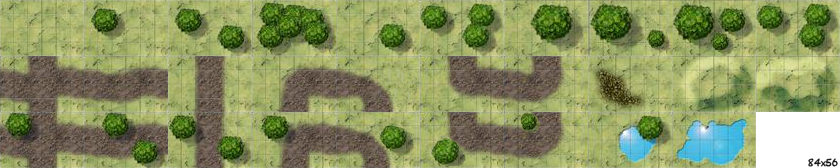
Quote from Patrik on August 25, 2022, 1:43 pmWe take this image on which there are tiles.
By arranging, duplicating, rotating these tiles, we can create a (huge) landscape on another image/container
We take this image on which there are tiles.
By arranging, duplicating, rotating these tiles, we can create a (huge) landscape on another image/container

Quote from luishp on August 26, 2022, 12:24 pm@patrik only way to do what you want is using Canvas HTML.
I have created a new plugin with the commands you need as a start point for a more complete one.
Please take a look at the sample app, plugin and plugin source code and let me know if this is a solution for you.Thank you!
@patrik only way to do what you want is using Canvas HTML.
I have created a new plugin with the commands you need as a start point for a more complete one.
Please take a look at the sample app, plugin and plugin source code and let me know if this is a solution for you.
Thank you!
Uploaded files:Quote from Patrik on August 26, 2022, 1:04 pmA very big-huge-faboulous thank :)
I'm looking at all this ASAP !---EDIT---
Perfect work !!
Just a funny ascertainment : the syntax is neoCanvasDrawImageTile destId sourceId sx sy sw sh dx dy dw dh
(sx = source.x, dw = dest.width etc.)
There is an inversion source/destination between ids and coords :)
A very big-huge-faboulous thank :)
I'm looking at all this ASAP !
---EDIT---
Perfect work !!
Just a funny ascertainment : the syntax is neoCanvasDrawImageTile destId sourceId sx sy sw sh dx dy dw dh
(sx = source.x, dw = dest.width etc.)
There is an inversion source/destination between ids and coords :)
Quote from luishp on August 26, 2022, 7:17 pmThere is an inversion source/destination between ids and coords :)
@patrik that's because most commands first parameter is the destination Container. I just wanted to be as consistent as possible.
I'm glad it worked for you :)Best thing about VisualNEO Web is it's very easy to expand thanks to plugins.
Note that you can check the plugin source code and modify it using the included Plugin Generator.
There is an inversion source/destination between ids and coords :)
@patrik that's because most commands first parameter is the destination Container. I just wanted to be as consistent as possible.
I'm glad it worked for you :)
Best thing about VisualNEO Web is it's very easy to expand thanks to plugins.
Note that you can check the plugin source code and modify it using the included Plugin Generator.
Quote from Patrik on August 26, 2022, 8:17 pmAnyway, thank you for this plugin :
I will now do a little test to display tiles on a phone.
By the way, what is the average resolution (pixels) of a smartphone?
Anyway, thank you for this plugin :
I will now do a little test to display tiles on a phone.
By the way, what is the average resolution (pixels) of a smartphone?
Quote from luishp on August 27, 2022, 10:22 amBy the way, what is the average resolution (pixels) of a smartphone?
@patrik there is not such a thing. Too much diversity, including retina display etc. You should think on average screen aspect ratio instead.
What I do is using a relatively high resolution (in pixels) and then scale the whole app according to the current device using FitAppToScreen command (cover screen = true). You just need to left enough space on margins as they could be trimmed on some devices with a different aspect ratio than your app.
I think this is the best approach for games.
The "VirusKiller" sample game app (source code included with VisualNEO Web) uses this technique.
Note that you can play the game on almost any screen size.
By the way, what is the average resolution (pixels) of a smartphone?
@patrik there is not such a thing. Too much diversity, including retina display etc. You should think on average screen aspect ratio instead.
What I do is using a relatively high resolution (in pixels) and then scale the whole app according to the current device using FitAppToScreen command (cover screen = true). You just need to left enough space on margins as they could be trimmed on some devices with a different aspect ratio than your app.
I think this is the best approach for games.
The "VirusKiller" sample game app (source code included with VisualNEO Web) uses this technique.
Note that you can play the game on almost any screen size.
Quote from Patrik on August 27, 2022, 1:20 pmI don't see FitAppToScreen in VirusKiller code... :(
The near only code is :
slScaleAppLetterBoxMax 1024 600
AppBackgroundColor "#000000"
ResizeDesktopWindow 1024 625
I don't see FitAppToScreen in VirusKiller code... :(
The near only code is :
slScaleAppLetterBoxMax 1024 600
AppBackgroundColor "#000000"
ResizeDesktopWindow 1024 625
Quote from luishp on August 27, 2022, 5:04 pm@patrik VisualNEO Web has evolved a lot. When I did VirusKiller there was not FitAppToScreen command. But it's the same concept. If you use slScaleAppLetterBoxMax instead there will be a maximum size for scaling the content. ResizeDesktopWindow only works on installed PWA's.
@patrik VisualNEO Web has evolved a lot. When I did VirusKiller there was not FitAppToScreen command. But it's the same concept. If you use slScaleAppLetterBoxMax instead there will be a maximum size for scaling the content. ResizeDesktopWindow only works on installed PWA's.
Quote from Patrik on August 27, 2022, 5:40 pmThank you...
Juste a little math problem : how to do an integer division, and not a rounding?
According to the documentation, Math does a rounding.
Thank you...
Juste a little math problem : how to do an integer division, and not a rounding?
According to the documentation, Math does a rounding.
Quote from luishp on August 27, 2022, 5:52 pm@patrik I dont understand you... If you do something like this:
SetVar [number1] 4
SetVar [number2] 3
SetVar [result] [number1]/[number2]
You will get 1.3333333333333333 as a result. What do you expect to get?
@patrik I dont understand you... If you do something like this:
SetVar [number1] 4
SetVar [number2] 3
SetVar [result] [number1]/[number2]
You will get 1.3333333333333333 as a result. What do you expect to get?